Isaac Sim Unitree Go2 ROS2



Welcome to the Isaac Sim Unitree Go2 repository! This repository provides a Unitree Go2 quadruped robot simulation, leveraging the Isaac Sim/Isaac Lab framework and integrating seamlessly with a ROS 2 interface. It offers a flexible platform for testing navigation, decision-making, and other autonomous tasks in various scenarios.
IsaacSim 4.5 is now supported. Please check the isaacsim-4.5 branch for details.
Installation Guide
Step I: Please follow the Isaac Lab official documentation to install the Isaac Sim 4.2.0 and Isaac Lab 1.2.0.
Step II: Please install ROS2 Humble with the official installation guide.
Step III: Install the prerequisite C extension in the conda environment. reference link
# default conda env for Isaac Lab
conda activate isaaclab
conda install -c conda-forge libstdcxx-ng
Step IV: Clone this repo to your local directory.
git clone https://github.com/Zhefan-Xu/isaac-go2-ros2.git
Run Unitree Go2 Simulation
To run the simulation, please use the following command:
conda activate isaaclab
python isaac_go2_ros2.py
Once the simulation is loaded, the robot can be teleoperated by the keyboard:
W: Forward, A: Left, S: Backward, D: Right, Z: Left Turn, C: Right Turn.
https://github.com/user-attachments/assets/7abb41fd-26f7-4e5d-bc7f-98ee10467a6a
ROS2 Topics and Visualization
After launching the simulation, the ROS2 data can be visualized in Rviz2:
rviz2 -d /path/to/isaac-go2-ros2/rviz/go2.rviz
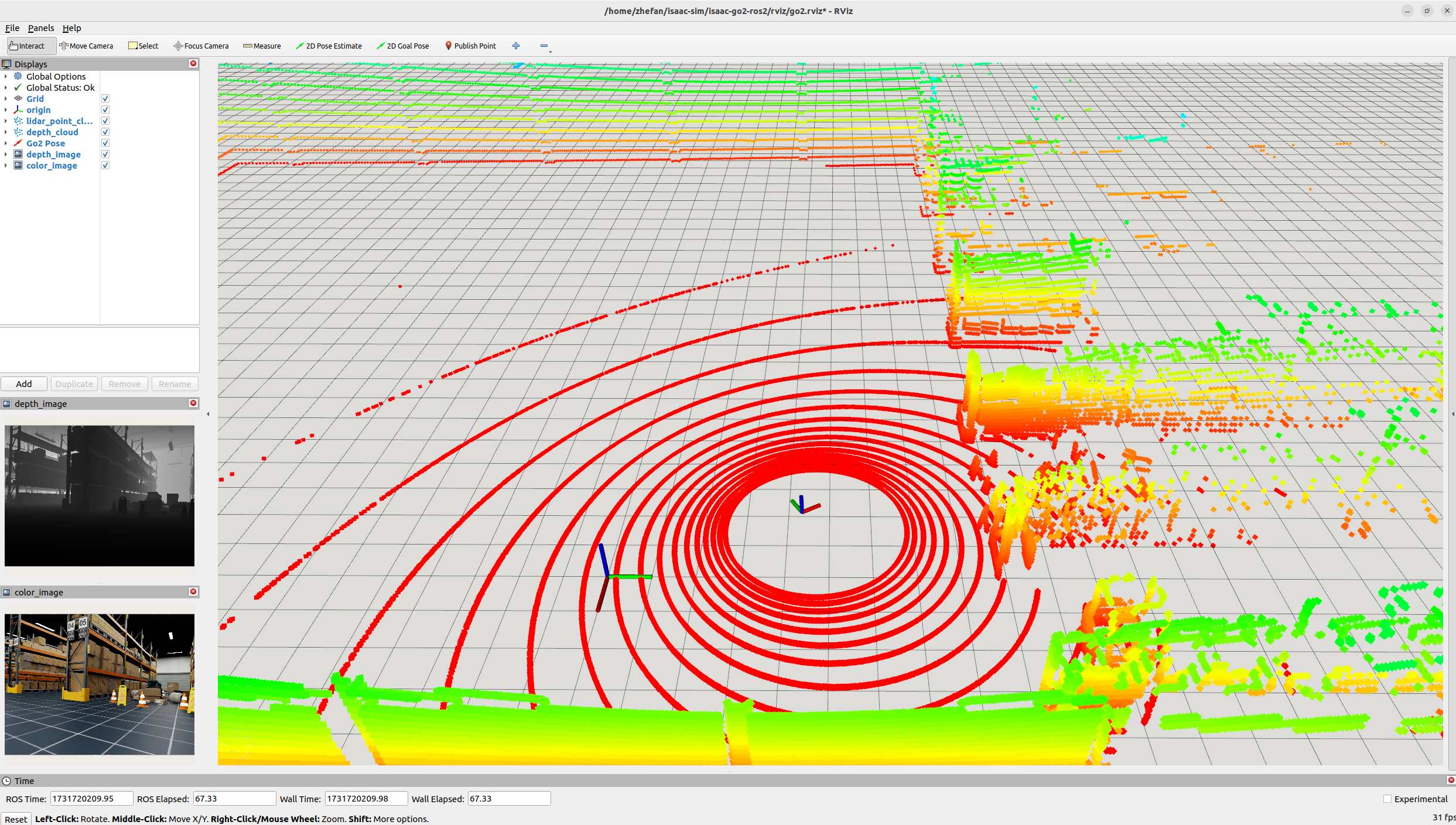
Here is a categorized list of ROS 2 topics available for the Unitree Go2:
Command and Control
/unitree_go2/cmd_vel: Topic to send velocity commands to the robot for motion control.
Front Camera
/unitree_go2/front_cam/color_image: Publishes RGB color images captured by the front camera./unitree_go2/front_cam/depth_image: Publishes depth images from the front camera.unitree_go2/front_cam/semantic_segmentation_image: Publishes semantic segmentation images from the front camera./unitree_go2/front_cam/info: Publishes camera information, including intrinsic parameters.
LIDAR
/unitree_go2/lidar/point_cloud: Publishes a point cloud generated by the robot’s LIDAR sensor.
Odometry and Localization
/unitree_go2/odom: Publishes odometry data, including the robot’s position, orientation, and velocity./unitree_go2/pose: Publishes the current pose of the robot in the world frame.
Simulation Environments & settings
The simulation environments and settings can be changed in isaac-go2-ros2/cfg/sim.yaml config file.
Launch different simulation environments
The current implementation contains a few environments which can be found on isaac-go2-ros2/env/sim_env.py, which follows standard Isaac Sim method for importing USD environments. To change the environment, please change the env_name in the config file isaac-go2-ros2/cfg/sim.yaml. Current available environments:
warehouse: A simple warehouse environment in Isaac Sim.warehouse-forklifts: A warehouse environment with forklifts.warehouse-shelves: A warehouse environment with shelves.full-warehouse: A full warehouse environment containing everything.obstacle-sparse: A sparse obstacle field environment.obstacle-medium: A medium obstacle field environment.obstacle-dense: A dense obstacle field environment.
Launch multiple robots in the environment
This repository supports running multiple Unitree Go2 robots and the number of robots can by changed by the num_envs parameter in the config file isaac-go2-ros2/cfg/sim.yaml. The following shows an example video.
https://github.com/user-attachments/assets/47ef05c1-5124-4feb-afc8-a3f2c306a212
Example Usage
The video shows an example of using this repo with an RL agent to achieve navigation and collision avoidance:
https://github.com/user-attachments/assets/ccc986c6-bf94-41fe-a4d5-3417ce8b3384
Acknowledgement
The Go2 controller is based on the RL controller implemented in go2_omniverse.


评论