FgSegNet_v2 : Foreground Segmentation Network version 2
This repository contains source codes and training sets for the following paper:
“Learning multi-scale features for foreground segmentation.” by Long Ang LIM and Hacer YALIM KELES


Citation
If you find FgSegNet_v2 useful in your research, please consider citing:
Lim, L.A. & Keles, H.Y. Pattern Anal Applic (2019). https://doi.org/10.1007/s10044-019-00845-9
Preprint:
@article{lim2018learning,
	  title={Learning Multi-scale Features for Foreground Segmentation},
	  author={Lim, Long Ang and Keles, Hacer Yalim},
	  journal={arXiv preprint arXiv:1808.01477},
	  year={2018}
}
Requirements
This work was implemented with the following frameworks:
- Spyder 3.2.x (recommended)
- Python 3.6.3
- Keras 2.0.6
- Tensorflow-gpu 1.1.0
Usage
-
Clone this repo: git clone https://github.com/lim-anggun/FgSegNet_v2.git
-
Download CDnet2014, SBI2015 and UCSD datasets, then put them in the following directory structure:
Example:
 FgSegNet_v2/
      scripts/FgSegNet_v2_CDnet.py
             /FgSegNet_v2_SBI.py
             /FgSegNet_v2_UCSD.py
             /FgSegNet_v2_module.py
             /instance_normalization.py
             /my_upsampling_2d.py
	     /prediction_example.ipynb

      datasets/
              /CDnet2014_dataset/...
              /SBI2015_dataset/...
              /UCSD_dataset/...

      training_sets/
                   /CDnet2014_train/...
                   /SBI2015_train/...
                   /UCSD_train20/...
                   /UCSD_train50/...

  testing_scripts/extract_mask.py
  		 /thresholding.py
		 /python_metrics/...
-
Run the codes with Spyder IDE. Note that all trained models will be automatically saved (in current working directory) for you.
-
Here is how to extract foreground masks. Suppose your files are stored in the following dir structures:
     # Script file in the root dir
     extract_mask.py

     # Dataset downloaded from changedetection.net
     CDnet2014_dataset/baseline/...
     		      /cameraJitter/...
		      /badWeather/...

     # your trained model dir (models25 = models trained with 25 frames, (50frames, 200frames)
     FgSegNet_v2/models25/baseline/mdl_highway.h5
     				  /mdl_pedestrians.h5
				  ...
		         /cameraJitter/mdl_badminton.h5
			 	      /mdl_traffic.h5
				      /...
			/...
Go to Window cmd and run:
> python extract_mask.py
Your extracted frames will be automatically stored in FgSegNet_v2/results25/[CATEGORY_NAME]/[SCENE_NAME]/[binXXXXXX.png, ...]
- Threshold your foreground masks. Suppose that your extracted frames are stored in above folders. Go to cmd and run:
> python thresholding.py
Your thresholded frames will be automatically stored in FgSegNet_v2/results25_th[0.X]/[CATEGORY_NAME]/[SCENE_NAME]/[binXXXXXX.png, ...]
- Remove training frames from your thresholded frames and evaluate your results.
Evaluation
We evaluate our method using three different datasets as described in here or here.
e.g.
> cd python_metrics
> python processFolder.py dataset_path root_path_of_thresholded_frames
Results
Results on CDnet2014 dataset
Table below shows overall results across 11 categories obtained from Change Detection 2014 Challenge.
| Methods |
PWC |
F-Measure |
Speed (320x240, batch-size=1) on NVIDIA GTX 970 GPU |
| FgSegNet_v2 |
0.0402 |
0.9847 |
23fps |
Results on SBI2015 dataset
Table below shows overall test results across 14 video sequences.
| Methods |
PWC |
F-Measure |
| FgSegNet_v2 |
0.7148 |
0.9853 |
Results on UCSD Background Subtraction dataset
Table below shows overall test results across 18 video sequences.
| Methods |
PWC (20% split) |
F-Measure (20% split) |
PWC (50% split) |
F-Measure (50% split) |
| FgSegNet_v2 |
0.6136 |
0.8945 |
0.4405 |
0.9203 |
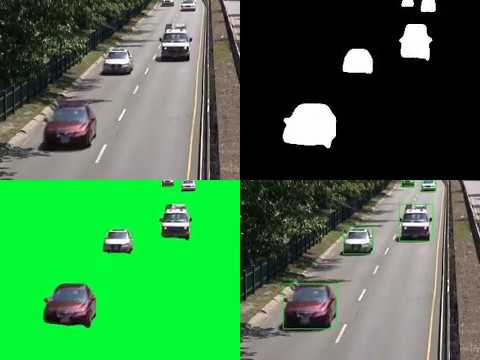
YouTube
Updates
09/11/2019:
- add testing scripts as requested
07/08/2018:
- add FgSegNet_v2 source codes and training frames
04/02/2019:
- add a jupyter notebook & a YouTube video
lim.longang at gmail.com
Any issues/discussions are welcome.


评论