Ray Tracing In Vulkan

My implementation of Peter Shirley’s Ray Tracing in One Weekend books using Vulkan and NVIDIA’s RTX extension (formerly VK_NV_ray_tracing, now ported to Khronos cross platform VK_KHR_ray_tracing_pipeline extension). This allows most scenes to be rendered at interactive speed on appropriate hardware.
The real-time ray tracer can also load full geometry from OBJ files as well as render the procedural spheres from the book. An accumulation buffer is used to increase the sample count when the camera is not moving while keeping the frame rate interactive. I have added a UI built using Dear ImGui to allow changing the renderer parameters on the fly. Unlike projects such as Q2VKPT, there is no denoising filter. So the image will get noisy when moving the camera.
This personal project follows my own attempts at CPU ray tracing following Peter Shirley’s books (see here and here if you are interested).
Karim Sayed also wrote an excellent CUDA implementation, along with a detailed step-by-step recount article of each iteration. It is a pretty detailed introduction to key CUDA performance considerations.
Gallery


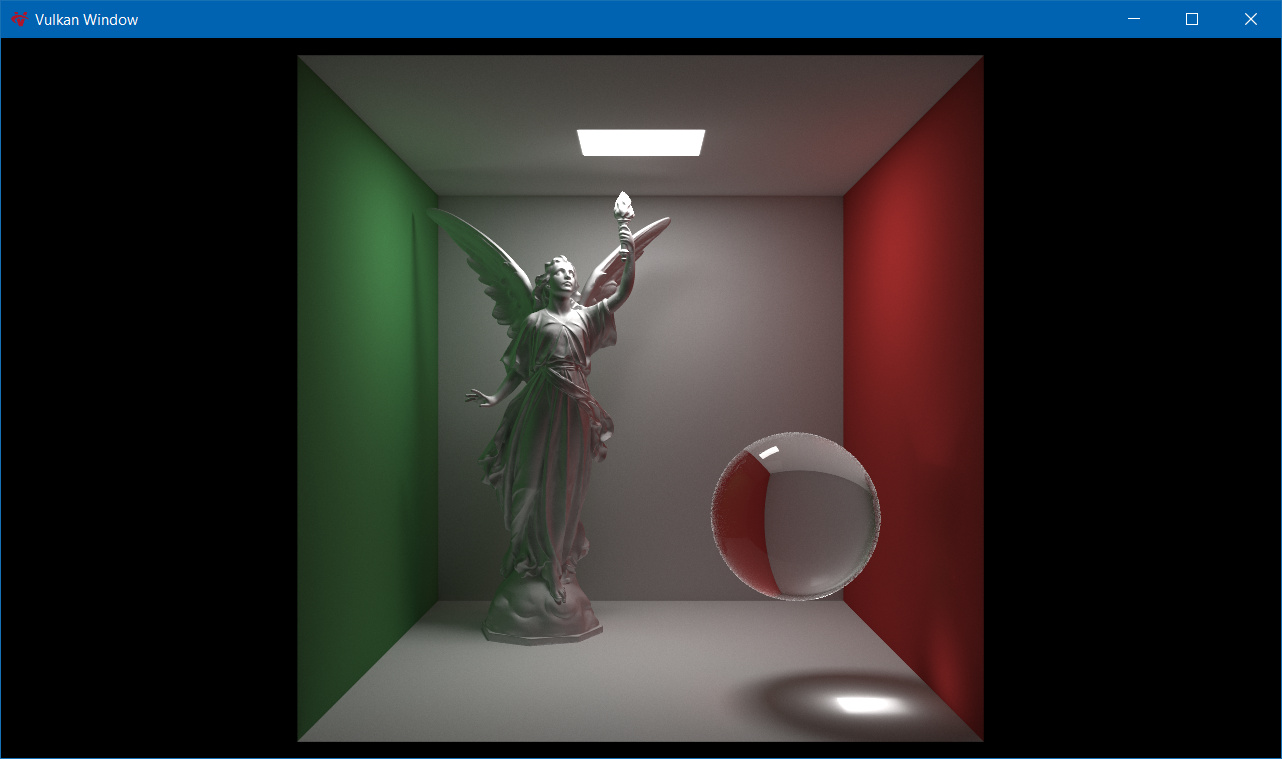
Using a GeForce RTX 2080 Ti, the rendering speed is obscenely faster than using the CPU renderer. Obviously both implementations are still quite naive in some places, but I’m really impressed by the performance. The cover scene of the first book reaches ~140fps at 1280x720 using 8 rays per pixel and up to 16 bounces.
I suspect performance could be improved further. I have created each object in the scene as a separate instance in the top level acceleration structure, which is probably not the best for data locality. The same goes for displaying multiple Lucy statues, where I have naively duplicated the geometry rather than instancing it multiple times.
Benchmarking
Command line arguments can be used to control various aspects of the application. Use --help to see all modes and arguments. For example, to run the ray tracer in benchmark mode in 2560x1440 fullscreen for scene #1 with vsync off:
RayTracer.exe --benchmark --width 2560 --height 1440 --fullscreen --scene 1 --present-mode 0
To benchmark all the scenes, starting from scene #1:
RayTracer.exe --benchmark --width 2560 --height 1440 --fullscreen --scene 1 --next-scenes --present-mode 0
Here are my results with the command above on a few different computers.
RayTracer Release 6 (NVIDIA drivers 461.40, AMD drivers 21.1.1)
| Platform |
Scene 1 |
Scene 2 |
Scene 3 |
Scene 4 |
Scene 5 |
| Radeon RX 6900 XT |
52.9 fps |
52.2 fps |
24.0 fps |
41.0 fps |
14.1 fps |
| GeForce RTX 3090 FE |
42.8 fps |
43.6 fps |
38.9 fps |
79.5 fps |
40.0 fps |
| GeForce RTX 2080 Ti FE |
37.7 fps |
38.2 fps |
24.2 fps |
58.7 fps |
21.4 fps |
RayTracer Release 4 (NVIDIA drivers 436.48)
| Platform |
Scene 1 |
Scene 2 |
Scene 3 |
Scene 4 |
Scene 5 |
| GeForce RTX 2080 Ti FE |
36.1 fps |
35.7 fps |
19.9 fps |
54.9 fps |
15.1 fps |
| GeForce RTX 2070 |
19.9 fps |
19.9 fps |
11.7 fps |
30.4 fps |
9.5 fps |
| GeForce GTX 1080 Ti FE |
3.4 fps |
3.4 fps |
1.9 fps |
3.8 fps |
1.3 fps |
Building
First you will need to install the Vulkan SDK. For Windows, LunarG provides installers. For Ubuntu LTS, they have native packages available. For other Linux distributions, they only provide tarballs. The rest of the third party dependencies can be built using Microsoft’s vcpkg as provided by the scripts below.
If in doubt, please check the GitHub Actions continuous integration configurations for more details.
Windows (Visual Studio 2022 x64 solution) 
vcpkg_windows.bat
build_windows.bat
Linux (GCC 9+ Makefile) 
For example, on Ubuntu 20.04 (same as the CI pipeline, build steps on other distributions may vary):
sudo apt-get install curl unzip tar libxi-dev libxinerama-dev libxcursor-dev xorg-dev
./vcpkg_linux.sh
./build_linux.sh
Fedora Installation
sudo dnf install libXinerama-devel libXcursor-devel libX11-devel libXrandr-devel mesa-libGLU-devel pkgconfig ninja-build cmake gcc gcc-c++ vulkan-validation-layers-devel vulkan-headers vulkan-tools vulkan-loader-devel vulkan-loader glslang glslc
./vcpkg_linux.sh
./build_linux.sh
Random Thoughts
-
I suspect the RTX 2000 series RT cores to implement ray-AABB collision detection using reduced float precision. Early in the development, when trying to get the sphere procedural rendering to work, reporting an intersection every time the rint shader is invoked allowed to visualise the AABB of each procedural instance. The rendering of the bounding volume had many artifacts around the boxes edges, typical of reduced precision.
-
When I upgraded the drivers to 430.86, performance significantly improved (+50%). This was around the same time Quake II RTX was released by NVIDIA. Coincidence?
-
When looking at the benchmark results of an RTX 2070 and an RTX 2080 Ti, the performance differences mostly in line with the number of CUDA cores and RT cores rather than being influences by other metrics. Although I do not know at this point whether the CUDA cores or the RT cores are the main bottleneck.
-
UPDATE 2020-01-07: the RTX 30xx results seem to imply that performance is mostly dictated by the number of RT cores. Compared to Turing, Ampere achieves 2x RT performance only when using ray-triangle intersection (as expected as per NVIDIA Ampere whitepaper), otherwise performance per RT core is the same. This leads to situations such as an RTX 2080 Ti being faster than an RTX 3080 when using procedural geometry.
-
UPDATE 2020-01-31: the 6900 XT results show the RDNA 2 architecture performing surprisingly well in procedural geometry scenes. Is it because the RDNA2 BVH-ray intersections are done using the generic computing units (and there are plenty of those), whereas Ampere is bottlenecked by its small number of RT cores in these simple scenes? Or is RDNA2 Infinity Cache really shining here? The triangle-based geometry scenes highlight how efficient Ampere RT cores are in handling triangle-ray intersections; unsurprisingly as these scenes are more representative of what video games would do in practice.
References
Initial Implementation (NVIDIA vendor specific extension)







评论