ArduPilot Gazebo Plugin



This is the official ArduPilot plugin for Gazebo.
It replaces the previous
ardupilot_gazebo
plugin and provides support for the recent releases of the Gazebo simulator:
Gazebo Garden, Gazebo Harmonic (LTS), Gazebo Ionic and Gazebo Jetty (LTS).
It also adds the following features:
- More flexible data exchange between SITL and Gazebo using JSON.
- Additional sensors supported.
- True simulation lockstepping. It is now possible to use GDB to stop
the Gazebo time for debugging.
- Improved 3D rendering using the
ogre2 rendering engine.
The project comprises a Gazebo plugin to connect to ArduPilot SITL
(Software In The Loop) and some example models and worlds.
Prerequisites
Gazebo Garden or Harmonic is supported on Ubuntu 22.04 (Jammy).
Harmonic is recommended.
If you are running Ubuntu as a virtual machine you will need at least
Ubuntu 20.04 in order to have the OpenGL support required for the
ogre2 render engine. Gazebo and ArduPilot SITL will also run on macOS
(Big Sur, Monterey and Venturua; Intel and M1 devices).
Follow the instructions for a binary install of
Gazebo Garden or Gazebo Harmonic or Gazebo Ionic
and verify that Gazebo is running correctly.
Set up an ArduPilot development environment.
In the following it is assumed that you are able to run ArduPilot SITL using
the MAVProxy GCS.
Installation
Install additional dependencies:
Ubuntu
Garden (apt)
Manual - Gazebo Garden Dependencies:
sudo apt update
sudo apt install libgz-sim7-dev rapidjson-dev
sudo apt install libopencv-dev libgstreamer1.0-dev libgstreamer-plugins-base1.0-dev gstreamer1.0-plugins-bad gstreamer1.0-plugins-ugly gstreamer1.0-libav gstreamer1.0-gl
Harmonic (apt)
Manual - Gazebo Harmonic Dependencies:
sudo apt update
sudo apt install libgz-sim8-dev rapidjson-dev
sudo apt install libopencv-dev libgstreamer1.0-dev libgstreamer-plugins-base1.0-dev gstreamer1.0-plugins-bad gstreamer1.0-plugins-ugly gstreamer1.0-libav gstreamer1.0-gl
Jetty (apt)
Manual - Gazebo Jetty Dependencies:
sudo apt update
sudo apt install libgz-sim10-dev rapidjson-dev
sudo apt install libopencv-dev libgstreamer1.0-dev libgstreamer-plugins-base1.0-dev gstreamer1.0-plugins-bad gstreamer1.0-plugins-ugly gstreamer1.0-libav gstreamer1.0-gl
Set GZ_VERSION=jetty when building, Harmonic is the default.
Rosdep
Use rosdep with
osrf’s rosdep rules
to manage all dependencies. This is driven off of the environment variable GZ_VERSION.
export GZ_VERSION=harmonic # or garden or ionic
sudo bash -c 'wget https://raw.githubusercontent.com/osrf/osrf-rosdep/master/gz/00-gazebo.list -O /etc/ros/rosdep/sources.list.d/00-gazebo.list'
rosdep update
rosdep resolve gz-harmonic # or gz-garden or gz-ionic
# Navigate to your ROS workspace before the next command.
rosdep install --from-paths src --ignore-src -y
macOS
brew update
brew install rapidjson
brew install opencv gstreamer
Ensure the GZ_VERSION environment variable is set to either
garden, harmonic, ionic or jetty.
Clone the repo and build:
git clone https://github.com/ArduPilot/ardupilot_gazebo
cd ardupilot_gazebo
mkdir build && cd build
cmake .. -DCMAKE_BUILD_TYPE=RelWithDebInfo
make -j4
Set the Gazebo environment variables in your .bashrc or .zshrc or in
the terminal used to run Gazebo.
Terminal
Assuming that you have cloned the repository to $HOME/ardupilot_gazebo:
export GZ_SIM_SYSTEM_PLUGIN_PATH=$HOME/ardupilot_gazebo/build:$GZ_SIM_SYSTEM_PLUGIN_PATH
export GZ_SIM_RESOURCE_PATH=$HOME/ardupilot_gazebo/models:$HOME/ardupilot_gazebo/worlds:$GZ_SIM_RESOURCE_PATH
.bashrc or .zshrc
Assuming that you have cloned the repository to $HOME/ardupilot_gazebo:
echo 'export GZ_SIM_SYSTEM_PLUGIN_PATH=$HOME/ardupilot_gazebo/build:${GZ_SIM_SYSTEM_PLUGIN_PATH}' >> ~/.bashrc
echo 'export GZ_SIM_RESOURCE_PATH=$HOME/ardupilot_gazebo/models:$HOME/ardupilot_gazebo/worlds:${GZ_SIM_RESOURCE_PATH}' >> ~/.bashrc
Reload your terminal with source ~/.bashrc (or source ~/.zshrc on macOS).
Usage
1. Iris quad-copter
Run Gazebo
gz sim -v4 -r iris_runway.sdf
The -v4 parameter is not mandatory, it shows additional information and is
useful for troubleshooting.
Run ArduPilot SITL
To run an ArduPilot simulation with Gazebo, the frame should have gazebo-
in it and have JSON as model. Other commandline parameters are the same
as usual on SITL.
sim_vehicle.py -v ArduCopter -f gazebo-iris --model JSON --map --console
Arm and takeoff
STABILIZE> mode guided
GUIDED> arm throttle
GUIDED> takeoff 5
2. Zephyr delta wing
The Zephyr delta wing is positioned on the runway for vertical take-off.
Run Gazebo
gz sim -v4 -r zephyr_runway.sdf
Run ArduPilot SITL
sim_vehicle.py -v ArduPlane -f gazebo-zephyr --model JSON --map --console
Arm, takeoff and circle
MANUAL> mode fbwa
FBWA> arm throttle
FBWA> rc 3 1800
FBWA> mode circle
Increase the simulation speed
The zephyr_runway.sdf world has a <physics> element configured to run
faster than real time:
<physics name="1ms" type="ignore">
  <max_step_size>0.001</max_step_size>
  <real_time_factor>-1.0</real_time_factor>
</physics>
To see the effect of the speed-up set the param SIM_SPEEDUP to a value
greater than one:
MANUAL> param set SIM_SPEEDUP 10
3. Streaming camera video
Images from camera sensors may be streamed with GStreamer using
the GstCameraPlugin sensor plugin. The example gimbal models include the
plugin element:
<plugin name="GstCameraPlugin"
    filename="GstCameraPlugin">
  <udp_host>127.0.0.1</udp_host>
  <udp_port>5600</udp_port>
  <use_basic_pipeline>true</use_basic_pipeline>
  <use_cuda>false</use_cuda>
  <use_vaapi>true</use_vaapi>
</plugin>
Video is encoded in H.264 with nvh264enc when <use_cuda> is true.
Otherwise, when <use_vaapi> is true (the default), the plugin uses the
VA-API hardware encoder vah264enc (Intel and AMD GPUs, from
gstreamer1.0-plugins-bad with a VA driver such as mesa-va-drivers or
intel-media-va-driver) when one is available, and falls back to the software
encoder x264enc from gstreamer1.0-plugins-ugly.
The <image_topic> and <enable_topic> parameters are deduced from the
topic name for the camera sensor, but may be overriden if required.
The gimbal.sdf world includes a 3 degrees of freedom gimbal with a
zoomable camera. To start streaming:
gz topic -t /world/gimbal/model/mount/model/gimbal/link/pitch_link/sensor/camera/image/enable_streaming -m gz.msgs.Boolean -p "data: 1"
Display the streamed video:
gst-launch-1.0 -v udpsrc port=5600 caps='application/x-rtp, media=(string)video, clock-rate=(int)90000, encoding-name=(string)H264' ! rtph264depay ! avdec_h264 ! videoconvert ! autovideosink sync=false
View the streamed camera frames in QGC:
Open QGC > Application Settings > Video Settings > Select UDP h.264 Video Stream & use port 5600
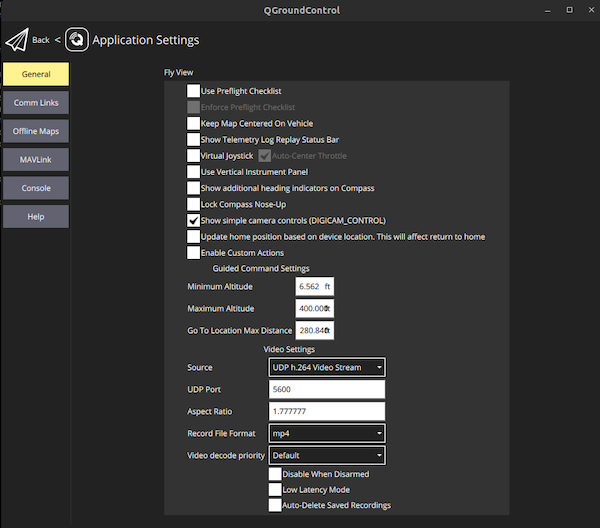
4. Using 3d Gimbal
The Iris model is equipped with a 3d gimbal and camera that can be controlled directly in MAVProxy using the RC overrides.
Run Gazebo
gz sim -v4 -r iris_runway.sdf
Run ArduPilot SITL with a specified parameter file
cd ardupilot

sim_vehicle.py -D -v ArduCopter -f JSON --add-param-file=$HOME/ardupilot_gazebo/config/gazebo-iris-gimbal.parm --console --map
Control action for gimbal over RC channel:
| Action |
Channel |
RC Low |
RC High |
| Roll |
RC6 |
Roll Left |
Roll Right |
| Pitch |
RC7 |
Pitch Down |
Pitch Up |
| Yaw |
RC8 |
Yaw Left |
Yaw Right |
Example usage:
rc 6 1100 - Gimbal rolls left
rc 7 1900 - Gimbal pitch upwards
rc 8 1500 - Gimbal yaw neutral
Models
In addition to the Iris and Zephyr models included here, a selection
of models configured use the ArduPilot Gazebo plugin is available in
ArduPilot/SITL_Models.
Click on the images to see further details.
Development
The checks run in CI can be run locally with pre-commit:
pipx install pre-commit
pre-commit install          # run the checks on every commit
pre-commit run --all-files  # run all checks now
The cppcheck and check-sdf hooks need cppcheck and Gazebo installed,
skip them with SKIP=cppcheck,check-sdf otherwise. The SDF files can also be
checked directly with scripts/check_sdf.sh [file.sdf ...].
Troubleshooting
For issues concerning installing and running Gazebo on your platform please
consult the Gazebo documentation for troubleshooting frequent issues.





评论