


DynamicColor provides powerful methods to manipulate colors in an easy way in Swift and SwiftUI.

Requirements • Usage • Installation • Contribution • Contact • License
Requirements
- iOS 11.0+ / Mac OS X 10.11+ / tvOS 11.0+ / watchOS 4.0+
- Xcode 10.2+
- Swift 5.0+
Usage
Creation (Hex String)
Firstly, DynamicColor provides useful initializers to create colors using hex strings or values:
let color = UIColor(hexString: "#3498db")
// equivalent to
// color = UIColor(hex: 0x3498db)
To be platform independent, the typealias DynamicColor can also be used:
let color = DynamicColor(hex: 0x3498db)
// On iOS, WatchOS or tvOS, equivalent to
// color = UIColor(hex: 0x3498db)
// On OSX, equivalent to
// color = NSColor(hex: 0x3498db)
You can also retrieve the RGBA value and components very easily using multiple methods like toHexString, toHex, toRGBA, etc.
SwiftUI
From the v5, DynamicColor also support basic methods to create and manipulate colors with SwiftUI.
let color = Color(hex: 0x3498db)
Darken & Lighten
These two create a new color by adjusting the lightness of the receiver. You have to use a value between 0 and 1.
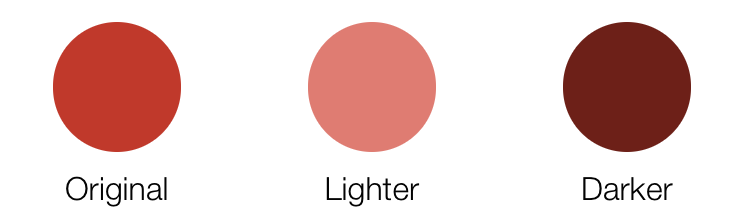
let originalColor = DynamicColor(hexString: "#c0392b")

let lighterColor = originalColor.lighter()
// equivalent to
// lighterColor = originalColor.lighter(amount: 0.2)

let darkerColor = originalColor.darkened()
// equivalent to
// darkerColor = originalColor.darkened(amount: 0.2)
Saturate, Desaturate & Grayscale
These will adjust the saturation of the color object, much like darkened and lighter adjusted the lightness. Again, you need to use a value between 0 and 1.
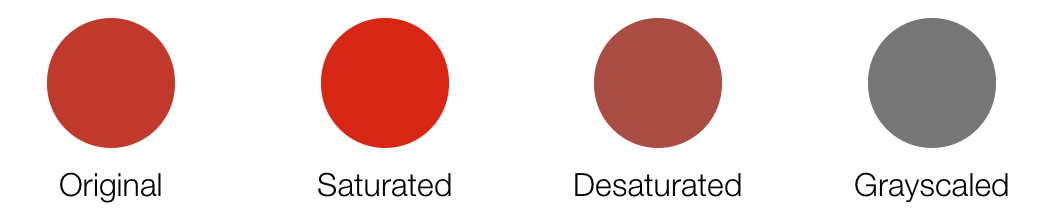
let originalColor = DynamicColor(hexString: "#c0392b")

let saturatedColor = originalColor.saturated()
// equivalent to
// saturatedColor = originalColor.saturated(amount: 0.2)

let desaturatedColor = originalColor.desaturated()
// equivalent to
// desaturatedColor = originalColor.desaturated(amount: 0.2)

// equivalent to
// let grayscaledColor = originalColor.grayscaled(mode: .luminance)
let grayscaledColor = originalColor.grayscaled()

let grayscaledColorLuminance = originalColor.grayscaled(mode: .luminance)
let grayscaledColorLightness = originalColor.grayscaled(mode: .lightness)
let grayscaledColorAverage = originalColor.grayscaled(mode: .average)
let grayscaledColorValue = originalColor.grayscaled(mode: .value)
Adjust-hue & Complement
These adjust the hue value of the color in the same way like the others do. Again, it takes a value between 0 and 1 to update the value.
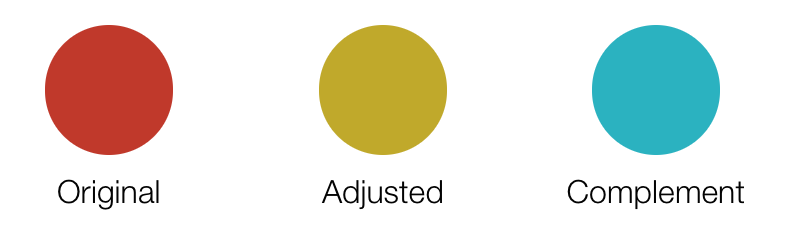
let originalColor = DynamicColor(hex: 0xc0392b)

// Hue values are in degrees
let adjustHueColor = originalColor.adjustedHue(amount: 45)

let complementedColor = originalColor.complemented()
Tint & Shade
A tint is the mixture of a color with white and a shade is the mixture of a color with black. Again, it takes a value between 0 and 1 to update the value.

let originalColor = DynamicColor(hexString: "#c0392b")

let tintedColor = originalColor.tinted()
// equivalent to
// tintedColor = originalColor.tinted(amount: 0.2)

let shadedColor = originalColor.shaded()
// equivalent to
// shadedColor = originalColor.shaded(amount: 0.2)
Invert
This can invert the color object. The red, green, and blue values are inverted, while the opacity is left alone.

let originalColor = DynamicColor(hexString: "#c0392b")

let invertedColor = originalColor.inverted()
Mix
This can mix a given color with the receiver. It takes the average of each of the RGB components, optionally weighted by the given percentage (value between 0 and 1).

let originalColor = DynamicColor(hexString: "#c0392b")

let mixedColor = originalColor.mixed(withColor: .blue)
// equivalent to
// mixedColor = originalColor.mixed(withColor: .blue, weight: 0.5)
// or
// mixedColor = originalColor.mixed(withColor: .blue, weight: 0.5, inColorSpace: .rgb)
Gradients
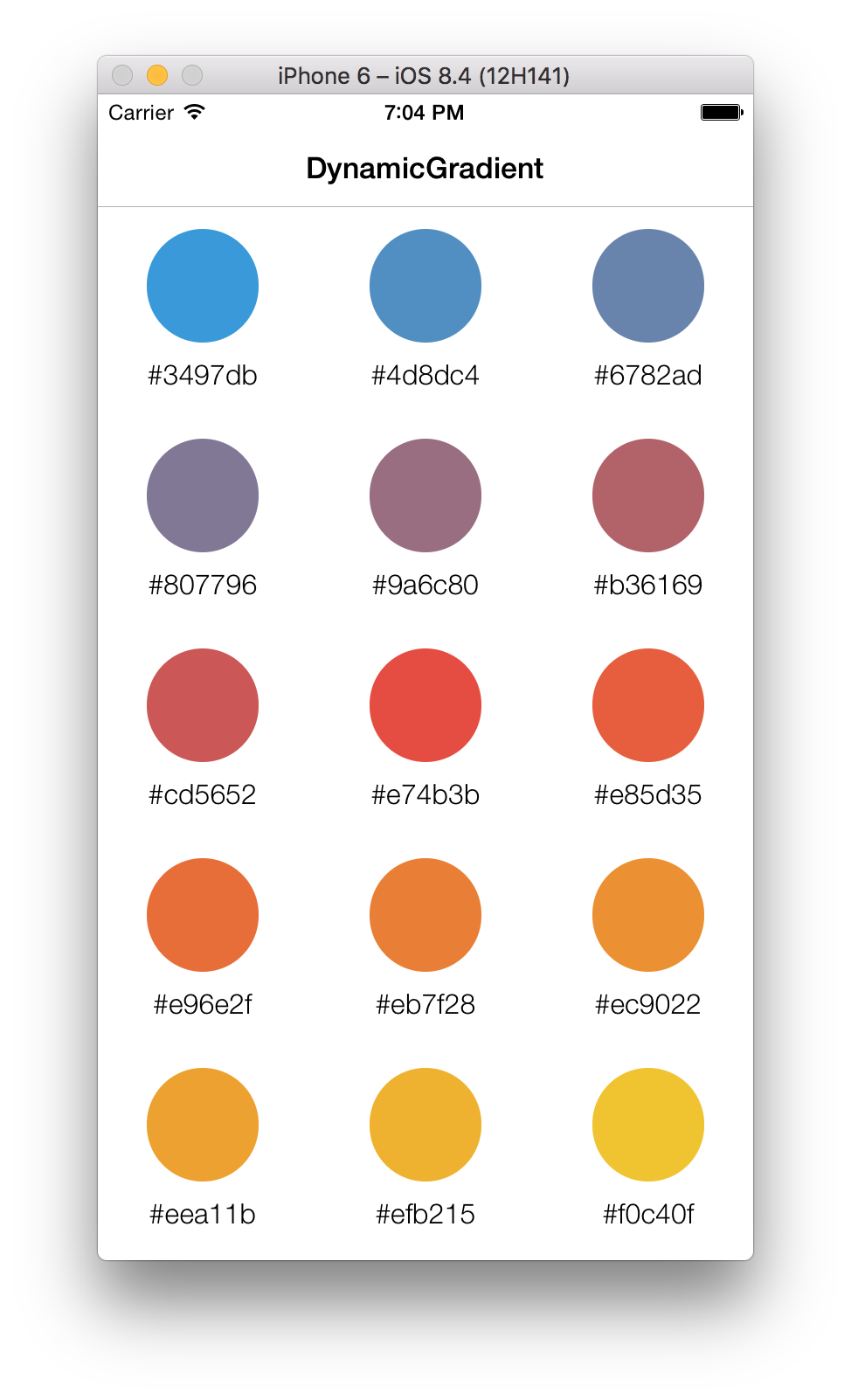
DynamicColor provides an useful object to work with gradients: DynamicGradient. It’ll allow you to pick color from gradients, or to build a palette using different color spaces (.e.g.: RGB, HSL, HSB, Cie L*a*b*).
Let’s define our reference colors and the gradient object:
let blue   = UIColor(hexString: "#3498db")
let red    = UIColor(hexString: "#e74c3c")
let yellow = UIColor(hexString: "#f1c40f")

let gradient = DynamicGradient(colors: [blue, red, yellow])
// equivalent to
// let gradient = [blue, red, yellow].gradient
RGB
Let’s build the RGB palette (the default color space) with 8 colors:

let rgbPalette = gradient.colorPalette(amount: 8)
HSL
Now if you want to change the gradient color space to have a different effect, just write the following lines:

let hslPalette = gradient.colorPalette(amount: 8, inColorSpace: .hsl)
Cie L*a*b*
Or if you prefer to work directly with array of colors, you can:

let labPalette = [blue, red, yellow].gradient.colorPalette(amount: 8, inColorSpace: .lab)
And many more…
DynamicColor also provides many another useful methods to manipulate the colors like hex strings, color components, color spaces, etc. To go further, take a look at the example project.
Installation
CocoaPods
Install CocoaPods if not already available:
$ [sudo] gem install cocoapods
$ pod setup
Go to the directory of your Xcode project, and Create and Edit your Podfile and add DynamicColor:
$ cd /path/to/MyProject
$ touch Podfile
$ edit Podfile
source 'https://github.com/CocoaPods/Specs.git'
platform :ios, '8.0'

use_frameworks!
pod 'DynamicColor', '~> 5.0.0'
Install into your project:
$ pod install
Open your project in Xcode from the .xcworkspace file (not the usual project file):
$ open MyProject.xcworkspace
You can now import DynamicColor framework into your files.
Carthage
Carthage is a decentralized dependency manager that automates the process of adding frameworks to your Cocoa application.
You can install Carthage with Homebrew using the following command:
$ brew update
$ brew install carthage
To integrate DynamicColor into your Xcode project using Carthage, specify it in your Cartfile file:
github "yannickl/DynamicColor" >= 5.0.0
Swift Package Manager
You can use The Swift Package Manager to install DynamicColor by adding the proper description to your Package.swift file:
import PackageDescription

let package = Package(
    name: "YOUR_PROJECT_NAME",
    targets: [],
    dependencies: [
        .package(url: "https://github.com/yannickl/DynamicColor.git", from: "5.0.0")
    ]
)
Note that the Swift Package Manager is still in early design and development, for more information checkout its GitHub Page.
Manually
Download the project and copy the DynamicColor folder into your project to use it in.
Contribution
Contributions are welcomed and encouraged ♡.
Yannick Loriot
License (MIT)
Copyright © 2015-present - Yannick Loriot
Permission is hereby granted, free of charge, to any person obtaining a copy
of this software and associated documentation files (the “Software”), to deal
in the Software without restriction, including without limitation the rights
to use, copy, modify, merge, publish, distribute, sublicense, and/or sell
copies of the Software, and to permit persons to whom the Software is
furnished to do so, subject to the following conditions:
The above copyright notice and this permission notice shall be included in
all copies or substantial portions of the Software.
THE SOFTWARE IS PROVIDED “AS IS”, WITHOUT WARRANTY OF ANY KIND, EXPRESS OR
IMPLIED, INCLUDING BUT NOT LIMITED TO THE WARRANTIES OF MERCHANTABILITY,
FITNESS FOR A PARTICULAR PURPOSE AND NONINFRINGEMENT. IN NO EVENT SHALL THE
AUTHORS OR COPYRIGHT HOLDERS BE LIABLE FOR ANY CLAIM, DAMAGES OR OTHER
LIABILITY, WHETHER IN AN ACTION OF CONTRACT, TORT OR OTHERWISE, ARISING FROM,
OUT OF OR IN CONNECTION WITH THE SOFTWARE OR THE USE OR OTHER DEALINGS IN
THE SOFTWARE.









评论