XMRig NVIDIA





XMRig is high performance Monero (XMR) NVIDIA miner, with the official full Windows support.
GPU mining part based on psychocrypt code used in xmr-stak-nvidia.
:warning: Suggested values for GPU auto configuration can be not optimal or not working, you may need tweak your threads options. Please feel free open an issue if auto configuration suggest wrong values.
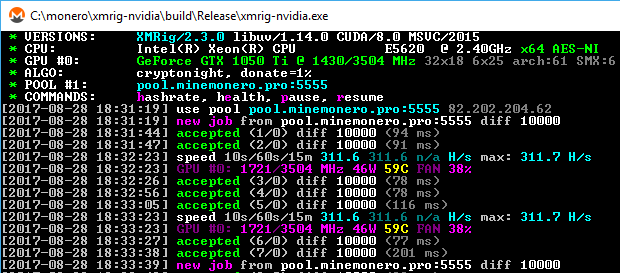
Table of contents
Features
- High performance.
- Official Windows support.
- Support for backup (failover) mining server.
- CryptoNight-Lite support for AEON.
- Automatic GPU configuration.
- GPU health monitoring (clocks, power, temperature, fan speed)
- Nicehash support.
- It’s open source software.
Download
Usage
Use config.xmrig.com to generate, edit or share configurations.
Command line options
  -a, --algo=ALGO          specify the algorithm to use
                             cryptonight
                             cryptonight-lite
                             cryptonight-heavy
  -o, --url=URL             URL of mining server
  -O, --userpass=U:P        username:password pair for mining server
  -u, --user=USERNAME       username for mining server
  -p, --pass=PASSWORD       password for mining server
      --rig-id=ID           rig identifier for pool-side statistics (needs pool support)
  -k, --keepalive           send keepalived packet for prevent timeout (needs pool support)
      --nicehash            enable nicehash.com support
      --tls                 enable SSL/TLS support (needs pool support)
      --tls-fingerprint=F   pool TLS certificate fingerprint, if set enable strict certificate pinning
  -r, --retries=N           number of times to retry before switch to backup server (default: 5)
  -R, --retry-pause=N       time to pause between retries (default: 5)
      --cuda-devices=N      list of CUDA devices to use.
      --cuda-launch=TxB     list of launch config for the CryptoNight kernel
      --cuda-max-threads=N  limit maximum count of GPU threads in automatic mode
      --cuda-bfactor=[0-12] run CryptoNight core kernel in smaller pieces
      --cuda-bsleep=N       insert a delay of N microseconds between kernel launches
      --cuda-affinity=N     affine GPU threads to a CPU
      --no-color            disable colored output
      --variant             algorithm PoW variant
      --donate-level=N      donate level, default 5% (5 minutes in 100 minutes)
      --user-agent          set custom user-agent string for pool
  -B, --background          run the miner in the background
  -c, --config=FILE         load a JSON-format configuration file
  -l, --log-file=FILE       log all output to a file
  -S, --syslog              use system log for output messages
      --print-time=N        print hashrate report every N seconds
      --api-port=N          port for the miner API
      --api-access-token=T  access token for API
      --api-worker-id=ID    custom worker-id for API
      --api-id=ID           custom instance ID for API
      --api-ipv6            enable IPv6 support for API
      --api-no-restricted   enable full remote access (only if API token set)
      --dry-run             test configuration and exit
  -h, --help                display this help and exit
  -V, --version             output version information and exit
Donations
Default donation 5% (5 minutes in 100 minutes) can be reduced to 1% via command line option --donate-level.
- XMR:
48edfHu7V9Z84YzzMa6fUueoELZ9ZRXq9VetWzYGzKt52XU5xvqgzYnDK9URnRoJMk1j8nLwEVsaSWJ4fhdUyZijBGUicoD
- BTC:
1P7ujsXeX7GxQwHNnJsRMgAdNkFZmNVqJT






评论