Diablo II QOL Mod Pack
This is a mod pack for Diablo II that brings together the best quality-of-life features I have found to maximize the singleplayer experience.
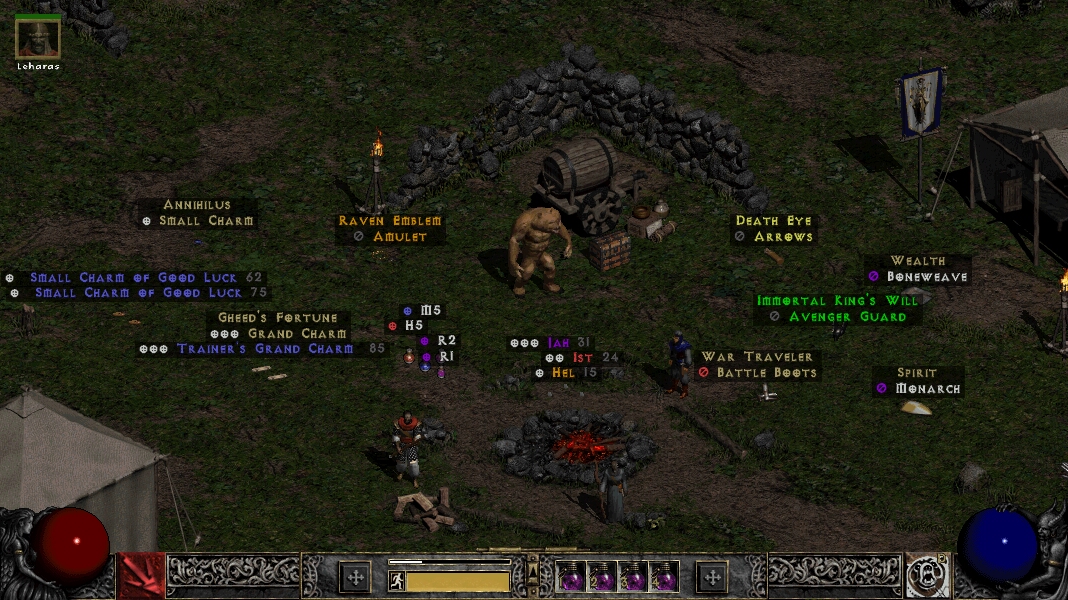
Introduction
It’s been 25 years and we’re still playing this game. Hats off to the Project Diablo 2 guys who continue to do amazing work, w/ modding capabilities second to none. For those looking to revisit the vanilla experience, this modpack might be just what you wanted.
This repo is just for tweaks to the game engine, adding QOL features w/ no changes to the game itself.
Other Projects
- Reformed - My soft-mod (TXT files) changes to the game (both D2LOD and D2R).
- Qolbot - Play multiplayer w/ your other singleplayer characters.
HELP WANTED!
Act 1 mercs can’t equip quivers and I don’t have the skills to fix it (requires DLL work). Also, I don’t know how to make the hex edit that fixes merc running animation when out of combat in v1.13d (clue here).
If anyone knows how to fix these issues, open a ticket and let’s discuss! I’d be so grateful.
What’s Included
- D2GL - Widescreen resolutions, HD upgrades, and wildly improves framerate (v1.0.4).
- D2FPS - Used in combo w/ D2GL and makes FPS even better, smooth as butter (v1.0.2).
- PlugY - Adds infinite stash, shared stash, infinite respec, all runewords (v14.02).
- BaseMod - Configurable settings, bug fixes, and much much more (v1.13.9).
- AutoPickup - Automatically pickup gold, scrolls, keys, and arrows.
- QuestRewards - Pay Akara/Charsi/Larzuk to respec/imbue/socket more than once.
- UberMod - Take down Diablo Clone and the Uber bosses in singleplayer.
- LinearMF - Removes diminishing returns on magic find.
- FontFix - Makes 5s look like 5s instead of 6s.
- NoIntro - Skip the intro videos when you boot the game.
- KeepEquip - Keep your equipment when you die.
- MapHack - Shows the entire map w/ monsters and chests (BH v1.9.10).
- LootFilter - Filter items and get notified about important drops (BH v1.9.10).
- BuffIcons - Shows your current buff and debuff icons (BH v1.9.10).
- 3DSound - Enables 3D sound option in sound settings (Windows only).
- ItemLabels - Toggle “always show items” on or off (v1.0.0).
- D2RCinematics - Use the new cinematic cutscenes from D2R.
- NoPenaltyMonsters - Remove XP penalty when you’re higher level than monsters.
- NoPenaltyParty - Low lvl players still get XP when partied w/ high lvl players (hex edit by me).
Install
Windows
- Purchase keys from Blizzard.
- Install Diablo II -
v1.12
- Install v1.13d patch -
v1.13d
- Download modpack files and merge the files into your D2 install directory.
- Download cinematic files and place the contents in
C:\Games\Diablo II\Data\local\video\eng\. I didn’t include these files in this repo bc a) they are 500mb, and b) I don’t want a copyright complaint.
- Make a
Game.exe shortcut w/ target "C:\Games\Diablo II\Game.exe" -3dfx -direct -txt.
- Launch the game by running the shortcut you made.
Special Keybinds
- Press
0 to show/hide the maphack settings button
- Press
9 to reload the maphack settings
- Press
B to show the verbose stats screen
- Press
L to show/hide items on the ground
- Press
Control-O to open the graphics settings
If your maphack settings button will not show, try deleting the C:\Games\Diablo II\UI.ini file (if it exists) and reload the game.
Mac/Linux
You can successfully install the game on Mac and Linux but you will have to use Wine in order to do it. It’s more advanced and requires the use of Terminal. I’ve written a guide on how to do this.
I recommend Bottles on Linux!
Uninstall
Delete all the files you merged through this install process and copy the files from Backups into your C:\Games\Diablo II\ folder.
Settings
Since this modpack includes a compilation of various mods, there are several places where you can tweak things:
PlugY.ini - stash settingsBaseMod.ini - game settingsBH_settings.cfg - maphack settingsBH.cfg - loot filter settings (check documentation)d2gl.ini - video settingsd2fps.ini - video settings
Keyboard
This game is very clicky and you can quickly develop carpal tunnel syndrome. To avoid this I wrote an AutoHotKey script that lets you hold down spacebar to move and attack. This makes melee characters a lot easier to play.
I recommend this alternate version on Linux!
Hero Editor
One of the benefits of playing vanilla Diablo II is you can still make use of all the old tools. When using Hero Editor, be sure to make the following changes to your config.ini file so it will still work w/ PlugY:
ErrorIgnore=1
LargerStashPicture=1
StashHeight=10
StashWidth=10
External Links
Credits
- D2GL by Bayaraa
- D2FPS by Jarcho
- PlugY by Yohann Nicolas
- UberMod by SnapChip
- BaseMod, AutoPickup, QuestRewards, LinearMF, NoPenaltyMonsters by devurandom
- FontFix, NoIntro, KeepEquip by SnakeByteStudios
- MapHack, LootFilter, BuffIcons by SlashDiablo
- 3DSound by IndirectSound
- ItemLabels by Trihedraf
- D2RCinematics by N3UR0N3TW0RK
Special thanks to all the fans of this amazing game for keeping it alive.


评论