MIT License

项目介绍

webkul/coolhue 是一个托管在 GitHub 上的开源项目,主要使用 JavaScript 编写,采用 MIT License 许可证,目前获得 3.5k 个 Star、201 次 Fork。

仓库全名
webkul/coolhue
开源许可证
MIT License
Star 数
3.5k
Fork 数
201
未关闭 Issue
2

README 摘要

coolHue Coolest handpicked Gradient Hues and Swatches for your next super ⚡ amazing stuff. coolHue has 60 coolest Gradients. You can also personalize the coolHue Palette as per as your taste. CoolHue gradients palette is rendered by JSON which makes it very easy to make a subtle update anytime. Installation You can create your very own personalized collection of Gradient Palette with CoolHue - You should have bower…

完整内容见 GitHub 原始 README 或本页 。

常见问题

coolhue 用什么语言开发?

主要使用 JavaScript 编写,采用 MIT License 许可证,目前有 3.5k 个 Star。

coolhue 可以免费商用吗?

仓库采用 MIT License 许可证,可免费使用与修改,商业使用请遵守许可证条款(例如保留版权声明与许可声明)。

如何获取 coolhue 的源码?

可以直接克隆仓库:git clone https://github.com/webkul/coolhue.git,默认分支为 master;安装与运行步骤见仓库 README。

coolhue 最近还在维护吗?

仓库最近一次更新为 2020年2月15日,当前有 2 个未关闭 Issue;Star 数为 3.5k,可作为社区活跃度的参考。

关于

GitHub 原始描述(英文)

Coolest Gradient Hues and Swatches

描述取自 GitHub 官方 API,保持仓库作者书写的原文。

简要分析

热度分
3958
价值分
2170
活跃状态
活跃

语言占比

CSS
HTML
JavaScript

Release

贡献者

README

coolHue

coolHue

Coolest handpicked Gradient Hues and Swatches for your next super ⚡ amazing stuff. coolHue has 60 coolest Gradients. You can also personalize the coolHue Palette as per as your taste.

CoolHue gradients palette is rendered by JSON which makes it very easy to make a subtle update anytime.

Installation

You can create your very own personalized collection of Gradient Palette with CoolHue - You should have bower package manager installed on your machine to proceed further.

  1. Open terminal and install CoolHue with bower install coolhue.
  2. Go to coolhue directory with cd bower_components/coolhue command and run npm install.
  3. Once, all the node modules are installed successfully, run npm run coolhue.
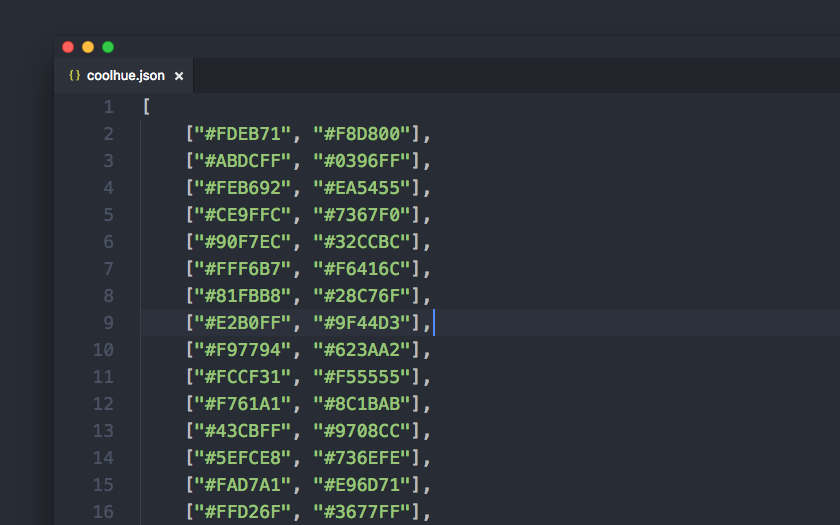
  4. All the gradients which appears in the browser are rendered from scripts/coolhue.json file.
  5. You just need to update the coolhue.json Object (array) to create your very own gradient palette. Open scripts/coolhue.json in the text editor and add or update the hex codes to generate the gradient palettes.

coolHue JS Object

Including CoolHue in npm Workflow

CoolHue is also available as a node module. You can read How it works with npm to get started. If you are already familiar; Installation command is mentioned just below -

npm install --save-dev coolhue

Sketch App Plugin

  1. Download Coolhue.sketchplugin.zip
  2. Extract the archive
  3. Install Coolhue.sketchplugin for Sketch App
  4. Access it from Sketch’s Menu Bar. Go to Plugins ➡️ Coolhue ➡️ Palette

coolHue Sketch Plugin

Sketch App Gradient Palette

You can download the coolHue Gradient Palette for Sketch App.

Photoshop Gradient Palette

You can download the coolHue Gradient Palette for Photoshop.

Credits

© Copyright Webkul Software, All rights reserved.

评论

暂无评论