Project Overview
This project provides a tool for learning English vocabulary, designed specifically for English learners, by expanding their vocabulary through reading English or bilingual articles. Users can automatically extract words from the learning articles, analyze word frequency, filter words, and track and record their mastery level.
- Vocabulary Learning Tool! Enter the URL of an English or bilingual article, and this tool will automatically extract all words and their corresponding sentences from the article, deduplicate and summarize the words in the article. You can filter to display only the words you don’t know.
- This tool supports custom dictionary libraries, allowing users to add their own dictionary libraries for referencing word meanings during the learning process.
Download and Installation
CHANGE_LOG.md
Key Features
- Word Extraction and Recording: Enter a URL, and the tool automatically retrieves and extracts all words and their contextual sentences from the web article. Additionally, it calculates and displays the vocabulary size of the article.
- Intelligent Management and Filtering: Avoid redundant learning of words you already know by utilizing deduplication and excluding options for mastered vocabulary, allowing you to focus on learning new words.
- Learning Progress Tracking: Words can be marked with different cognitive levels, including “0: Unknown,” “1: Recognized”, “2: Familiar”, “3: Proficient”. This helps customize the learning path while enhancing memory retention.
- Filtered Browsing Functionality: Filter out words of specific cognitive levels, for example, selecting the “0” tag displays all the words you are yet to understand.
- Synchronization and Platform Compatibility: Developed using Go and Flutter for cross-platform applications, supports usage on Android, Linux, and Windows, with data synchronization between devices, enabling convenient learning without constraints.
- Web Version Support: Supports local or cloud deployment, enabling access to the web application via a browser, offering a consistent user experience with desktop and mobile applications.
- Local Data Storage: No reliance on backend servers, ensuring all data is securely stored locally.
Development and Technical Support
-
This tool is developed with a focus on cross-platform compatibility and user convenience. It not only utilizes the high-performance Go language for core logic but also employs Flutter to ensure a smooth user interface experience and consistency across platforms. Whether users are learning on any device, they can ensure seamless synchronization of their learning progress.
-
With a focus on English learning needs, our goal is to create a simple, efficient, and user-friendly vocabulary learning aid. We welcome you to use this tool to accelerate your language learning journey.
Reading and Vocabulary Expansion
Reading English articles is widely recognized as an effective way to expand vocabulary. According to data analysis, about 50% to 70% of the vocabulary in each English article is considered effective. Please note that punctuation marks, articles, prepositions, and other simple vocabulary (such as “a,” “in,” “on,” “the,” “I,” “than,” “you,” “he,” etc.) have been automatically excluded from the articles. We suggest you:
- Consistently Read Daily: Develop a habit of reading English articles daily, whether it’s news, academic papers, or novels.
- Record New Vocabulary: When encountering new words, use this tool to record them and classify their cognitive levels.
Measuring Progress
Continuous reading practice will directly reflect in the growth of your vocabulary. Over time, you will notice:
- Reduction in "0-level Unknown Words": The number of completely unfamiliar words encountered when reading each new article will gradually decrease.
- Improved Reading Speed: You will read articles faster and with a significant increase in comprehension depth and speed.
Consistently practicing reading and using tools to assist you in recording and reviewing these new words is key to improving your English proficiency. As your vocabulary grows, you will not only read more fluently but also enhance your writing and conversational skills.
Recommended Learning Resources
To effectively use this tool and enhance your English proficiency, this project recommends the following English reading resources. They provide rich bilingual content covering a wide range of topics suitable for learners of all levels:
-
The New York Times (Chinese-English Edition):Visit The New York Times Chinese-English Edition for high-quality bilingual reading materials. This will help improve your English comprehension and vocabulary.

-
The Economist China: The Economist China: English content tailored for Chinese readers,
covering politics, economics, technology, and more. It’s very beneficial for learners who want to gain in-depth understanding of global topics.

By utilizing these resources, you can not only expand your vocabulary in a targeted manner but also gain insights into
different topics and background knowledge, comprehensively enhancing your English proficiency.
Build Guide
Screenshots
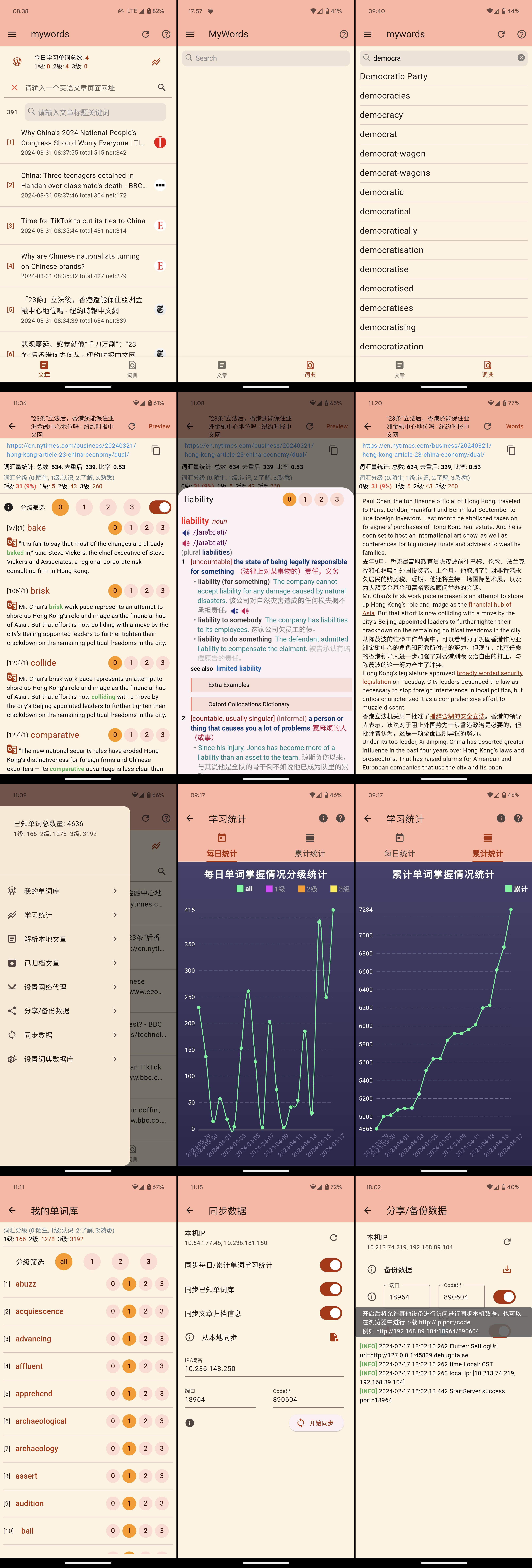
Adding Dictionary Guide
Adding Dictionary Guide
TODO
- If you encounter any issues while using this tool or adding dictionaries, or if you want to share your learning experiences and progress with us, please contact us via:
Acknowledgements
We sincerely thank the following individuals and organizations for their support and contributions to this project:
- Thanks to The New York Times Chinese and English Edition for providing us with high-quality bilingual reading materials, which are very helpful for English learners.
- Thanks to The Economist China for providing us with high-quality English reading materials, enriching our learning with abundant content.
- Special thanks to Bitbucket.org/xwangfor providing the Python dictionary parsing tool, which is crucial for us to build the vocabulary database.
- Special thanks to louischeung.top for providing the Oxford Advanced English-Chinese bilingual dictionary, which is highly valuable for English learners.
- We express our deep gratitude to all users who have actively provided feedback and suggestions through Telegram or Email.
- Thanks to all contributors, testers, and users who have supported and used our tool. It is your support that drives the continuous improvement of this project.
Additionally, we would like to thank all friends who have quietly supported this project behind the scenes. Your encouragement and feedback are the sources of the project’s continuous development.


评论