trzsz.js ( trz / tsz ) - the js version of trzsz


trzsz.js makes terminal built with electron and webshell to support trzsz ( trz / tsz ), which similar to ( rz / sz ), and compatible with tmux.
Please check https://trzsz.github.io for more information about trzsz ( trz / tsz ).
Getting Started
-
Install the module
npm install trzsz
or
yarn add trzsz
-
Use in Node.js
import { TrzszFilter } from "trzsz";
or
const { TrzszFilter } = require("trzsz");
-
Use in browser
<script src="node_modules/trzsz/lib/trzsz.js"></script>
-
Create TrzszFilter object for each connection.
const trzszFilter = new TrzszFilter({
});
-
Generally, the output of the server is forwarded to the terminal. Pass the output through TrzszFilter.
const trzszFilter = new TrzszFilter({
writeToTerminal: (data) => terminal.write(typeof data === "string" ? data : new Uint8Array(data)),
});
webSocket.addEventListener("message", (ev) => trzszFilter.processServerOutput(ev.data));
-
Generally, the user input is forwarded to the server. Pass the user input through TrzszFilter.
const trzszFilter = new TrzszFilter({
sendToServer: (data) => webSocket.send(data),
});
terminal.onData((data) => trzszFilter.processTerminalInput(data));
terminal.onBinary((data) => trzszFilter.processBinaryInput(data));
-
Let TrzszFilter know the terminal columns for rendering progress bar.
const trzszFilter = new TrzszFilter({
terminalColumns: terminal.cols,
});
terminal.onResize((size) => trzszFilter.setTerminalColumns(size.cols));
-
If the remote server is a Windows shell, such as cmd and PowerShell.
const trzszFilter = new TrzszFilter({
isWindowsShell: true,
});
-
If running in Node.js and TrzszFilter can require('fs'), chooseSendFiles and chooseSaveDirectory are required. If running in web browser, they will be ignored. Note that they are async functions.
const trzszFilter = new TrzszFilter({
chooseSendFiles: async (directory) => {
return ["/path/to/file1", "/path/to/file2", "/path/to/directory3"];
},
chooseSaveDirectory: async () => {
return "/path/to/directory";
},
});
-
Support dragging files or directories to upload.
terminalHtmlElement.addEventListener("dragover", (event) => event.preventDefault());
terminalHtmlElement.addEventListener("drop", (event) => {
  event.preventDefault();
  trzszFilter
    .uploadFiles(event.dataTransfer.items)
    .then(() => console.log("upload success"))
    .catch((err) => console.log(err));
});
-
TrzszAddon is a wrapper for TrzszFilter. If you are using xterm-addon-attach, just replace AttachAddon with TrzszAddon.
import { Terminal } from "xterm";
import { TrzszAddon } from "trzsz";

const terminal = new Terminal();
const trzszAddon = new TrzszAddon(webSocket);
terminal.loadAddon(trzszAddon);
Examples
Screenshot
upload and download files in web browser
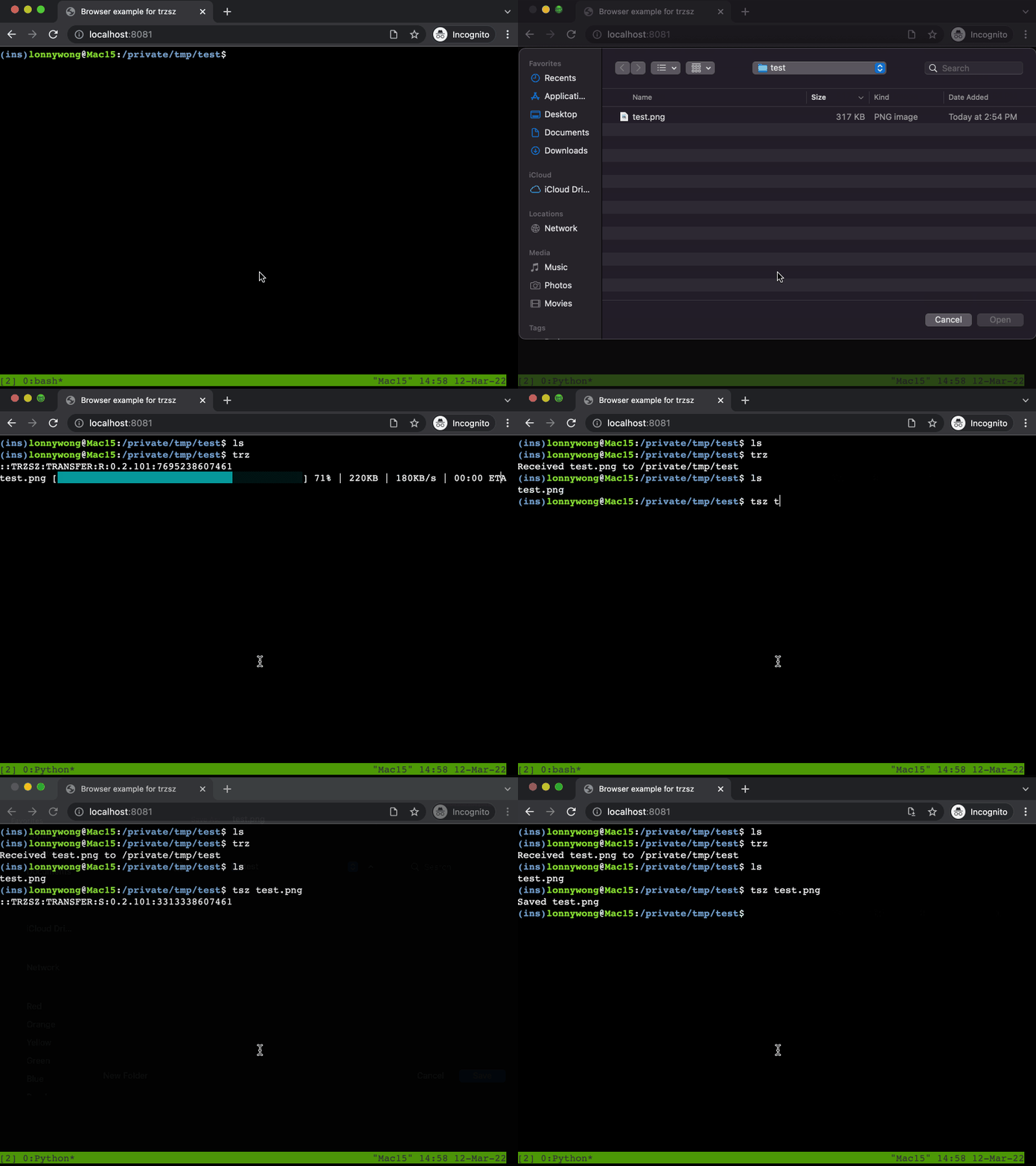
upload and download files in electron app

Feel free to email the author [email protected], or create an issue. Welcome to join the QQ group: 318578930.
❤️ Sponsor trzsz ❤️, buy the author a drink 🍺 ? Thank you for your support!





评论