RPG Save Editor
RPG Save Editor is a desktop application built using Tauri and React, designed for editing save files of RPG games.
Development
Prerequisites
Setup
- Clone the repository:
git clone https://github.com/truongthang2211/RPGSaveEditor.git
cd RPGSaveEditor
- Install dependencies:
npm install
Development Commands
- Start development server:
npm run tauri dev
npm run tauri build
The built application will be available in the src-tauri/target/release directory.
Support Us
If you find this tool useful, please consider supporting us:


Screenshots
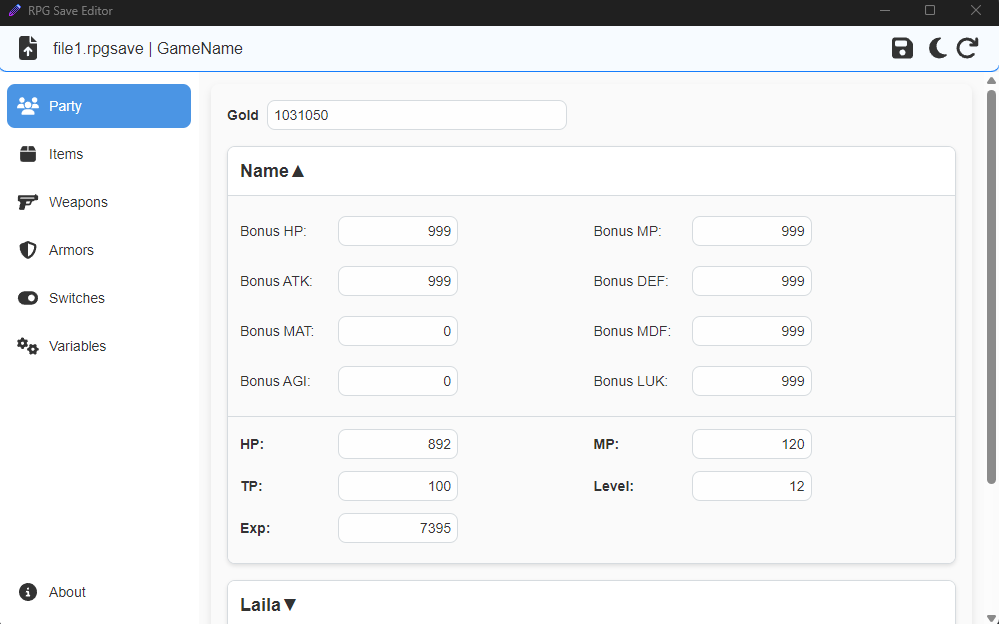 Main interface of RPG Save Editor
 Main interface of RPG Save Editor with dark mode enabled.
Features
- Open and edit
.rpgsave files.
- Modify game data such as party, items, switches, and variables.
- Supports light and dark modes.
- Easy-to-use interface with file selection and reload options.
- Sidebar navigation with sections for Party, Items, Switches, and Variables.
- About section with information and donation options.
Technologies Used
- Tauri: For building the desktop application.
- React: For creating the user interface.
- Styled-components: For styling the application.
- Lodash: For utility functions and data manipulation.
Usage
- Launch the application.
- Click on the file icon to open a
.rpgsave file.
- Edit the desired data using the available sections in the sidebar.
- Save your changes or reload the file if needed.
Download
You can download the latest release of RPG Save Editor from the Releases page. The release includes:
- A standalone executable file (
.exe) for users who already have the necessary dependencies installed.
- A setup installer (
setup.exe) for users who may need to install additional dependencies.
If the standalone .exe file does not run on your system, please use the setup.exe to install the required software and try again.
Contributing
- Fork the repository
- Create your feature branch (
git checkout -b feature/amazing-feature)
- Commit your changes (
git commit -m 'Add some amazing feature')
- Push to the branch (
git push origin feature/amazing-feature)
- Open a Pull Request
Troubleshooting
Common Development Issues
-
Rust toolchain issues
- Make sure you have the latest stable Rust toolchain installed
- Run
rustup update to update your Rust installation
-
Build errors
- Ensure all dependencies are installed with
npm install
- Check that you have the required system dependencies for Tauri
- Clear the build cache:
cargo clean in the src-tauri directory
-
Development server issues
- Try clearing the npm cache:
npm cache clean --force
- Ensure no other process is using port 1420 (default Vite port)
License
This project is licensed under the Apache License 2.0 - see the LICENSE file for details.


评论