MIT License

项目介绍

tomazas/ledcube8x8x8 是一个托管在 GitHub 上的开源项目,主要使用 C 编写,采用 MIT License 许可证,目前获得 150 个 Star、50 次 Fork。

仓库全名
tomazas/ledcube8x8x8
开源许可证
MIT License
Star 数
150
Fork 数
50
未关闭 Issue
1

README 摘要

About Source code and all files for the generic 8x8x8 3D LED Cube found on eBay (having STC 8051-based STC12C5A60S2 mcu), aka. 3D LightSquared 8x8x8 LED Cube DIY kit, ideasoft etc. Note: as received from manufacturer with additional cleanups/optimizations. Firmware v2 The firmware/v2 directory contains an optimized and more advanced version of the ledcube firmware. All animations were removed except one and…

完整内容见 GitHub 原始 README 或本页 。

常见问题

ledcube8x8x8 用什么语言开发?

主要使用 C 编写,采用 MIT License 许可证,目前有 150 个 Star。

ledcube8x8x8 可以免费商用吗?

仓库采用 MIT License 许可证,可免费使用与修改,商业使用请遵守许可证条款(例如保留版权声明与许可声明)。

如何获取 ledcube8x8x8 的源码?

可以直接克隆仓库:git clone https://github.com/tomazas/ledcube8x8x8.git,默认分支为 master;安装与运行步骤见仓库 README。

ledcube8x8x8 最近还在维护吗?

仓库最近一次更新为 2021年9月20日,当前有 1 个未关闭 Issue;Star 数为 150,可作为社区活跃度的参考。

关于

GitHub 原始描述(英文)

8x8x8 3D LED Cube source code

描述取自 GitHub 官方 API,保持仓库作者书写的原文。

简要分析

热度分
275
价值分
107
活跃状态
活跃

语言占比

Batchfile
C

README

About

Source code and all files for the generic 8x8x8 3D LED Cube found on eBay (having STC 8051-based STC12C5A60S2 mcu), aka. 3D LightSquared 8x8x8 LED Cube DIY kit, ideasoft etc.

Note: as received from manufacturer with additional cleanups/optimizations.

Firmware v2

The firmware/v2 directory contains an optimized and more advanced version of the ledcube firmware. All animations were removed except one and UART/serial based control was implemented. So the cube can be controlled with Arduino/Atmega or simple PC serial console.

Note: The ledcube UART control mode is activated once the first command comes over serial connection.

The new firmware can be flashed/written to STC MCU through UART/serial connection. Software such as STC-ISP is required to transfer the hex file (machinecode) to the STC microcontroller.

Download here: http://www.stcmcudata.com/STCISP/stc-isp-15xx-v6.86R.zip

Serial connection:
  • USB-2-TTL converter/adapter/module can be used to connect to PC (e.g. search eBay)
  • Parameters: baud - 9600 bps, 1 stop bit, no parity
  • Cube UART pins: VCC, GND, P30(RXD), P31(TXD)
Programming STC
  • Connect serial module to ledcube serial pins, RX to TX, TX to RX
  • Open STC-ISP and select STC12C5A60S2 and serial port
  • Select HEX file: ledcube8.hex and press Download/Program or Re-Program
  • Reset power to MCU to start programming

Alt text

Alt text

Alternative programming/flashing tool: STCGAL

If you have trouble with the official STC-ISP, try using: https://github.com/grigorig/stcgal

Extra - C51 project

Keil uVision C51 project file is also available in the firmware/v2 directory if compiling the source code is a must. Keil C51 compiler tools are required to open the project.

Download here: https://www.keil.com/demo/eval/c51.htm

The required STC mcu C headers need to be installed from the STC-ISP tool via “Keil ICE Settings” tab. Use the “Add MCU type to Keil” button and point to your Keil install directory.

Alt text

Firmware v2 for SDCC

SDCC compiler supports compiling code for STC12C5A60S2.
Adapted version of v2 firmware for SDCC can be found in firmware/v2-sdcc folder (created by Michael Knyazev).

LED Cube control

Control program

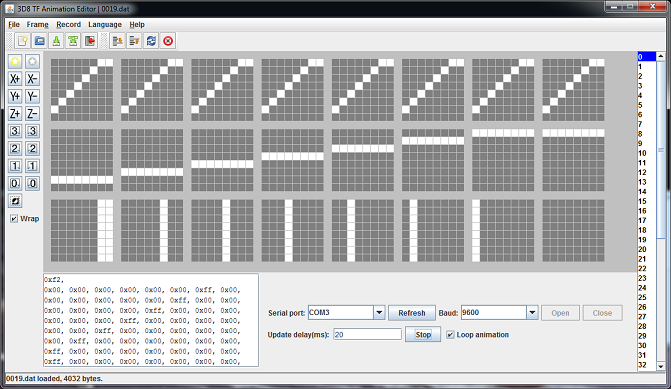
The cube (with Firmware v2) can be controlled over serial port/console with: PC Program.
Program allows to create animations and playback them.

评论

暂无评论