WebAudioFont
WebAudioFont is a set of resources and associated technology that uses sample-based synthesis to play musical instruments in the browser.
You can choose from thousands of instrument, see Catalog.
License
see LICENSE.md. Contact me if you need different license.
Help
Hire me if you need advanced help ([email protected]) - https://www.linkedin.com/in/sergeysurikov/
Docs
API
Wiki
Bug Reports
Issues
Code examples
Example applications
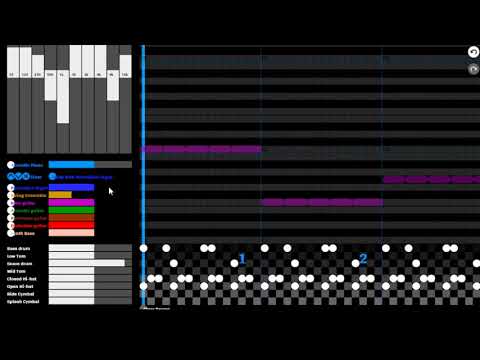
Pianoroll editor
Launch Web version
Install Android version
Fretboard for chords
Launch

Auto accompaniment
https://github.com/surikov/rockdice

3D music sequencer
Launch

BandLab clone for children

Use cases
- Virtual instruments
- Interactive music generated on the fly
- Sound effects for non-music applications
Content
How to use
Add a link to WebAudioFontPlayer.js and the instrument file. Invoke queueWaveTable.
Hello, world
Minimal HTML page
<html>
	<head>
		<script src='https://surikov.github.io/webaudiofont/npm/dist/WebAudioFontPlayer.js'></script>
		<script src='https://surikov.github.io/webaudiofontdata/sound/0250_SoundBlasterOld_sf2.js'></script>
		<script>
			var AudioContextFunc = window.AudioContext || window.webkitAudioContext;
			var audioContext = new AudioContextFunc();
			var player=new WebAudioFontPlayer();
			player.loader.decodeAfterLoading(audioContext, '_tone_0250_SoundBlasterOld_sf2');
			function play(){
				player.queueWaveTable(audioContext, audioContext.destination
					, _tone_0250_SoundBlasterOld_sf2, 0, 12*4+7, 2);
				return false;
			}
		</script>
	</head>
	<body>
		<p><a href='javascript:play();'>Hello, world!</a></p>
	</body>
</html>
See live example.
Use queueWaveTable to play single note. Use queueChord, queueSnap, queueStrumDown, queueStrumUp to play chords. See live example for strumming.
Use time for notes to define sequence. See live example of sequencer.
Dynamic loading
Use the startLoad and waitLoad functions.
var instr=null;
var AudioContextFunc = window.AudioContext || window.webkitAudioContext;
var audioContext = new AudioContextFunc();
var player=new WebAudioFontPlayer();
function changeInstrument(path,name){
	player.loader.startLoad(audioContext, path, name);
	player.loader.waitLoad(function () {
		instr=window[name];
	});
}
changeInstrument('https://surikov.github.io/webaudiofontdata/sound/0290_Aspirin_sf2_file.js','_tone_0290_Aspirin_sf2_file');
All loaded instruments are cached in memory.
See live example
Effects and mixer
Use WebAudioFontChannel to create a chain of 10-band equalizers.
Use WebAudioFontReverberator to add echo.
See live example
Custom samples
See tutorial
Installation
WebAudioFont doesn’t require installation. It hosts all code and instruments at GitHub Pages.
Minimal NPM code (if you need this)
JavaScript
var webaudiofont = require('webaudiofont');
var player = new WebAudioFontPlayer();
package.json
...
"devDependencies": {
	"webaudiofont":"^2.5.0"
...
Parts of WebAudioFont
WebAudioFont uses Web Audio API to play instruments.
Synthesizer uses wavetables to play sound.
Instruments came from free soundfonts:
How to use catalog of sounds:
- open index page
- find an instrument
- copy the name of the file to include the instrument data
- copy the name of the variable to refer to the instrument
- add this info to a page
Use drumInfo and instrumentInfo in realtime. See live example.
Player
WebAudioFontPlayer has the function queueWaveTable(audioContext, target, preset, when, pitch, duration, volume, slides)
Parameters:
- audioContext - AudioContext
- target - a node to connect to, for example audioContext.destination
- preset - variable with the instrument preset
- when - when to play, audioContext.currentTime or 0 to play now, audioContext.currentTime + 3 to play after 3 seconds
- pitch - note pitch from 0 to 127, for example 2+12*4 to play D of fourth octave (use MIDI key for drums)
- duration - note duration in seconds, for example 4 to play 4 seconds
- volume - 0.0 <=1.0 volume (0 is ‘no value’, ‘no value’ is 1)
- slides - array of pitch bends
The function queueWaveTable returns an envelope object. You can use this object to cancel a sound or to access AudioBufferSourceNode.
Strumming
Use queueChord, queueStrumUp, queueStrumDown, queueSnap for chords. See live example.
How to get help
Feel free to ask for any kind of help at project issues.
ReactJS
See ReactJS implementation.
Catalog of instruments
The catalog consists of a full set of MIDI standards. Each instrument has 5-10 sound variations from different soundfonts.
- Piano
- Chromatic Percussion
- Organ
- Guitar
- Bass
- Strings
- Ensemble
README 内容过长,已截取部分内容。完整内容请前往 GitHub 仓库查看。


评论