MeltySynth
MeltySynth is a SoundFont synthesizer written in C#.
The purpose of this project is to provide a MIDI music playback functionality for any .NET applications without complicated dependencies.
The codebase is lightweight and can be applied to any audio drivers which support streaming audio, such as SFML.Net, Silk.NET, OpenTK, and NAudio.
The entire code is heavily inspired by the following projects:
An example code to synthesize a simple chord:
// Create the synthesizer.
var sampleRate = 44100;
var synthesizer = new Synthesizer("TimGM6mb.sf2", sampleRate);

// Play some notes (middle C, E, G).
synthesizer.NoteOn(0, 60, 100);
synthesizer.NoteOn(0, 64, 100);
synthesizer.NoteOn(0, 67, 100);

// The output buffer (3 seconds).
var left = new float[3 * sampleRate];
var right = new float[3 * sampleRate];

// Render the waveform.
synthesizer.Render(left, right);
Another example code to synthesize a MIDI file:
// Create the synthesizer.
var sampleRate = 44100;
var synthesizer = new Synthesizer("TimGM6mb.sf2", sampleRate);

// Read the MIDI file.
var midiFile = new MidiFile("flourish.mid");
var sequencer = new MidiFileSequencer(synthesizer);
sequencer.Play(midiFile, false);

// The output buffer.
var left = new float[(int)(sampleRate * midiFile.Length.TotalSeconds)];
var right = new float[(int)(sampleRate * midiFile.Length.TotalSeconds)];

// Render the waveform.
sequencer.Render(left, right);
Features
- Suitable for both real-time and offline synthesis.
- Support for standard MIDI files with additional functionalities like dynamic tempo change.
- No dependencies other than .NET Standard 2.1.
Installation
The NuGet package is available:
Install-Package MeltySynth
All the classes are in the MeltySynth namespace:
using MeltySynth;
If you don’t like DLLs, copy all the .cs files to your project.
Playing sound
MeltySynth can only generate PCM waveforms; MeltySynth itself does not have the ability to play sound from speakers. To make the sound audible, export the generated waveform as an audio file (e.g., WAV file) or pass it to some audio driver (e.g., NAudio). If you are not very familiar with how to handle PCM audio, NAudio’s tutorials should be helpful.
Note that MeltySynth does not provide thread safety. If you want to send notes and render the waveform in separate threads, you must ensure that the related methods will not be called simultaneously.
Demo
https://www.youtube.com/watch?v=xNgsIJKxPkI

https://www.youtube.com/watch?v=_j1izHgIT4U

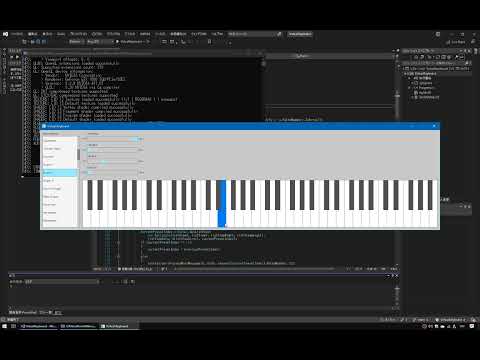
A virtual keyboard made with Raylib-CsLo
https://www.youtube.com/watch?v=a8vuIq4JKhs
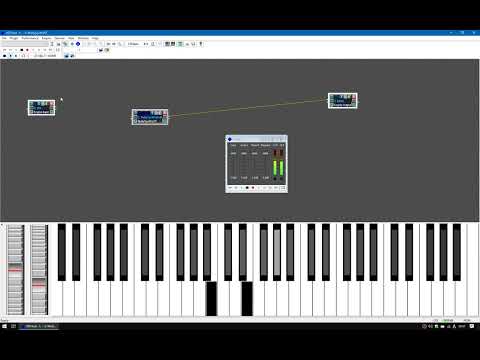
Use MeltySynth as a MIDI device (NAudio + loopMIDI)
https://www.youtube.com/watch?v=BiFxvzs0jUI

Use MeltySynth as a VST plugin (VST.NET)
https://www.youtube.com/watch?v=IUKIEWvw6Ik
Examples
MIDI file player for various audio drivers
Handling SoundFont
To enumerate samples in the SoundFont:
var soundFont = new SoundFont("TimGM6mb.sf2");

foreach (var sample in soundFont.SampleHeaders)
{
    Console.WriteLine(sample.Name);
}
To enumerate instruments in the SoundFont:
var soundFont = new SoundFont("TimGM6mb.sf2");

foreach (var instrument in soundFont.Instruments)
{
    Console.WriteLine(instrument.Name);
}
To enumerate presets in the SoundFont:
var soundFont = new SoundFont("TimGM6mb.sf2");

foreach (var preset in soundFont.Presets)
{
    var bankNumber = preset.BankNumber.ToString("000");
    var patchNumber = preset.PatchNumber.ToString("000");

    Console.WriteLine($"{bankNumber}:{patchNumber} {preset.Name}");
}
Handling synthesizer
To change the instrument to play, send a program change command (0xC0) to the synthesizer:
// Create the synthesizer.
var sampleRate = 44100;
var synthesizer = new Synthesizer("TimGM6mb.sf2", sampleRate);

// Change the instrument to electric guitar (#30).
synthesizer.ProcessMidiMessage(0, 0xC0, 30, 0);

// Play some notes (middle C, E, G).
synthesizer.NoteOn(0, 60, 100);
synthesizer.NoteOn(0, 64, 100);
synthesizer.NoteOn(0, 67, 100);

// The output buffer (3 seconds).
var left = new float[3 * sampleRate];
var right = new float[3 * sampleRate];

// Render the waveform.
synthesizer.Render(left, right);
To play a melody, render the sound as a sequence of short blocks:
// Create the synthesizer.
var sampleRate = 44100;
var synthesizer = new Synthesizer("TimGM6mb.sf2", sampleRate);

// The length of a block is 0.1 sec.
var blockSize = sampleRate / 10;

// The entire output is 3 sec.
var blockCount = 30;

// Define the melody.
// A single row indicates the start timing, end timing, and pitch.
var data = new int[][]
{
    new int[] {  5, 10, 60 },
    new int[] { 10, 15, 64 },
    new int[] { 15, 25, 67 }
};

// The output buffer.
var left = new float[blockSize * blockCount];
var right = new float[blockSize * blockCount];

for (var t = 0; t < blockCount; t++)
{
    // Process the melody.
    foreach (var row in data)
    {
        if (t == row[0]) synthesizer.NoteOn(0, row[2], 100);
        if (t == row[1]) synthesizer.NoteOff(0, row[2]);
    }

    // Render the block.
    var blockLeft = left.AsSpan(blockSize * t, blockSize);
    var blockRight = right.AsSpan(blockSize * t, blockSize);
    synthesizer.Render(blockLeft, blockRight);
}
Handling MIDI file sequencer
To change the playback speed:
// Create the synthesizer.
var sampleRate = 44100;
var synthesizer = new Synthesizer("TimGM6mb.sf2", sampleRate);

// Read the MIDI file.
var midiFile = new MidiFile(@"C:\Windows\Media\flourish.mid");
var sequencer = new MidiFileSequencer(synthesizer);

// Play the MIDI file.
sequencer.Play(midiFile, false);

// Change the playback speed.
sequencer.Speed = 1.5F;

// The output buffer.
var left = new float[(int)(sampleRate * midiFile.Length.TotalSeconds / sequencer.Speed)];
var right = new float[(int)(sampleRate * midiFile.Length.TotalSeconds / sequencer.Speed)];

// Render the waveform.
sequencer.Render(left, right);
To mute a certain track:
// Create the synthesizer.
var sampleRate = 44100;
var synthesizer = new Synthesizer("TimGM6mb.sf2", sampleRate);

// Read the MIDI file.
var midiFile = new MidiFile(@"C:\Windows\Media\flourish.mid");
var sequencer = new MidiFileSequencer(synthesizer);

// Discard MIDI messages if its channel is the percussion channel.
sequencer.OnSendMessage = (synthesizer, channel, command, data1, data2) =>
{
    if (channel == 9)
    {
        return;
    }

    synthesizer.ProcessMidiMessage(channel, command, data1, data2);
};

// Play the MIDI file.
sequencer.Play(midiFile, false);

// The output buffer.
var left = new float[(int)(sampleRate * midiFile.Length.TotalSeconds)];
var right = new float[(int)(sampleRate * midiFile.Length.TotalSeconds)];

// Render the waveform.
sequencer.Render(left, right);
To change the instruments used in the MIDI file:
// Create the synthesizer.
var sampleRate = 44100;
var synthesizer = new Synthesizer("TimGM6mb.sf2", sampleRate);

// Read the MIDI file.
var midiFile = new MidiFile(@"C:\Windows\Media\flourish.mid");
var sequencer = new MidiFileSequencer(synthesizer);

// Turn all the instruments into electric guitars.
sequencer.OnSendMessage = (synthesizer, channel, command, data1, data2) =>
{
    if (command == 0xC0)
    {
        data1 = 30;
    }

    synthesizer.ProcessMidiMessage(channel, command, data1, data2);
};

// Play the MIDI file.
sequencer.Play(midiFile, false);

// The output buffer.
var left = new float[(int)(sampleRate * midiFile.Length.TotalSeconds)];
var right = new float[(int)(sampleRate * midiFile.Length.TotalSeconds)];

// Render the waveform.
sequencer.Render(left, right);
Todo
- Wave synthesis
- MIDI message processing
- Effects
- Other things
License
MeltySynth is available under the MIT license.
References


评论