项目介绍

sholafalana/MT5-MT4-Telegram-API-Bot 是一个托管在 GitHub 上的开源项目,主要使用 MQL5 编写,目前获得 225 个 Star、98 次 Fork。

仓库全名
sholafalana/MT5-MT4-Telegram-API-Bot
Star 数
225
Fork 数
98
未关闭 Issue
8

README 摘要

MT5-MT4-Telegram-API-Bot MT5-MT4-Telegram-API-Bot is a Bot that communicates with Telegram, and copy all trades from one MT4 or MT5 terminal to Telegram Groups or channel - It support MQL4/MQL5 language. it delivers Trade Signal Alert From MT4 and MT5 Terminal to Telegram, EMail, or the notification terminal TODO Search for a bot on telegram with name "@BotFather". We will find it through the search engine. After…

完整内容见 GitHub 原始 README 或本页 。

常见问题

MT5-MT4-Telegram-API-Bot 用什么语言开发?

主要使用 MQL5 编写,目前有 225 个 Star。

如何获取 MT5-MT4-Telegram-API-Bot 的源码?

可以直接克隆仓库:git clone https://github.com/sholafalana/MT5-MT4-Telegram-API-Bot.git,默认分支为 master;安装与运行步骤见仓库 README。

MT5-MT4-Telegram-API-Bot 最近还在维护吗?

仓库最近一次更新为 2023年4月21日,当前有 8 个未关闭 Issue;Star 数为 225,可作为社区活跃度的参考。

关于

GitHub 原始描述(英文)

A Bot To deliver Trade Signal Alert From MT4 and MT5 Terminal to Telegram, EMail, and Android/IOS Mobile Devices

描述取自 GitHub 官方 API,保持仓库作者书写的原文。

简要分析

热度分
440
价值分
165
活跃状态
活跃
暂无主题

语言占比

MQL4
MQL5

贡献者

README

MT5-MT4-Telegram-API-Bot

MT5-MT4-Telegram-API-Bot is a Bot that communicates with Telegram, and copy all trades from one MT4 or MT5 terminal to Telegram Groups or channel - It support MQL4/MQL5 language. it delivers Trade Signal Alert From MT4 and MT5 Terminal to Telegram, EMail, or the notification terminal

TODO

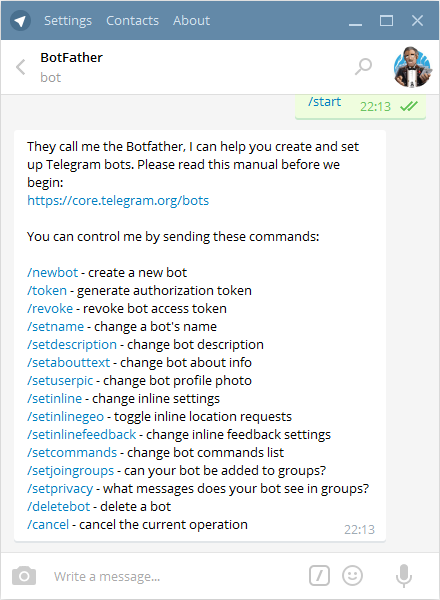
  • Search for a bot on telegram with name “@BotFather”. We will find it through the search engine. After adding it to the list of contacts, we will start communicating with it using the /start command. As a response it will send you a list of all available commands, As shown in the image below pic1

  • With the /newbot command we begin the registration of a new bot. We need to come up with two names. The first one is a name of a bot that can be set in your native language. The second one is a username of a bot in Latin that ends with a “bot” prefix. As a result, we obtain a token or API Key – the access key for operating with a bot through API as shown below

pic2

Operation mode for bots

With regard to bots, you can let them join groups by using the /setjoingroups command. If a bot is added to a group, then by using the /setprivacy command you can set the option to either receive all messages, or only those that start with a sign of the symbol team “/”.

pic4

The other mode focuses on operation on a channel. Telegram channels are accounts for transmitting messages for a wide audience that support an unlimited number of subscribers. The important feature of channels is that users can’t leave comments and likes on the news feed (one-way connection). Only channel administrators can create messages there

pic5__2

  • Export and copy all files from include to the MT4/MT5 include folder, input the api key from the bot to the Expert Advisor’s token, add the bot as an administrator of your signal channel or Group, any event that happens on your trade terminal will be notify to instantly on your channel

mt4-telegram-signal-provider-screen-8054

test1

评论

暂无评论