JoyDance

Demo
https://youtu.be/f_1IkUHFdH8
Features
- Play Just Dance 2016 and later on all platforms with Joy-Cons.
- Playing with a Joy-Con (+ its strap) is safer and more comfortable than holding a phone.
- No latency.
- Better score than using a phone (hopefully).
- No random disconnection.
- Support up to 6 players.
- Support all platforms:
|
Xbox Series |
Xbox One |
PS4/5 |
NSW |
Stadia |
PC |
Wii U |
| 2020-2022 |
✅ |
✅ |
✅ |
✅ |
✅ |
|
|
| 2016-2019 ⚠️ |
|
✅ |
✅ |
✅ |
|
✅ |
✅ |
⚠️ Important: Can’t use buttons on Joy-Con to navigate the UI in JD 2016-2019 (you’ll have to use controllers/keyboard). See #6.
How does it work?
It pretends to be the Just Dance Controller app, sends movements of the Joy-Con to your game console.
Tested on
Requirements
- PC/Mac/Linux with bluetooth support. Doesn’t work with Chrome OS/Crostini (#15).
- Python 3.7+ and pip installed.
- 1 to 6 Joy-Cons.
- It’s RECOMMENDED to:
- Use a Bluetooth dongle, because built-in Bluetooth sucks (or you will get disconnected constantly while playing). Make sure you buy a dongle with game controllers support, not just for audio devices. Not all dongles support Mac/Linux, so remember to check compatibility before buying.
- Use a Nintendo Switch to update Joy-Con to the latest firmware & calibate its motion sensors. Ask your friends or bring it to the game shop if you don’t have one.
Installation
- Download the latest version and extract it into a folder.
- Open that folder in Terminal/Command Prompt, then run this command:
pip3 install -r requirements.txt
Click to expand!
- Linux users may need to use
hid instead of hidapi (not sure why hidapi couldn’t find Joy-Cons on Linux).
pip3 uninstall hidapi
sudo apt install libhidapi-dev
pip3 install hid
- Create a new udev rule file at
/etc/udev/rules.d/50-nintendo-switch.rules (Source)
# Switch Joy-con (L) (Bluetooth only)
KERNEL=="hidraw*", SUBSYSTEM=="hidraw", KERNELS=="0005:057E:2006.*", MODE="0666"

# Switch Joy-con (R) (Bluetooth only)
KERNEL=="hidraw*", SUBSYSTEM=="hidraw", KERNELS=="0005:057E:2007.*", MODE="0666"

# Switch Pro controller (USB and Bluetooth)
KERNEL=="hidraw*", SUBSYSTEM=="hidraw", ATTRS{idVendor}=="057e", ATTRS{idProduct}=="2009", MODE="0666"
KERNEL=="hidraw*", SUBSYSTEM=="hidraw", KERNELS=="0005:057E:2009.*", MODE="0666"

# Switch Joy-con charging grip (USB only)
KERNEL=="hidraw*", SUBSYSTEM=="hidraw", ATTRS{idVendor}=="057e", ATTRS{idProduct}=="200e", MODE="0666"
Reload udev rules:
sudo udevadm control --reload-rules
sudo udevadm trigger
- Install
dkms-hid-nintendo (Joy-Con driver) if you’re running Linux kernel older than 5.16.
Usage
-
Open the phone pairing screen on Just Dance.
-
Connect your PC/Mac/Linux to the same Wi-Fi or LAN network as your game console. For Stadia you just need to connect to the internet.
-
Run this command:
python3 dance.py
or
python dance.py
-
Open http://localhost:32623 (not https://…) in a web browser (32623 = DANCE). You can also open JoyDance on another device (connected to the same network) with this link: http://[JOYDANCE_DEVICE_IP]:32623 (for example: http://192.168.1.100:32623).
-
Turn on Bluetooth and pair with Joy-Con by holding down the SYNC button until the light move up and down. Press the “Refresh” button until your Joy-Con shows up.
-
Fill the form.
-
Pairing Method:
|
Default |
Fast |
Stadia |
Old |
| Platforms |
All but Stadia |
X1/PS/NSW |
Stadia |
All, incl. PC & Wii U |
| Game versions |
2020-2022 |
2020-2022 |
2020-2022 |
2016-2019 |
| Pairing Speed |
Slow |
Fast |
Slow |
Fast |
| Pairing Code |
Require |
|
Require |
|
| Private IP Address |
Host |
Console |
|
PC/Console |
-
Host’s Private IP Address:
- The private IP address of your PC/Mac/Linux running JoyDance. Find this in the Wi-Fi settings.
- Starts with
192.168. or 10..
-
PC/Console’s Private IP Address:
- The private IP address of your PC/console. Find this in the Wi-Fi settings on PC/console.
- Starts with
192.168. or 10..
-
Pairing Code: get this from the game.
-
Press the “Connect” button next to Joy-Con to start the pairing process.
-
💃🕺
FAQ
-
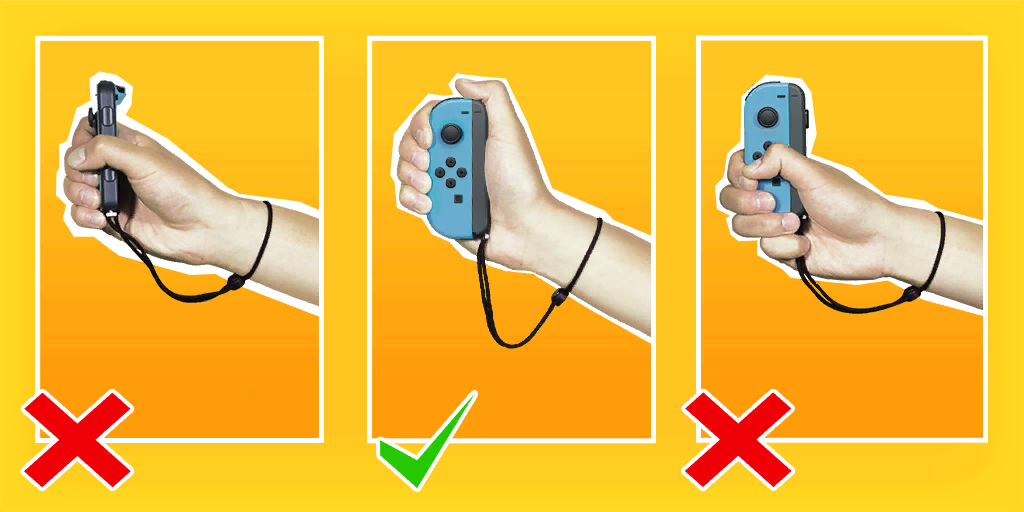
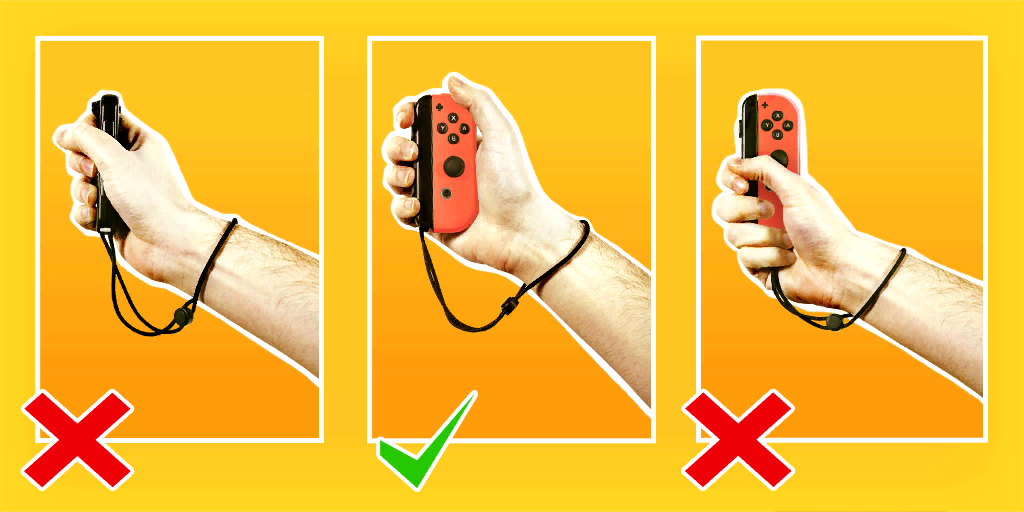
What is the correct way to hold a Joy-Con?
Please follow these images for Joy-Con (L) and Joy-Con ®.
-
How to control with Joy-Con (L)?
| Joy-Con (L) |
Joy-Con ® |
| Up |
X |
| Right |
A |
| Down |
B |
| Left |
Y |
| L |
R |
| ZL |
ZR |
| Minus |
Plus |
-
How to exit JoyDance?
Press Ctrl + C two times or close the Terminal window.
-
Is it possible to port JoyDance to wearable devices like smart watches (Wear OS, watchOS…)?
Yes. I tested on a tiny M5StickC Plus and it worked! But remember, some movements require you to move only the palm of your hand won’t be recognized correctly.
-
Can I play Just Dance 2017 (PC) and run JoyDance on the same PC?
Yes, you can.
Acknowledgements


评论