项目介绍

phanxuanquang/Adobe-Camera-Profiles-Unlocker 是一个托管在 GitHub 上的开源项目,主要使用 C# 编写,目前获得 154 个 Star、21 次 Fork。

仓库全名
phanxuanquang/Adobe-Camera-Profiles-Unlocker
Star 数
154
Fork 数
21
未关闭 Issue
1

README 摘要

© 2024 Phan Xuan Quang / Adobe Camera Profiles Unlocker A tool to unlock hidden Camera Profiles in Adobe Lightroom and Adobe Camera Raw, enabling enhanced color matching for a wide range of camera brands. :pushpin: Supported Camera Brands The complete list of supported camera models can be found HERE. No. | Brand Name | 01 | Olympus | 02 | OM Digital Solutions | 03 | Panasonic Lumix | 04 | Pentax | 05 | Ricoh GR |…

完整内容见 GitHub 原始 README 或本页 。

常见问题

Adobe-Camera-Profiles-Unlocker 用什么语言开发?

主要使用 C# 编写,目前有 154 个 Star。

如何获取 Adobe-Camera-Profiles-Unlocker 的源码?

可以直接克隆仓库:git clone https://github.com/phanxuanquang/Adobe-Camera-Profiles-Unlocker.git;安装与运行步骤见仓库 README。

Adobe-Camera-Profiles-Unlocker 最近还在维护吗?

仓库最近一次更新为 5月2日,当前有 1 个未关闭 Issue;Star 数为 154,可作为社区活跃度的参考。

关于

GitHub 原始描述(英文)

Unlock the hidden Camera Profiles in the Adobe Lightroom and Adobe Camera Raw

描述取自 GitHub 官方 API,保持仓库作者书写的原文。

简要分析

热度分
350
价值分
114
活跃状态
活跃

语言占比

C#

Release

贡献者

README

© 2024 Phan Xuan Quang / Adobe Camera Profiles Unlocker

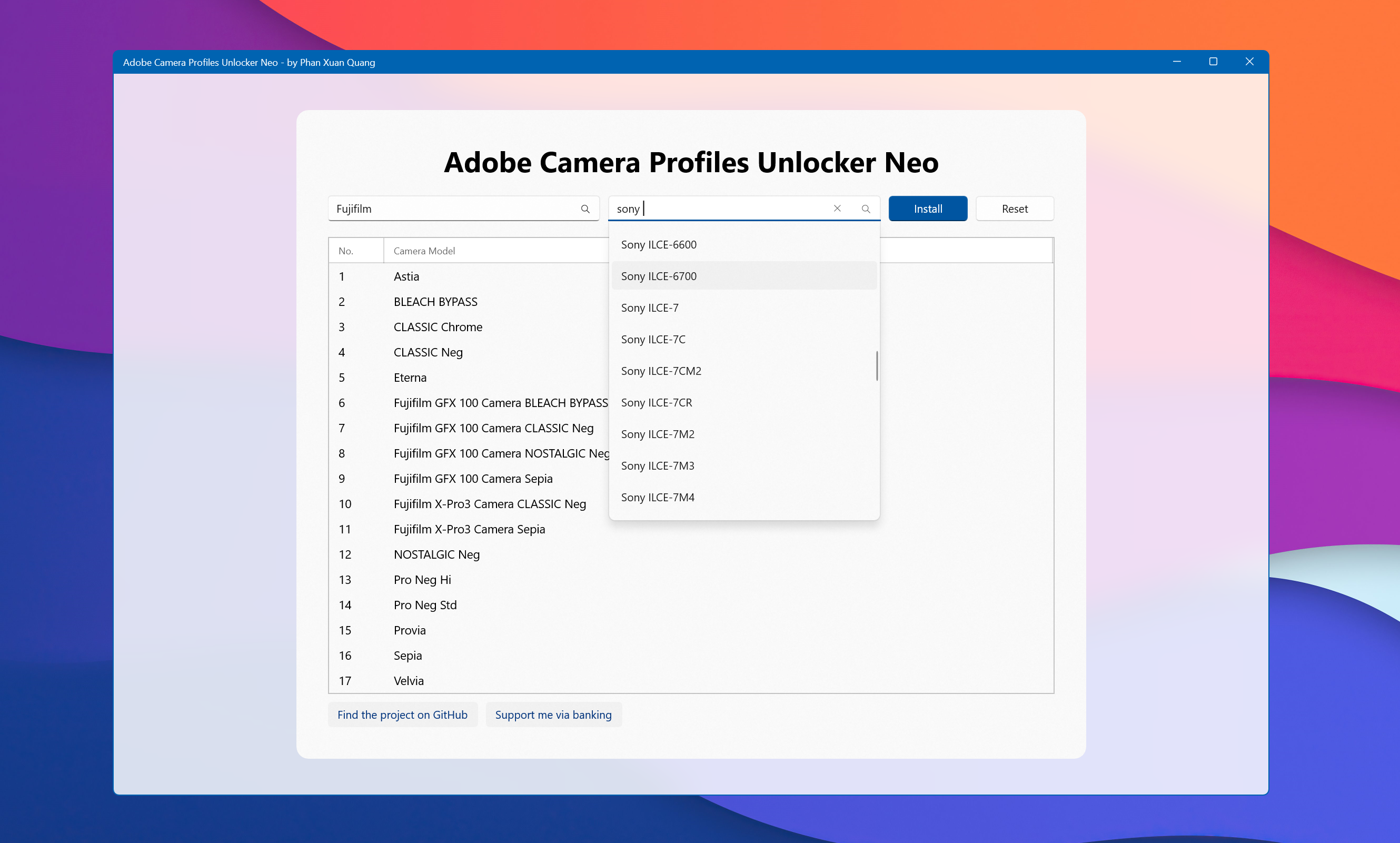
A tool to unlock hidden Camera Profiles in Adobe Lightroom and Adobe Camera Raw, enabling enhanced color matching for a wide range of camera brands.

:pushpin: Supported Camera Brands

The complete list of supported camera models can be found HERE.

No. Brand Name
01 Olympus
02 OM Digital Solutions
03 Panasonic Lumix
04 Pentax
05 Ricoh GR
06 Sigma fp
07 Sony
08 Canon
09 Leica
10 Nikon
11 Fujifilm

:computer: System Requirements

Minimum Version Recommended Version
Windows Windows 10 version 1809 Windows 10 version 2004 or Windows 11
Adobe Camera Raw Version 15.0 Latest version
Adobe Photoshop or Adobe Lightroom Classic Version 2022 Latest version

:blue_book: Usage Instructions

For Windows Users

  1. Download: Get the Adobe.Camera.Profiles.Unlocker.Neo.zip file from the latest release page.
  2. Watch the Tutorial: Follow the video tutorial linked below. Guidance video
  3. Restart Adobe Applications: Restart Adobe Photoshop or Lightroom to apply the changes.

For macOS Users

  1. Prepare Profiles on Windows: Follow the instruction video for Windows above.
  2. Transfer Profiles to Mac: Copy the .dcp files from C:\Users\%username%\AppData\Roaming\Adobe\CameraRaw\CameraProfiles on the Windows device to /Library/Application Support/Adobe/CameraRaw/Settings/Adobe/Profiles in the target Mac.
  3. Restart Adobe Applications: Restart Adobe Photoshop or Lightroom to apply the changes.

:exclamation: Important Notes

  • Profiles specific to Adobe and Fujifilm are only supported on Windows.
  • Profiles apply exclusively to RAW photo formats (e.g., .ARW for Sony, .NEF for Nikon).
  • Restarting Adobe applications after profile installation is mandatory to activate the new profiles.
  • Profiles can be found under Camera Matching or Profiles in the Camera Profile section of Adobe Camera Raw or Lightroom.
  • Using the latest version of Adobe Camera Raw is recommended over Lightroom for optimal performance.

:gift: Support Me

Vietcombank Momo ZaloPay

评论

暂无评论