ZoteroPortable
Zotero in PortableApps.com Format
Read in other langages: Français 🇫🇷, English 🇬🇧
Since ZoteroPortable is now an official PortableApp, you should download ZoteroPortable from PortableApps™. This Github repo is for development only.
Why?
With Mozilla switching to webextensions, Zotero had to adapt: the developers dropped support of the legacy extension for Firefox, and focused their efforts on Zotero Standalone: when there was two programs, Zotero is now unified (from version 5 onwards).
Unfortunately, the portableapp created by orschiro is out of date, as it’s based on version 4, and not fully portable if you update it to 5, as it creates Zotero’s profile and store user data in %appdata%\Zotero.
With my version, Zotero is portable: you can install it even if you don’t have admin rights, you can launch it from a usb key, there’s nothing writen in Windows registry, and no traces (folders, files…) are left behind.
This version of Zotero is not officially endorsed by Zotero Team. Do not expect official support for portable Zotero issues.
Note that I also made a Juris-M Portable, available here!
How to use:
- Download latest release here.
- Unpack Zotero by launching installer and selecting target folder (it can be an USB Key or a folder on your desktop…)
- Install Zotero Connector in your browser (I personnaly use FirefoxPortable)
Or better: use PortableApps platform and install Zotero from the app store!
Notes on release:
For official changelog of Zotero, please see here.
Zotero Portable is now an official PortableApps.com™ app !
Updating:
To update Zotero, I recommend using the PortableApps platform. The updates are automatic, and your data won’t be affected, only the program will be updated.
However this Zotero version still contains original Zotero Update module: if you check for updates, Zotero will update:
- Click on Help > Check for updates in Zotero.

- Click on Update Zotero, wait for download.
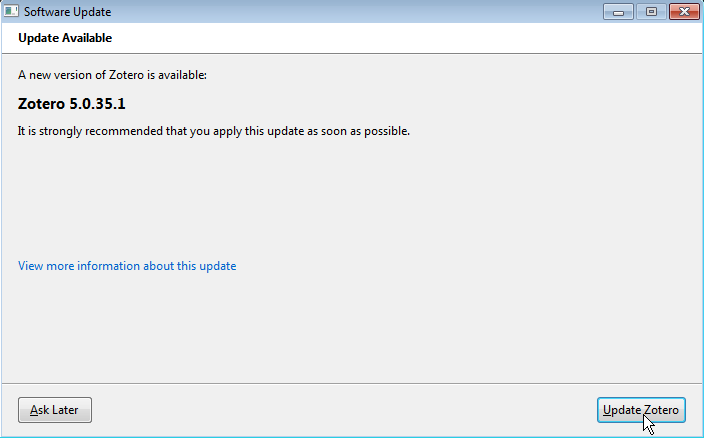

Update is installed.
Note that updating Zotero this way will prevent you to get the modifications I made to the portable app (modifications of ini files related to the portablization for instance).
SmartScreen Filter:
Windows 10 may have problems with installing or launching Zotero Portable. If this happens to you, it is often possible to tell Windows that you still want to run the program. To do this, you first need to trust me. Then click on Additional information:
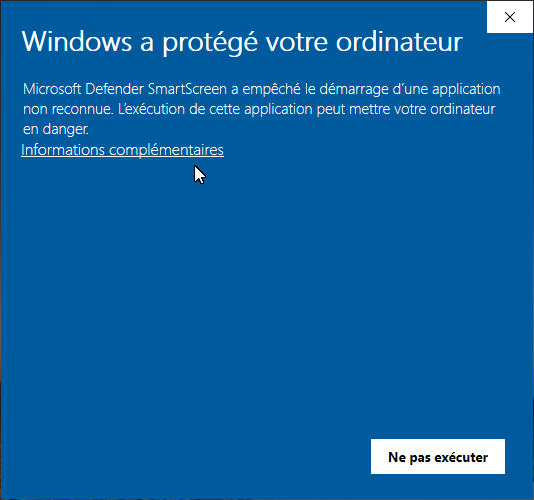
And then on Run anyway:

However, some organizations block this workaround (see #20 for more info).
If you still want to use ZoteroPortable, one solution is to check “unblock” option in the file properties: see this comment from AndhikaWB.
Another solution is to use the official PortableApps.org platform and install Zotero from the app store.
Custom profile folder:
Some users want to use a custom profile folder (see #24). This is possible with Zotero, but with ZoteroPortable, this possibility is limited by the ZoteroPortable.ini file.
I don’t recommend changing this file. However, if you know what you are doing, you can modify the line 3 in the ZoteroPortable.ini file to specify the folder of your choice.
Versions history:
See here.


评论