Kage CSS (影 = Shadow) — Custom Glassmorphism CSS
A polished, animated glassmorphism theme for the Kagi search engine. Clean UI, subtle motion, consistent styling across results, images, videos, news, and podcasts.
Gallery (Static Images)
-
Start page

-
Search results

-
Searchbar

-
Quick Answer

-
Domain info

-
Dropdowns

-
Glassy Dropdown
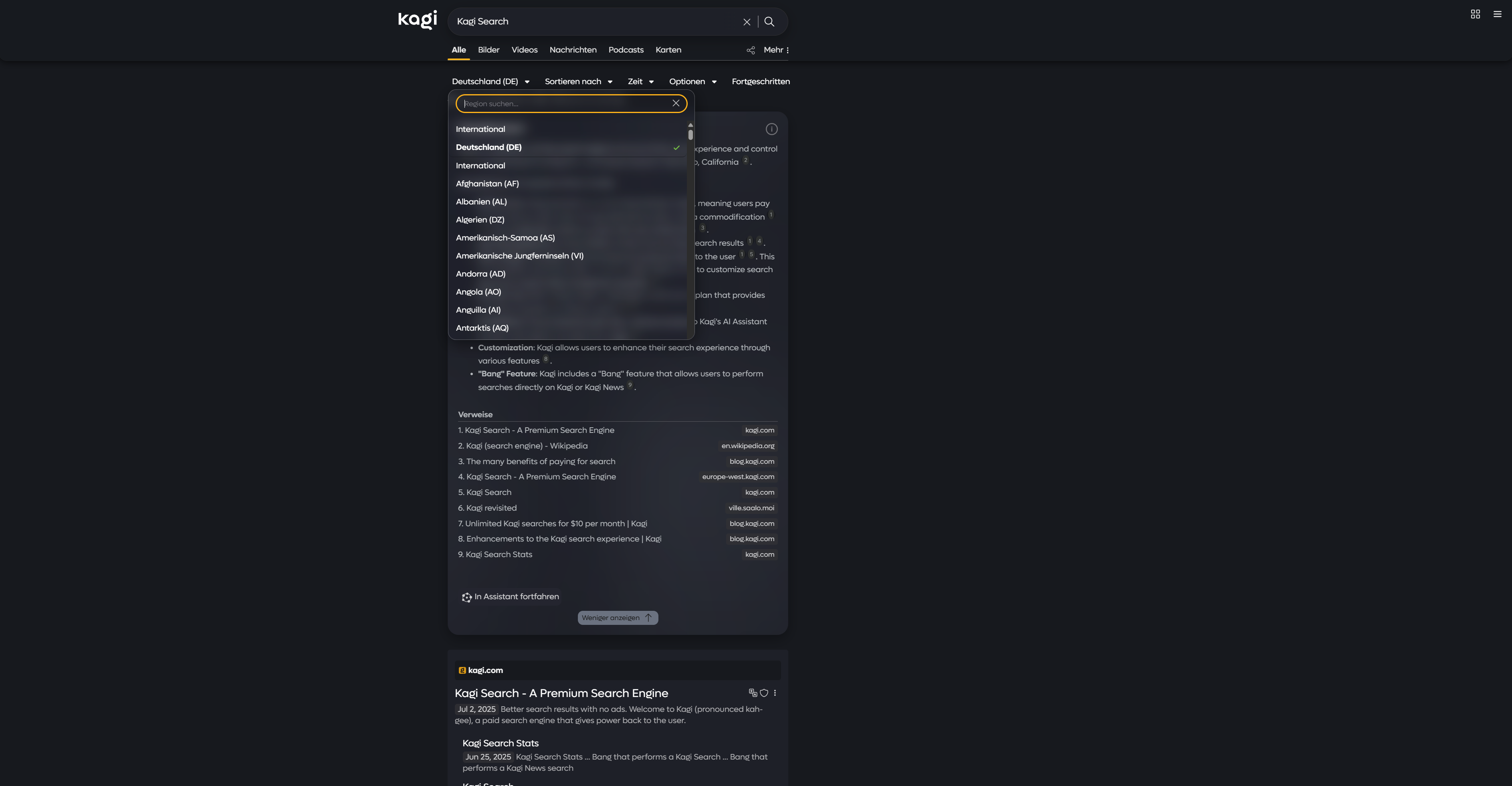
-
Assistant

-
Assistant Prompt Box

-
News Tab

-
Podcasts Tab

Overview
kage-css is a custom stylesheet that gives Kagi a refined glassmorphism look with smooth transitions and a cohesive UI.
Features
- Glassmorphism visuals for navigation, settings, and key UI elements
- Thoughtful documentation and structure for easy customization
- Smooth animations and hover effects
- Enhanced buttons, search bar, and results layout
- Responsive across desktop and mobile
- Easy color customization via variables at the top of the file
- Uniform styling for results, images, videos, news, and podcasts
Installation
- Download custom.css from this repository.
- In Kagi, enable custom CSS: https://kagi.com/settings?p=custom_css
- Paste the entire CSS into the input field.
- Save and refresh Kagi.
Recommended setting: Set URL placement to “Above Title” under Appearance for best visual alignment. (With the latest update, the theme can now be used without the following setting.)

Recommended setting for mobile devices: For best results, set the search bar position to “bottom”.

The theme only works correctly if you set it to dark mode.
If you encounter problems with glass morphing in Firefox, this is not a problem and does not prevent you from using this theme. Simply add this element to the css.
@-moz-document url-prefix() {
  .backdrop-blur-elements {
    backdrop-filter: none !important;
    -webkit-backdrop-filter: none !important;
    background: var(--backdrop-fallback) !important;
  }
}
compressed version:
@-moz-document url-prefix(){.backdrop-blur-elements{backdrop-filter:none!important;-webkit-backdrop-filter:none!important;background:var(--backdrop-fallback)!important}}
Customization
Feel free to customize the theme’s colors as you wish. To do this, you can adjust the variables at the beginning of the CSS file. Here you will also find a short description for each variable:
--bg-primary: #17191e;
--bg-secondary: #1A1B22;
--bg-tertiary: #1e2028;
--bg-container: #24252F;
--bg-elevated: #2A2B36;
--bg-modal: #121213;
--bg-dropdown: #34373f;
--bg-special: #28282a;
--bg-citation: #2d2f2f;
--bg-separator: #222222;
--text-primary: #EAEAEA;
--text-secondary: #A0A0B4;
--text-muted: #b3b7bb;
--text-citation: #8d9191;
--text-dark: #1b1b1b;
--text-very-dark: #232325;
--text-light: #fdfdfd;
--button-bg: #6B7280;
--button-hover: #9CA3AF;
--link-visited: #8B89A3;
--link-hover: #9CA3AF;
--source-highlight-color: #A1A1AA;
--theme-switch-hover: #2a2d38;
--status-good: #a5d46a;
--status-mid: #ffdf80;
--status-danger: #ffa080;
--auto-suggestion: rgba(29, 237, 131, 0.2);
--timestamp-bg: rgba(49, 49, 53, 0.8);
--backdrop-fallback: rgba(30, 32, 40, 0.95);
--dropdown-bg: rgba(30, 32, 40, 0.32);
--border-thread: rgba(255, 255, 255, 0.28);
--shadow-medium: rgba(0, 0, 0, .2);
--shadow-strong: rgba(0, 0, 0, .4);
--shadow-dark: rgba(0, 0, 0, .6);
--shadow-very-dark: rgba(0, 0, 0, .7);
Donation
This theme took a great deal of time to get to the level it is at today. I don’t expect any payment and did everything purely to support the Kagi Network. If you use one of my themes and would like to support me financially, you are welcome to do so via the button below.
I am very grateful for every donation! If you would like your name to be displayed below as a sponsor, feel free to write to me on Discord or Reddit, and I will add you here as a sponsor.
The theme will continue to be updated, even without a single donation! This is just meant to be an option, not an obligation. A donation does not unlock any additional features or a “special version” of the theme.

Animations
- Results fade-in as they load
- Pleasant hover transitions on links and buttons
- Subtle tile and component motion for a lively feel
What’s New
21. October 2025
v3.3 bug fixed and comeback of addons
This update reintroduces the addons. Unfortunately, I can’t provide the complete theme as a single CSS file because of the 40,000 character limit for Custom CSS. Therefore, the least used page is now available as an addon (Podcast-addon.css). Currently, it is not possible to use the addon and the custom.css at the same time. To do so, you have to remove individual elements from the custom.css and replace them with the compressed version from the addon. The compressed version can be found at the end of the podcast-addon.css document. Please forgive me for this inconvenience.
The following elements have been adjusted:
- The clear button for selecting search parameters has been adjusted.
- The timestamps have been color-adjusted (see Discord poll)
Additionally, the following bugs have been fixed:
@Temanor:
- “The active page button is a bit low contrast when you hover over it.”
- “Info icon in quick answers is barely visible.”
@Zeuhx:
- “Some problem with the light when I click on the tab”
- “On Kagi search, image tab, when I want to upload a image”
And as always, thank you all for your support on Discord!!
Roadmap
Near-term
Mid-term
Omnipresent
Tips & Notes
- Not affiliated with Kagi. This is a community theme.
Contributing
Issues and ideas are welcome. If you spot a bug or have suggestions, reach out on Discord in kagi-discussions → “UI Design Ideas for my custom css”.
Discord thread: https://discord.com/channels/1256077108111868035/1265596713083732060
Credits
Created by pdanzma. Inspired by modern search UIs (e.g., Google and Brave) with many original touches.
License
See LICENSE file for terms. Feel free to fork this project and change it to your needs :)


评论