Amazon ASIN Scraper


In this tutorial, we’ll demonstrate how to collect Amazon ASIN (Standard Identification Number) data for free.
If you need this data on a bigger scale, please refer to the 2nd part of the tutorial, where we use Oxylabs API for extracting this data.
Free Amazon ASIN Scraper
A free tool used to get Amazon ASIN numbers for a provided Amazon department page.
Prerequisites
To run this tool, you need to have Python 3.11 installed in your system.
Installation
Open up a terminal window, navigate to this repository and run this command:
make install
Retrieving the URL of an Amazon page to scrape prices from
First off, open up Amazon and select a department from which you want to scrape prices for products.
For this example, we’ll be using the Headphones department.
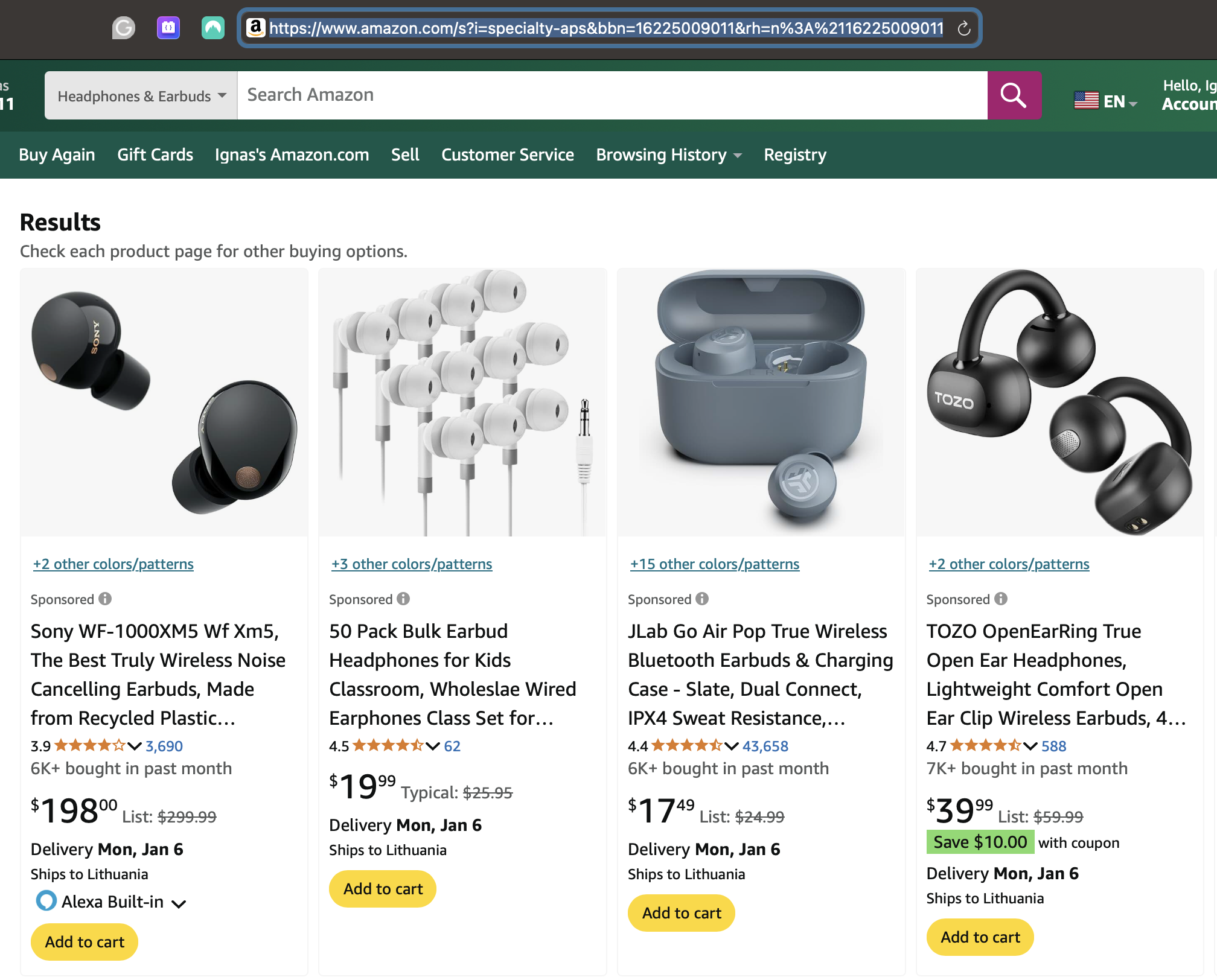
After the page loads, simply copy the URL in the browser and save it. We’ll need it for scraping ASIN codes.
Scraping Amazon product ASIN codes
To get ASIN codes from products listed on the department page you chose, simply run this command in your terminal:
make scrape URL="<amazon_department_page_url>"
With the URL we retrieved earlier, the command would look like this:
make scrape URL="https://www.amazon.com/s?i=specialty-aps&bbn=16225009011&rh=n%3A%2116225009011%2Cn%3A172541&ref=nav_em__nav_desktop_sa_intl_headphones_0_2_6_8"
Make sure to surround the URL with quotation marks, otherwise the tool might have trouble parsing it.
After running the command, your terminal should look something like this:

Retrieved data
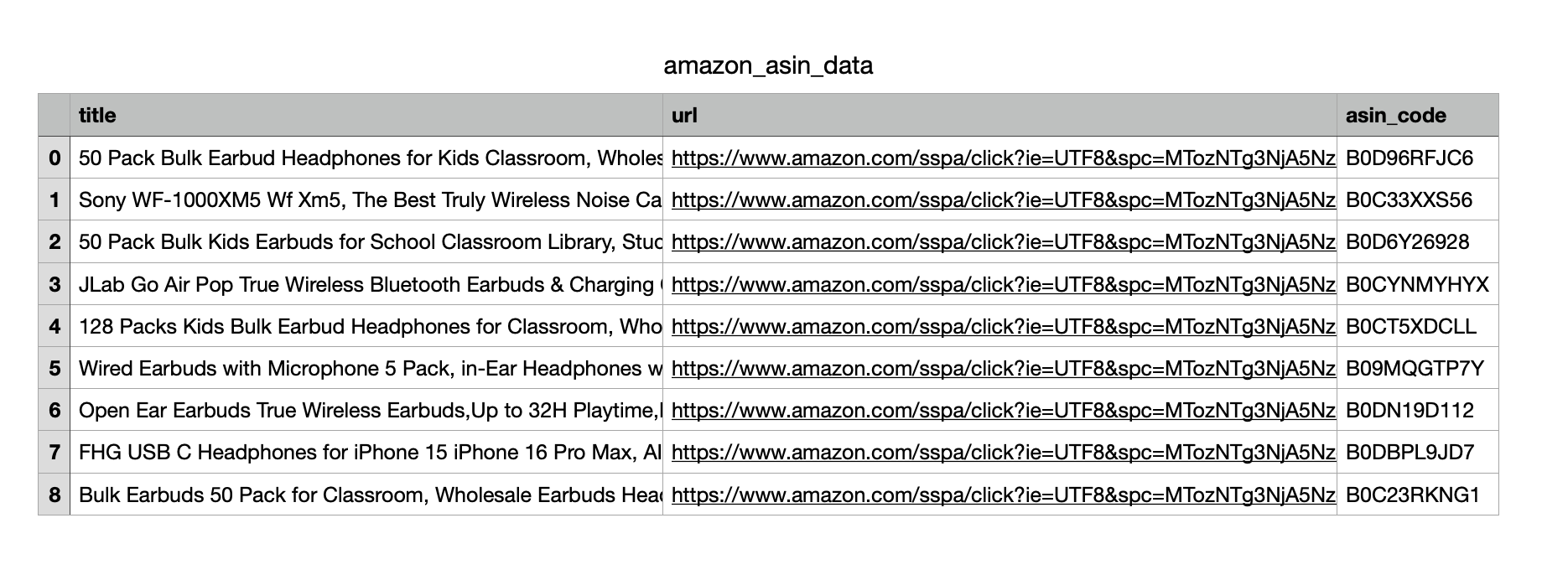
After the tool has finished running, you should see a file named amazon_asin_data.csv in your directory.
The generated CSV file contains data with these columns inside it:
title - The title of the product.url - The URL pointing to the product’s Amazon page.asin_code - The ASIN code of the product.
The data should look something like this:
Notes
In case the code doesn’t work or your project is of bigger scale, please refer to the second part of the tutorial. There, we showcase how to scrape public data with Oxylabs Scraper API.
Scraping with Oxylabs API
Now, we’ll demonstrate how to collect Amazon ASIN data with Oxylabs API. Keep in mind that you’ll need an active subscription for this part, whether that’s a paid one or a free trial.
To get a free, 7-day trial, please go to our self-service dashboard.
How it works
You can retrieve Amazon ASIN numbers by sending a request to our API,
which will return the results in JSON, HTML, or Markdown format.
Python code example
The below code sample shows how you can get parsed Amazon results with
product ASINs in JSON format:
import requests
from pprint import pprint

# Structure payload.
payload = {
   'source': 'amazon_search',
   'query': 'nintendo',
   'user_agent_type': 'desktop',
   'parse': True,
   'domain': 'com',
   'geo_location': '10020',
   'locale': 'en-us',
   'start_page': '1',
   'pages': '1'
}

# Get a response.
response = requests.request(
    'POST',
    'https://realtime.oxylabs.io/v1/queries',
    auth=('USERNAME', 'PASSWORD'), #Your credentials go here
    json=payload,
)

# Instead of response with job status and results url, this will return the
# JSON response with results.
pprint(response.json())
Visit our
documentation
for more details and code examples on using Oxylabs’ Amazon Scraper API.
Output Example
Here’s a partial output sample that includes paid and organic Amazon search results:
{
  "results": [
    {
      "content": {
        "url": "https://www.amazon.com/s?k=nintendo&page=1",
        "page": 1,
        "pages": 1,
        "query": "nintendo",
        "results": {
          "paid": [
            {
              "pos": 1,
              "url": "/sspa/click?ie=UTF8&spc=MTo0OTQyODU2MjAxNjE4NzQwOjE2OTA1MzMwNDM6c3BfYXRmOjIwMDE0MzU3MzAzMTQ5ODo6MDo6&url=/Sonic-Origins-Plus-Nintendo-Switch/dp/B0BZFGSY5W/ref=sr_1_1_sspa?keywords=nintendo&qid=1690533043&sr=8-1-spons&sp_csd=d2lkZ2V0TmFtZT1zcF9hdGY&psc=1",
              "asin": "B0BZFGSY5W",
              "price": 29.99,
              "title": "Sonic Origins Plus - Nintendo Switch",
              "rating": 4,
              "currency": "USD",
              "is_prime": false,
              "url_image": "https://m.media-amazon.com/images/I/81NUog-gECL._AC_UY218_.jpg",
              "variations": [
                {
                  "price": 29.99,
                  "title": "Nintendo Switch",
                  "not_available": false,
                  "price_strikethrough": 39.99
                }
              ],
              "best_seller": false,
              "price_upper": 29.99,
              "is_sponsored": true,
              "manufacturer": "SEGA",
              "sales_volume": "2K+ bought in past month",
              "pricing_count": 1,
              "reviews_count": 0,
              "is_amazons_choice": false,
              "price_strikethrough": 39.99,
              "shipping_information": "FREE delivery Wed, Aug 2 Or fastest delivery Mon, Jul 31"
            }
          ],
          "organic": [
            {
              "pos": 4,
              "url": "/Nintendo-eShop-Gift-Card-Digital/dp/B01LYOCVZF/ref=sr_1_4?keywords=nintendo&qid=1690533043&sr=8-4",
              "asin": "B01LYOCVZF",
              "price": 20,
              "title": "$20 Nintendo eShop Gift Card [Digital Code]",
              "rating": 4.7,
              "currency": "USD",
              "is_prime": false,
              "url_image": "https://m.media-amazon.com/images/I/71cj5cNm7ZL._AC_UY218_.jpg",
              "variations": [
                {
                  "asin": "B01LYOCVZF",
                  "price": 20,
                  "title": "Nintendo Switch",
                  "not_available": false
                }
              ],
              "best_seller": false,
              "price_upper": 20,
              "is_sponsored": false,
              "manufacturer": "Nintendo",
              "pricing_count": 1,
              "reviews_count": 0,
              "is_amazons_choice": false
            }
          ],
          "suggested": [],
          "amazons_choices": [...],
          "instant_recommendations": []
        },
        "parse_status_code": 12000,
        "total_results_count": 60000
      },
      "created_at": "2023-07-28 08:30:35",
      "updated_at": "2023-07-28 08:30:44",
      "page": 1,
      "url": "https://www.amazon.com/s?k=nintendo&page=1",
      "job_id": "7090609474792097793",
      "status_code": 200,
      "parser_type": ""
    }
  ]
}
If you have any questions, feel free to contact our 24/7 support team
via live chat or email.
Looking to scrape more other Amazon data? Amazon Review Scraper, Handle Amazon CAPTCHA, How to Scrape Amazon Prices, Scraping Amazon Product Data


评论