MIT License

项目介绍

nuxt-ui-templates/chat 是一个托管在 GitHub 上的开源项目,主要使用 Vue 编写,采用 MIT License 许可证,目前获得 379 个 Star、111 次 Fork。

仓库全名
nuxt-ui-templates/chat
开源许可证
MIT License
Star 数
379
Fork 数
111
未关闭 Issue
9

README 摘要

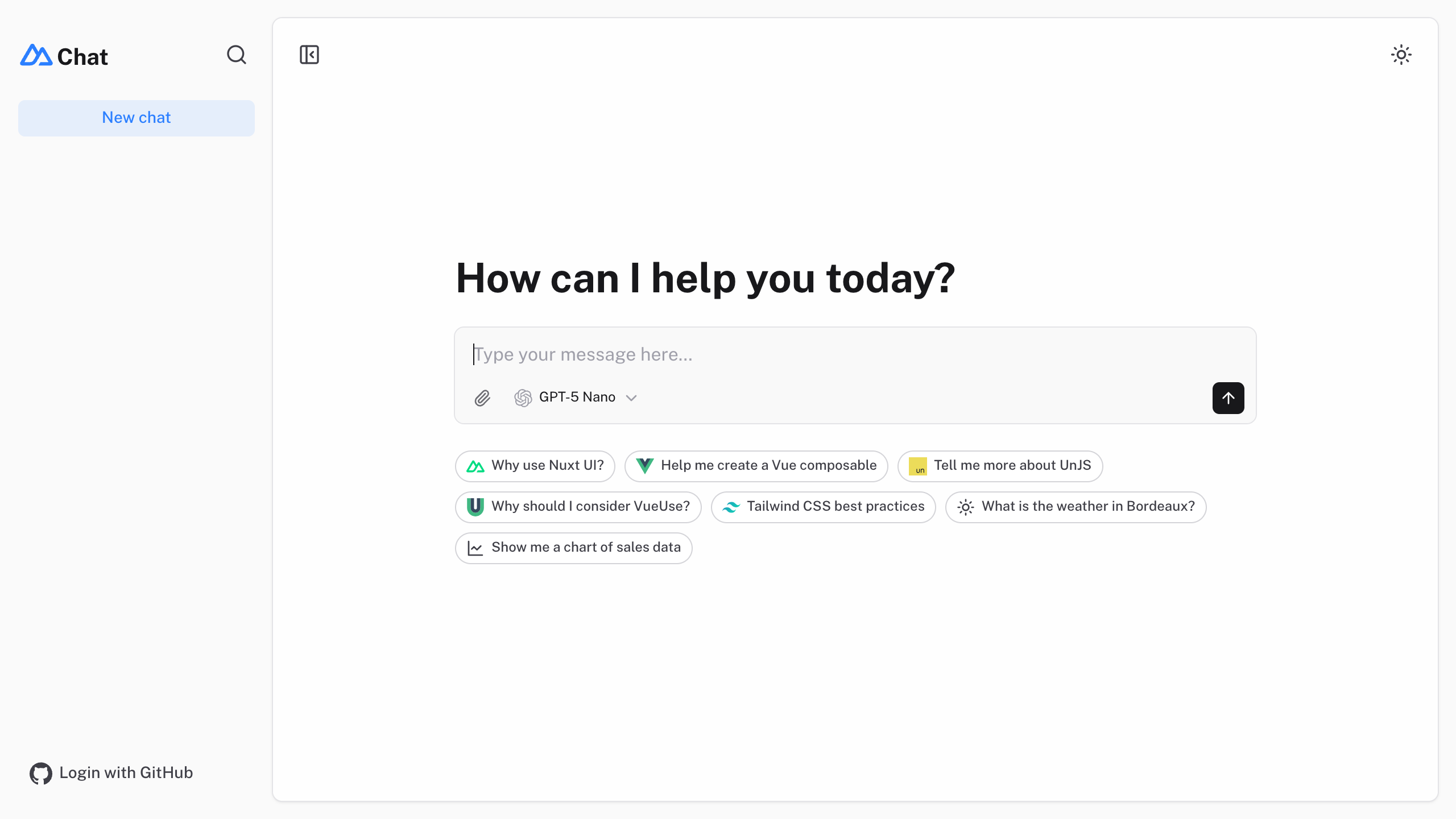
Nuxt AI Chatbot Template Full-featured AI Chatbot Nuxt application with authentication, chat history, collapsible sidebar, keyboard shortcuts, light & dark mode, command palette and more. Built using Nuxt UI components and integrated with AI SDK for a complete chat experience. Live demo Documentation The chat template for Vue is on https://github.com/nuxt-ui-templates/chat-vue. Features ⚡️ Streaming AI messages…

完整内容见 GitHub 原始 README 或本页 。

常见问题

chat 用什么语言开发?

主要使用 Vue 编写,采用 MIT License 许可证,目前有 379 个 Star。

chat 可以免费商用吗?

仓库采用 MIT License 许可证,可免费使用与修改,商业使用请遵守许可证条款(例如保留版权声明与许可声明)。

如何获取 chat 的源码?

可以直接克隆仓库:git clone https://github.com/nuxt-ui-templates/chat.git,默认分支为 main;安装与运行步骤见仓库 README。

chat 最近还在维护吗?

仓库最近一次更新为 1 周前,当前有 9 个未关闭 Issue;Star 数为 379,可作为社区活跃度的参考。

关于

Nuxt AI Chatbot Template made with Nuxt UI and Vercel AI SDK.

描述取自 GitHub 官方 API,中文内容由 GitRead 中文社区 编辑团队整理。

简要分析

热度分
605
价值分
260
活跃状态
活跃

语言占比

CSS
JavaScript
TypeScript
Vue

README

Nuxt AI Chatbot Template

Nuxt UI

Full-featured AI Chatbot Nuxt application with authentication, chat history, collapsible sidebar, keyboard shortcuts, light & dark mode, command palette and more. Built using Nuxt UI components and integrated with AI SDK for a complete chat experience.

Nuxt AI Chatbot Template

The chat template for Vue is on https://github.com/nuxt-ui-templates/chat-vue.

Features

  • ⚡️ Streaming AI messages powered by the AI SDK with thinking/reasoning support
  • 🤖 Multiple model support — Claude Haiku 5.5, Gemini 3 Flash and GPT-5.6 Luna via Vercel AI Gateway
  • 🔍 Web search with built-in provider tools (Anthropic, Google, OpenAI), toggleable from the prompt menu along with extended thinking
  • 🎤 Dictation in the prompt with live streaming transcription over WebSocket through AI Gateway
  • 📊 Charts and weather tool calling with rich UI rendering
  • 🔐 Authentication via GitHub OAuth using nuxt-auth-utils
  • 💾 Chat history persistence using SQLite database (Turso in production) and Drizzle ORM
  • 📎 File uploads with drag & drop using NuxtHub Blob (requires authentication)
  • ✨ Markdown rendering with streaming code highlighting via Comark

Quick Start

npm create nuxt@latest -- -t ui/chat

Deploy your own

Deploy with Vercel

Setup

Make sure to install the dependencies:

pnpm install

Run database migrations:

pnpm db:migrate
Note 注意

In production, configure your database connection. On Vercel, add the Turso integration to automatically provision TURSO_DATABASE_URL and TURSO_AUTH_TOKEN.

AI Integration

This template uses the Vercel AI SDK for streaming AI responses with support for multiple providers through Vercel AI Gateway. When deployed on Vercel, the AI Gateway is configured automatically.

For local development, set your API key in .env:

AI_GATEWAY_API_KEY=<your-vercel-ai-gateway-api-key>
Tip 提示

With Vercel AI Gateway, you don’t need individual API keys for OpenAI, Anthropic, etc. It provides a unified API to access hundreds of models through a single endpoint with automatic load balancing, fallbacks, and spend monitoring.

Authentication (Optional)

This template uses nuxt-auth-utils for authentication with GitHub OAuth.

To enable authentication, create a GitHub OAuth application and set:

NUXT_OAUTH_GITHUB_CLIENT_ID=<your-github-oauth-app-client-id>
NUXT_OAUTH_GITHUB_CLIENT_SECRET=<your-github-oauth-app-client-secret>
NUXT_APP_SECRET=<output-of-openssl-rand-base64-32>

Blob Storage (Optional)

This template uses NuxtHub Blob for file uploads, which supports multiple storage drivers:

  • Local filesystem (default for development, stored in .data/blob)
  • Vercel Blob (auto-configured when deployed to Vercel)
  • Cloudflare R2 (when deployed to Cloudflare)
  • Amazon S3 (with manual configuration)

For Vercel Blob, assign a Blob Store to your project from the Vercel dashboard (Project → Storage), then set the token for local development:

BLOB_READ_WRITE_TOKEN=<your-vercel-blob-token>
Note 注意

File uploads require authentication. See the NuxtHub Blob documentation for configuring other storage drivers.

Development Server

Start the development server on http://localhost:3000:

pnpm dev

Production

Build the application for production:

pnpm build

Locally preview production build:

pnpm preview

Check out the deployment documentation for more information.

Renovate integration

Install Renovate GitHub app on your repository and you are good to go.

评论

暂无评论