
Track & reduce CO₂ emissions from your local computing
Estimate and track carbon emissions from your computer, quantify and analyze their impact.





- A lightweight, easy to use Python library – Simple API to track emissions
- Open source, free & community driven – Built by and for the community
- Effective visual outputs – Put emissions in context with real-world equivalents
Tracking GenAI API calls? CodeCarbon measures emissions from local computing (your hardware). To track emissions from remote GenAI API calls (OpenAI, Anthropic, Mistral, etc.), use EcoLogits. Both tools are complementary.
Join the community! Have questions, want to share your work, or contribute? Join us on Discord – we’re here to help and excited to hear from you!
Installation
pip install codecarbon
If you use Conda:
conda activate your_env
pip install codecarbon
More installation options: installation docs.
Something not working, or numbers that look wrong? See the
troubleshooting guide.
Quickstart (Python)
from codecarbon import EmissionsTracker

tracker = EmissionsTracker()
tracker.start()

# Your code here

emissions = tracker.stop()
print(f"Emissions: {emissions} kg CO₂")
Learn more →
Quickstart (CLI)
Track a command without changing your code:
codecarbon monitor --no-api -- python train.py
Detect your hardware:
codecarbon detect
Full CLI guide: CLI tutorial.
Configuration
You can configure CodeCarbon using:
~/.codecarbon.config (global)./.codecarbon.config (project-local)CODECARBON_* environment variables- Python arguments (
EmissionsTracker(...))
Configuration precedence and examples: configuration guide.
How it works
We created a Python package that estimates your hardware electricity power consumption (GPU + CPU + RAM) and we apply to it the carbon intensity of the region where the computing is done.
CodeCarbon focuses on the main compute components it can measure or estimate directly: CPU, GPU, and RAM. It does not separately model disk I/O, network transfers, displays, cooling, or other peripherals because those sources are usually much smaller for local code-level experiments and are not exposed through the same low-overhead measurement interfaces.
On Linux, CodeCarbon reads Intel RAPL hardware energy counters when it can. If those counters are not readable it falls back to estimating from CPU load, which is less accurate — see getting accurate CPU measurements to enable them.

We explain more about this calculation in the Methodology section of the documentation, and we document how close those numbers are — and where they are not close — in Accuracy and validation.
Visualize
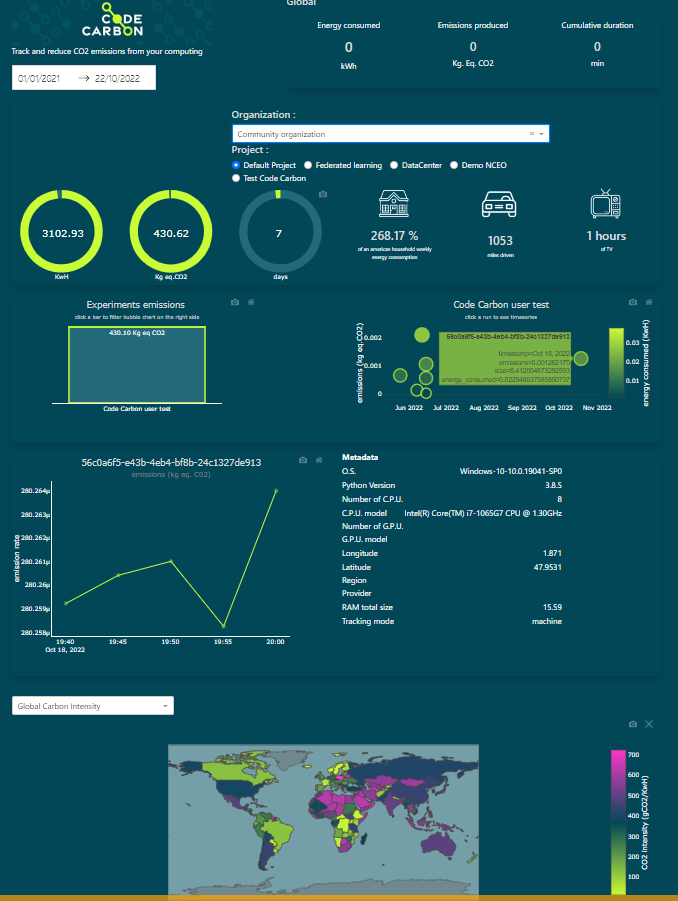
You can visualize your experiment emissions on the dashboard or locally with carbonboard.
Quick links
Links
Contributing
We are hoping that the open-source community will help us edit the code and make it better!
You are welcome to open issues, even suggest solutions and better still contribute the fix/improvement! We can guide you if you’re not sure where to start but want to help us out.
Check out our contribution guidelines.
Feel free to chat with us on Discord.
Citation
If you find CodeCarbon useful for your research, use the Cite this repository button in the GitHub sidebar, or copy the BibTeX below. The DOI is a Zenodo concept DOI: it always resolves to the latest release. All versions and formats are on Zenodo.
@software{codecarbon,
  author       = {Benoit Courty and
                  Amine Saboni and
                  Iñigo Imaz Chacón and
                  Sasha Luccioni and
                  Victor Schmidt and
                  Boris Feld and
                  David Berenstein and
                  Jérémy Lecourt and
                  Mathilde Léval and
                  Luis Blanche and
                  Marion Coutarel and
                  Alexis Bogroff and
                  Patrick Lloret and
                  {The CodeCarbon contributors}},
  title        = {CodeCarbon: Estimate and track carbon emissions from computing},
  publisher    = {Zenodo},
  version      = {3.3.2},
  doi          = {10.5281/zenodo.4658424},
  url          = {https://doi.org/10.5281/zenodo.4658424}
}
Feel free to chat with us on Discord.
Codecarbon was formerly developed by volunteers from Mila and the DataForGoodFR community alongside donated professional time of engineers at Comet.ml and BCG GAMMA.
Now CodeCarbon is supported by Code Carbon, a French non-profit organization whose mission is to accelerate the development and adoption of CodeCarbon.





评论