
Windows 11 Guide


Note: You can easily convert this markdown file to a PDF in VSCode using this handy extension Markdown PDF.

Table of Contents
-
Getting Started
-
Getting Software
-
Gaming
-
Windows Subsystem for Android (WSA)
-
Windows Subsystem for Linux (WSL)
-
Windows Terminal
-
Visual Studio and VSCode
-
Game Development
-
Setting up a macOS Workspace
-
Android Development
-
Professional Audio/Video Editing
-
3D Graphics and Design
-
Kubernetes
-
Machine Learning
-
Robotics
-
Open Source Security
-
Differential Privacy
-
DevOps
-
.NET Development
-
C# Development
-
F# Development
-
PowerShell Development
-
TypeScript Development
-
React Native Development
-
ElectronJS Development
-
C/C++ Development
-
Java Development
-
Python Development
-
Ruby Development
-
Flutter Development
-
Node.js Development
-
Networking
-
Databases
Getting Started
Getting started with your new Windows 11 PC
Windows 11 Installation Assistant
Update to Windows Subsystem for Android™ on Windows 11
Getting Started with the DirectX 12 Agility SDK
Microsoft Windows Server is the operating system that connects on-premises environments with Azure, adding additional layers of security while helping you modernize your applications and infrastructure.
Windows as a Service (WaaS) is a new development concept, introduced with the release of Windows 11. It simplifies the jobs of IT professionals and maintains a consistent Windows 11 experience for all Windows customers. These improvements primarily focus on maximizing customer involvement in Windows development, simplifying the deployment and servicing of Windows client computers, and leveling out the resources needed to deploy and maintain Windows over time.
Windows Virtual Desktop is a service that enables a secure, remote desktop experience from anywhere.
Windows 365 Cloud PC is a service that provides a secure way to stream your Windows experience including your personalized apps, content, and settings from the Microsoft cloud(Azure) to any device with your Windows 365 Cloud PC. Available August 2nd, 2021.
Microsoft Dynamics 365 is the essential business solution for busy professionals who need to engage with customers while staying productive at work and on the go. Arrive prepared for every appointment and update notes, tasks, and attachments. Along with relevant service and sales records.
Microsoft Edge is a cross-platform web browser developed by Microsoft. It is supported on Windows 11, Windows 10, Xbox, Android, iOS, macOS, and as a preview for Linux.
Microsoft Azure is a public cloud computing platform that comes with solutions developed by Microsoft including Infrastructure as a Service (IaaS), Platform as a Service (PaaS), Windows as a Service (WaaS), and Software as a Service (SaaS) that can be used for services such as analytics, virtual computing, storage, networking, and security.
VMware Horizon Cloud on Microsoft Azure is a desktop virtualization service available in Azure Marketplace. Simplify your delivery of on-premises and cloud virtual desktops and applications by connecting your instance of Azure to VMware.
Citrix Virtual Apps and Desktops for Azure is a desktop and app virtualization service available through Azure Marketplace or agreements with Citrix. Use familiar tools to manage on-premises Citrix deployments alongside Windows Virtual Desktop on Azure, supporting cloud modernization while maximizing your existing investment.
DirectStorage API is an API in the DirectX family originally designed for the Velocity Architecture to Windows. The DirectX API is architected in a way that takes all this into account and maximizes performance throughout the entire pipeline from NVMe drive all the way to the GPU. It does this in several ways: by reducing per-request NVMe overhead, enabling batched many-at-a-time parallel IO requests which can be efficiently fed to the GPU, and giving games better control over when they get notified of IO request completion instead of having to react to every tiny IO completion. The DirectStorage API will be available on Windows 11 PCs with NVMe SSDs, but will also be support in Windows 10 version 1909 and newer.
WinDirStat(Windows Directory Statistics) is a disk usage statistics viewer and cleanup tool for various versions of Microsoft Windows.
eBPF for Windows is an eBPF implementation that runs on top of Windows. eBPF is a well-known technology for providing programmability and agility, especially for extending an OS kernel, for use cases such as DoS protection and observability.
Sysinternals Suite is the entire set of Sysinternals Utilities rolled up into a single download. Also, checkout the Sysinternals Utilities Index.
Secure boot is a security standard developed by members of the PC industry to help make sure that a device boots(Unified Extensible Firmware Interface (UEFI) BIOS) using only software(such as bootloaders, OS, UEFI drivers, and utilities) that is trusted by the Original Equipment Manufacturer (OEM).
Microsoft Defender Security Center is a user portal where you can access Microsoft Defender for Endpoint capabilities. It gives enterprise security operations teams a single pane of glass experience to help secure networks.
BitLocker Drive Encryption is a data protection feature that integrates with the operating system and addresses the threats of data theft or exposure from lost, stolen, or inappropriately decommissioned computers. BitLocker provides the most protection when used with a Trusted Platform Module (TPM) version 1.2 or later.
Windows 11 Desktop
Back to the Top

Windows 11 Desktop with new Start menu. Source: Microsoft

By Default the Start menu and icons are centered. Source: Microsoft

In system settings to change the position of the Start menu back to the Left-side layout. Source: Microsoft

Windows 11 desktop with the traditional Left-side layout. Source: Microsoft

Easily snap the layout of your Desktop Apps on Windows 11. Source: Microsoft
Windows on ARM
ARM64EC (“Emulation Compatible”) is an application binary interface (ABI) for Windows 11 on ARM that runs with native speed and is interoperable with x64 architecture. An app, process, or even a module can freely mix and match with ARM64EC and x64 as needed. The ARM64EC code in the app will run natively while any x64 code will run using Windows 11 on ARM’s built-in emulation. The ARM64EC ABI differs slightly from the current ARM64 ABI in ways that make it binary compatible with x64 code. Specifically, the ARM64EC ABI follows x64 software conventions including calling convention, stack usage, and data alignment, making ARM64EC and x64 interoperable. Apps built as ARM64EC may contain x64 code but do not have to, since ARM64EC is its own complete, first-class ABI for Windows.
NOTE: Qualcomm’s Snapdragon X Elite chip will be available in mobile devices starting Mid-2024.
Snapdragon X Elite is its all-new custom CPU architecture, codenamed Oryon. The X Elite includes a total of 12 Oryon cores, rather than a mix of large and small cores like Qualcomm has used in past designs. When all cores are active, they can run at peak speeds of up to 3.8 GHz, though when just one or two cores are boosting they can go up to 4.3 GHz.
-
Qualcomm says that the X Elite’s Adreno GPU has upgradeable drivers, which means new capabilities can be added over time. it will support a 4K 120 Hz laptop display, plus a total of three 4K external displays (or two 5K external displays). The GPU supports the DirectX 12 graphics API—no Vulkan support, at least not yet—and Qualcomm says it will feature upgradeable drivers. Qualcomm compared the X Elite’s GPU performance to both Intel’s Iris Xe and AMD’s Radeon 780M. The Adreno GPU is reportedly up to 2x as fast as the Iris Xe and up to 80% faster than the Radeon 780M, while using about one-fifth as much power.
-
The chip also includes respectable media encoding and decoding capabilities, with support for hardware-accelerated H.264, H.265/HEVC, and AV1 video encoding and decoding, plus hardware-accelerated decoding support for the VP9 codec.
-
The X Elite can use up to 64GB of LPDDR5x RAM with up to 136 GB/s of memory bandwidth to the chip. The image signal processor (ISP) supports up to 64 MP cameras and 4K HDR video capture. The chip supports PCIe 4.0 NVMe SSDs and the UFS 4.0 and SD 3.0 storage standards, as well as up to three USB 4 ports (plus two more 10 Gbps USB 3.2 gen 2 ports).
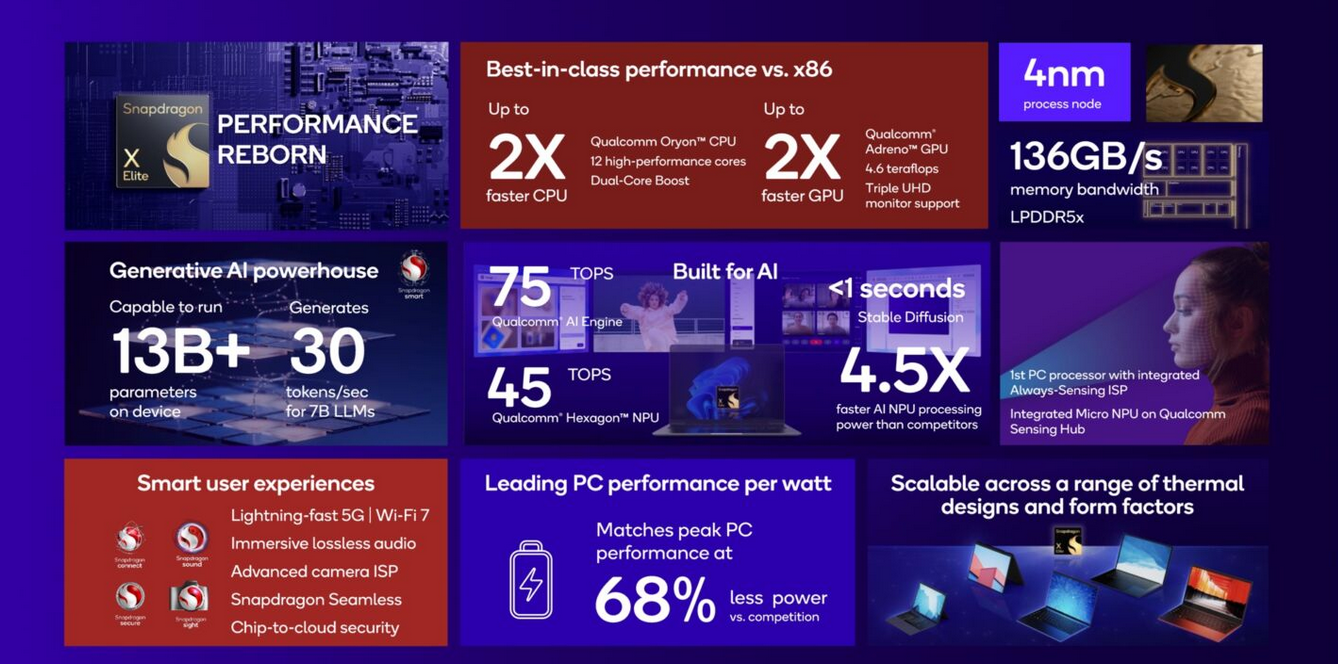 Image credit: Qualcomm
 Image credit: Qualcomm
 Image credit: Qualcomm
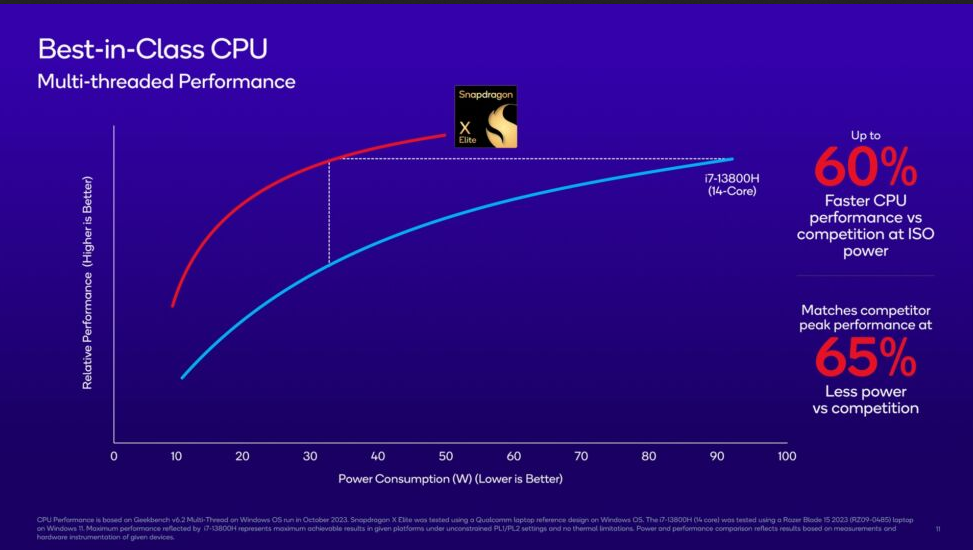 Image credit: Qualcomm
 Image credit: Qualcomm
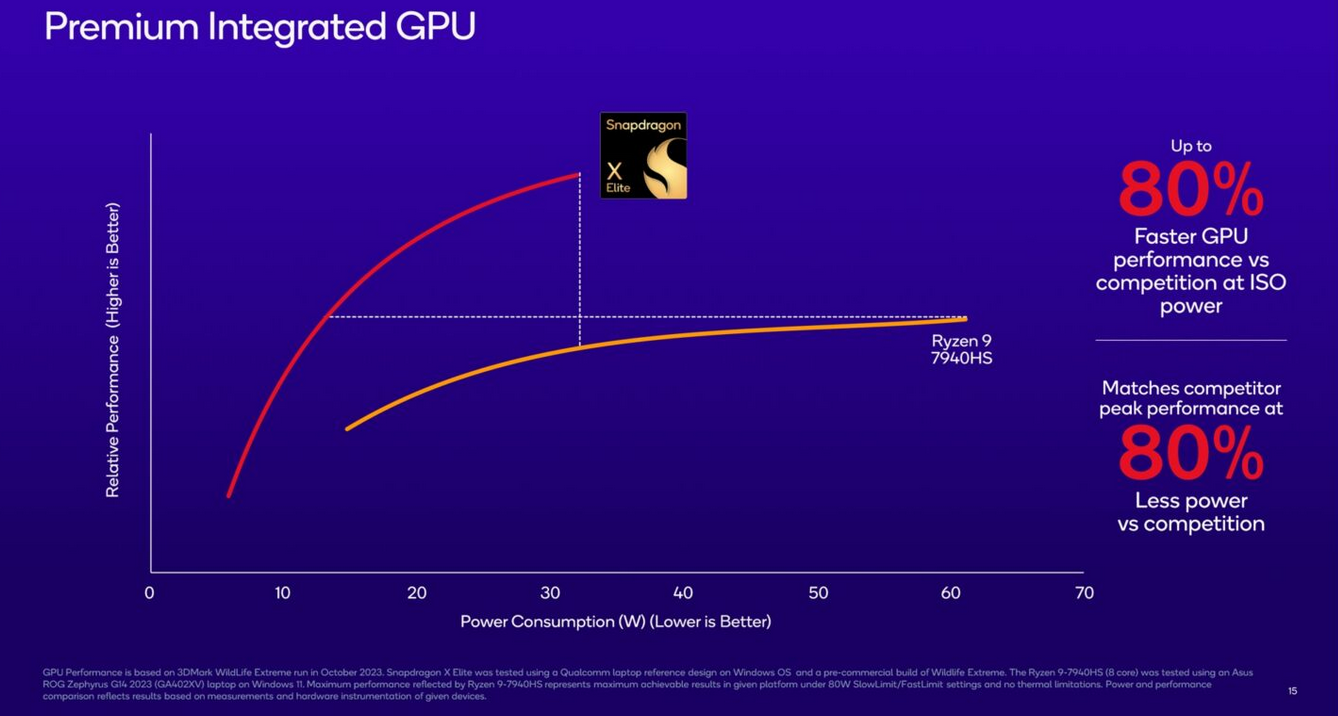 Image credit: Qualcomm
Snapdragon X Elite Benchmarks
| Geekbench 6 |
(multi-core) scores |
| Snapdragon X Elite (Config A) |
15,130 |
| Snapdragon X Elite (Config B) |
14,000 |
| Apple M2 |
8,911 |
| Apple M2 Pro |
14,965 |
| Apple M2 Max |
14,939 |
| Intel Core i7-13000H |
12,171 |
| 3DMark |
Wild Life Extreme Unlimited |
| Snapdragon X Elite |
44.5 fps (Config A) |
| MacBook Pro 14-inch M2 Pro |
73 fps |
| MacBook Pro 14-inch M2 Max |
80 fps |
| MacBook Pro 13-inch M2 |
40.5 fps |
Bypass Windows 11 Requirements
Back to the Top
Note 1: Before performing any upgrade to your system make sure to do a full backup of your system in case anything happens during the upgrade process!
Note 2: Some anti-cheat software for video games(like Valorant) will require TPM, Secure Boot on Windows 11.
Ways to install Windows 11 on Unsupported hardware | Microsoft Support
Fido is a PowerShell script that is primarily designed to be used in Rufus, but that can also be used in standalone fashion, and whose purpose is to automate access to the official Microsoft Windows retail ISO download links as well as provide convenient access to bootable UEFI Shell images.

Fido
OR
Rufus is a utility that helps format and create bootable USB flash drives.

Rufus
In Rufus 3.19:
Add a new selection dialog for Windows 11 setup customization:
- Secure Boot and TPM bypass have now been moved to this dialog.
- Allows to bypass the mandatory requirement for a Microsoft account on Windows 11 22H2.
(Note: Network must be temporarily disabled for the local account creation to be proposed).
- Added an option to skip all collection questions (Sets all answers to “Don’t allow”).
- Added an option for setting internal drives offline for Windows To Go.

Rufus 3.19 Windows 11 setup customization.
Creating a Local Account on Windows 11 Home and Pro
Back to the Top
In Windows 11 Home and Pro editions Microsoft will require you to sign-in with Microsoft Account. Though, by following these simple steps below you can create a Local Account on the your Windows 11 device.

Microsoft Account Sign-in on Windows 11
Before we begin this process make sure to not connect your Wi-Fi or unplug your Ethernet cable if you use one.

Steps 1-5:
- Press keys Shift + F10 this will open the Windows Command prompt as System.

- Then type taskmgr and Press Enter.

- This opens up the Task Manager. Click the more details option in the bottom left corner.

- Now scroll down til you see Network Connection Flow. Right click on the process and select End task.

- You will now see on the Windows screen that you can sign-up for a Local account.

Removing the Windows 11 Watermark
Back to the Top
The simplest way to do this is with Winarows Universal Water Mark Disabler which can be found at https://winaero.com/download-universal-watermark-disabler/
There’s also a manual a way to remove the Windows 11 watermark. It’s important to know that removing the watermark does include editing some system registry files. So, do this at your own risk, and be careful.
-
- Access the Registry Editor by typing ‘Regedit’ in the Windows 11 search box and hitting OK to open it.
-
- On the left side, open up HKEY_CURRENT_USER and scroll down to the Control Panel.
-
- Find the entry called UnsupportedHardwareNotificationCache.
-
- Right-click that entry and select ‘Modify’ from the menu.
-
- Change the SV2 DWORD value from 1 to 0.
-
- Save, exit, and then restart your PC.

Optimizing Windows 11
Back to the Top


BloatyNosy is a tool that streamlines and houses all the essential settings under one app and allows you to disable and remove unnecessary features with just a simple click.

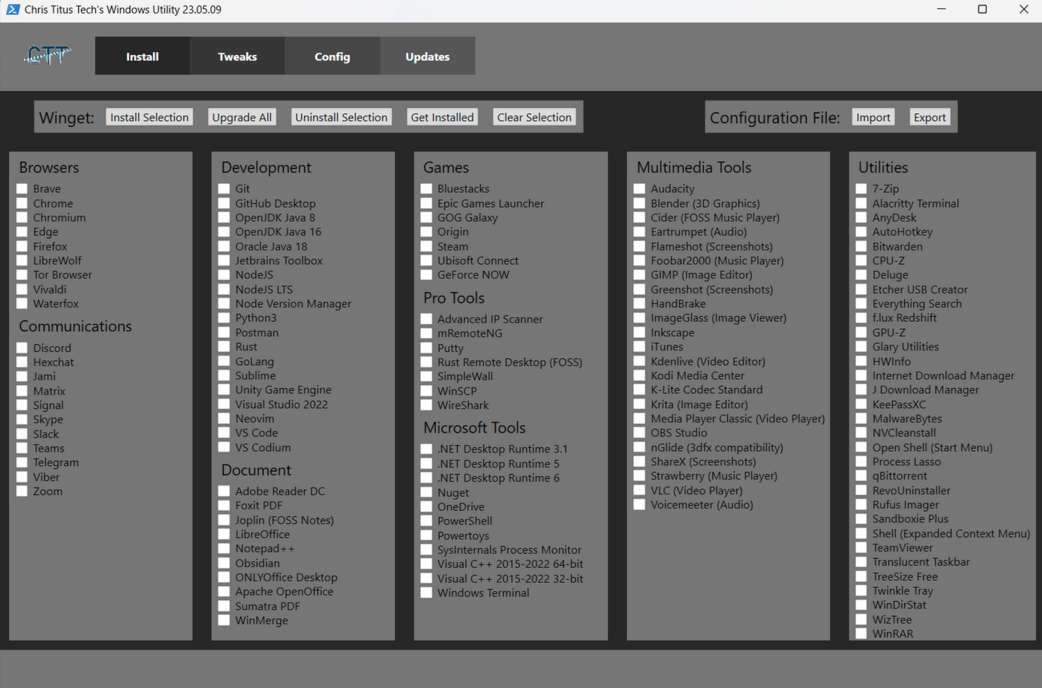
Chris Titus Tech Windows Utility is a tool that helps you install Programs, Tweaks, Fixes, and Updates. It makes Windows 11 setup easy and optimizes your machine. The Ultimate Windows Utility | Chris Titus Tech YouTube.
The recommended way is to right click on the start menu and select (Windows Terminal As Admin Windows 11)
Launch Command:
iwr -useb https://christitus.com/win | iex
Or
irm christitus.com/win | iex
Process Lasso is a tool for real-Time CPU Optimization and Automation.

Disable/Turnoff unwanted Apps on your Windows system
With Windows 11 a lot system resources such as CPU and Ram are taken up when your system starts up. There are serval ways turnoff/disable apps from auto-starting when you log-in to Windows 11
First way to stop auto-start apps is through Startup folder in the Windows settings.


Second way to stop auto-start apps is through Task Manager. Open task manager in the start menu.

Turnoff VBS
Virtualization Based Security (VBS) can slow apps (and games) down by 5 to 15% in Windows 11 especially if you’re on an AMD system.
-
- Open System Information. Do this by searching for “system information” in Windows search and clicking the top result.
-
- Scroll down to find the “Virtualization-based security” row. If it says “running,” VBS is enabled. But if it says “not enabled,” then you’re done.
Below are different are Two Ways you can disable VBS in Windows 11:
Disable VBS/HVCI in Windows 11
-
- Search for Core Isolation in Windows search and click the top result.
-
- Toggle Memory Integrity to off, if it was on.
-
- Reboot your PC as prompted.
-
- Check System Information again to see if virtualization-based security is listed as “not enabled.”
Disable VBS By Uninstalling Virtual Machine
If VBS is running, you can get rid of it by uninstalling the “Virtual Machine” feature in Windows. Note: that if this is the feature that’s enabling VBS for you, losing it may cost you the ability to run Windows Subsystem for Linux 2 (WSL2).
-
- Open Turn Windows Features on or Off by searching for it.
-
- Uncheck Virtual machine and click Ok.
-
- Reboot your PC.
-
- Check System Information again to make sure virtualization based security is listed as “not enabled.”
Ways to Customize Windows 11 Look and Feel
Back to the Top
Chris Titus Tech Windows Utility is the Ultimate Windows 10 & 11 script designed to be a swiss army knife of Windows tools to help setup and optimize machines. The Ultimate Windows Utility | Chris Titus Tech YouTube.
Paste this command into Powershell (admin):
iwr -useb https://christitus.com/win | iex
WingetUI is a GUI Store for the most common cli package managers, such as Winget and Scoop. It’s developed by Martí Climent AKA martinet101.

ViVe is a C# library you can use to make your own programs that interact with Windows 10/11’s A/B feature mechanism.

O&O ShutUp10++ is a free tool that let’s you have full control over which comfort functions under Windows 10 and Windows 11 you wish to use, and you decide when the passing on of your data goes too far.

NTLite ($40) is a local Windows configuration tool for updating and editing Windows images and deployments made for IT professionals and enthusiasts.
Features:
- Download Latest Windows Updates.
- Integrate/Install Updates and Languages.
- Integrate Drivers, Applications and REG files.
- Unattended Windows Setup, including Disk Partitioning.
- Hardware Driver Targeting.
- Windows Settings Configuration.
- Component Removal.
- Image, live (e.g. C:\Windows) and offline (e.g. D:\Windows, mounted VHD etc) editing *no capturing.
- Pending Changes Overview.

WinPaletter is a tool to colorize Windows 10/11 Accents without restrictions. It was created/developed by Abdelrhman-AK.

SecureUxTheme is a secure boot compatible in-memory UxTheme patcher.

Files is a file manager for Windows with a powerful yet intuitive design. It has features like multiple tabs, panes, columns, shell extensions in the context menu and tags.
EverythingToolbar is a tool that provides instant file search integration for the Windows taskbar powered by Everything. It’s compatible with both Windows 10 and Windows 11 and works well with tools like ExplorerPatcher and StartAllBack to give you the full deskband integration even on Windows 11.
Wintoys is a tool that improves your Windows experience in your way and keep it fresh every day. Set up, debloat, optimize, repair, and tweak your operating system in a simple, time-saving, yet safe approach. Maintain it in a clean, healthy and productive state while having everything you need in one place.
Sysinternals Suite is the entire set of Sysinternals Utilities rolled up into a single download. Also, checkout the Sysinternals Utilities Index.
ExplorerPatcher is a tool that restores the taskbar, start menu, context menus, explorer, style and order back to the Windows 7 & 10 style.
Directory Opus is a complete replacement for Explorer, with far more power and functionality than any other file manager available today. Image marking lets you sort your photos quickly and easily.
ClickPaste is a Windows 10/11 notification area appthat can paste clipboard contents as keystrokes to whatever location you click.
StartAllBack ($4.99) is another tool that restores the taskbar, start menu, context menus, explorer, style and order back to the Windows 7 & 10 style.
Start11 (£5.99) is a tool designed to bring menus back from Windows 7/10 to Windows 11.
ElevenClock is a tool that provides a customizable clock on your Windows 11 multi-monitor displays. It’s developed by Martí Climent AKA martinet101.
Live Tiles Anywhere is a tool that brings a new way of thinking and using Windows Live Tiles, this is Live Tiles Anywhere. LTA is the first app that allows you to create not only working custom Live Tiles, but also add Live Tiles as widgets on your Desktop.
RoundedTB is a tool that adds margins, rounded corners and segments to your taskbars.
Win11DisableOrRestoreRoundedCorners is a tool that cold patches dwm (uDWM.dll) in order to disable window rounded corners in Windows 11.
MSEdgeRedirect is a tool that redirects News, Search, Widgets, Weather and more to Your Default Browser of choice in Windows 11.
AltSnap is a maintained continuation of Stefan Sundin’s AltDrag. It allows you to move and resize windows by using the Alt key and clicking wherever on the window instead of relying on very precise clicking. This behavior is very common on Linux distributions and is not actually hard to implement on Windows.
Twinkle Tray is a tool that lets you easily manage the brightness levels of multiple monitors. This app adds a new icon into your system tray, where you can click to have instant access to the brightness levels of all compatible monitors.
Microsoft PowerToys is a set of utilities for power users to tune and streamline their Windows 10 experience for greater productivity. To get more information on PowerToys, or any other tools and resources for Windows development environments, go to docs.microsoft.com.
WPF UI is a tool that prvides a simple way to make your application written in WPF keep up with modern design trends. Library changes the base elements like Page, ToggleButton or List, and also includes additional controls like Navigation, NumberBox, Dialog or Snackbar.
Windows 11 Drag & Drop to the Taskbar (Fix) is a program that fixes the missing “Drag & Drop to the Taskbar” support in Windows 11. It works with the new Windows 11 taskbar and does not require nasty changes like UndockingDisabled or restoration of the classic taskbar.
ConfigureDefender is a small utility for configuring Windows 10/11 (and Windows Server) built-in Defender Anti-Virus settings. It is a part of Hard_Configurator project (including source files), but it can be used as a standalone application (portable).
TweakUIX is a PowerToys/Tweak UI Replica created by Builtbybel.
Winaero Tweaker is an all-in-one application that comes with dozens of options for fine-grained tuning of various Windows settings and features.
QTTab Bar is a simple utility that will enable you to operate files and folders like tab browser folder grouping, and histories for Windows Explorer in Windows 10/11.
Ear Trumpet is a powerful volume control app for Windows 10/11 providing a system tray utility that gives you volume levels for every app and the ability to set custom inputs and outputs for those apps.
Wallpaper Engine (£2.99) is a tool enables you to use live wallpapers on your Windows desktop. Various types of animated wallpapers are supported, including 3D and 2D animations, websites, videos and even certain applications.
Lively Wallpaper is a Windows application designed to turn GIFs, games, and videos into animated wallpapers.
“God Mode” is a folder that shows all things in Control Panel in one folder. To add this
-
1.) Make sure you system account has administrative privilages.
-
2.) Right-click on the Windows 10 desktop and choose New > Folder.
-
3.) Name the folder: GodMode.{ED7BA470-8E54-465E-825C-99712043E01C} and hit enter/return.
Installing drivers for
Back to the Top
General Drivers
Back to the Top
Snappy Driver Installer(SDI) Origin is a portable Windows tool to install and update device drivers. It can be used offline to install drivers where Internet isn’t available. No more searching for drivers after a clean install of Windows 10/11.

Snappy Driver Installer(SDI) Origin
Download Display Driver Uninstaller(DDU) is a driver removal utility that can help you completely uninstall AMD/NVIDIA graphics card drivers and packages from your system, without leaving leftovers behind (including registry keys, folders and files, driver store).
Recommended usage:
- The tool can be used in Normal mode but for absolute stability when using DDU, Safemode is always the best.
- Make a backup or a system restore (but it should normally be pretty safe).
- It is best to exclude the DDU folder completely from any security software to avoid issues.

Download Display Driver Uninstaller(DDU)
Microsoft Office Alternatives
Back to the Top
OnlyOffice is a secure offline/online office suite highly compatible with MS Office formats for Windows, Mac and Linux.

OnlyOffice
FreeOffice is a secure office suite highly compatible with MS Office formats for Windows, Mac and Linux.

FreeOffice
LibreOffice is a free and open-source office productivity software suite similar to Microsoft Office.

LibreOffice
Replacing OneDrive with Nextcloud
Back to the Top

Replacing these OneDrive services:
Nextcloud is an industry-leading, on-premises content collaboration platform for file sync & share and communication server. It is fully open source and you can host it yourself or pay a company to do it for you. Also checkout the following links below:

Nexcloud login screen
Nextcloud Hub is a tool that allows you to share and collaborate on documents, send and receive email, manage your calendar and have video chats without data leaks. As fully on-premises solution, Nextcloud Hub provides the benefits of online collaboration without the compliance and security risks.

Nexcloud Hub
Nextcloud AIO (All In One) is a tool that provides easy deployment and maintenance with most features included in this one Nextcloud instance.
Features it includes:
- Nextcloud
- Nextcloud Office
- High performance backend for Nextcloud Files
- High performance backend for Nextcloud Talk
- Backup solution (based on BorgBackup)
- Imaginary
- ClamAV
- Fulltextsearch
Nextcloud Desktop Client is a tool to synchronize files from Nextcloud Server with your computer.
Nextcloud Deck is a kanban style organization tool aimed at personal planning and project organization for teams integrated with Nextcloud.
Nextcloud Files is a tool tool that allows your employees have easy access to their files, photos and documents to work and can share and collaborate with team members, customers and partners. So IT knows nobody besides those they shared with has access to those files.
Nextcloud Talk is a tool that protects your communication better than other team collaboration platforms like Microsoft Teams or Slack, making sure your data stays on your servers. It also goes further than other encrypted communication technologies by keeping even metadata from leaking.
Nextcloud Home is a tool that allows you store your documents, calendar, contacts and photos on your server at home, at one of at one Nextcloud’s providers or in a data center you trust.
Nextcloud Enterprise is a service that gives professional organizations software optimized and tested for mission critical environments.
Nextcloud Outlook Integration is a tool that automatically upload files to replace large attachments or integrate Calendars and Contacts in Microsoft Outlook.
Collabora Online in Nextcloud is a powerful LibreOffice-based online office suite with collaborative editing, which supports all major document, spreadsheet and presentation file formats and works in all modern browsers.
ONLYOFFICE integration in Nextcloud is a service that empowers your users to collaborate on office documents with team members in real time. It has compatibility with Microsoft Office formats means perfect documents, every time.
Nextcloud VM(virtual machine appliance) is a set of carefully crafted family of *nix scripts, which interactively guide you through a quality-controlled installation of a Nextcloud instance for Home/SME Server and scripts for Raspberry Pi 4. It is Community developed and maintained.
Secure & Privacy Focused Web Browsers
Back to the Top
Mozilla Firefox is a free and open-source web browser developed by the Mozilla Foundation.

Firefox
LibreWolf is an open-source web browser designed to increase protection against tracking and fingerprinting techniques, while also including a few security improvements. It removes all the telemetry, data collection and annoyances, as well as disabling anti-freedom features like DRM.

LibreWolf
Brave is a fast, private and secure web browser for PC, Mac and mobile. It comes with Brave Search, which is a private search engine that puts you first, not big tech for those that don’t want to use Google Search.

Brave
Ungoogled-Chromium is a lightweight approach to removing Google web service dependency.

Ungoogled-Chromium
Vivaldi is a fast, private and secure web browser for PC, Mac and mobile. It comes with built-in features like Notes, Screen Capture, Image Properties and (a lot) more.

Vivaldi
Ghostery Dawn is a fast, private and secure web browser for PC, Mac and mobile. It comes with the complete Ghostery Privacy Suite including Ghostery Glow a private search engine that does not log your search history, which means you get served objective results, not results that are filtered by the likelihood you’ll click on them.

Ghostery Dawn
Privacy & Security Focused Browser extensions
Back to the Top
UBlock Origin is a free and open-source, cross-platform browser extension for content filtering primarily aimed at neutralizing privacy invasion in an efficient, user-friendly method.
Privacy Badger is a browser extension that automatically learns to block invisible trackers.
DuckDuckGo Privacy Essentials is an extension that seamlessly helps prevent your personal information from being exposed during everyday online activity.
Ghostery is a comprehensive privacy protection Ad Blocker browser extension.
HTTPS Everywhere is an extension created by EFF and the Tor Project which automatically switches thousands of sites from insecure “http” to secure “https”.
CleanURLs is an extension will automatically remove tracking elements from URLs to help protect your privacy when browsing through the Internet.
PixelBlock is an Gmail extension that blocks email tracking attempts used to detect when you open and read emails.
Sitejabber is an extension for consumers to find trustworthy online businesses and avoid scams.
Firefox extension
Chrome extension
1Password is a password manager that provides a place for users to store various passwords, software licenses, and other sensitive information in a virtual vault that is locked with a PBKDF2-guarded master password.
Bitwarden is a free and open-source password management service that stores sensitive information such as website credentials in an encrypted vault.
Guardio is a lightweight extension designed to help you browse quickly and securely. It will clean your browser, speed it up, and protect your private information.
OneTab is an extension that converts your tabs to a list and speeds up your browser.
Privacy-focused Search Engines
Back to the Top


Systems Management
Back to the Top
Systems management is a range of tasks, ranging across infrastructures, operating systems and applications.

-
Active Directory is a directory service developed by Microsoft for Windows domain networks. It is included in most Windows Server operating systems as a set of processes and services.
-
Microsoft 365 is a subscription that includes the most collaborative, up-to-date features in one seamless, integrated experience. It includes productivity tools such as Microsoft Word, Excel, PowerPoint, Microsoft Teams, Outlook, OneDrive, and more all in one place.
-
Microsoft Entra ID (formerly Azure Active Directory) is a service that manages user identities and control access to your apps, data, and resources. It protects, monitors, and audits access to critical assets in your organization.
-
Activepieces is a No-code business automation tool like Zapier or Tray. For example, you can send a Slack notification for each new Trello card.
-
ActiveWorkflow is an intelligent process and workflow automation platform based on software agents.
-
AdvancedRun is a simple tool for Windows that allows you to run a program with different settings that you choose, including - low or high priority, start directory, main window state (Minimized/Maximi
README 内容过长,已截取前 64 KB。完整内容请前往 GitHub 仓库查看。


评论