DragonSync iOS


Professional drone and aircraft detection for iOS/macOS
Remote/Drone ID • ADS-B • FPV Detection • Encrypted Drone ID • Spoofing & Randomization Sniffers
Works with the WarDragon Pro out of the box
Get Started • What It Detects • In-Action • Integrations • Legal
What It Detects
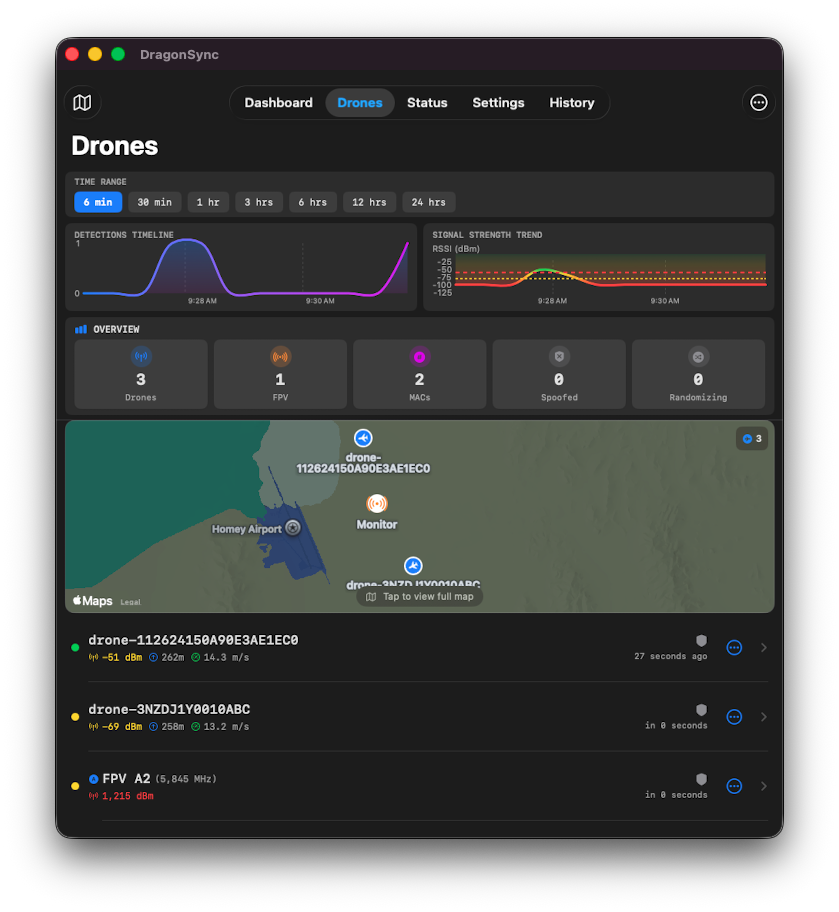
 |
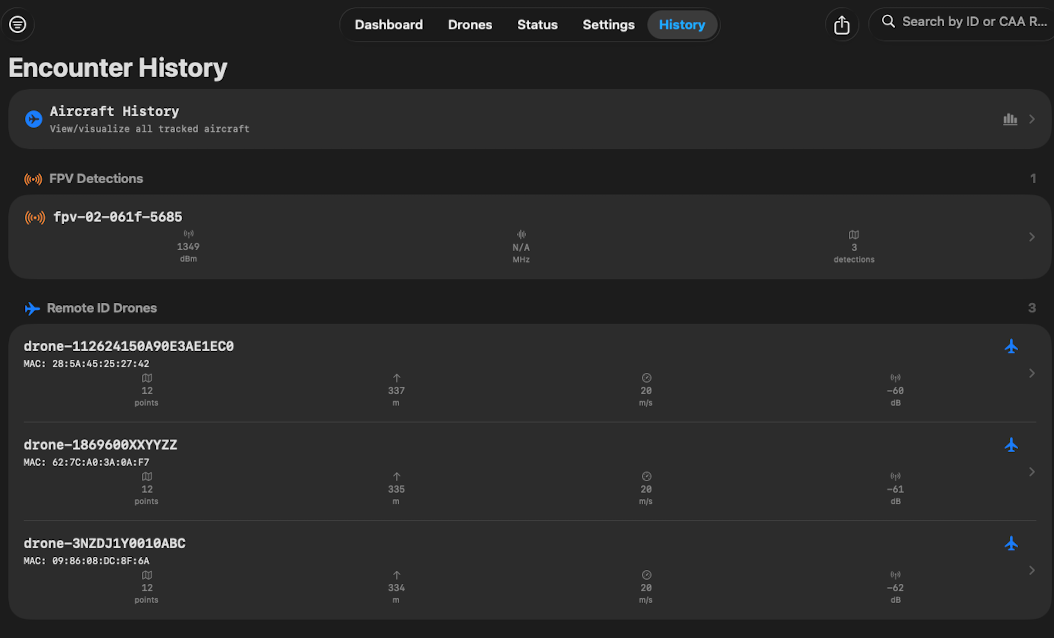 |
 |
|
Remote ID Broadcasts
- WiFi 2.4GHz and 5GHz transmissions
- Bluetooth Low Energy advertisements
- SDR-based RF decoding (ANTSDR)
- Live position, altitude, speed, heading
- Pilot and home point locations, FAA lookup
ADS-B Aircraft
- 1090MHz Mode S transponders
- Real-time aircraft tracking
- Flight number, altitude, speed
- Supply your own or use OpenSky
Encrypted Drones (DJI Ocusync)
- RSSI-based distance estimation
- Reads unencrypted elements of RID
FPV Video Transmitters
- 5.8GHz analog video detection
- RX5808 receiver integration
- Channel and frequency identification
- Signal strength ring map markers
Threats and Anomalies
- Spoof detection via signal analysis
- Position consistency validation
- Flight physics anomaly detection
- MAC randomization detection
|
In Action
Portable

Features
- Live Map View - All detections on unified map with color-coded markers
- Detection Details - Full telemetry: position, altitude, speed, heading, manufacturer & more
- FAA Registry Lookup - Real-time drone registration data with operator info
- History & Analysis - Search, filter, export encounters (KML, CSV). Data is stored securely in iOS Keychain (TAK) and the app uses SwiftData.
- System Monitoring - CPU, memory, temperature, GPS, ANTSDR sensors
- Proximity & System Alerts - Configurable distance thresholds with notifications. Memory and temperature alert triggers.
Integrations
Push Detection Data To:
- MQTT - Home Assistant auto-discovery, TLS support, QoS 0-2
- TAK/ATAK - CoT XML via multicast/TCP/TLS with iOS Keychain .p12
- Lattice DAS - Structured detection reports to Lattice platform
- Webhooks - Discord, Slack, custom HTTP POST with event filtering
Receive Data From:
- ZMQ - Ports 4224 (detections, droneid-go unified output — falls back to legacy zmq_decoder.py) and 4225 (system status from
wardragon_monitor)
- Multicast CoT - 239.2.3.1:6969 from DragonSync.py wrapper
- ADS-B - readsb, tar1090, dump1090 JSON feeds and OpenSky Network
- Background Mode - Continuous monitoring with local notifications
Android & Linux users: See DragonSync KMP for the cross-platform version targeting Android and Linux desktop.
Installation
Hardware Options
| Setup |
Time |
WiFi RID |
BT RID |
SDR |
FPV |
Best For |
| WarDragon Pro |
30 sec |
✓ |
✓ |
✓ |
✓ |
Full-spectrum deployment |
| Drag0net ESP32 |
15 min |
✓ 2.4GHz |
✗ |
✗ |
✗ |
Portable WiFi RID only |
| Custom Build |
60 min |
✓ |
✓ |
✓ |
✓ |
DIY / maximum control |
- New default backend: droneid-go — single Go binary (
zmq-decoder systemd service) that replaces the old wifi_receiver + sniffle + zmq_decoder.py Python pipeline. Same wire port (4224), richer JSON (adds transport, frequency_mhz, Frequency Message, Auth Message, area beacons, full ASTM accuracy fields).
- Existing legacy installs (
DroneID + DragonSync 3-process pipeline) still work — the iOS parser supports both. Run setup.sh --legacy to install that path.
- For new kits:
git pull in droneid-go and DragonSync. (DroneID and Sniffle Python clones are no longer required.)
- Multicast/
dragonsync.py is not a requirement for FPV. Run fpv_mdn_receiver.py from the DroneID repo if you need FPV detection.
Option 1: WarDragon Pro (Powerful)
Pre-configured system with ANTSDR E200, WiFi/BT, GPS hardware
Quick Start:
- Power on device
- Connect iOS device to same network
- App → Settings → ZMQ → Enter WarDragon IP
- Start monitoring
Troubleshooting:
No Network Connection/Data:
- Ensure iOS app permission granted in Settings > Apps > DragonSync > Network
- Multicast: Toggle the connect button if first launch, needs to request permissions.
RSSI rings not showing for encrypted/fpv:
- Needs GPS data for the host in Status from
wardragonmonitor.py
- Ensure iOS app permission granted in Settings > Apps > DragonSync > Location
System Status:
A. In prior versions wardragon_monitor.py requires GPS lock (use --static_gps flag or wait for lock) to send data.
B. SDR temps require DJI firmware on ANTSDR (UHD firmware won’t report temps)
Option 2: Drag0net ESP32 (Portable) Firmware
ESP32-C3/S3 (with optional mesh integration) for standalone WiFi RID detection
Automated Flash:
curl -fsSL https://raw.githubusercontent.com/Root-Down-Digital/DragonSync-iOS/refs/heads/main/Util/setup.sh -o setup.sh
chmod +x setup.sh && ./setup.sh
# Select option 4 (ESP32-C3) or 5 (ESP32-S3)
Connect to Device:
- SSID:
Dr4g0net
- Password:
wardragon1234
- IP Address:
192.168.4.1
- App Settings → ZMQ IP:
192.168.4.1
- Web UI: Navigate to
192.168.4.1 in browser
Manual Flash: Download firmware
esptool.py --chip auto --port /dev/YOUR_PORT --baud 115200 \
  --before default_reset --after hard_reset write_flash -z \
  --flash_mode dio --flash_freq 80m --flash_size detect \
  0x10000 firmware.bin
Option 3: Custom Build (Full Features)
Complete detection stack with all protocols. Default install uses droneid-go — a single Go binary that replaces the old wifi_receiver.py + sniffle + zmq_decoder.py Python pipeline. The iOS app is fully compatible with both backends.
Hardware Requirements:
- Dual-band WiFi adapter (2.4/5GHz, monitor-mode capable)
- Sniffle-compatible BLE dongle (nRF52840 or Sonoff CC2652P, pre-flashed with Sniffle firmware)
- Optional: DragonSDR / ANTSDR E200 (DJI DroneID), GPS module, RX5808 (FPV)
Automated Install (droneid-go default):
curl -fsSL https://raw.githubusercontent.com/Root-Down-Digital/DragonSync-iOS/refs/heads/main/Util/setup.sh -o setup.sh
chmod +x setup.sh && ./setup.sh           # droneid-go install (recommended)
# or, to install the legacy 3-process Python pipeline:
./setup.sh --legacy
Manual Installation Steps
Default — droneid-go (Linux x86_64 / ARM64):
sudo apt update
sudo apt install -y libpcap0.8 libzmq5 git
cd /home/dragon/WarDragon
git clone https://github.com/alphafox02/droneid-go.git
cd droneid-go
sudo ./install.sh
The installer:
- Drops the binary at
/home/dragon/WarDragon/droneid-go/droneid
- Stops/disables legacy
wifi-receiver and sniff-receiver services
- Installs and enables a
zmq-decoder systemd service that publishes unified JSON on tcp://*:4224
- Health probe:
./droneid-check.sh
DragonSync still handles multicast CoT / TAK / MQTT fan-out:
git clone https://github.com/alphafox02/DragonSync.git
cd DragonSync && pip install -r requirements.txt
Legacy — Python 3-process pipeline (use only if you need it):
sudo apt install -y python3 python3-pip git gpsd gpsd-clients lm-sensors
git clone https://github.com/alphafox02/DroneID.git
git clone https://github.com/alphafox02/DragonSync.git
cd DroneID && git submodule update --init && ./setup.sh
macOS: droneid-go ships Linux binaries only. Install on a Linux host (WarDragon kit / Pi). Use macOS for the iOS app build only.
Windows: Use WSL2.
Run Detection Stack — droneid-go (default):
# Single service, all sources unified on tcp://*:4224
sudo systemctl status zmq-decoder
sudo journalctl -u zmq-decoder -f

# Manual run with everything enabled (WiFi 5GHz hop + native BLE + ESP32 UART + DJI DroneID)
sudo /home/dragon/WarDragon/droneid-go/droneid \
    -g -ble auto -uart /dev/esp0 -dji 127.0.0.1:4221 \
    -z -zmqsetting 0.0.0.0:4224

# System health monitor (separate from drone telemetry)
cd DragonSync
python3 wardragon_monitor.py --zmq_host 0.0.0.0 --zmq_port 4225 --interval 30

# Optional FPV
cd DroneID && python3 fpv_mdn_receiver.py --serial /dev/ttyFPV --baud 115200 --zmq-port 4226 --stationary --debug
Run Detection Stack — Legacy 3-process pipeline
# Terminal 1 - WiFi RID Receiver
cd DroneID
python3 wifi_receiver.py --interface wlan0 -z --zmqsetting 127.0.0.1:4223

# Terminal 2 - Bluetooth RID Receiver
cd DroneID/Sniffle
python3 python_cli/sniff_receiver.py -l -e -a -z -b 2000000

# Terminal 3 - Decoder (aggregates all sources)
cd DroneID
python3 zmq_decoder.py -z --dji 127.0.0.1:4221 --zmqsetting 0.0.0.0:4224 --zmqclients 127.0.0.1:4222,127.0.0.1:4223,127.0.0.1:4226 -v

# Terminal 4 - System Health Monitor
cd DragonSync
python3 wardragon_monitor.py --zmq_host 0.0.0.0 --zmq_port 4225 --interval 30
iOS App Configuration:
- Settings → ZMQ → Host IP address, Port 4224 (telemetry — droneid-go default)
- Advanced → Status Port 4225 (system health from
wardragon_monitor.py)
- Enable ADS-B, MQTT, TAK, webhooks as needed
The app’s parser supports both droneid-go (canonical long-form keys, transport, frequency_mhz, Frequency Message, Auth Message, area beacons) and legacy zmq_decoder.py (short-form accuracy keys). No app reconfiguration needed when switching backends.

Persistence: droneid-go installs its own zmq-decoder systemd unit. For the legacy path, use DragonSync systemd files.
System Architecture
┌──────────────────────────────────────────────────────┐
│               Detection Sources                      │
│                                                      │
│  WiFi RID (2.4/5GHz) ──┐                             │
│  Bluetooth RID (Sniffle)┤                            │
│  ESP32 UART passthrough ┼──► droneid-go (Go binary)  │
│  DJI DroneID (DragonSDR)┘     unified ZMQ tcp:4224   │
│  FPV Video ─────────── RX5808 + fpv_mdn_receiver     │
│  ESP32 Standalone ──── Drag0net WiFi 2.4GHz          │
└────────────────────┬─────────────────────────────────┘
                     │ JSON Data
        ┌────────────┴────────────┐
        │                         │
 ┌──────▼────────┐       ┌────────▼────────┐
 │ droneid-go    │       │ DragonSync.py   │
 │ Port 4224     │       │ (wrapper)       │
 │ (JSON)        │       │ Multicast CoT   │
 │ + health      │       │ + MQTT/TAK      │
 └──────┬────────┘       └────────┬────────┘
        │                         │
        └──────────┬──────────────┘
                   │
        ┌──────────▼──────────┐      ┌────────────────┐
        │  DragonSync iOS     │◄─────┤ ADS-B Source   │
        │                     │      │ HTTP JSON      │
        │  ZMQ: 4224, 4225    │      │ readsb/tar1090 │
        │  CoT: 239.2.3.1     │      └────────────────┘
        └──────────┬──────────┘
                   │
        ┌──────────▼──────────┐
        │   Output Channels   │
        │                     │
        │  MQTT               │
        │  TAK/ATAK (CoT)     │
        │  Webhooks           │
        │  Lattice DAS        │
        └─────────────────────┘
Data Flow:
- Ingestion: ZMQ JSON (4224 unified detections from droneid-go, 4225 system status from
wardragon_monitor), Multicast CoT (239.2.3.1:6969), ADS-B HTTP
- Processing: SwiftData persistence, spoof detection, signature analysis, rate limiting
- Output: MQTT, TAK/ATAK, Webhooks & Lattice
Command Reference
| Task |
Command |
| droneid-go (all sources) |
sudo /home/dragon/WarDragon/droneid-go/droneid -g -ble auto -uart /dev/esp0 -dji 127.0.0.1:4221 -z -zmqsetting 0.0.0.0:4224 |
| droneid-go health probe |
/home/dragon/WarDragon/droneid-go/droneid-check.sh |
| System Monitor |
python3 wardragon_monitor.py --zmq_host 0.0.0.0 --zmq_port 4225 --interval 30 |
| Static GPS |
python3 wardragon_monitor.py --static_gps 37.7749,-122.4194,10 |
| WiFi only (droneid-go) |
sudo droneid -i wlan1 -g -z -v |
| BLE only (droneid-go) |
sudo droneid -ble auto -z -v |
| DJI only (droneid-go) |
droneid -dji 127.0.0.1:4221 -z -v |
| FPV Detection |
python3 fpv_mdn_receiver.py -z --zmqsetting 127.0.0.1:4222 |
| Legacy WiFi Sniffer |
python3 wifi_receiver.py --interface wlan0 -z --zmqsetting 127.0.0.1:4223 |
| Legacy BT Sniffer |
python3 Sniffle/python_cli/sniff_receiver.py -l -e -a -z -b 2000000 |
| Legacy Decoder |
python3 zmq_decoder.py -z --zmqsetting 0.0.0.0:4224 --zmqclients 127.0.0.1:4222,127.0.0.1:4223 -v |
Connection Protocols
ZMQ (Recommended) - Full JSON telemetry with complete detection data
- Port 4224: Drone detections
- Port 4225: System health and status
Multicast CoT - TAK/ATAK integration with reduced detail
- Address: 239.2.3.1:6969
- Protocol: CoT XML
ADS-B HTTP - Aircraft tracking from standard feeds or OpenSky
- Endpoints: readsb, tar1090, dump1090
- OpenSky Network: Use with or without an account
MQTT - Publish to Home Assistant or broker
- Formats: JSON, Home Assistant discovery
- TLS and authentication support
Build from Source
git clone https://github.com/Root-Down-Digital/DragonSync-iOS.git
cd DragonSync-iOS
pod install
Open WarDragon.xcworkspace in Xcode 15+.
Requirements:
- Xcode 15.0 or later
- iOS 17.0+ / macOS 14.0+ deployment target
- CocoaPods for dependencies
Credits & License
This app is not affiliated with DragonOS or cemaxecutor in any official context. I wanted a simple way to interact with the drone capabilities, and easily integrate my ANTSDR. cemaxecuter was instrumental to the development of this project- All credit really should go to him.
Built on: DroneID • DragonSync • Sniffle
Third-party frameworks used:
SwiftyZeroMQ5
CocoaMQTT
CocoaAsyncSocket
Starscream
API Data Sources:
Privacy Policy
MIT License
Legal Disclaimer
READ BEFORE USE
Nature of This Software
DragonSync iOS is a passive radio frequency monitoring and data visualization application. It receives and displays publicly broadcast Remote ID (RID) transmissions as mandated by FAA 14 CFR Part 89, FCC regulations, and equivalent international standards (EU 2019/945, EASA, etc.). It transmits no signals of any kind.
Remote ID broadcasts are intentionally public by regulatory design. The FAA, FCC, and EASA explicitly require drone operators to continuously broadcast RID data for public safety, airspace awareness, and law enforcement use. Reception and display of these broadcasts is not only legal — it is the intended and stated purpose of the RID mandate.
No Interception. No Decryption. No Transmission.
This application:
- Receives only publicly broadcast, unencrypted radio transmissions
- Does not intercept, decode, or access any private, encrypted, or protected communications
- Does not transmit any RF signals
- Does not interfere with any aircraft, drone, or communications system
- Does not circumvent any security measure or access control
- ADS-B data is similarly public by FAA mandate (14 CFR Part 91.225). ADS-B ground station data provided via OpenSky Network is publicly licensed.
Federal Wiretap Act / ECPA
The Electronic Communications Privacy Act (18 U.S.C. § 2511) explicitly exempts radio communications that are:
- Transmitted using frequencies allocated under Part 15 or Part 97 of FCC rules, or
- Not scrambled, encrypted, or made private by the transmitter, or
- Transmitted for the use of the general public
- Remote ID (WiFi 2.4/5GHz, Bluetooth LE) and ADS-B (1090MHz) fall entirely within these exemptions. No provision of ECPA is implicated by passive receipt of these broadcasts.
User Responsibilities
Users are responsible for:
- Compliance with all applicable local, state, federal, and international laws
- Ensuring any hardware used (SDR, WiFi adapters, Bluetooth sniffers) is operated within licensed parameters
- Not using detection data to harass, track, or harm any individual
- Understanding that laws vary by jurisdiction and may change
- Disclaimer of Warranties and Liability
This software is provided “AS IS” without warranty of any kind, express or implied. The authors, contributors, and maintainers:
- Make no warranty of fitness for any particular purpose
- Accept no liability for damages, legal consequences, or harm arising from use or misuse
- Bear no responsibility for actions taken by users based on data displayed
By using this software, you confirm you have read, understood, and accept these terms in full.
Keep WarDragon and DragonOS updated for optimal compatibility.
Use only in compliance with local regulations and laws.


评论