cfn-diagram

CLI tool to visualise CloudFormation/SAM/CDK templates as diagrams.
Installation
npm i -g @mhlabs/cfn-diagram
Usage
Usage: cfn-dia [options] [command]

Options:
  -v, --vers                          Output the current version
  -h, --help                          Display help for command

Commands:
  draw.io|d [options]                 Generates a draw.io diagram from a CloudFormation template
  html|h [options]                    Generates a vis.js diagram from a CloudFormation template
  browse|b [options]                  Browses and generates diagrams from your deployed templates
  help [command]                      Display help for command

Draw.io Options:
  -t, --template-file [templateFile]  Path to template or cdk.json file
  -c, --ci-mode                       Disable terminal/console interactivity
  -o, --output-file [outputFile]      Name of output file
  -co, --cdk-output [outputPath]      CDK synth output path
  -s, --skip-synth                    Skips CDK synth
  -e, --exclude-types [excludeTypes]  List of resource types to exclude when using CI mode

Html Options:
  -t, --template-file [templateFile]  Path to template or cdk.json file
  -c, --ci-mode                       Disable terminal/console interactivity
  -o, --output-path [outputPath]      Name of output file
  -co, --cdk-output [outputPath]      CDK synth output path
  -s, --skip-synth                    Skips CDK synth
Usage: cfn-dia draw.io|d [options]

Generates a draw.io diagram from a CloudFormation template

Options:
  -t, --template-file [templateFile]     Path to template or cdk.json file (default: "template.yaml or
                                         cdk.json")
  -c, --ci-mode                          Disable terminal/console interactivity (default: false)
  --stacks [stacks]                      Comma separated list of stack name(s) to include. Defaults to
                                         all.
  -o, --output-file [outputFile]         Name of output file (default: "template.drawio")
  -co, --cdk-output [outputPath]         CDK synth output path (default: "cdk.out")
  -s, --skip-synth                       Skips CDK synth (default: false)
  -e, --exclude-types [excludeTypes...]  List of resource types to exclude when using CI mode
  -h, --help                             display help for command
Use it in combination with the Draw.io Integration for VS Code to instantly visualise your stacks.
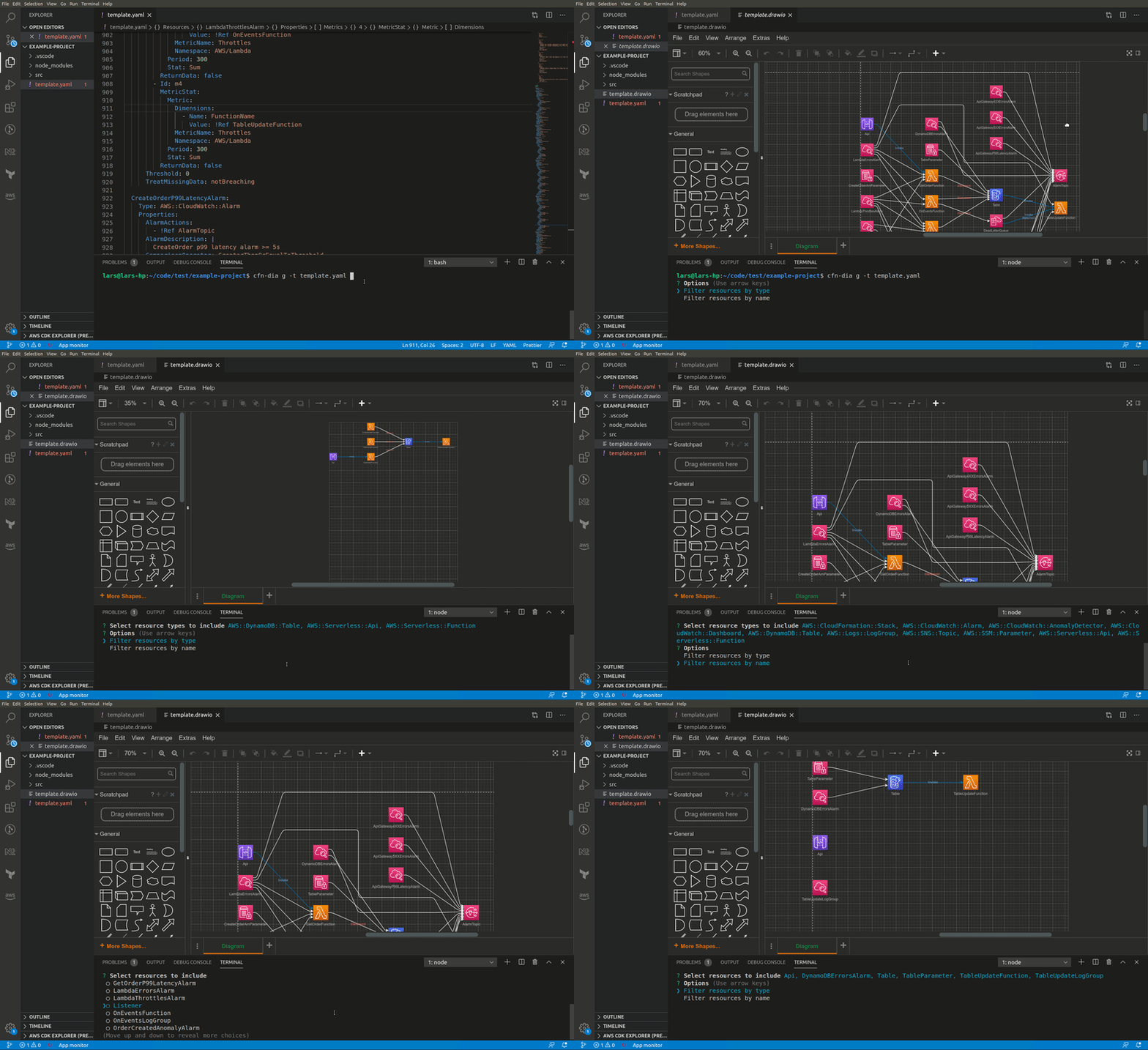
Example
cfn-dia draw.io -t template.yaml
Features
- Select only the resource types you want to see. This lets you skip granlar things like roles and policies that might not add to the overview you want to see
- Navigate through a new differnet layouts
- Works for both JSON and YAML templates
- Filter on resource type and/or resource names
- Works with CloudFormation, SAM and CDK
HTML
Usage: cfn-dia html|h [options]

Generates a vis.js diagram from a CloudFormation template

Options:
  -t, --template-file [templateFile]  Path to template or cdk.json file (default: "template.yaml or
                                      cdk.json")
  --stacks [stacks]                   Comma separated list of stack name(s) to include. Defaults to all.
  -all --render-all                   If set, all nested stacks will be rendered. By default only root
                                      template is rendered (default: false)
  -c, --ci-mode                       Disable terminal/console interactivity (default: false)
  -o, --output-path [outputPath]      Name of output file (default: "/tmp/cfn-diagram")
  -co, --cdk-output [outputPath]      CDK synth output path (default: "cdk.out")
  -s, --skip-synth                    Skips CDK synth (default: false)
  -h, --help                          display help for command
The HTML output uses vis.js to generate an interactive diagram from your template.

Example
cfn-dia html -t template.yaml
or, for CDK stacks, go to project directory (where cdk.json is located) and enter
cfn-dia html
Large stacks, in particular multi-stack CDK projects, tend to generate huge diagrams. You can pass the stack names you want to render using the --stacks argument followed by a comma separated list of stack names.
Ascii-art
Usage: cfn-dia ascii-art|a [options]

Generates an ascii-art diagram from a CloudFormation template

Options:
  -t, --template-file [templateFile]     Path to template or cdk.json file (default: "template.yaml or cdk.json")
  --stacks [stacks]                      Comma separated list of stack name(s) to include. Defaults to all.
  -co, --cdk-output [outputPath]         CDK synth output path (default: "cdk.out")
  -s, --skip-synth                       Skips CDK synth (default: false)
  -w, --watch                            Watch for changes in template and rerender diagram on change (default: false)
  -e, --exclude-types [excludeTypes...]  List of resource types to exclude when using CI mode
  -h, --help                             display help for command                           display help for command
Renders a simple Ascii-art diagram of your template directly in the console. Useful to gain a quick overview of smaller stacks.
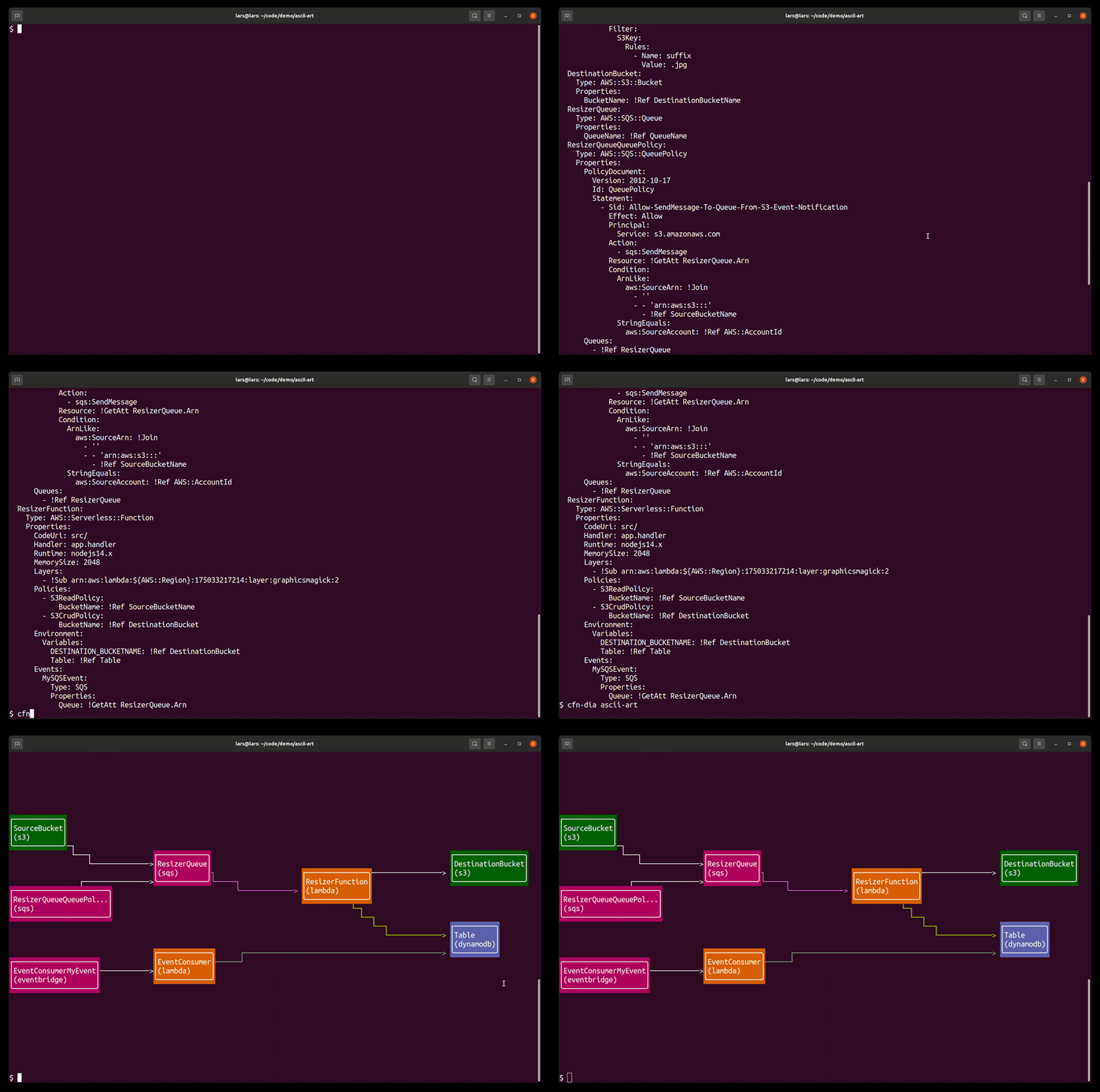
Video demo of using the --watch option:

Mermaid
Usage: cfn-dia mermaid|m [options]

Generates a mermaid graph from a template

Options:
  -t, --template-file [templateFile]  Path to template or cdk.json file (default: "template.yaml or cdk.json")
  -all --render-all                   If set, all nested stacks will be rendered. By default only root template is rendered (default: false)
  -o, --output-path [outputPath]      Name of output file
  -co, --cdk-output [cdkOutputPath]   CDK synth output path (default: "cdk.out")
  -s, --skip-synth                    Skips CDK synth (default: false)
  -h, --help                          display help for command
Renders a mermaid diagram of your template directly in the console or to a file. Useful to gain a quick overview of smaller stacks and to generate as part of your CI/CD flow for up-to-date documentation.

CI-mode
This functionality lives in its own CLI, cfn-diagram-ci. This is beacuse it requires headless Chromium to be installed which makes the package size very large
It uses pageres to generate a screenshot of a HTML diagram. This can be used in a CI/CD pipeline to keep an always up-to-date diagram in your readme-file.
Installation
npm install -g @mhlabs/cfn-diagram-ci
Example
cfn-dia-ci html -t template.yaml
Known issues
- Some icons are missing. Working on completing the coverage.
- When using WSL you might experience
Error: spawn wslvar ENOENT when trying to use HTML output. To resolve, install wslu. See issue #9.


评论