FanCtrl
FanCtrl is a software that allows you to automatically control the fan speed on your PC.
Requires
Support
- Motherboard
- NZXT Kraken is support
- EVGA CLC is support
- NZXT RGB & Fan Controller is support
- liquidctl is support
Main

- Show temperature, fan speed and fan control.
- The percentage of the fan control can be changed to simply control the pwm.(not saved)
- You can rename each item.
Option
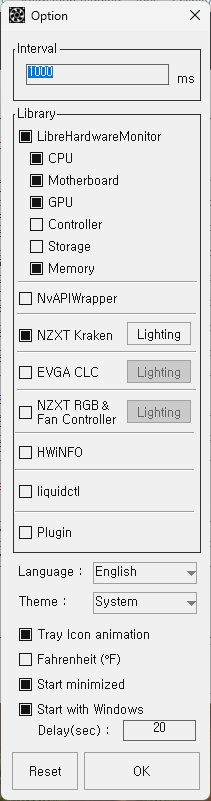
- LibreHardwareMonitor : You can choose whether to use the library or not, and you can choose which devices are required for control.
- NvAPIWrapper : Allows you to add the NVIDIA graphics card control library.
- NZXT Kraken : NZXT Kraken support
- EVGA CLC : EVGA CLC support
- NZXT RGB & Fan Controller : NZXT RGB & Fan controller support
- HWiNFO : Communicated with HWiNFO to get sensor temperature and fan rpm (Link)
- liquidctl : liquidctl support
- Language : English, Korean, Japanese, French, Spanish, Russian, Chinese
- Tray icon animation : tray icon animation starts when checked for automatic fan control activation.
- Fahrenheit : set the temperature to Fahrenheit.
- Start minimized : starts with minimal when the program runs.
- Start with Windows : Auto-Run at windows start.
- Delay(sec) : Delay time before auto-run at windows start.
- Reset : Initialize all settings and libraries.
Auto Fan Control

- Check to enable automatic fan control, select the temperature sensor to target, add the fan to control, and select from the list to display the graph, but adjust the graph accordingly.
- Mode : only four names are divided, but must be set separately.
- Preset : Allows you to save or load the current graph’s setup state.
- Unit : You can change the unit of temperature and pwm percentage.(1, 5, 10)
- Hysteresis : If the pwm changes when the temperature drops, the pwm changes only after the hysteresis temperature drops further.
- Step : determines whether the graph setting is step or linear.
- Auto : The fan control operates in the bios default state up to the set temperature. (LHM, OHM, Gigabyte, NvAPIWrapper only, see link)
- When you click Apply and OK, it is saved as a file and works with the settings you set.
- Automatically reads from a file to act on the next program run.
On Screen Display (RTSS)


Lighting
You can see the lighting packet on the link.
NZXT Kraken X2 : X2.txt
NZXT Kraken X3 : X3.txt
EVGA CLC : clc.txt
NZXT RGB & Fan Controller : RGBnFC.txt
Example X2

Logo : Spectrum wave
Ring : Spectrum wave

Logo : Fading
Ring : Pulse
liquidctl
How to use : Link
Plugins
How to use : Link
Using external Libraries
Sensor and Fan Control : LibreHardwareMonitorLib
Nvidia Graphic card Sensor and Fan Control : NvAPIWrapper
NZXT Kraken USB Communication : HIDSharp
EVGA CLC USB Communication : SiUSBXp or libusb-1.0
Json : Newtonsoft Json
Graph : ZedGraph
liquidctl plugin : liquidctl
License
GNU General Public License v3.0
Precautions
- FanCtrl is free software with a GNU GPLv3 license.
- You can malfunction while other fan control programs are on at the same time.
- I am not responsible for hardware that has failed or is not working using this software.
- Not all types of hardware are supported.
Donate

Bitcoin(BTC) : bc1p36n3atpv7d477tpgxcn4rztvx7cst68lqn8qa6uhvxe803fu7akq3c9j0x
Ethereum(ETH) : 0xE431Af19a04926d461B97cD190e10F817155ABcC





评论