
Link Previewer for iOS, macOS, watchOS and tvOS
It makes a preview from an URL, grabbing all the information such as title, relevant texts and images.
Update 2025: I’ve decided to archive this repo due to the fact that any AI integration performs a job better than SLP. It was a nice concept at the beginning and it served its purpose. 🫡





Index
Visual Examples
| UTF-8 |
Extended UTF-8 |
Gallery |
 |
 |
 |
| Video Websites |
Images |
|
 |
 |
|
Requirements and Details
- iOS 8.0+ / macOS 10.11+ / tvOS 9.0+ / watchOS 2.0+
- Xcode 8.0+
- Built with Swift 5
Installation
CocoaPods
To use SwiftLinkPreview as a pod package just add the following in your Podfile file.
	source 'https://github.com/CocoaPods/Specs.git'
	platform :ios, '9.0'

	target 'Your Target Name' do
	  	use_frameworks!
	  	// ...
	  	pod 'SwiftLinkPreview', '~> 3.5.0'
	  	// ...
	end
Carthage
To use SwiftLinkPreview as a Carthage module package just add the following in your Cartfile file.
  	// ...
	github "LeonardoCardoso/SwiftLinkPreview" ~> 3.5.0
  	// ...
Swift Package Manager
To use SwiftLinkPreview as a Swift Package Manager package just add the following in your Package.swift file.
import PackageDescription

let package = Package(
  name: "Your Target Name",
  dependencies: [
  	// ...
    .Package(url: "https://github.com/LeonardoCardoso/SwiftLinkPreview.git", "3.5.0")
  	// ...
  ]
)
Manually
You just need to drop all contents in Sources folder, but .plist files, into Xcode project (make sure to enable “Copy items if needed” and “Create groups”).
Usage
Instatiating
import SwiftLinkPreview

// ...

let slp = SwiftLinkPreview(session: URLSession.shared,
			   workQueue: SwiftLinkPreview.defaultWorkQueue,
			   responseQueue: DispatchQueue.main,
		           cache: DisabledCache.instance)
Requesting preview
let preview = slp.preview("Text containing URL",
                          onSuccess: { result in print("\(result)") },
                          onError: { error in print("\(error)")})
// preview.cancel() to cancel it.
result is a struct Response:
Response {
	let baseURL: String? // base
	let url: URL? // URL
	let finalUrl: URL? // unshortened URL
	let canonicalUrl: String? // canonical URL
	let title: String? // title
	let description: String? // page description or relevant text
	let images: [String]? // array of URLs of the images
	let image: String? // main image
	let icon: String? // favicon
	let video: String? // video
	let price: String? // price
}
Cancelling a request
let cancelablePreview = slp.preview(...,
				    onSuccess: ...,
				    onError: ...)

cancelablePreview.cancel()
Enabling and accessing cache
SLP has a built-in memory cache, so create your object as the following:
let slp = SwiftLinkPreview(cache: InMemoryCache())
To get the cached response:
if let cached = self.slp.cache.slp_getCachedResponse(url: String) {
    // Do whatever with the cached response
} else {
	// Perform preview otherwise
	slp.preview(...)
}
If you want to create your own cache, just implement this protocol and use it on the object initializer.
public protocol Cache {

    func slp_getCachedResponse(url: String) -> SwiftLinkPreview.Response?

    func slp_setCachedResponse(url: String, response: SwiftLinkPreview.Response?)
}
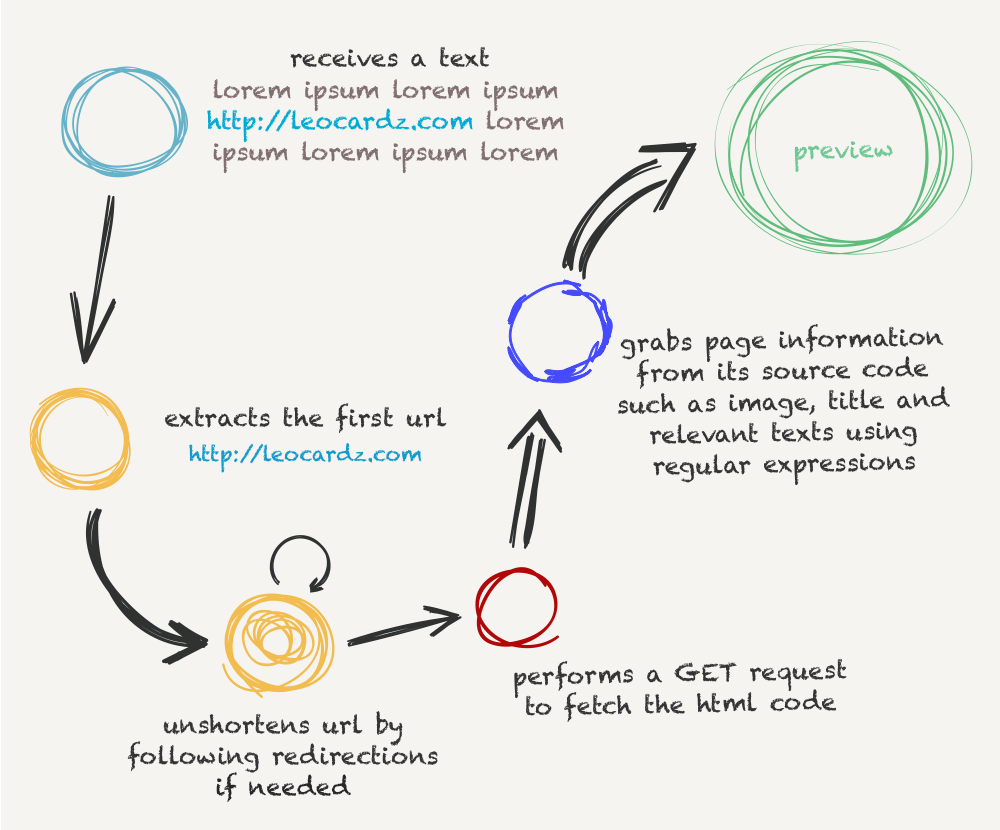
FLOW
Important
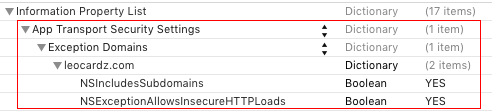
You need to set Allow Arbitrary Loads to YES on your project’s Info.plist file.

If you don’t want to use the option above and you are using SwiftLinkPreview for services of your knowledge, you can whitelist them on Info.plist file as well. You can read more about it here, here and here.
Tips
Not all websites will have their info brought, you can treat the info that your implementation gets as you like. But here are two tips about posting a preview:
- If some info is missing, you can offer the user to enter it. Take for example the description.
- If more than one image is fetched, you can offer the user the feature of picking one image.
Tests
Feel free to fork this repo and add URLs on SwiftLinkPreviewTests/URLs.swift to test URLs and help improving this lib. The more URLs the better the reliability.
Developed by @LeonardoCardoso.
Contact me either by Twitter @leocardz or emailing me to [email protected].
License
The MIT License (MIT)

Copyright (c) 2016 Leonardo Cardoso

Permission is hereby granted, free of charge, to any person obtaining a copy
of this software and associated documentation files (the "Software"), to deal
in the Software without restriction, including without limitation the rights
to use, copy, modify, merge, publish, distribute, sublicense, and/or sell
copies of the Software, and to permit persons to whom the Software is
furnished to do so, subject to the following conditions:

The above copyright notice and this permission notice shall be included in all
copies or substantial portions of the Software.

THE SOFTWARE IS PROVIDED "AS IS", WITHOUT WARRANTY OF ANY KIND, EXPRESS OR
IMPLIED, INCLUDING BUT NOT LIMITED TO THE WARRANTIES OF MERCHANTABILITY,
FITNESS FOR A PARTICULAR PURPOSE AND NONINFRINGEMENT. IN NO EVENT SHALL THE
AUTHORS OR COPYRIGHT HOLDERS BE LIABLE FOR ANY CLAIM, DAMAGES OR OTHER
LIABILITY, WHETHER IN AN ACTION OF CONTRACT, TORT OR OTHERWISE, ARISING FROM,
OUT OF OR IN CONNECTION WITH THE SOFTWARE OR THE USE OR OTHER DEALINGS IN THE
SOFTWARE.
Follow me for the latest updates






评论