Diablo IV Companion


Readme translations


A companion app for Diablo IV to help you find your perfect gear affixes.
If you like my work you can sponsor me on Ko-fi.

Looking for help?
Table of Contents
Features
- Loot filter.
- Supports affixes, aspects, runes and sigils.
- Filter by affix value.
- Filter by item power.
- Tuning prism hints. See wiki.
- Show matching tuning prism for each affix.
- Trading lists
- Track valuable items for trading.
- Show trade value ingame.
- Import builds from D2Core.com
- Import builds from D4Builds.gg
- Import builds from InfinityBuilds.gg
- Import builds from Maxroll.gg
- Import builds from Mobalytics.gg
- Import paragon boards. See wiki.
- Dashboard overlay. See wiki.
- Multi-language support. See wiki if you want to translate the app.
Installation
- Download the latest version from Releases
- Extract files and run D4Companion.exe
- Go to settings and select the System preset matching your resolution.
- Make sure to click the update / download button first to get the latest version.
- Use the recommended app settings listed for each resolution.
- Go to affixes and create a new Gear Affix Preset.
- Or import a build from D2Core, D4Builds, InfinityBuilds, Maxroll or Mobalytics (wiki).
- Select your prefered affixes for each item slot.
- Double click affixes to add/remove them from the list.
- Read Usage for more details on using the app.
- For tips and troubleshooting there is also a wiki.
Configurations
Currently the following system presets are included:
| Preset |
Languages |
Config |
Status |
Missing icons |
| 1080p_SMF |
        |
SDR (HDR off) with font set to medium. |
 |
|
| 1080p_SSF |
|
SDR (HDR off) with font set to small. |
|
|
| 1440p_HSF |
|
HDR with font set to small. |
|
|
| 1440p_SMF |
 |
SDR (HDR off) with font set to medium. |
|
|
| 1440p_SMF_zhCN |
 |
SDR (HDR off) with font set to medium for the Chinese (Simplified) language. |
|
|
| 1440p_SSF |
|
SDR (HDR off) with font set to small. |
|
|
| 1600p_SMF |
|
SDR (HDR off) with font set to medium. |
|
|
| 1600p_SMF_zhCN |
|
SDR (HDR off) with font set to medium for the Chinese (Simplified) language. |
 |
greater, temper, mythic, runes |
| 2160p_HSF |
|
HDR with font set to small. |
|
|
| 2160p_SSF |
|
SDR (HDR off) with font set to small. |
|
|
Each preset works for both normal and widescreen resolutions. e.g. for 2560x1440 and 3440x1440 use the 1440p preset.
Feel free to share you system presets with me so I can add them to the app.
See the following wiki page to create your own.
Usage

- Navigation menu. In the following order, Affixes, Trade, Logging, Debug, and Settings.
- Toggle the overlay on/off. Note: This is also possible using the ingame button in the top left corner.
- Change language for affixes.
- Create, select, or delete affix presets. The import/export buttons can be used to share your builds, or to import builds from D4Builds, Maxroll and Mobalitics. See wiki for more details.
- Overview of selected affixes for each gear slot. Click to change color, or double click affix name to remove it.
- Filter affixes.
- Switch between affixes, aspects, sigils, uniques, and runes.
- Adds the affix to your preset so you can monitor it ingame.
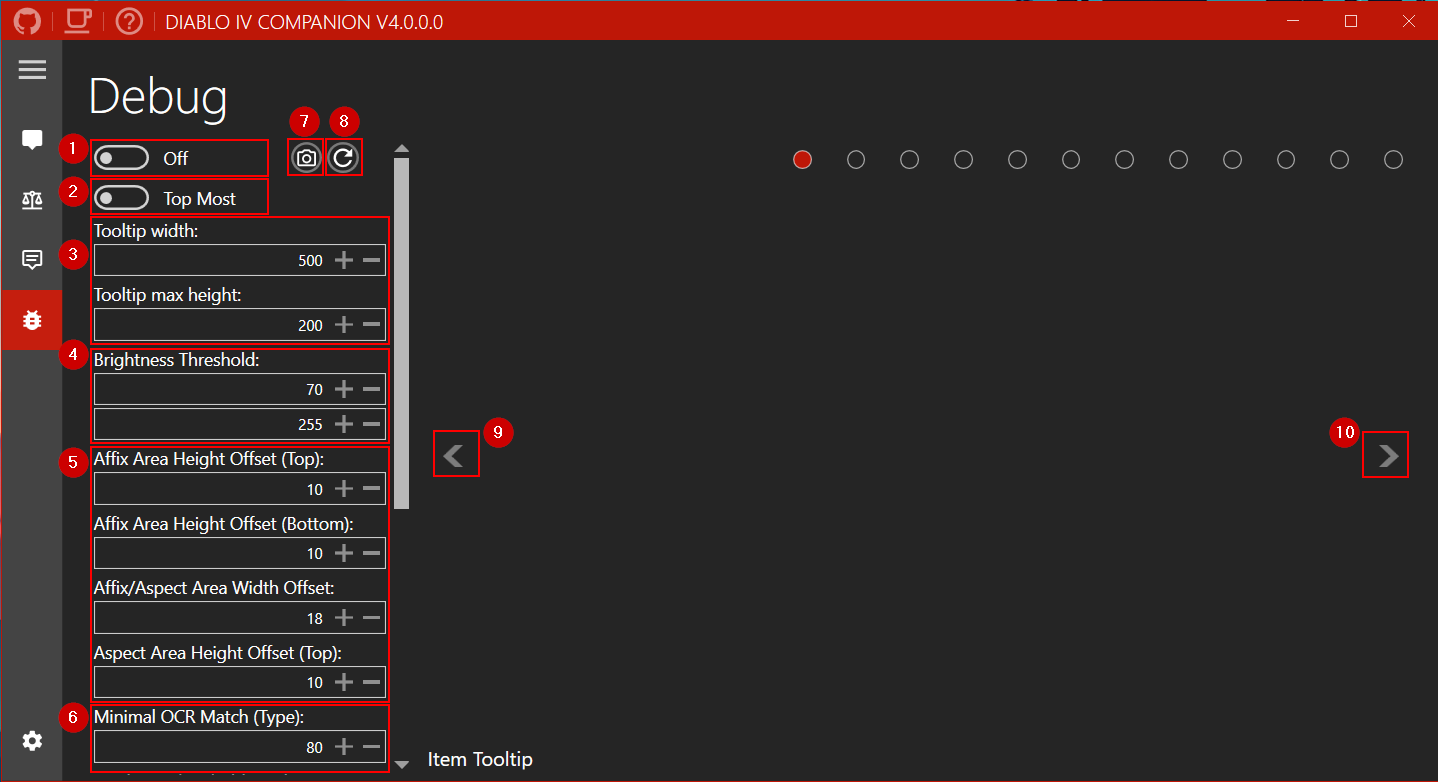
- Toggle the debug information on or off.
- Set the app as the top-most window.
- Set the width of the tooltip. Default for 1440p is 500. Recommended settings for other resolutions are listed when you download a system preset and are applied automatic when you select another preset. The height setting is used to limit item type area of the tooltip.
- Threshold settings for filtering out background noise. Defaults for SDR is (70/255). Recommended settings for HDR are listed when you download a system preset and are applied automatic when you select another preset.
- Area offsets for affixes/aspects descriptions. Recommended settings for each resolution are listed when you download a system preset and are applied automatic when you select another preset.
- Minimum match for OCR converted text that is acceptable. Default is 80%.
- Take a screenshot.
- Reloads the current active system preset.
- Previous debug image.
- Next debug image.
- Similarity thresholds for matching images. A lower value means a closer match is required. Default of 0.05 is recommended.
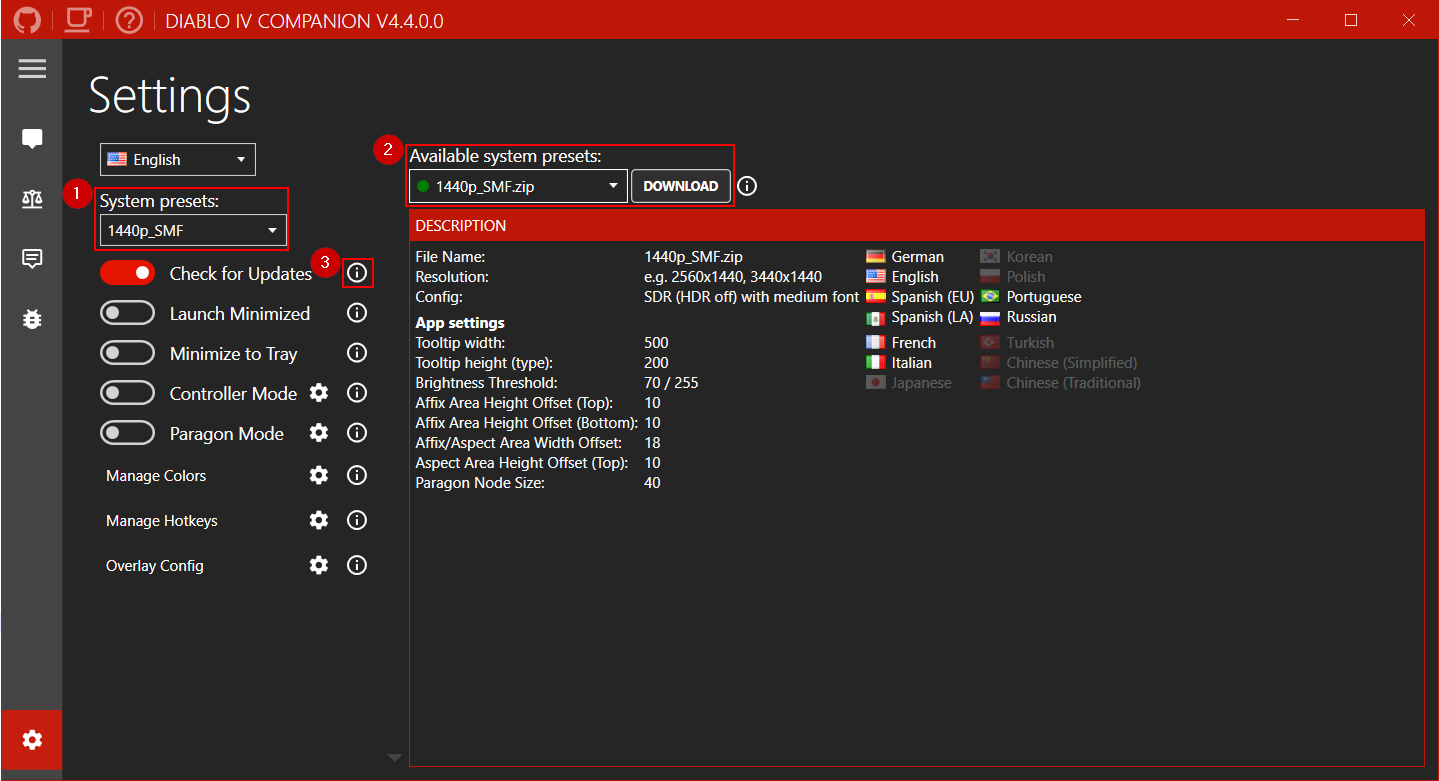
- Select the preset matching your resolution. See wiki to create your own.
- The download manager can be used to download community created system presets. If your language or resolution is missing please send them to me and I’ll add them to the list. Follow the recommended app settings in the description.
- Hover your mouse over one of the info icons to get more detailed information about a setting.
Troubleshooting
See F.A.Q.
Licensing
MIT
Thirdparty packages
The Hidden Gaming Lair
Mentions


评论