SoccerPredictor
SoccerPredictor uses machine learning to predict outcomes of Premier League matches focusing on predicting win-or-draw or loss (corresponding to betting on double chance). The predictions are modeled as time series classification in an unconventional way. A neural network model is created for each team and trained simultaneously.
NOTE:
Please, keep in mind that you will not be able to run the actual training, since I did not publish the dataset. If you would like to test it out, you would have to put together your own. Sites offering juicier features are trickier to scrape, but it is definitely possible.
So, take it mostly as an inspiration if you would like to build something similar or just to take a look how I implemented various things.
Without the dataset, only a visualization and backtesting on the attached set of files can be run. This serves mainly for demonstration purposes.
Please, refer to accompanying blog post to get more information about how the program works.
Results
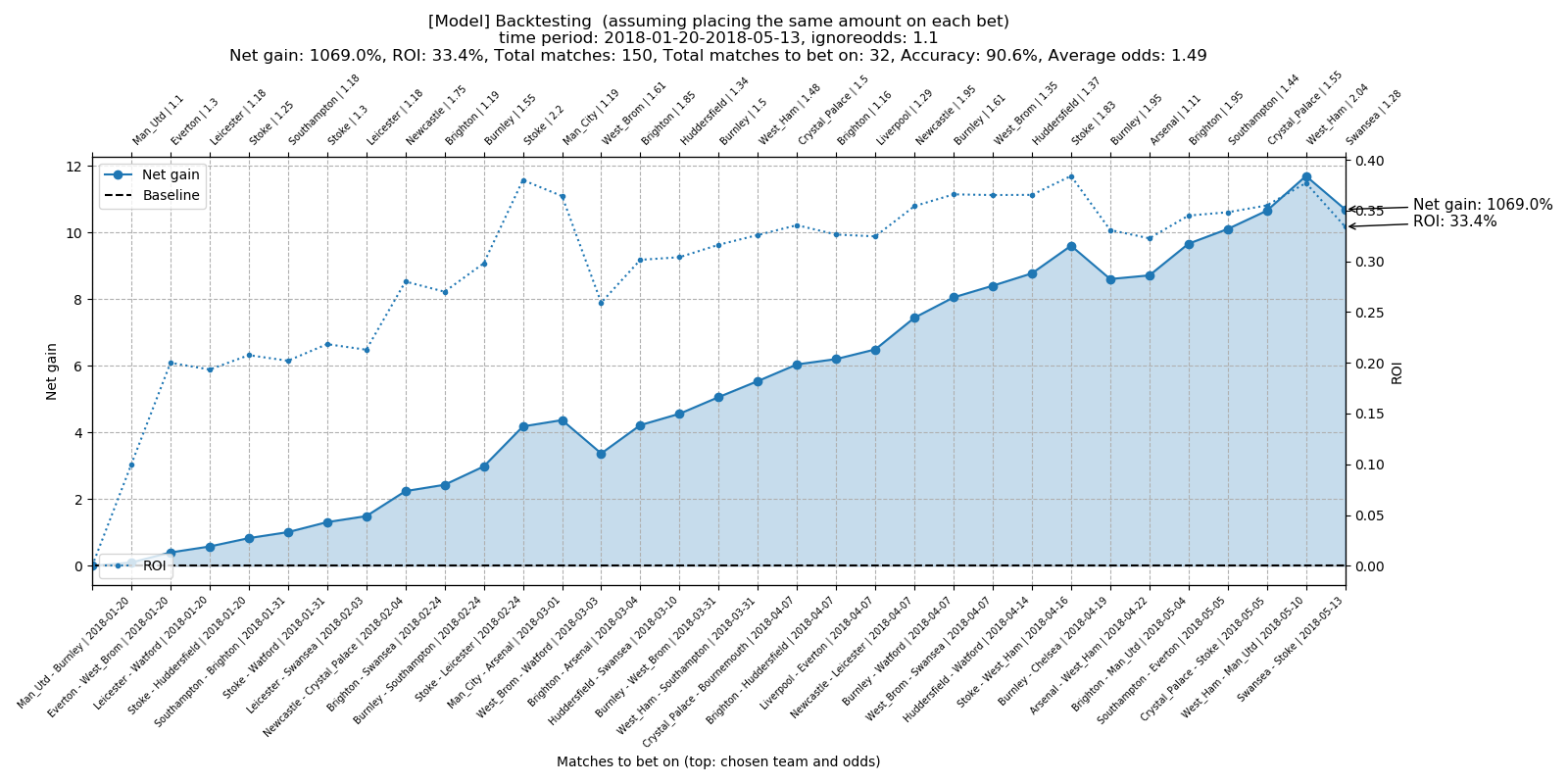
Best result achieved was profit 1069 % with prediction accuracy around 90 % and ROI 33.4 % over the tested period. Timespan of the tested period was 113 days with betting on 32 out of 150 matches totally played.

Installation
Running the program requires manual installation, e.g.:
$ git clone https://github.com/jkrusina/SoccerPredictor

# Create virtual environment and install required libraries
$ python3 -m venv SoccerPredictor
$ cd SoccerPredictor && source bin/activate
$ pip3 install -r requirements.txt

# To deactivate virtual environment
$ deactivate
Usage
The program is intended to be run in three different modes - training, visualization, and backtesting:
$ python3 main.py --help
usage: main.py [-h] {train,vis,backtest} ...

SoccerPredictor:

optional arguments:
  -h, --help            show this help message and exit

Modes to run:
  {train,vis,backtest}
    train               Trains model and makes predictions.
    vis                 Runs visualization of predictions.
    backtest            Runs backtesting on multiple folders.
Training
NOTE: You will not be to run training without the dataset as mentioned above.
$ python3 main.py train
Possible arguments to use:
$ python3 main.py train --help
usage: main.py train [-h] [--resume] [--epochs EPOCHS] [--ntest NTEST]
                     [--ndiscard NDISCARD] [--timesteps TIMESTEPS] [--predict]
                     [--lrpatience LRPATIENCE] [--lrdecay LRDECAY]
                     [--seed SEED] [--savefreq SAVEFREQ]
                     [--printfreq PRINTFREQ] [--verbose {0,1}] [--name NAME]

optional arguments:
  -h, --help            show this help message and exit
  --resume              Resumes training of previously saved model. Tries to
                        load the latest model saved if no name or prefix
                        specified via --name. (default: False)
  --epochs EPOCHS       Number of epochs to train model for. (default: 1)
  --ntest NTEST         Number of last samples used for testing for each team.
                        (default: 10)
  --ndiscard NDISCARD   Number of last samples to discard for each team.
                        (default: 0)
  --timesteps TIMESTEPS
                        Number of timesteps to use as data window size for
                        input to network. (default: 40)
  --predict             Whether to rerun predictions without any training.
                        (default: False)
  --lrpatience LRPATIENCE
                        How many epochs to tolerate before decaying learning
                        rate if no improvement. Turned off if 0. (default: 20)
  --lrdecay LRDECAY     How much to decay learning rate after patience
                        exceeded. (default: 0.95)
  --seed SEED           Specifies seed for rng. (default: None)
  --savefreq SAVEFREQ   How often (number of epochs) to save models. No
                        intermediate saving if 0. (default: 50)
  --printfreq PRINTFREQ
                        How often (number of epochs) to print current
                        summaries. No intermediate printing if 0. (default:
                        10)
  --verbose {0,1}       Level of verbosity. (default: 1)
  --name NAME           Tries to load the latest saved model with given name
                        prefix. Loads exact model if exact dir name specified.
                        Loads latest model if only a prefix of the name
                        specified. (default: None)
Examples:
# Training with fixed seed for 100 epochs
$ python3 main.py train --epochs 100 --seed 42

# Resuming training from latest directory
$ python3 main.py train --resume --epochs 100

# Training with discarding different amount of last samples, useful for backtesting
$ python3 main.py train --epochs 100 --ndiscard 1
$ python3 main.py train --epochs 100 --ndiscard 2
$ python3 main.py train --epochs 100 --ndiscard 3
$ python3 main.py train --epochs 100 --ndiscard 4

# Recreate predictions without training
$ python3 main.py train --predict
Visualization
A simple visualization of the trained model built with Dash.
$ python3 main.py vis
Then it is accessible via browser (by default):
http://127.0.0.1:8050/
Possible arguments to use:
$ python3 main.py vis --help
usage: main.py vis [-h] [--port PORT] [--host HOST] [--name NAME]
                   [--ignoreodds IGNOREODDS]

optional arguments:
  -h, --help            show this help message and exit
  --port PORT           Custom port for Dash visualization. (default: 8050)
  --host HOST           Custom host for Dash visualization. Can use 0 for
                        0.0.0.0 shortcut. (default: 127.0.0.1)
  --name NAME           Tries to load the latest saved model with given name
                        prefix. Loads exact model if exact dir name specified.
                        Loads latest model if only a prefix of the name
                        specified. (default: None)
  --ignoreodds IGNOREODDS
                        Ignores odds less than given amount when predicting
                        which team to bet on. (default: 1.1)
Examples:
# Exact name of directory can be specified
$ python3 main.py vis --name KIIY_2019-11-26T02-13-11_400

# Loads latest directory with given prefix
$ python3 main.py vis --name KIIY
# Change value of odds to ignore
$ python3 main.py vis --ignoreodds 1.01
Backtesting
Backtesting on trained models:
$ python3 main.py backtest
Possible arguments to use:
$ python3 main.py backtest --help
usage: main.py backtest [-h] [--path PATH] [--ignoreodds IGNOREODDS]

optional arguments:
  -h, --help            show this help message and exit
  --path PATH           Path to folder where multiple trained models are
                        saved. (default: ./data/models/)
  --ignoreodds IGNOREODDS
                        Ignores odds less than given amount when predicting
                        which team to bet on. (default: 1.1)
Examples:
# Change value of odds to ignore
$ python3 main.py backtest --ignoreodds 1.01
Requirements
Main requirements are:
- Python 3.7
- Keras 2.3.1
- Tensorflow 1.14.0
- Dash 1.4.1
Other required packages are specified in the requirements.txt file.


评论