Introduction
This repo hosts my Nvim configuration for Linux, macOS, and Windows.
init.lua is the config entry point for terminal Nvim,
and ginit.vim is the additional config file for GUI client of Nvim.
My configurations are heavily documented to make it as clear as possible.
While you can clone the whole repository and use it, it is not recommended though.
Good configurations are personal. Everyone should have his or her unique config file.
You are encouraged to copy from this repo the part you want and add it to your own config.
To reduce the possibility of breakage, this config is only maintained for the latest nvim stable release.
No effort is spent on maintaining backward compatibility.
Install and setup
See doc here on how to install Nvim’s dependencies, Nvim itself,
and how to set up on different platforms (Linux, macOS, and Windows).
Features
UI Demo
For more UI demos, check here.
File fuzzy finding using fzf-lua

Code autocompletion with nvim-cmp

Git add, commit and push via fugitive.vim

Cursor jump via hop.nvim
Go to a string starting with se

GUI-style notification with nvim-notify

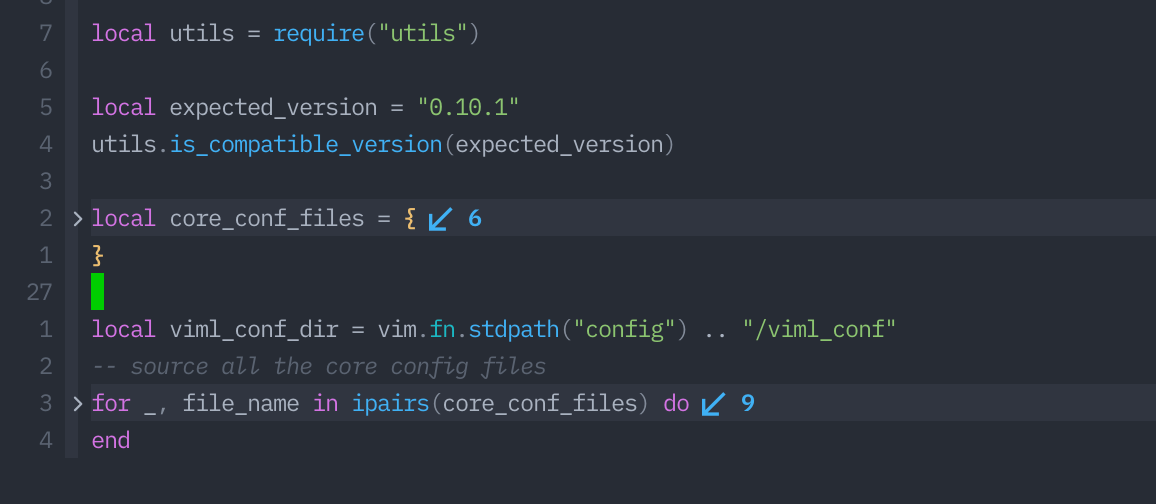
code folding with nvim-ufo and statuscol.nvim
Shortcuts
Some of the shortcuts I use frequently are listed here. In the following shortcuts, <leader> represents ASCII character ,.
| Shortcut |
Mode |
platform |
Description |
<leader>ff |
Normal |
Linux/macOS/Win |
Fuzzy file searching in a floating window |
<leader>fh |
Normal |
Linux/macOS/Win |
Fuzzy help file grepping in a floating window |
<leader>fg |
Normal |
Linux/macOS/Win |
Fuzzy project-wide grepping in a floating window |
<leader>ft |
Normal |
Linux/macOS/Win |
Fuzzy buffer tag searching in a floating window |
<leader>fb |
Normal |
Linux/macOS/Win |
Fuzzy buffer switching in a floating window |
<leader><Space> |
Normal |
Linux/macOS/Win |
Remove trailing white spaces |
<leader>v |
Normal |
Linux/macOS/Win |
Reselect last pasted text |
<leader>ev |
Normal |
Linux/macOS/Win |
Edit Nvim config in a new tabpage |
<leader>sv |
Normal |
Linux/macOS/Win |
Reload Nvim config |
<leader>q |
Normal |
Linux/macOS/Win |
Quit current window |
<leader>Q |
Normal |
Linux/macOS/Win |
Quit all window and close Nvim |
<leader>w |
Normal |
Linux/macOS/Win |
Save current buffer content |
<leader>y |
Normal |
Linux/macOS/Win |
Copy the content of entire buffer to default register |
<leader>cl |
Normal |
Linux/macOS/Win |
Toggle cursor column |
<leader>cd |
Normal |
Linux/macOS/Win |
Change current working directory to to the dir of current buffer |
<space>t |
Normal |
Linux/macOS/Win |
Toggle tag window (show project tags in the right window) |
<leader>gs |
Normal |
Linux/macOS/Win |
Show Git status result |
<leader>gw |
Normal |
Linux/macOS/Win |
Run Git add for current file |
<leader>gc |
Normal |
Linux/macOS/Win |
Run git commit |
<leader>gpl |
Normal |
Linux/macOS/Win |
Run git pull |
<leader>gpu |
Normal |
Linux/macOS/Win |
Run git push |
<leader>gbd |
Normal |
Linux/macOS/Win |
Delete a branch |
<leader>gbn |
Normal |
Linux/macOS/Win |
Create a new branch |
<leader>gl |
Normal/Visual |
Linux/macOS/Win |
Get perm link for current/visually-select lines |
<leader>gbr |
Normal |
macOS |
Browse current git repo in browser |
<leader>gb |
Visual |
macOS |
Blame current line |
<F9> |
Normal |
Linux/macOS/Win |
Compile&run current source file (for C++, LaTeX, Lua, Python) |
<F11> |
Normal |
Linux/macOS/Win |
Toggle spell checking |
<F12> |
Normal |
Linux/macOS/Win |
Toggle paste mode |
\x |
Normal |
Linux/macOS/Win |
Close location or quickfix window |
\d |
Normal |
Linux/macOS/Win |
Close current buffer and go to previous buffer |
{count}gb |
Normal |
Linux/macOS/Win |
Go to buffer {count} or next buffer in the buffer list. |
{operator}iB |
Normal |
Linux/macOS/Win |
Operate in the whole buffer, {operator} can be v, y, c, d etc. |
Alt-k |
Normal |
Linux/macOS/Win |
Move current line or selected lines up |
Alt-j |
Normal |
Linux/macOS/Win |
Move current line or selected lines down |
ctrl-u |
Insert |
Linux/macOS/Win |
Turn word under cursor to upper case |
ctrl-t |
Insert |
Linux/macOS/Win |
Turn word under cursor to title case |
jk |
Insert |
Linux/macOS/Win |
Return to Normal mode without lagging |
ZR |
Normal |
Linux/macOS/Win |
Restart nvim without quitting |
Custom commands
In addition to commands provided by various plugins, I have also created some custom commands for personal use.
| command |
description |
example |
Redir |
capture command output to a tabpage for easier inspection. |
Redir hi |
Edit |
edit multiple files at the same time, supports globing |
Edit *.vim |
Datetime |
print current date and time or convert Unix time stamp to date and time |
Datetime 12345 or Datetime |
JSONFormat |
format a JSON file |
JSONFormat |
CopyPath |
copy current file path to clipboard |
CopyPath relative |
Contributing
If you find anything that needs improving, do not hesitate to point it out or create a PR.
If you come across an issue, you can first use :checkhealth command provided by nvim to trouble-shoot yourself.
Please read carefully the messages provided by health check.
If you still have an issue, open a new issue.
Further readings
Some of the resources that I find helpful in mastering Nvim is documented here.
You may also be interested in my posts on configuring Nvim here.


评论