sms-spring-boot-project
短信服务 Spring Boot Starter,目前只支持腾讯和阿里短信服务,腾讯和阿里云短信均已验证,期待各位小伙伴合作完善这个 starter。
前言
短信服务在用户注册、登录、找回密码等相关操作中,可以让用户使用更加便捷,越来越多的公司都采用短信验证的方式让用户进行操作,从而提高用户的实用性。
Spring Boot Starter
由于 Spring Boot 的约定大于配置的理念,使得在使用 Spring 变得更加方便。Spring Boot 项目组提供了很多 Starter,让我们在使用 Spring 的时候变得非常容易。对于官方提供的 Starter 采用 spring-boot-starter-xxx开头,对于非官方提供的Spring Boot Starter,官方建议采用 xxxx-spring-boot-starter 命名。
短信服务 Starter
1. 开发工具及编译
- IntelliJ IDEA 2018.2.5
- Maven 3.5
- JDK 1.8
2. 如何使用 sms-spring-boot-starter
(1). 在 pom 文件中引入
<dependency>
   <groupId>com.github.jackieonway.sms</groupId>
   <artifactId>sms-spring-boot-starter</artifactId>
   <version>0.0.1</version>
</dependency>
(2). 在 application.yml 中进行配置
spring:
  jackieonway:
    sms:
      sms-type: tencent  # 短信服务商 暂目前只有 腾讯和阿里的短信服务,默认为ali
      security-key: your security-key # 短信的私钥
      appid: your appid # 短信的应用id
      sign: your sign # 短信的签名
如果是阿里云短信,请参考以下配置:
spring:
  jackieonway:
    sms:
      sms-type: ali  # 短信服务商 暂目前只有 腾讯和阿里的短信服务,默认为ali
      access-key: your aliyun access-key-id # 阿里云短信服务的公钥
      security-key: your aliyun access-key-secret # 阿里云短信服务的私钥
      region-id: cn-hangzhou # 阿里云短信服务的特有区域id
(3). 在 Springboot 主程序上加入注解
@SpringBootApplication
@EnabledSmsAutoConfiguration
public class SmsDemoApplication {

   public static void main(String[] args) {
       SpringApplication.run(SmsDemoApplication.class, args);
   }

}
(4). 创建发送短信程序
- 可以采用排除相关依赖的方式注入 Service;
- 可以采用加
@Qualifier("tencentSmsService") 的方式注入 Service ,value 的可选值目前只有 tencentSmsService 和 aliSmsService 两种;
- 可以采用以下方法进行注入,方式与方法 2 类似:
    @Autowired
    private SmsService tencentSmsService;
注意: 采用方式 1 ,最终的 jar 包将会比方式 2 和方法 3 小,但是最终只有一种短信模式生效,即只能使用一个短信运营商的服务,方式 2 和 3 能快速切换短信运营商。
参考示例如下:
@RestController
public class HelloController {

    @Autowired
    private SmsService tencentSmsService;

//    @Autowired
//    private SmsService aliSmsService;

    @GetMapping("/tencent")
    public Object tencent() {
        // 具体配置请参照具体运营商
        // your template params
        String[] paramst = {"5678","5"};
        TencentSmsRequest tencentSmsRequest = new TencentSmsRequest();
        tencentSmsRequest.setPhoneNumber(new String[]{"your cellphone"});
        tencentSmsRequest.setParams(paramst);
        return tencentSmsService.sendTemplateSms("328921", tencentSmsRequest);
    }

    /* @GetMapping("/ali")
     public Object ali() {
         // 具体配置请参照具体运营商
         AliSmsRequest aliSmsRequest = new AliSmsRequest();
         aliSmsRequest.setPhoneNumbers(new String[]{"18600000000"});
         aliSmsRequest.setTemplateParam("{\"code\":\"123456\"}");
         aliSmsRequest.setSignName("xx科技");
         return aliSmsService.sendTemplateSms("SMS_148614533",aliSmsRequest);
     }*/
}
(5). 发送
访问 localhost:8080/tencent

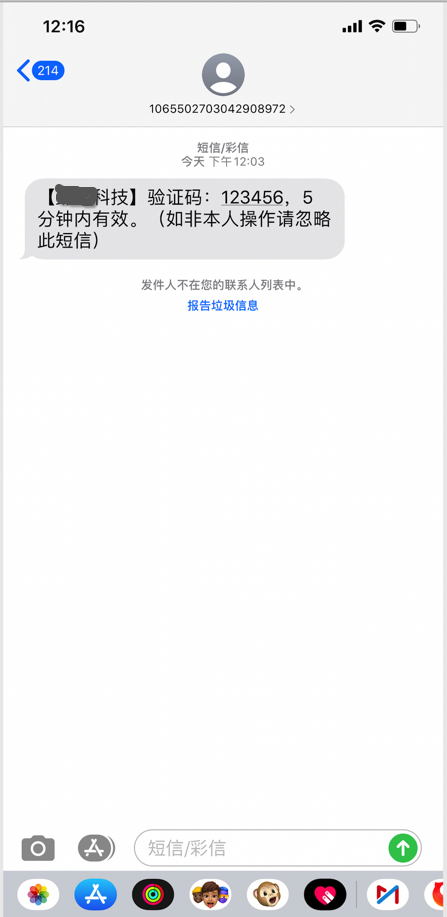
访问 http://localhost:8080/ali,短信发送成功:
3. SmsService 接口
    /**
     *  单个发送短信
     * @param params 根据对应的短信服务商所需信息填写
     */
    public Object sendSms(Integer type,Object params) throws SmsException;

    /**
     * 单个发送模板短信
     * @param tempalteId 短信模板id
     * @param params 根据对应的短信服务商所需信息填写
     */
    public Object sendTemplateSms(String tempalteId, Object params) throws SmsException;

    /**
     *  批量发送短信
     * @param params 根据对应的短信服务商所需信息填写
     */
    public Object sendBatchSms(int type,Object params) throws SmsException;

    /**
     * 批量发送模板短信
     * @param tempalteId 短信模板id
     * @param params 根据对应的短信服务商所需信息填写
     */
    public Object sendBatchTemplateSms(String tempalteId, Object params) throws SmsException;
该接口提供了单个和群发短信与模板短信,注意目前只提供了同步发送方法,异步发送方法,请结合线程池进行。
总结
只是针对腾讯短信服务进行了试验,阿里的短信服务并未真正验证, 目前腾讯短信服务和阿里云短信服务均已验证成功,希望各位小伙伴共同完善该 starter,觉得有用请 starter 该项目。如果只想使用而腾讯云或者阿里云短信业务的话,按照 Demo 使用即可。
github地址:sms-spring-boot-project
云之讯短信服务提供: bigbearLoveTingting


评论