MIT License

技术解读

以下内容由 GitRead 中文社区 编辑团队基于项目 README 与官方资料整理, 结合中文开发者的常见使用场景补充技术选型建议。具体以项目官方文档为准。

深度技术分析:giswqs/qgis-earthengine-examples 项目

项目背景与痛点

在遥感数据分析领域,Google Earth Engine(GEE)因其庞大的遥感数据集和强大的计算能力,成为众多研究者首选。然而,GEE 在用户界面和地理信息系统的整合方面一直略显薄弱。giswqs/qgis-earthengine-examples 提供了丰富的 Python 例程,使得研究者可以在 QGIS 这一强大且灵活的地理信息系统中利用 GEE 的数据与计算资源。项目通过集成 GEE 与 QGIS,满足了科研人员在地理信息系统中进行大规模遥感数据处理和分析的需求。

核心技术揭秘

giswqs/qgis-earthengine-examples 项目的核心在于通过 Python 脚本实现 GEE 的函数调用和 QGIS 插件的交互。GEE 提供了 Remote Sensing、图像处理和矢量数据处理等功能,这些功能需通过 HTTP API 访问。QGIS 插件框架允许开发者通过 Python 脚本创建自定义插件,从而将 GEE 的能力嵌入 QGIS 中。

graph TD A[用户请求] --> B[QGIS 插件] B --> C[HTTP 请求] C --> D[GEE API] D --> E[GEE 服务器] E --> F[数据处理] F --> G[返回结果] G --> H[QGIS 插件] H --> I[展示结果]

QGIS 插件负责用户的交互,包括参数设置和结果展示。GEE API 提供数据下载、处理和计算,通过 HTTP 请求与 GEE 服务器通讯。返回的结果通过插件展示在 QGIS 用户界面上。

功能亮点与差异

这个项目最大的亮点在于它将 QGIS 的用户界面与 GEE 的强大计算能力结合在一起,提供了一系列的 Python 代码示例,帮助用户快速掌握如何在 QGIS 中集成 GEE 的功能。相比其他类似工具,它具有以下独特优势:

  1. 丰富示例集:提供超过 300 个代码示例,涵盖 GEE 的功能范围,方便用户快速上手。
  2. 插件架构:通过 QGIS 插件系统来整合 GEE 的服务,使得用户无需离开 QGIS 环境即可进行复杂的数据处理。
  3. 迭代更新:维护者持续关注 GEE 新功能的发布并进行适配优化,确保插件始终能使用 GEE 的最新能力。

应用场景与落地建议

该插件适合需要在 QGIS 环境中进行遥感数据分析的用户。在实际部署和使用过程中,需要注意以下几点:

  1. 网络稳定性:GEE API 的使用依赖于高速且稳定的 Internet 连接。在网络条件不佳的情况下,交互可能会较慢。
  2. 数据权限:一些 GEE 数据集需要授权访问,使用前需确保账号权限。
  3. 计算资源管理:GEE 提供了云端计算资源,用户在进行大规模数据处理时,需注意任务优化和资源配置以避免不必要的资源浪费。

综合评价

优点

  • 提供了大量的代码示例,降低了 GEE 和 QGIS 的学习曲线,使得遥感数据分析业务能够在熟悉 QGIS 工具的环境下进行。
  • 插件化的方式将两者无缝结合,使功能扩展变得容易,开发者可以基于现有框架进行二次开发和功能增强。

缺点

  • 对于资源丰富的用户而言,GEE 的计算能力与 QGIS 本身的功能结合尚有拓展空间,例如在本地数据处理的支持上还可以进一步增强。
  • 项目更新主要依赖于维护者,数据与算法的多样化要求开发者持续更新代码库。

关于

GitHub 原始描述(英文)

A collection of 300+ Python examples for using Google Earth Engine in QGIS

描述取自 GitHub 官方 API,保持仓库作者书写的原文。

简要分析

热度分
1613
价值分
686
活跃状态
活跃

语言占比

JavaScript
Jupyter Notebook
Python

README

qgis-earthengine-examples

License: MIT

A collection of 290+ Python examples for using Google Earth Engine in QGIS

Contact: Qiusheng Wu (https://wetlands.io)

1. Description

This repository is a collection of 290+ Python examples for the Google Earth Engine plugin for QGIS. I developed these Python examples by converting all the JavaScript examples (except those not yet supported by plugin) from the Google Earth Engine API Documentation. Additionally, some examples were adapted from Google Earth Engine plugin and the Earth Engine API examples. Kudos to GEE Community for developing this amazing Google Earth Engine plugin for QGIS.

2. Usage

  • Step 1: Sign up for Google Earth Engine.
  • Step 2: Install QGIS.
  • Step 3: Install the Google Earth Engine Plugin for QGIS and authenticate Google Earth Engine.
  • Step 4: Git clone or download this repository.
  • Step 5: Open the Python console in QGIS and load any downloaded Python script into the QGIS Python Editor.
  • Step 6: Click the Run script button on the Python Editor to execute the script.
  • Step 7: Zoom in/out the QGIS Canvas to inspect the results.

3. Add QGIS Basemaps

  • Open the Python console in QGIS and load the Python script (Basemaps/qgis_basemaps.py) into the QGIS Python Editor.
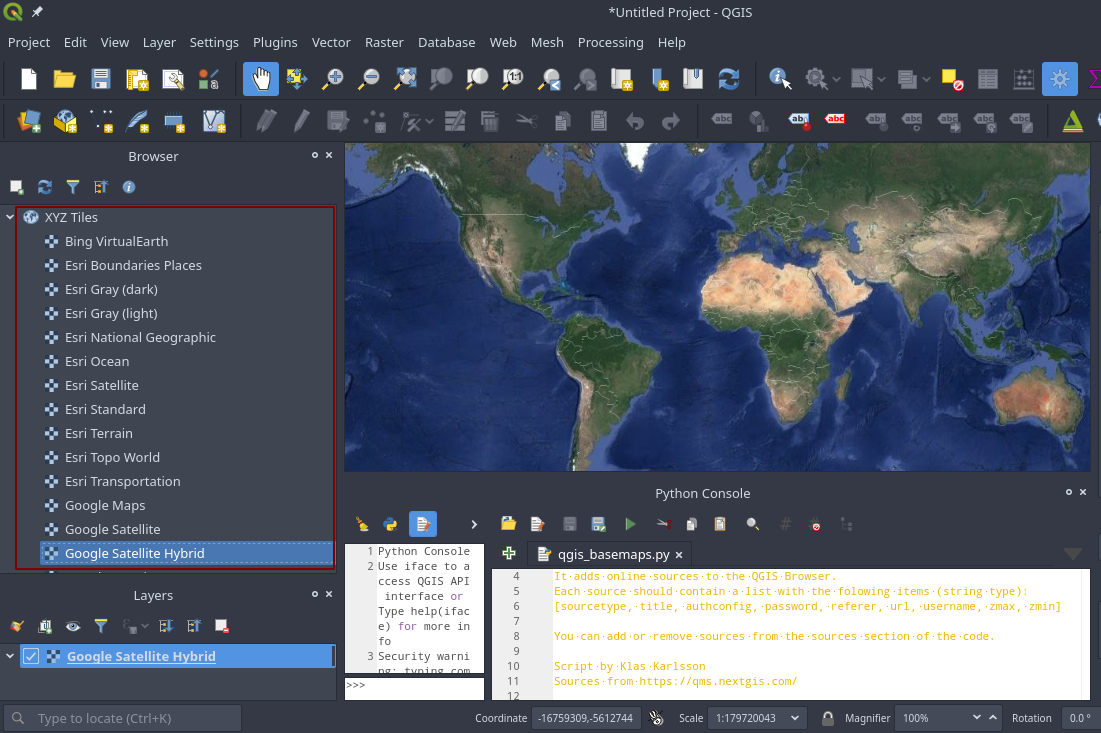
  • Click the Run script button on the Python Editor to execute the script. This will add many basesmaps as XYZ tiles to QGIS. Select and double click any basemap under XYZ Ttiles to be added to QGIS Canvas. See the screenshot below.
  • Alternatively, you can install the QGIS QuickMapServices plugin. After installing the plugin, go to QGIS – Web –QuickMapServices – Settings – More services – Get contributed pack – Save.

QGIS Basemaps

4. Earth Engine QGIS Plugin Demo

qgis-gee-demo

5. Earth Engine and Folium Interactive Mapping

If you do not have QGIS installed on your computer, you can try Earth Engine API and the folium library for interactive mapping. A Jupyter notebook example can be found here.

6. QGIS Examples

The Table of Contents below mimics the structure of the Google Earth Engine API Documentation. I strongly encourage you to check out the API Documentation if you need an in-depth explanation of each Python example. Please note that the list below does not include all the Python examples contained in this repository. You are welcome to explore the repository and find more examples to suit your needs.

Get Started

Machine Learning

Image

ImageCollection

Geometry, Feature, FeatureCollection

Reducer

Join

Array

Specialized Algorithms

Asset Management

How Earth Engine Works

Filter

Visualization

Datasets

Tutorials

Gena’s Examples

评论

暂无评论