FPGA Drive FMC Reference Designs
Description
This repository provides example designs for connecting NVMe SSDs and other M.2 M-key modules to various FPGA, MPSoC,
and ACAP evaluation boards. These designs are compatible with both standalone and PetaLinux environments, and all scripts
and code are provided for building these environments. The interface between the evaluation board and M.2 modules is
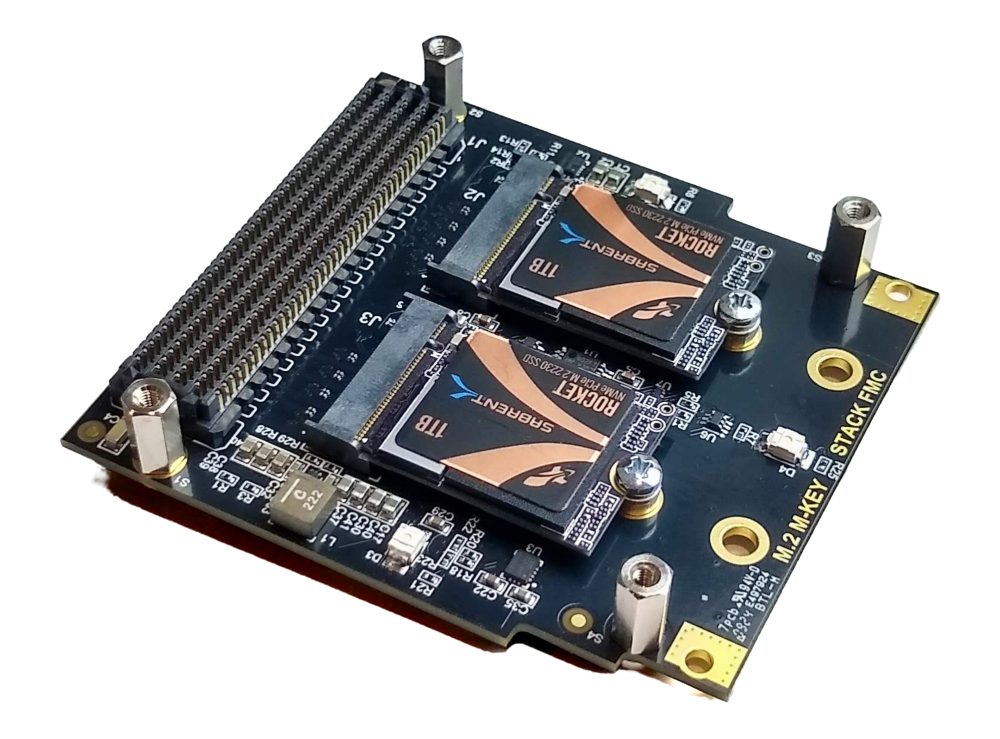
facilitated by Opsero’s FPGA Drive FMC Gen4 (OP063) and M.2 M-key Stack FMC (OP073) mezzanine cards, either of which can be used with
these designs.
| FPGA Drive FMC Gen4 |
M.2 M-key Stack FMC |
 |
 |
Important links:
Requirements
This project is designed for version 2025.2 of the Xilinx tools (Vivado/Vitis/PetaLinux).
If you are using an older version of the Xilinx tools, then refer to the
release tags
to find the version of this repository that matches your version of the tools.
In order to test this design on hardware, you will need the following:
Target designs
This repo contains several designs that target various supported development boards and their
FMC connectors. The table below lists the target design name, the M2 ports supported by the design and
the FMC connector on which to connect the mezzanine card. Some of the target designs
require a license to generate a bitstream with the AMD Xilinx tools.
FPGA designs
| Target board |
Target design |
M2 Slot 1
PCIe Lanes |
M2 Slot 2
PCIe Lanes |
FMC Slot |
Standalone |
PetaLinux |
Yocto |
Vivado
Edition |
IP
License |
| KC705 |
kc705_hpc |
4 |
- |
HPC |
:white_check_mark: |
:x: |
:x: |
Enterprise |
- |
| KC705 |
kc705_lpc |
1 |
- |
LPC |
:white_check_mark: |
:x: |
:x: |
Enterprise |
- |
| KCU105 |
kcu105_hpc |
4 |
4 |
HPC |
:white_check_mark: |
:x: |
:x: |
Enterprise |
- |
| KCU105 |
kcu105_lpc |
1 |
- |
LPC |
:white_check_mark: |
:x: |
:x: |
Enterprise |
- |
| VC707 |
vc707_hpc1 |
4 |
- |
HPC1 |
:white_check_mark: |
:x: |
:x: |
Enterprise |
- |
| VC707 |
vc707_hpc2 |
4 |
- |
HPC2 |
:white_check_mark: |
:x: |
:x: |
Enterprise |
- |
| VC709 |
vc709_hpc |
4 |
- |
HPC |
:white_check_mark: |
:x: |
:x: |
Enterprise |
- |
| VCU118 |
vcu118 |
4 |
4 |
FMCP |
:white_check_mark: |
:x: |
:x: |
Enterprise |
- |
Zynq-7000 designs
| Target board |
Target design |
M2 Slot 1
PCIe Lanes |
M2 Slot 2
PCIe Lanes |
FMC Slot |
Standalone |
PetaLinux |
Yocto |
Vivado
Edition |
IP
License |
| PicoZed 7015 |
pz_7015 |
1 |
- |
LPC |
:white_check_mark: |
:white_check_mark: |
:white_check_mark: |
Standard :free: |
- |
| PicoZed 7030 |
pz_7030 |
1 |
- |
LPC |
:white_check_mark: |
:white_check_mark: |
:white_check_mark: |
Standard :free: |
- |
| ZC706 |
zc706_hpc |
4 |
- |
HPC |
:white_check_mark: |
:white_check_mark: |
:white_check_mark: |
Enterprise |
- |
| ZC706 |
zc706_lpc |
1 |
- |
LPC |
:white_check_mark: |
:white_check_mark: |
:white_check_mark: |
Enterprise |
- |
Zynq UltraScale+ designs
| Target board |
Target design |
M2 Slot 1
PCIe Lanes |
M2 Slot 2
PCIe Lanes |
FMC Slot |
Standalone |
PetaLinux |
Yocto |
Vivado
Edition |
IP
License |
| UltraZed-EV Carrier |
uzev |
4 |
4 |
HPC |
:white_check_mark: |
:white_check_mark: |
:white_check_mark: |
Standard :free: |
- |
| ZCU104 |
zcu104 |
1 |
- |
LPC |
:white_check_mark: |
:white_check_mark: |
:white_check_mark: |
Standard :free: |
- |
| ZCU106 |
zcu106_hpc0 |
4 |
4 |
HPC0 |
:white_check_mark: |
:white_check_mark: |
:white_check_mark: |
Standard :free: |
- |
| ZCU106 |
zcu106_hpc1 |
1 |
- |
HPC1 |
:white_check_mark: |
:white_check_mark: |
:white_check_mark: |
Standard :free: |
- |
| ZCU111 |
zcu111 |
4 |
4 |
FMCP |
:white_check_mark: |
:white_check_mark: |
:white_check_mark: |
Enterprise |
- |
| ZCU208 |
zcu208 |
4 |
4 |
FMCP |
:white_check_mark: |
:white_check_mark: |
:white_check_mark: |
Enterprise |
- |
| ZCU216 |
zcu216 |
4 |
4 |
FMCP |
:white_check_mark: |
:white_check_mark: |
:white_check_mark: |
Enterprise |
- |
Versal designs
| Target board |
Target design |
M2 Slot 1
PCIe Lanes |
M2 Slot 2
PCIe Lanes |
FMC Slot |
Standalone |
PetaLinux |
Yocto |
Vivado
Edition |
IP
License |
| VCK190 |
vck190_fmcp1 |
4 |
4 |
FMCP1 |
:white_check_mark: |
:white_check_mark: |
:white_check_mark: |
Enterprise |
- |
| VCK190 |
vck190_fmcp2 |
4 |
4 |
FMCP2 |
:white_check_mark: |
:white_check_mark: |
:white_check_mark: |
Enterprise |
- |
| VHK158 |
vhk158 |
4 |
- |
FMCP |
:white_check_mark: |
:white_check_mark: |
:white_check_mark: |
Enterprise |
- |
| VMK180 |
vmk180_fmcp1 |
4 |
4 |
FMCP1 |
:white_check_mark: |
:white_check_mark: |
:white_check_mark: |
Enterprise |
- |
| VMK180 |
vmk180_fmcp2 |
4 |
4 |
FMCP2 |
:white_check_mark: |
:white_check_mark: |
:white_check_mark: |
Enterprise |
- |
| VEK280 |
vek280 |
4 |
4 |
FMCP |
:white_check_mark: |
:white_check_mark: |
:white_check_mark: |
Enterprise |
- |
| VPK120 |
vpk120 |
4 |
- |
FMCP |
:white_check_mark: |
:white_check_mark: |
:white_check_mark: |
Enterprise |
- |
| VPK180 |
vpk180 |
4 |
- |
FMCP |
:white_check_mark: |
:white_check_mark: |
:white_check_mark: |
Enterprise |
- |
Notes:
- The Vivado Edition column indicates which designs are supported by the Vivado Standard Edition, the
FREE edition which can be used without a license. Vivado Enterprise Edition requires
a license however a 30-day evaluation license is available from the AMD Xilinx Licensing site.
- The VPK120, VPK180 and VHK158 have enough GTs to interface with both M.2 slots, however they have only 2 integrated PCIe blocks
one of which is on the opposite side of the device with respect to the relevant GT quads, making routing a challenge.
For this reason these designs supports only 1x M.2 slot.
Software
These reference designs can be driven by a standalone (bare-metal) application or
from within an embedded Linux environment. The repository includes all the scripts
and code needed to build either one.
For Linux, two build flows are provided, both based on AMD’s 2025.2 tools:
- PetaLinux — AMD’s long-standing embedded Linux build tool (see the
PetaLinux/
directory).
- Yocto / EDF — AMD’s Embedded Development Framework, the announced successor to
PetaLinux, built with the
gen-machineconf parse-sdt flow (see the Yocto/
directory).
[!IMPORTANT]
The PetaLinux flow is being retired for this repository. Version 2025.2 is the
last tool release for which we will support PetaLinux; from the next tool version
onward, Linux images will be built with the Yocto / EDF flow only. New work should
use the Yocto flow.
For 2025.2, both flows produce an equivalent Linux image with the same applications,
so you can pick whichever fits your workflow. The target design tables
show which boards are supported by each flow.
| Environment |
Build flow |
Available applications |
| Standalone |
Vitis |
PCIe enumeration test |
| Linux |
PetaLinux / Yocto |
Built-in Linux commands
Additional tools: nvme-cli, pciutils (lspci), mke2fs, mkfs, mount, blkid, fdisk
Versal: SSD speed-test scripts |
The standalone application reports on the status of the PCIe link and performs
enumeration of the detected PCIe end-points (i.e. the M.2 modules). Under Linux, those
same M.2 SSDs come up as NVMe block devices that you can partition, format and test
with the bundled tools. The Yocto images also bring up the board’s Ethernet port (DHCP,
SSH server). The user guide describes the hardware
design of each device family (with block diagrams), and how to boot, log in and test the
SSDs, including the link speeds and throughput to expect.
Build instructions
Clone the repo and change into its directory:
git clone --recursive https://github.com/fpgadeveloper/fpga-drive-aximm-pcie.git
cd fpga-drive-aximm-pcie
All builds are driven by build.py at the repo root, on both Windows
(git bash) and Linux. The build.sh / build.bat shim finds a suitable
Python 3 automatically (including the one bundled with the AMD tools).
Pick a target design label from the tables above (or run ./build.sh list), then run the build command for the stage(s) you want — each
command builds whatever it depends on automatically and skips anything
already built. On Windows without git bash, run the same commands from
Command Prompt or PowerShell using build.bat (e.g. build.bat xsa --target <target>).
You don’t need to source the AMD tools first — the build runner finds
Vivado, Vitis and PetaLinux automatically in their standard install
locations and sets up the environment each stage needs. If your tools
are installed somewhere non-standard and the runner can’t find them,
source the tool settings yourself before running the build.
Build the Vivado project (bitstream + XSA)
./build.sh xsa --target <target>
Build the standalone application
Builds the Vitis workspace and the baremetal boot file (BOOT.BIN or
bit file, depending on the device family):
./build.sh standalone --target <target>
Build PetaLinux (Linux only)
./build.sh petalinux --target <target>
Note: this release supports both PetaLinux and Yocto; PetaLinux will be
dropped in favor of the Yocto flow at the next version update.
Build Yocto (Linux only)
./build.sh yocto --target <target>
Build everything
Builds all of the above that the target supports, then gathers the boot
images into bootimages/*.zip:
./build.sh all --target <target>
./build.sh all --target all          # every target in the repo
Also available: status, clean, project — see
./build.sh --help. On Windows, the PetaLinux and Yocto stages require a
Linux machine; the runner says so and prints the hand-off command. The
legacy make interface still works on Linux (each Makefile now wraps
build.sh) but is deprecated and will be removed at the next version
update.
Contribute
We strongly encourage community contribution to these projects. Please make a pull request if you
would like to share your work:
- if you’ve spotted and fixed any issues
- if you’ve added designs for other target platforms
- if you’ve added software support for other devices
Thank you to everyone who supports us!
About us
Opsero Inc. is a team of FPGA developers delivering FPGA products and
design services to start-ups and tech companies. Follow our blog,
FPGA Developer, for news, tutorials and
updates on the awesome projects we work on.


评论