


About
•
Features
•
Installation
•
Images
•
Help
About
The TradingView Webhook Bot ⚙️ listens to TradingView alerts via webhooks using flask.
All alerts can be instantly sent to Telegram, Discord, Twitter and/or Email.
📊 If you are looking for an exchange to trade on, I can recommend Bybit.
Sign up now and receive up to $30,000 in Deposit Rewards!
Features
- Telegram Support using the Python Telegram libary.
- Discord Support using webhooks.
- Slack Support using webhooks.
- Twitter Support using the tweepy libary.
- Email Support using smtplib.
- Alert channels can be enabled or disabled in
config.py.
- Dynamically send alerts to different Telegram and/or Discord channels.
- TradingView
{{close}}, {{exchange}} etc. variables support. Read more here.
Installation
⚠️ Best to run the bot on a VPS. I can recommend Hetzner's CX11 VPS for 3.79€/month. Sign up now and receive €20 free credits.
- Clone this repository
git clone https://github.com/fabston/TradingView-Webhook-Bot.git
- Create your virtual environment
python3 -m venv TradingView-Webhook-Bot
- Activate it
source TradingView-Webhook-Bot/bin/activate && cd TradingView-Webhook-Bot
- Install all requirements
pip install -r requirements.txt
- Edit and update
config.py
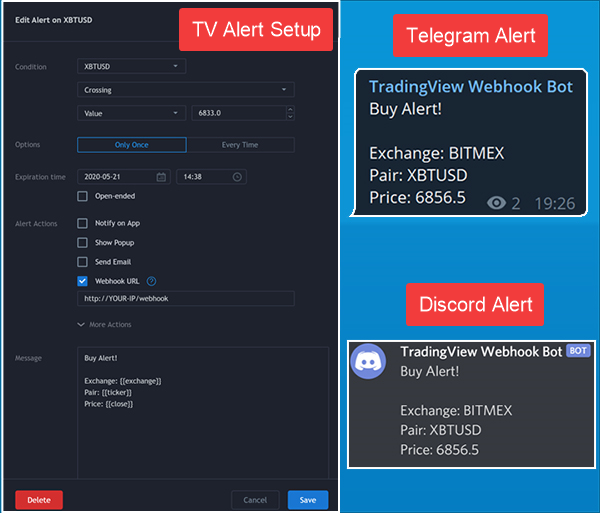
- Setup TradingView alerts. An example alert message would be:
{
 "key": "9T2q394M92",
 "telegram": "-1001277977502",
 "discord": "789842341870960670/BFeBBrCt-w2Z9RJ2wlH6TWUjM5bJuC29aJaJ5OQv9sE6zCKY_AlOxxFwRURkgEl852s3",
 "slack": "T00000000/B00000000/XXXXXXXXXXXXXXXXXXXXXXXX",
 "msg": "Long *#{{ticker}}* at `{{close}}`"
}
key is mandatory! It has to match with sec_key in config.py. It’s an extra security measurement to ensure nobody else is executing your alertstelegram, discord, slack is optional. If it is not set it will fall back to the config.py settingsmsg can be anything. Markdown for Telegram and Discord is supported as well
- TradingViews variables like
{{close}}, {{exchange}} etc. work too. More can be found here
- Your webhook url would be
http://<YOUR-IP>/webhook
- If you use a firewall be sure to open the corresponding port
- Run the bot with
python main.py
- PM2 can help you in running the app in the background / on system boot.
Forward Port 80 to 8080 using NGINX
It is recommended to run flask on a different port like 8080. It is then necessary to forward port 80 to 8080.
- Install the necessary packages:
sudo apt-get install nginx
- Edit the NGINX configuration file:
sudo nano /etc/nginx/sites-enabled/tv_webhook
- Add the following content:
server {
   listen 80;

   server_name <YOUR-IP>;

   location / {
       proxy_pass http://127.0.0.1:8080;  # Forward traffic to port 8080
       proxy_set_header Host $host;
       proxy_set_header X-Real-IP $remote_addr;
       proxy_set_header X-Forwarded-For $proxy_add_x_forwarded_for;  # Pass client's IP address
       proxy_set_header X-Forwarded-Proto $scheme;
   }
}
- Restart NGINX
sudo service nginx restart
Docker
- Clone this repository
git clone https://github.com/fabston/TradingView-Webhook-Bot.git
- Edit and update
config.py
docker-compose builddocker-compose up
Images
How can I help?
All kinds of contributions are welcome 🙌! The most basic way to show your support is to ⭐️ star the project, or raise 🐞 issues.


评论