eBPF Developer Tutorial: Learning eBPF Step by Step with Examples


GitHub
Gitee Mirror
中文版
This is a development tutorial for eBPF based on CO-RE (Compile Once, Run Everywhere). It provides practical eBPF development practices from beginner to advanced, including basic concepts, code examples, and real-world applications. Unlike BCC, we use frameworks like libbpf, Cilium, libbpf-rs, and eunomia-bpf for development, with examples in languages such as C, Go, and Rust.
This tutorial does not cover complex concepts and scenario introductions. Its main purpose is to provide examples of eBPF tools (very short, starting with twenty lines of code!) to help eBPF application developers quickly grasp eBPF development methods and techniques. The tutorial content can be found in the directory, with each directory being an independent eBPF tool example.
The tutorial focuses on eBPF examples in observability, networking, security, and more.
中文版在这里
Table of Contents
Getting Started Examples
This section contains simple eBPF program examples and introductions. It primarily utilizes the eunomia-bpf framework to simplify development and introduces the basic usage and development process of eBPF.
Advanced Documents and Examples
We start to build complete eBPF projects mainly based on libbpf and combine them with various application scenarios for practical use.
In-Depth Topics
This section covers advanced topics related to eBPF, including using eBPF programs on Android, possible attacks and defenses using eBPF programs, and complex tracing. Combining the user-mode and kernel-mode aspects of eBPF can bring great power (as well as security risks).
GPU:
Scheduler:
Networking:
Tracing:
Security:
Features:
Other:
- lesson 49-hid Fixing Broken HID Devices Without Kernel Patches
- cgroup cgroup-based Policy Control
Android:
Continuously updating…
Why write this tutorial?
In the process of learning eBPF, we have been inspired and helped by the bcc Python developer tutorial. However, from the current perspective, using libbpf to develop eBPF applications is a relatively better choice.
This project is mainly based on libbpf frameworks.
- We also provide a small tool called GPTtrace, which uses ChatGPT to automatically write eBPF programs and trace Linux systems through natural language descriptions. This tool allows you to interactively learn eBPF programs: GPTtrace
- Feel free to raise any questions or issues related to eBPF learning, or bugs encountered in practice, in the issue or discussion section of this repository. We will do our best to help you!
Install deps and Compile
GitHub Templates: Easily build eBPF projects and development environments, compile and run eBPF programs online with one click
When starting a new eBPF project, are you confused about how to set up the environment and choose a programming language? Don’t worry, we have prepared a series of GitHub templates for you to quickly start a brand new eBPF project. Just click the Use this template button on GitHub to get started.
These starter templates include the following features:
- A Makefile to build the project with a single command
- A Dockerfile to automatically create a containerized environment for your eBPF project and publish it to GitHub Packages
- GitHub Actions to automate the build, test, and release processes
- All dependencies required for eBPF development
By setting an existing repository as a template, you and others can quickly generate new repositories with the same basic structure, eliminating the need for manual creation and configuration. With GitHub template repositories, developers can focus on the core functionality and logic of their projects without wasting time on the setup and structure. For more information about template repositories, see the official documentation: https://docs.github.com/en/repositories/creating-and-managing-repositories/creating-a-template-repository
When you create a new repository using one of the eBPF project templates mentioned above, you can easily set up and launch an online development environment with GitHub Codespaces. Here are the steps to compile and run eBPF programs using GitHub Codespaces:
-
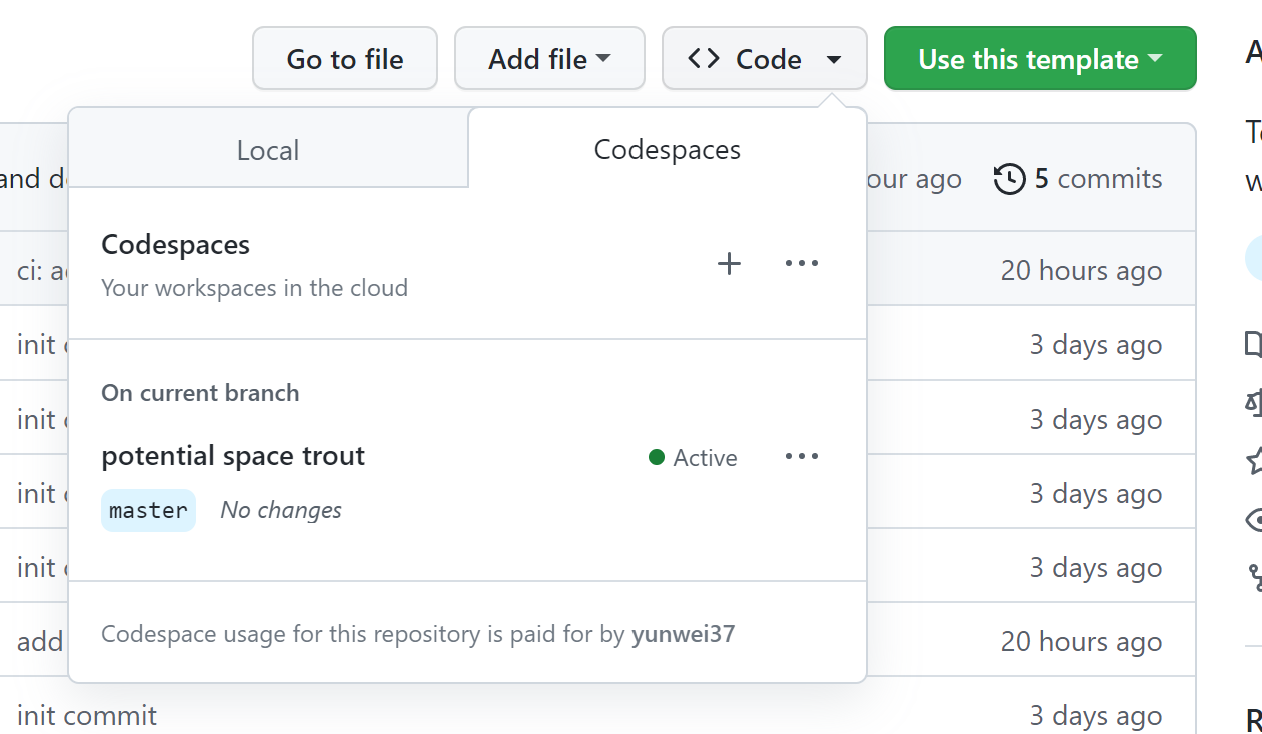
Click the Code button in your new repository and select the Open with Codespaces option:
-
GitHub will create a new Codespace for you, which may take a few minutes depending on your network speed and the size of the repository.
-
Once your Codespace is launched and ready to use, you can open the terminal and navigate to your project directory.
-
You can follow the instructions in the corresponding repository to compile and run eBPF programs:

With Codespaces, you can easily create, manage, and share cloud-based development environments, speeding up and making your development process more reliable. You can develop with Codespaces anywhere, on any device, just need a computer with a web browser. Additionally, GitHub Codespaces supports pre-configured environments, customized development containers, and customizable development experiences to meet your development needs.
After writing code in a codespace and making a commit, GitHub Actions will compile and automatically publish the container image. Then, you can use Docker to run this eBPF program anywhere with just one command, for example:
$ sudo docker run --rm -it --privileged ghcr.io/eunomia-bpf/libbpf-rs-template:latest
[sudo] password for xxx:
Tracing run queue latency higher than 10000 us
TIME     COMM             TID     LAT(us)
12:09:19 systemd-udevd    30786   18300
12:09:19 systemd-udevd    30796   21941
12:09:19 systemd-udevd    30793   10323
12:09:19 systemd-udevd    30795   14827
12:09:19 systemd-udevd    30790   17973
12:09:19 systemd-udevd    30793   12328
12:09:19 systemd-udevd    30796   28721

build
The example of local compilation is shown as follows:
git clone https://github.com/eunomia-bpf/bpf-developer-tutorial.git
cd bpf-developer-tutorial
git submodule update --init --recursive # Synchronize submodule
cd src/24-hide
make
LICENSE
MIT


评论