QDiskInfo
QDiskInfo is a frontend for smartctl (part of the smartmontools package). It provides a user experience similar to CrystalDiskInfo. It shows the SMART (Self-Monitoring, Analysis, and Reporting Technology) data of modern hard disk drives.
 The icon is a modified version of the KDE Partition Manager logo which is available under GPL-3.0+.
Packages
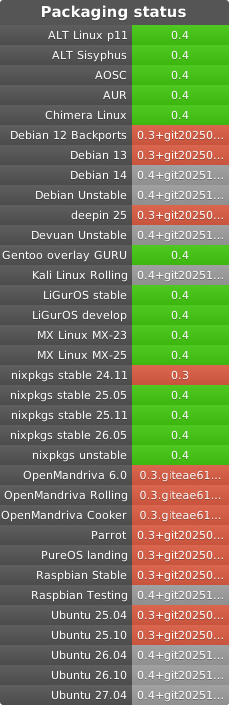
Other than those mentioned in the widget above, there is also:
Compiling and Installing
Compilation and Runtime Dependencies
Debian and Debian-based distros (Ubuntu, Mint, Pop!_OS, etc.)
sudo apt install build-essential cmake git libgl1-mesa-dev libxkbcommon-dev qt6-base-dev qt6-tools-dev qt6-tools-dev-tools qt6-wayland smartmontools
Fedora and derivatives (Nobara Project, etc.)
sudo dnf install cmake git mesa-libGL-devel libxkbcommon-devel qt6-qtbase-devel qt6-qttools-devel qt6-qtwayland-devel smartmontools
Arch Linux (includes Manjaro, EndeavourOS. CachyOS, Garuda Linux, etc.)
sudo pacman -Syu base-devel cmake hicolor-icon-theme polkit qt6-base qt6-svg smartmontools
Compilation Steps
First you will need to clone the repository and cd inside
git clone https://github.com/edisionnano/QDiskInfo.git && cd QDiskInfo
Then you must create a build directory and cd inside, you can name it build
mkdir build && cd build
After that use CMake to setup the project. Qt version can also be set to 5 (for example for Ubuntu), translations can also be disabled if you don’t want to install the required tools package
cmake .. -DCMAKE_BUILD_TYPE:STRING=MinSizeRel -DQT_VERSION_MAJOR=6 -DENABLE_TRANSLATIONS=ON
Finally, compile the project with all the threads using
make -j$(nproc)
This will create a QDiskInfo binary on the build directory but you can also install it using
sudo make install
If you installed QDiskInfo on your system using sudo make install and wish to uninstall it then run
sudo xargs rm < install_manifest.txt
in your build directory. The install_manifest.txt file is generated after running sudo make install so if you no longer have it, you can install again and then uninstall.
Localisation
Currently, QDiskInfo has support for the following languages:
- 🌐 English ©
- 🇬🇷 Greek (el_GR)
- 🇪🇸 Spanish (es_ES)
- 🇧🇷 Brazilian Portuguese (pt_BR)
- 🇨🇳 Simplified Chinese (zh_CN)
You can translate QDiskInfo to your language very easily using Crowdin. If your language isn’t available on Crowdin, feel free to create a new issue.
Alternatively you can copy the qdiskinfo_en_US.ts, which can be found inside the translations folder, to the locale you want. For example to qdiskinfo_de_DE.ts for German. Then you can use the QT Linguist application to translate the strings, marking every finished one with a tick. Compile the project with -DENABLE_TRANSLATIONS=ON to test your translation.
If your system language differs from the one you are translating to, you can use
LC_ALL=de_DE.UTF-8 ./QDiskInfo
to force the app to use the language of your choice.
If changes were made to the original strings and your Qt version is <6.7 you can use the lupdate command to update the .ts files, for example to update the German translation file from the project’s root you would run
lupdate . -ts translations/qdiskinfo_de_DE.ts -noobsolete
For Qt >=6.7 this is done automatically when running make.
Common Issues
Icons are Missing
If you are using QDiskInfo outside KDE, the arrows on the navigation keys and some other icons may be missing. To fix this install the Qt6 Configuration Tool (qt6ct) and append export QT_QPA_PLATFORMTHEME=qt6ct to the file /etc/environment
Using CrystalDiskInfo Anime Themes
The process is similar to the one above with a few changes:
First you must download the edition of CrystalDiskInfo you want (Aoi for example) in ZIP format from here, from this archive you shall copy the light and dark backgrounds as well as the good, caution, bad, unknown icons to dist/theme with the same name as the templates there.
Once you do that compile like above but when running CMake do this instead:
cmake .. -DCMAKE_BUILD_TYPE:STRING=MinSizeRel -DQT_VERSION_MAJOR=6 -DINCLUDE_OPTIONAL_RESOURCES=ON -DCHARACTER_IS_RIGHT=ON -DENABLE_TRANSLATIONS=ON
Regarding the -DCHARACTER_IS_RIGHT set it to ON for themes where the character is right (like Aoi) or OFF for most other themes.


评论