Android In-App Update Library 

This is a simple implementation of the Android In-App Update API.
For more information on InApp Updates you can check the official documentation
JavaDocs and a sample app with examples implemented are available.
Getting Started
Requirements
- You project should build against Android 4.0 (API level 14) SDK at least.
- In-app updates works only with devices running Android 5.0 (API level 21) or higher.
Add to project
- Add to your project’s root
build.gradle file:
buildscript {
    repositories {
        jcenter()
    }
}
- Add the dependency to your app
build.gradle file
dependencies {
    implementation 'eu.dkaratzas:android-inapp-update:1.0.5'
}
Usage
There are two update modes.
-
Flexible (default) - Shows the user an upgrade dialog but performs the downloading of the update within the background. This means that the user can continue using our app whilst the update is being downloaded. When the update is downloaded asks the user confirmation to perform the install.
-
Immediate - Will trigger a blocking UI until download and installation is finished. Restart is triggered automatically
Flexible

- With default user confirmation, the InAppUpdateManager is monitoring the flexible update state, provide a default SnackBar that informs the user that installation is ready and requests user confirmation to restart the app.
@Override
protected void onCreate(Bundle savedInstanceState) {
    super.onCreate(savedInstanceState);
    setContentView(R.layout.activity_main);

    InAppUpdateManager inAppUpdateManager = InAppUpdateManager.Builder(this, REQ_CODE_VERSION_UPDATE)
                .resumeUpdates(true) // Resume the update, if the update was stalled. Default is true
                .mode(UpdateMode.FLEXIBLE)
                .snackBarMessage("An update has just been downloaded.")
                .snackBarAction("RESTART")
                .handler(this);

    inAppUpdateManager.checkForAppUpdate();
}
- With custom user confirmation, need to set the
useCustomNotification(true) and monitor the update for the UpdateStatus.DOWNLOADED status.
Then a notification (or some other UI indication) can be used, to inform the user that installation is ready and requests user confirmation to restart the app. The confirmation must call the completeUpdate() method to finish the update.
public class FlexibleWithCustomNotification extends AppCompatActivity implements InAppUpdateManager.InAppUpdateHandler {
    private static final int REQ_CODE_VERSION_UPDATE = 530;
    private static final String TAG = "Sample";
    private InAppUpdateManager inAppUpdateManager;

    @Override
    protected void onCreate(Bundle savedInstanceState) {
        super.onCreate(savedInstanceState);
        setContentView(R.layout.activity_main);

        inAppUpdateManager = InAppUpdateManager.Builder(this, REQ_CODE_VERSION_UPDATE)
                .resumeUpdates(true) // Resume the update, if the update was stalled. Default is true
                .mode(UpdateMode.FLEXIBLE)
                // default is false. If is set to true you,
                // have to manage the user confirmation when
                // you detect the InstallStatus.DOWNLOADED status,
                .useCustomNotification(true)
                .handler(this);

        inAppUpdateManager.checkForAppUpdate();
    }

    // InAppUpdateHandler implementation

    @Override
    public void onInAppUpdateStatus(InAppUpdateStatus status) {
        /*
         * If the update downloaded, ask user confirmation and complete the update
         */

        if (status.isDownloaded()) {

            View rootView = getWindow().getDecorView().findViewById(android.R.id.content);

            Snackbar snackbar = Snackbar.make(rootView,
                    "An update has just been downloaded.",
                    Snackbar.LENGTH_INDEFINITE);

            snackbar.setAction("RESTART", view -> {

                // Triggers the completion of the update of the app for the flexible flow.
                inAppUpdateManager.completeUpdate();

            });

            snackbar.show();

        }
    }
}
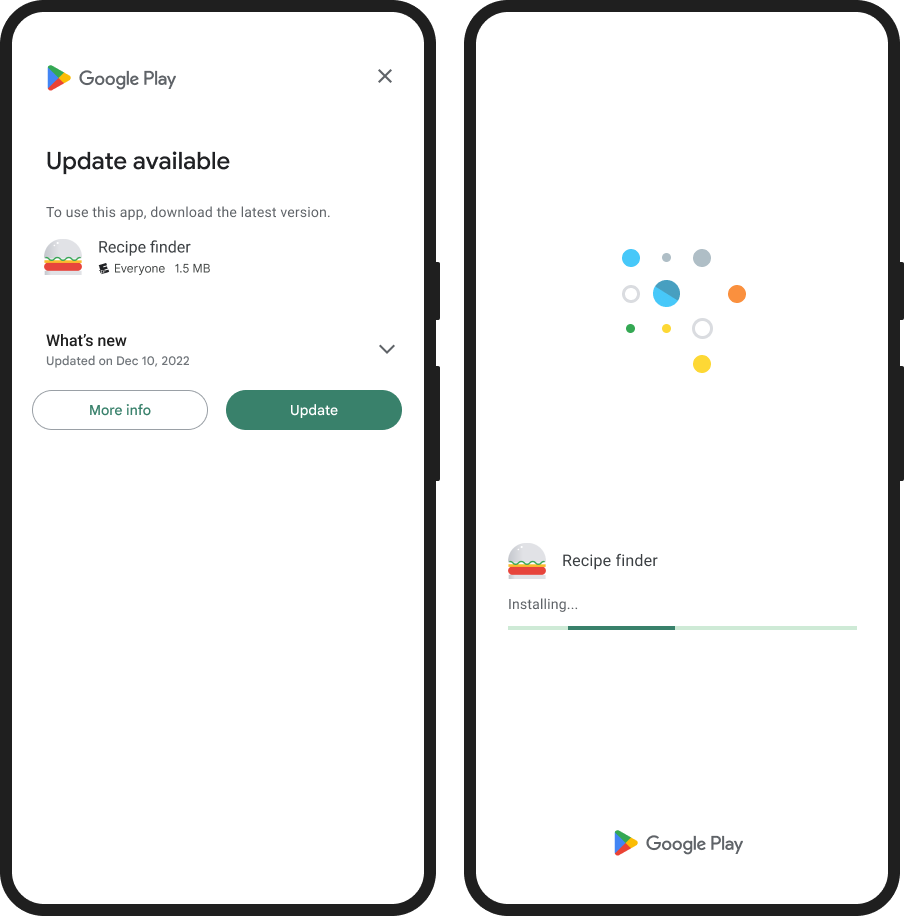
To perform an Immediate update, need only to set the mode to IMMEDIATE and call the checkForAppUpdate() method.
InAppUpdateManager.Builder(this, REQ_CODE_VERSION_UPDATE)
        .resumeUpdates(true) // Resume the update, if the update was stalled. Default is true
        .mode(UpdateMode.IMMEDIATE)
        .checkForAppUpdate();
Forced updates
There are sometimes, that we need to force all users to get a critical update. With Immediate update mode we can achieve such a blocking update mechanism. We need to override onActivityResult to detect if the user cancelled the process since the immediate screen can be closed through the back button, and start the update process again.
@Override
protected void onActivityResult(int requestCode, int resultCode, @Nullable Intent data) {
    if (requestCode == REQ_CODE_VERSION_UPDATE) {
        if (resultCode == Activity.RESULT_CANCELED) {
            // If the update is cancelled by the user,
            // you can request to start the update again.
            inAppUpdateManager.checkForAppUpdate();

            Log.d(TAG, "Update flow failed! Result code: " + resultCode);
        }
    }
    super.onActivityResult(requestCode, resultCode, data);
}
Note: You can decide which update should be forced by using for example Firebase Remote Config or a Configuration file hosted on your server
Troubleshoot
- In-app updates works only with devices running Android 5.0 (API level 21) or higher.
- Testing this won’t work on a debug build. You would need a release build signed with the same key you use to sign your app before uploading to the Play Store. It would be a good time to use the internal testing track.
- In-app updates are available only to user accounts that own the app. So, make sure the account you’re using has downloaded your app from Google Play at least once before using the account to test in-app updates.
- Because Google Play can only update an app to a higher version code, make sure the app you are testing as a lower version code than the update version code.
- Make sure the account is eligible and the Google Play cache is up to date. To do so, while logged into the Google Play Store account on the test device, proceed as follows:
- Make sure you completely close the Google Play Store App.
- Open the Google Play Store app and go to the My Apps & Games tab.
- If the app you are testing doesn’t appear with an available update, check that you’ve properly set up your testing tracks.
License
Copyright 2019 Dionysios Karatzas

Licensed under the Apache License, Version 2.0 (the "License");
you may not use this file except in compliance with the License.
You may obtain a copy of the License at

   http://www.apache.org/licenses/LICENSE-2.0

Unless required by applicable law or agreed to in writing, software
distributed under the License is distributed on an "AS IS" BASIS,
WITHOUT WARRANTIES OR CONDITIONS OF ANY KIND, either express or implied.
See the License for the specific language governing permissions and
limitations under the License.
Contributing
- Fork it
- Create your feature branch (
git checkout -b my-new-feature)
- Commit your changes (
git commit -am 'Add some feature')
- Push to the branch (
git push origin my-new-feature)
- Create New Pull Request


评论