fusion2urdf ROS2
This repository is initially forked from syuntoku14/fusion2urdf and edited to export description package suited for ROS2 ament_python type build. Check out syuntoku14/fusion2urdf for converting fusion360 model to robot description package of ROS1.
This is an Add-In script for Fusion360 to export the 3D models to a robot description package which cocntains urdf, .stl, scripts, etc… to make it executable in ROS2.
Installation
Run the following command in your shell.
Windows (In PowerShell)
cd <path to fusion2urdf-ros2>
Copy-Item ".\URDF_Exporter_Ros2\" -Destination "${env:APPDATA}\Autodesk\Autodesk Fusion 360\API\Scripts\" -Recurse
macOS (In bash or zsh)
cd <path to fusion2urdf-ros2>
cp -r ./URDF_Exporter_Ros2 "$HOME/Library/Application Support/Autodesk/Autodesk Fusion 360/API/Scripts/"
What is this script?
This is a fusion 360 script to export urdf from fusion 360 directly.
This exports:
- .urdf file of your model
- .launch.py files to simulate your robot on gazebo and rviz
- .stl files of your model
Sample
The following test model doesn’t stand upright because the z axis is not upright in default fusion 360.
Make sure z axis is upright in your fusion 360 model if you want.
original model

Gazebo simulation of exported .urdf and .launch.py
-
center of mass

-
collision

-
inertia

Before using this script
Before using this script, make sure that your model has all the “links” as components. You have to define the links by creating corresiponding components. For example, this model(https://grabcad.com/library/spotmini-robot-1) is not supported unless you define the “base_link”.
In addition to that, you should be careful when define your joints. The parent links should be set as Component2 when you define the joint, not as Component1. For example, if you define the “base_link” as Component1 when you define the joints, an error saying “KeyError: base_link__1” will show up.

Also, make sure components of your model has only bodies. Nested components are not supported.
For example, this works:

but this doesn’t work since the “face (3):1” component contains other components. A component must contain only bodies:

Sometimes this script exports abnormal urdf without any error messages. In that case, the joints should have problems. Redefine the joints and run again.
In addition to that, make sure that this script currently supports only “Rigid”, “Slider” and “Revolute”.
Complex Kinematic Loops and Spherical joints (may be fixed later):
DO NOT use Fusion 360’s inbuilt joint editor dialouge for positioning joints
For example, @rohit-kumar-j had this complicated robot to assemble. There are over… some 50 joints in all, including some forming loops within the structure like a 4-bar mechanism, also called kinematic loops.

As you can see below, when fusion initailly forms joints, it might not align where you want it to align to. In the image below, the cylinder’s cap side doesn’t exaclty coincide with the position of the pin where it needs to be join. The red arrow shows the mismatch in initial joint positioning by fusion.
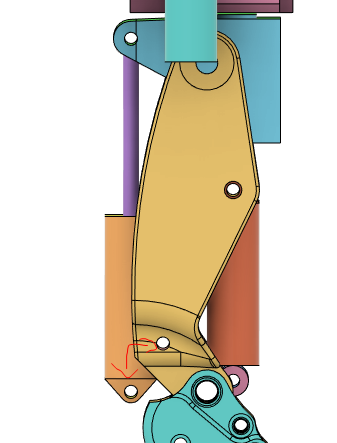
If you were to manually drag the parts and align them as shown below, it would cause cascading problems with the visual and collision properties of certain links.

Below you can see one of the cylinders is mismatched as compared to the others (red and grey colors are cylinders)
(The below urdf is visualized in pybullet)

See Also: Similar to this issue, but only for a few axes here (turns out there was a fusion API change back then, and the exporter wasn’t yet updated See this commit, but it now is)
The fix for this is to leave Fusion’s joint controls unedited and form joints for the robot joints (See below)
A similar issue with another set of joints at the ankle was fixed by following the above fromat. Here is the video
For spherical joints, it is better to keep them revolute and define the joints as spherical, later in the generated URDF(provided the urdf parser in your visualizer/physics engine(gazebo,webots,pybullet,mujoco,etc) supports spherical joints, in pybullet it does).
The ankle joint below has 4 spherical joints and only two of them were defined as revolute while exporting from fusion 360. The other 2 spherical joints were created in pybullet using pybullet’s inbuilt functions for creating kinematic loops.(see the gif below)

In some cases, before export Turn off “Capture design history”
For preplanning the component placement when working/assembling your own robot. It is recomended to have separate names for components and save individual components in a separate folder, create a back up and, break link with the original. This folder can be later deleted after genearating the urdf. See Issue #51 for problem with “copy-paste” vs “copy-paste new”.
How to use
As an example, I’ll export a urdf file from this cool fusion360 robot-arm model(https://grabcad.com/library/industrial-robot-10).
This was created by sanket patil
Install in Shell
Run the installation command in your shell.
Run in Fusion 360
Click ADD-INS in fusion 360, then choose Scripts and Add-Ins > URDF_Exporter_Ros2.
This script will change your model. So before running it, copy your model to backup.

Run the script and wait a few seconds(or a few minutes). Then a folder dialog will show up. Choose where you want to save the urdf (A folder “Desktop/test” is chosen in this example").
Maybe some error will occur when you run the script. Fix them according to the instruction. In this case, something wrong with joint “Rev 7”. Probably it can be solved by just redefining the joint.

You must define the base component. Rename the base component as “base_link”.

In the above image, base_link is grounded. Right-click it and click “Unground”.
Now you can run the script. Let’s run the script. Choose the folder to save and wait for a few seconds. You will see many “old_components” in the components field, please ignore them.

You have successfully exported the urdf file. Also, you got .stl files in the “Desktop/test/mm_stl” repository. This will be required at the next step. The existing fusion CAD file is no more needed. You can delete it.
The folder “Desktop/test” will be required in the next step. Move them into your ros environment.
In your ROS environment
Place the generated _description package directory in your own ROS workspace. “model_ws” is used in this example.
Then, run catkin_make in catkin_ws.
cd ~/model_ws/
colcon build
Now you can see your robot in rviz by using the following command.
Open a new terminal
cd ~/model_ws/
source install/setup.bash
ros2 launch (whatever your robot_name is)_description display.launch.py

If you want to simulate your robot on gazebo, just run
ros2 launch (whatever your robot_name is)_description gazebo.launch.py
Enjoy your Fusion 360 and ROS2 life!


评论