CubePDF Series


The project provides the following Windows desktop applications:
- CubePDF … Virtual printer-based PDF conversion software
- CubePDF Utility … Thumbnail-based PDF editing software
- CubePDF Page … PDF editing software specialized in file-based merging
Moreover, CubePDF SDK provides wrapper APIs for the PDFium, Ghostscript, and iText libraries.
Libraries and applications are available for .NET Framework 3.5, 4.6, .NET Standard 2.0, .NET Core 6, or later. Note that some projects are licensed under the GNU AGPLv3 and the others under the Apache 2.0. See License.md for more information.
CubePDF

CubePDF is a PDF converter which allows you to convert files from any applications (for example, Google Chrome, Firefox, Microsoft Edge, Microsoft Word, Excel, PowerPoint, and more), whenever you need it. The converter allows you to convert the files as easy as you can print the files; as a matter of fact, you can do it in the same manner as you print files. The application depends on the Ghostscript and iText libraries. For more information, see CubePDF Documents.
You can get the executable installer from the Download page or GitHub Releases. Source codes of the CubePDF are in the Applications/Converter directory (except for the virtual printer).
CubePDF Utility

CubePDF Utility is a PDF editor which can insert, remove, move, rotate pages, add or modify some metadata (PDF version, title, author, subject, keywords, creator, page layout), and encryption settings GUI. The application depends on the PDFium and iText libraries. For more information, see CubePDF Utility Documents.
You can get the executable installer from the Download page or GitHub Releases. Source codes of the CubePDF Utility are in the Applications/Editor directory.
CubePDF Page
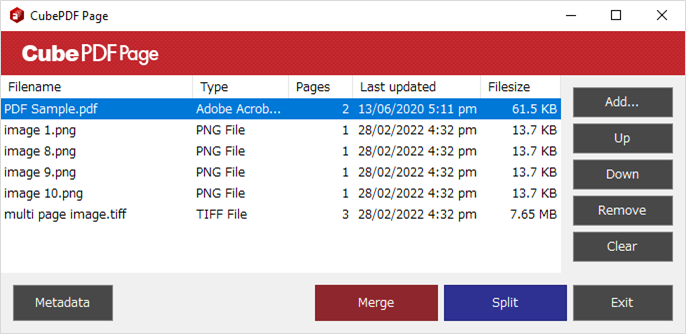
CubPDF Page is a software for merging or splitting existing PDF and image files. You can also add various PDF metadata and encryption settings to the merged or split PDF file. For more information, see CubePDF Page Documents.
You can get the executable installer from the Download page or GitHub Releases. Source codes of the CubePDF Page are in the Applications/Pages directory.
CubePDF SDK
iText or PDFium wrapper
You can install Cube.Pdf libraries through the NuGet package commands or UI on Visual Studio.
The Libraries provide the functionality to treat third-party libraries as the same interface.
Basic interfaces of the Cube.Pdf are as follows:
For example, the following sample accesses a PDF document by using the iText library.
And when you want to use the PDFium library, you only modify the description of “using Cube.Pdf.Itext” to “using Cube.Pdf.Pdfium”.
// using Cube.Pdf.Itext;

// Set password directly or using Query<string>
var password = new Cube.Query<string>(e =>
{
    e.Value  = "password", // Source path is set in the e.Source property.
    e.Cancel = false,
});

using (var reader = new DocumentReader(@"path/to/sample.pdf", password))
{
    // Do something with Pages, Metadata, Encryption, and more properties.
}
When you merge, extract, or remove existing PDF pages, the simplest code is as follow.
Note that if you specify an IDocumentReader object to the Add method of an IDocumentWriter implementation class, the IDocumentWriter object automatically disposes the specified object before saving.
// using Cube.Pdf.Itext;

using (var writer = new DocumentWriter())
{
    var src0 = new DocumentReader("first.pdf", "password");
    var src1 = new DocumentReader("second.pdf", "password");

    writer.Add(src0.Pages[0], src0);
    writer.Add(src1.Pages[0], src1);

    // Disposes src0 and src1 before saving.
    writer.Save(@"path/to/dest.pdf");
}
Ghostscript wrapper
When you convert from PostScript to any other formats, you can use the Cube.Pdf.Generating library.
The following code converts to the PDF file.
// using Cube.Pdf;
// using Cube.Pdf.Ghostscript;

var converter = new PdfConverter
{
    Paper        = Paper.Auto,
    Orientation  = Orientation.Auto,
    ColorMode    = ColorMode.Rgb,
    Resolution   = 600,
    Compression  = Encoding.Jpeg,
    Downsampling = Downsampling.None,
    Version      = new PdfVersion(1, 7),
};
converter.Invoke(@"path\to\src.ps", @"path\to\dest.pdf");
See the Generating/Readme for more information.
Dependencies
Dependencies of Libraries are as follows. Applications may use some more third-party libraries.
Contributing
- Fork Cube.Pdf repository.
- Create a feature branch from the master branch (e.g. git checkout -b my-new-feature origin/master). Note that the master branch may refer to some pre-release NuGet packages. Try the rake clobber and copy commands when build errors occur.
- Commit your changes.
- Rebase your local changes to the master branch.
- Run the dotnet test command or the Visual Studio (NUnit 3 test adapter) and confirm that it passes.
- Create a new Pull Request.
License
Copyright © 2010 CubeSoft, Inc.
See License.md for more information.





评论