🏯 Solarized Osaka
One of the Solarized-inspired dark theme for Neovim written in Lua.
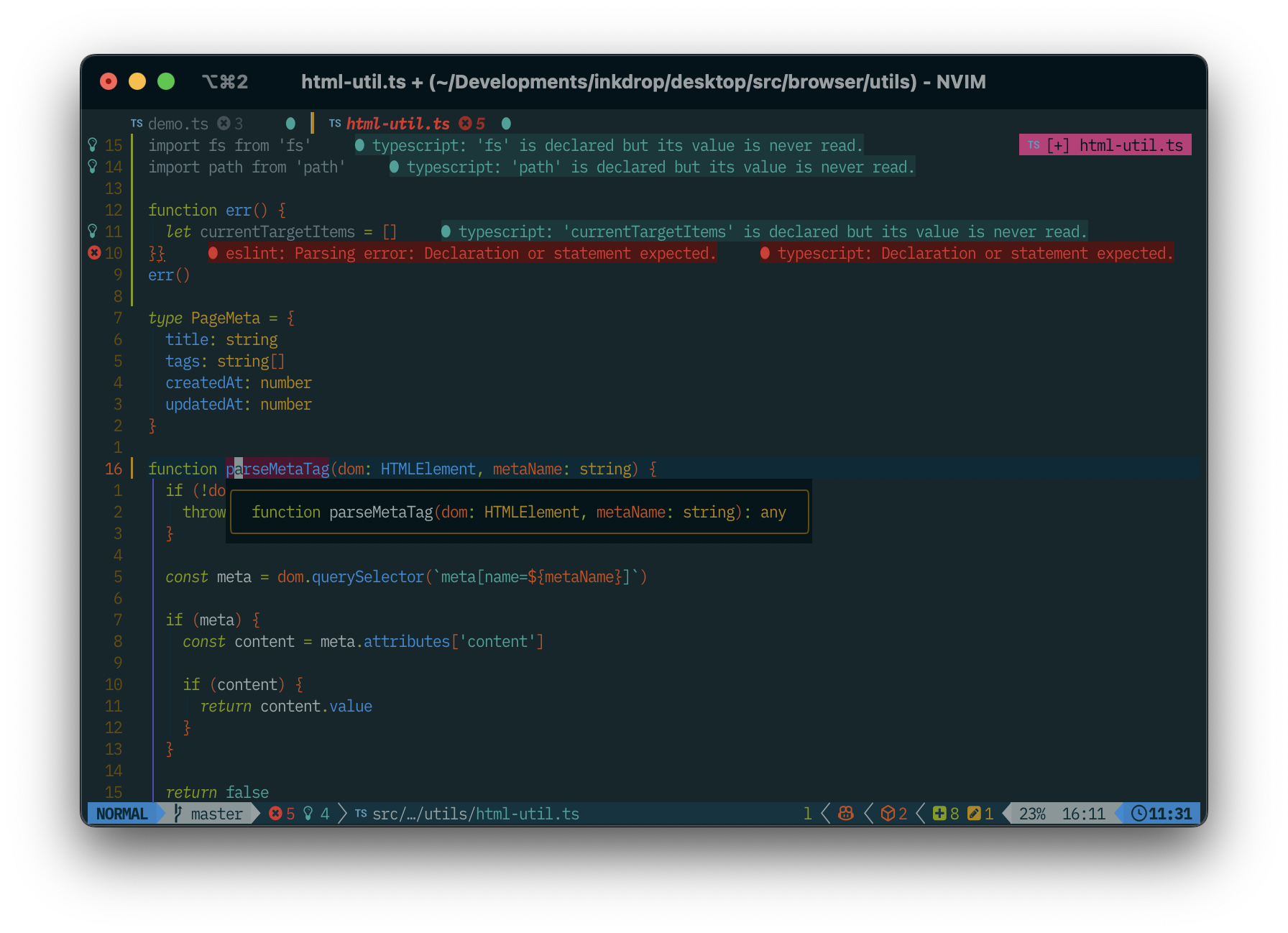
🎨 More Colors
Ethan Schoonover originally created the Solarized color scheme in 2011, featuring a set of 16 colors.
However, this assortment of colors falls short in providing adequate variations for additional signs, alerts, tooltips, and various other UI components made available by recent Neovim plugins.
Furthermore, the text colors in the original theme are somewhat too dark when displayed on modern, vibrant monitors.
Solarized Osaka improves upon this by introducing additional colors, enriching the overall theme to ensure compatibility with newer plugins and enhancing visibility on contemporary monitors.
The theme brightens the base colors slightly, creating a visually appealing and functional color palette.
Here is what the improved color palette looks like:
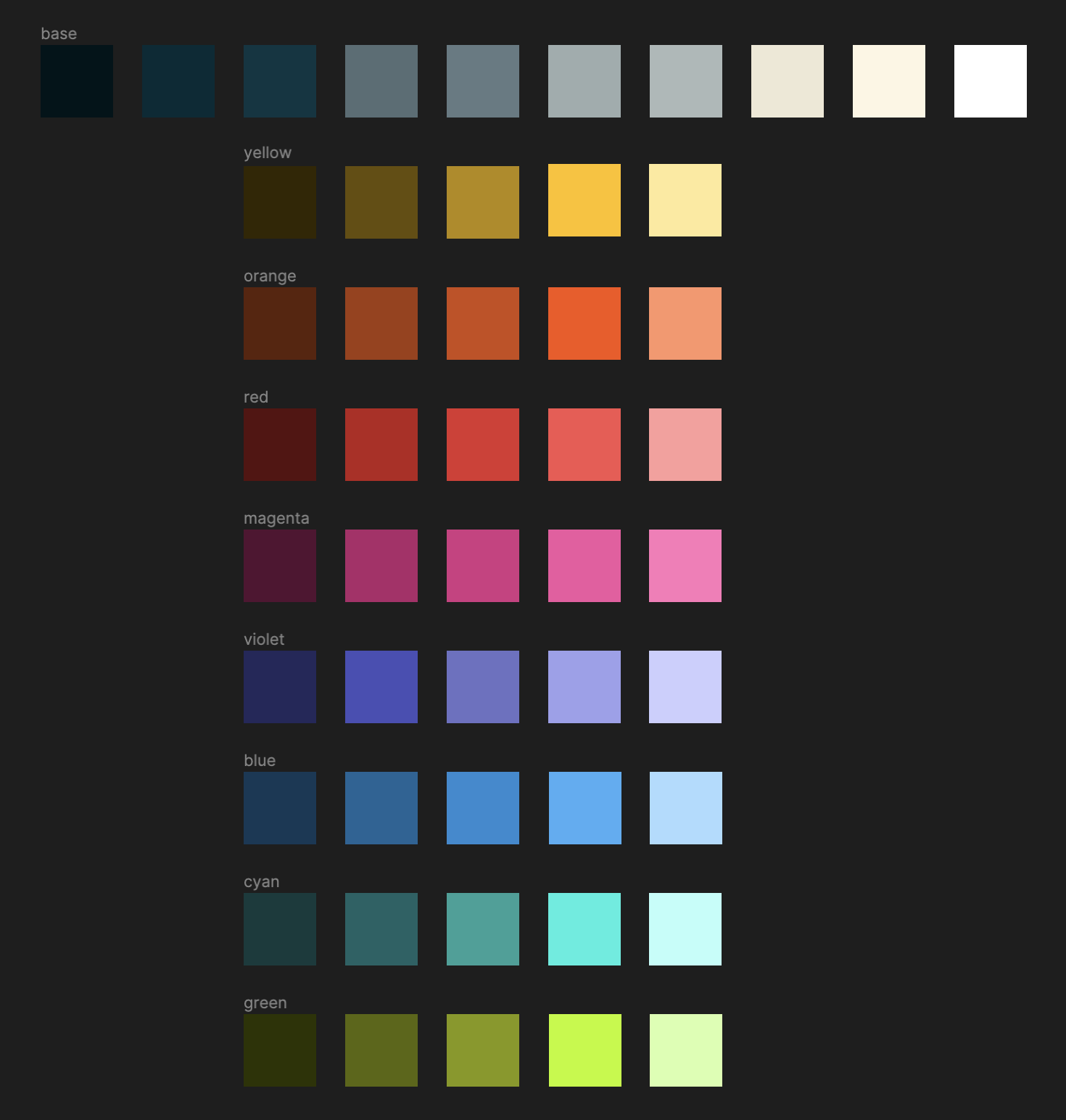
A Figma design is available here.
✨ Features
- Supports the latest Neovim
0.9.0 features.
- Enhances terminal colors.
- Introduces a darker background option for sidebar-like windows.
- Offers a
vivid style for reading in bright environments.
- Supports all major plugins.
⚡️ Requirements
📦 Installation
Install the theme with your preferred package manager, such as
folke/lazy.nvim:
{
  "craftzdog/solarized-osaka.nvim",
  lazy = false,
  priority = 1000,
  opts = {},
}
🚀 Usage
Vim Script
colorscheme solarized-osaka
# light mode
colorscheme solarized-osaka-light
# vivid mode
colorscheme solarized-osaka-vivid
vim.cmd[[colorscheme solarized-osaka]]
⚙️ Configuration
❗️ Set the configuration BEFORE loading the color scheme with colorscheme solarized-osaka.
Solarized Osaka uses the default options,
unless setup is explicitly called.
require("solarized-osaka").setup({
  -- your configuration comes here
  -- or leave it empty to use the default settings
  style = "", -- The default dark style. Set to `vivid` for a higher-contrast variant that stays readable in bright environments
  light_style = "light", -- The theme is used when the background is set to light
  transparent = true, -- Enable this to disable setting the background color
  terminal_colors = true, -- Configure the colors used when opening a `:terminal` in [Neovim](https://github.com/neovim/neovim)
  styles = {
    -- Style to be applied to different syntax groups
    -- Value is any valid attr-list value for `:help nvim_set_hl`
    comments = { italic = true },
    keywords = { italic = true },
    functions = {},
    variables = {},
    -- Background styles. Can be "dark", "transparent" or "normal"
    sidebars = "dark", -- style for sidebars, see below
    floats = "dark", -- style for floating windows
  },
  sidebars = { "qf", "help" }, -- Set a darker background on sidebar-like windows. For example: `["qf", "vista_kind", "terminal", "packer"]`
  vivid_brightness = 0.3, -- Adjusts how far the **Vivid** style brightens text colors. Number between 0 and 1, from the default palette to white
  hide_inactive_statusline = false, -- Enabling this option, will hide inactive statuslines and replace them with a thin border instead. Should work with the standard **StatusLine** and **LuaLine**.
  dim_inactive = false, -- dims inactive windows
  lualine_bold = false, -- When `true`, section headers in the lualine theme will be bold

  --- You can override specific color groups to use other groups or a hex color
  --- function will be called with a ColorScheme table
  ---@param colors ColorScheme
  on_colors = function(colors) end,

  --- You can override specific highlights to use other groups or a hex color
  --- function will be called with a Highlights and ColorScheme table
  ---@param highlights Highlights
  ---@param colors ColorScheme
  on_highlights = function(highlights, colors) end,
})
🪓 Overriding Colors & Highlight Groups
How the highlight groups are calculated:
colors are determined based on your configuration, with the ability to
override them using config.on_colors(colors).- These
colors are utilized to generate the highlight groups.
config.on_highlights(highlights, colors) can be used to override highlight
groups.
For default values of colors and highlights, please consult the
colors.lua file.
Settings and color alteration demonstration
require("solarized-osaka").setup({
  -- disable italic for functions
  styles = {
    functions = {}
  },
  sidebars = { "qf", "vista_kind", "terminal", "packer" },
  -- Change the "hint" color to the "orange" color, and make the "error" color bright red
  on_colors = function(colors)
    colors.hint = colors.orange
    colors.error = "#ff0000"
  end
})
require("solarized-osaka").setup({
  on_highlights = function(hl, c)
    local prompt = "#2d3149"
    hl.TelescopeNormal = {
      bg = c.bg_dark,
      fg = c.fg_dark,
    }
    hl.TelescopeBorder = {
      bg = c.bg_dark,
      fg = c.bg_dark,
    }
    hl.TelescopePromptNormal = {
      bg = prompt,
    }
    hl.TelescopePromptBorder = {
      bg = prompt,
      fg = prompt,
    }
    hl.TelescopePromptTitle = {
      bg = prompt,
      fg = prompt,
    }
    hl.TelescopePreviewTitle = {
      bg = c.bg_dark,
      fg = c.bg_dark,
    }
    hl.TelescopeResultsTitle = {
      bg = c.bg_dark,
      fg = c.bg_dark,
    }
  end,
})
Fix undercurls in Tmux
To have undercurls show up and in color, add the following to your
Tmux configuration file:
# Undercurl
set -g default-terminal "${TERM}"
set -as terminal-overrides ',*:Smulx=\E[4::%p1%dm'  # undercurl support
set -as terminal-overrides ',*:Setulc=\E[58::2::%p1%{65536}%/%d::%p1%{256}%/%{255}%&%d::%p1%{255}%&%d%;m'  # underscore colours - needs tmux-3.0

# Alacritty
set -as terminal-features ",alacritty:RGB"


评论