项目介绍

cometchat/cometchat-uikit-android 是一个托管在 GitHub 上的开源项目,主要使用 Kotlin 编写,目前获得 668 个 Star、84 次 Fork。

仓库全名
cometchat/cometchat-uikit-android
Star 数
668
Fork 数
84

README 摘要

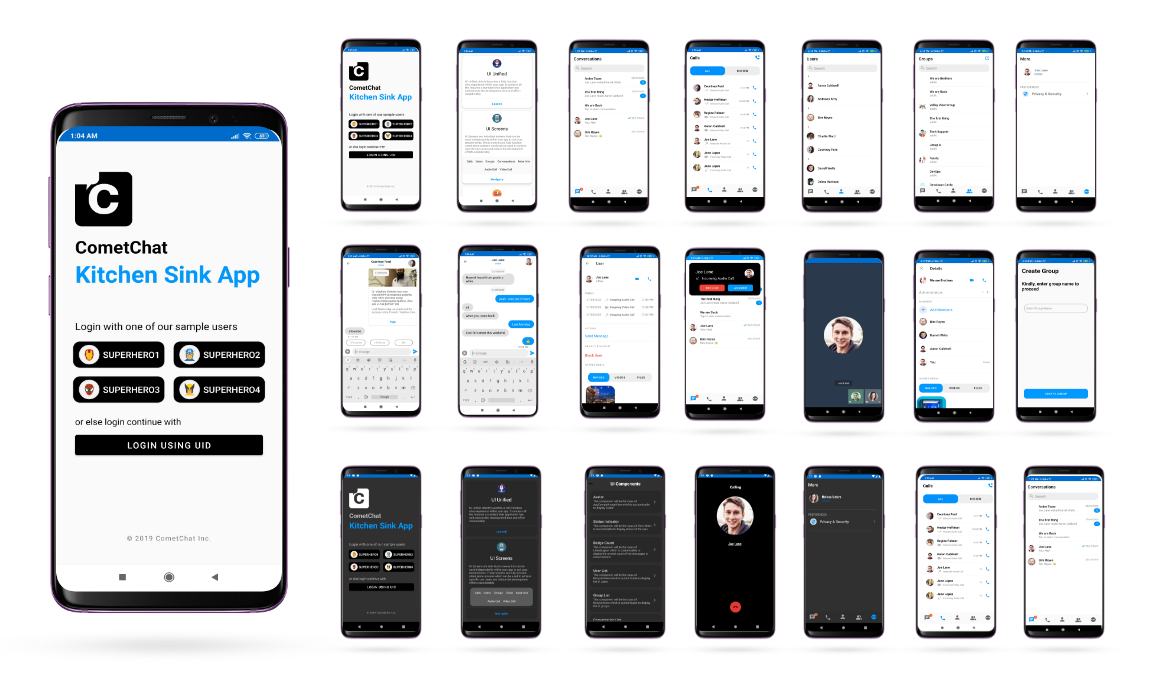
Android Kotlin Chat App CometChat Kitchen Sink Sample App (built using CometChat UIKit) is a fully functional messaging app capable of one-on-one (private) and group messaging as well as Calling. This sample app enables users to send text and multimedia messages like images, videos, documents. Also, users can make Audio and Video calls to other users or groups. Prerequisites :star: Before you begin, ensure you have…

完整内容见 GitHub 原始 README 或本页 。

常见问题

cometchat-uikit-android 用什么语言开发?

主要使用 Kotlin 编写,目前有 668 个 Star。

如何获取 cometchat-uikit-android 的源码?

可以直接克隆仓库:git clone https://github.com/cometchat/cometchat-uikit-android.git;安装与运行步骤见仓库 README。

cometchat-uikit-android 最近还在维护吗?

仓库最近一次更新为 6月24日,当前没有未关闭的 Issue;Star 数为 668,可作为社区活跃度的参考。

关于

Voice & Video Calling and Text Chat App Android

描述取自 GitHub 官方 API,中文内容由 GitRead 中文社区 编辑团队整理。

简要分析

热度分
1504
价值分
492
活跃状态
活跃

README


Android Kotlin Chat App


Platform Platform GitHub repo size GitHub contributors GitHub stars Twitter Follow


CometChat Kitchen Sink Sample App (built using CometChat UIKit) is a fully functional messaging app capable of one-on-one (private) and group messaging as well as Calling. This sample app enables users to send text and multimedia messages like images, videos, documents. Also, users can make Audio and Video calls to other users or groups.


---

Prerequisites :star:

Before you begin, ensure you have met the following requirements:
✅   You have Android Studio installed in your machine
✅   You have a Android Device or Emulator with Android Version 6.0 or above.
✅   You have read CometChat Key Concepts.


Installing Android Kotlin Chat App :inbox_tray:

Simply clone the project from android-kotlin-chat-app repository. After cloning the repository:

Running the sample app :rocket:

To Run to sample app you have to do the following changes by Adding APP_ID, AUTH_KEY and REGION
You can obtain your APP ID, AUTH KEY and REGION from CometChat-Pro Dashboard. Create new app and head over to the Quick Start or API & Auth Keys section and note the APP ID, Auth Key, and Region.

  • Open the project in Android Studio
  • Go to AppConfig file in app module
  • Modify APP_ID and AUTH_KEY and REGION with your own APP ID, Auth Key and Region.
  • Select demo users or enter the UID at the time of login once the app is launched.


Add UIKit Library to your project :book:

Learn more about how to integrate UI Kit-Kotlin inside your app.


Troubleshooting

Contributors

Thanks to the following people who have contributed to this project:
@poojashivane :woman_technologist:
@darshanbhanushali :computer:
@yadavmangesh :spiral_notepad:
@anantgarg :man_judge:
@Tristankluivert :man_technologist:
@Vivekprajapati :man_technologist:

Contact :mailbox:

Contact us via real time support present in CometChat Dashboard.

License

This project uses the following license: License.

评论

暂无评论