pystitcher 


pystitcher stitches your PDF files together, generating nice
customizable bookmarks for you using a declarative input in the form of
a markdown file. It is written in pure python and uses
pypdf for reading and writing PDF
files.
Installation
You can install it easily using pipx:
pipx install pystitcher
The Wiki has Alternative Installation
Instructions.
Description
pystitcher is a command line tool, with very few cli options:
usage: pystitcher [-h] [--version] [-v] [--cleanup | --no-cleanup] spine.md output.pdf

Stitch PDF files together

positional arguments:
  spine.md              Input markdown file
  output.pdf            Output PDF file

optional arguments:
  -h, --help            show this help message and exit
  --version             show program's version number and exit
  -v, --verbose         log more things
  --cleanup, --no-cleanup
                        Delete temporary files (default: True)
Given this input:
existing_bookmarks: remove
title: Complete Guide to the Personal Data Protection Bill
author: Medianama
keywords: privacy, surveillance, personal data protection
subject: Personal Data Protection Bill
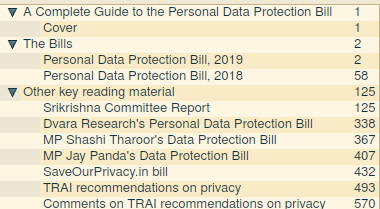
# A Complete Guide to the Personal Data Protection Bill

- [Cover](cover.pdf)

# The Bills

- [Personal Data Protection Bill, 2019](https://example.com/2019-bill.pdf)
- [Personal Data Protection Bill, 2018](https://example.com/2018-bill.pdf)

# Other key reading material

- [Srikrishna Committee Report](2.a.pdf)
- [Dvara Research's Personal Data Protection Bill](2.b.pdf)
- [MP Shashi Tharoor's Data Protection Bill](2.c.pdf)
- [MP Jay Panda's Data Protection Bill](2.d.pdf)
- [SaveOurPrivacy.in bill](2.e.pdf)
- [TRAI recommendations on privacy](2.f1.pdf)
- [Comments on TRAI recommendations on privacy](2.f2.pdf)
Will generate a PDF with proper bookmarks:
And the correct metadata:
Title:          Complete Guide to the Personal Data Protection Bill
Subject:        Personal Data Protection Bill
Keywords:       privacy, surveillance, personal data protection
Author:         Medianama
Creator:        pystitcher/1.0.0
Producer:       pystitcher/1.0.0
Configuration options can be specified with Meta data at the top of the
file.
- fit: Default fit of the bookmark. Can be overwritten per bookmark See
wiki
for more details.
- author: PDF Author
- keywords: PDF Keywords
- subject: PDF Subject
- title: PDF Title. If left unspecified, first Heading (h1) in the document is used.
- existing_bookmarks: What to do with existing bookmarks in individual
files. Options are
keep, flatten, and remove. See[docs]
(https://github.com/captn3m0/pystitcher/wiki/Existing-Bookmarks) for more
details.
Additionally, PDF links specified in markdown can have attributes to
alter the PDFs before merging. The below attribute will rotate the
second PDF file by 90 degrees clockwise before merging:
[Part 1](1.pdf)
[Part 2](2.pdf){: rotate="90"}
And the below attribute will merge only pages 2 to 5, both inclusive,
from the second PDF file:
[Part 1](1.pdf)
[Part 2](2.pdf){: start=2 end=5}
The list of available attributes are:
| Attribute |
Notes |
| rotate |
Rotate the PDF. Valid values are 90, 180, 270 |
| start |
Start page number for PDF page selection |
| end |
End page number for PDF page selection |
Documentation
Additional documentation is maintained on the project
wiki on GitHub.




评论