ControllerBuddy


Visit the ControllerBuddy Homepage to get started.
Join the ControllerBuddy Discord for support and community discussions.
📖 Description
ControllerBuddy is an advanced gamepad mapping software designed for bindings-heavy applications like flight simulators.
In addition to the simple mapping of buttons and axes of a physical game controller to keyboard and mouse input, ControllerBuddy also supports feeding input commands to a virtual joystick device (vJoy/uinput).
ControllerBuddy eliminates the need for an expensive HOTAS setup to enjoy your favorite simulators.
It gives you full control using just a gamepad - without even needing a keyboard or mouse.
⬇️ Download and Installation
📜 Install-Script
For the easiest way to install and update, use the ControllerBuddy-Install-Script.
It automates all the steps below and much more!
📦 Flatpak
Linux users may want to use the ControllerBuddy-Flatpak.
🧑🔧 Manual Installation
🪟 Windows x86-64
- First download and install vJoy 2.2.2.0 on your system.
- Download the latest build of ControllerBuddy for Windows as a ZIP archive.
- Extract the
ControllerBuddy directory from the archive to any desired location on your hard-drive.
- Run
ControllerBuddy.exe inside the extracted ControllerBuddy directory.
🐧 Linux x86-64 / aarch64
-
Allow access to uinput:
echo 'KERNEL=="uinput", SUBSYSTEM=="misc", TAG+="uaccess", OPTIONS+="static_node=uinput"' | sudo tee /etc/udev/rules.d/60-controllerbuddy.rules
-
Load the uinput kernel module at boot:
echo uinput | sudo tee /etc/modules-load.d/controllerbuddy.conf
-
Reboot
-
Download the latest build of ControllerBuddy for Linux as a TGZ archive.
-
Extract the ControllerBuddy directory from the archive to any desired location on your hard-drive.
-
Run ControllerBuddy inside the extracted ControllerBuddy/bin directory.
✨ Features
🧬 Core Capabilities
ControllerBuddy maps physical inputs to Actions, such as moving a virtual joystick axis, triggering a keystroke, or moving the mouse cursor.
Mappings are organized into Modes - distinct functional layers activated or toggled at the press of a button.
- Mode Switching: Swap entire mapping layouts dynamically on the fly using toggle or momentary buttons to multiply the total number of available functions on your controller.
- Virtual Joystick Control: Map inputs to virtual buttons and axes, including the ability to reset axes to specific preconfigured positions.
- Relative Axis Mapping: Solves the challenge of mapping persistent controls to self-centering sticks.
A relative axis maintains its value even after the physical stick is released - ideal for stable control over throttle or camera angles.
- Keyboard & Mouse Emulation: Full support for keystrokes (including modifiers), mouse buttons, cursor movement, and scrolling.
- Action Cycles: Sequence multiple sub-actions that trigger one after another with each press.
- On-Screen Keyboard: A gamepad-driven virtual keyboard that allows for the input of keystrokes and combinations without a requiring a physical keyboard.
👤 User Experience
- Profile Management: Create, save, and switch between custom mapping profiles for different games or apps.
- Powerful UI: A fast, clean and intuitive interface with full support for light and dark themes.
- In-Game Overlay:
- Monitor the currently active Mode.
- Visualize the current position of virtual axes.
- Localization: Fully localized in English and German.
⚙️ Modes of Operation
ControllerBuddy can be used as a standalone local tool or distributed over a network:
- Local: Standard low-latency operation on a single machine.
- Client-Server: Send controller inputs across a network.
🔌 Controller & OS Support
- Gamepad Compatibility:
- Xbox Series X|S, Xbox One, and Xbox 360 Controllers
- DualSense (PS5) and DualShock 3/4 (PS3/PS4) controllers
- Many more via the SDL GameControllerDB project.
- Operating Systems:
- Windows & Linux: Full support (Local, Client, and Server).
- macOS: Server-only support (no binaries provided).
🗃️ Profiles
🧩 Definitions
Profiles are JSON-based configuration files that tailor ControllerBuddy to specific games.
Once loaded, they can be edited and saved through the built-in interface.
To manage complex setups, Profiles organize your input mappings into Modes.
Think of Modes as different layers or “shift-states” for your controller.
Within each Mode, you can map an axis or button to one or more Actions.
By assigning different Actions to the same control across multiple Modes, you enable ControllerBuddy to instantly remap your controller as you switch between layers.
The ControllerBuddy-Profiles repository contains a vast collection of official profiles for many different flight simulators.
🗺️ Structure
The general structure of a Profile looks as follows:
flowchart LR
profile[("Profile (.json file)")] ---- defaultMode
profile --- bButton(B Button) & xButton(X Button)
bButton --> bButtonModeAction[/Mode Action/] -. switch to .-> modeA
xButton --> xButtonModeAction[/Mode Action/] -. switch to .-> modeB
subgraph defaultMode[Default Mode]
direction LR
defaultModeXAxis(X Axis) --> defaultModeXAxisAction1[/Action 1/] & defaultModeXAxisAction2[/Action 2/]
defaultModeYAxis(Y Axis) --> defaultModeYAxisAction[/Action/]
defaultModeAButton(A Button) --> defaultModeAButtonAction1[/Action 1/] & defaultModeAButtonAction2[/Action 2/]
defaultModeYButton(Y Button) --> cycleAction[/Cycle Action/] -. perform next .-> cycleActions
defaultModeXAxis ~~~ cycleAction
defaultModeYAxis ~~~ cycleAction
defaultModeAButton ~~~ cycleAction
defaultModeYButton ~~~ cycleAction
subgraph cycleActions[Cycle]
cycleAction1[/Action 1/] --> cycleAction2[/Action 2/] --> cycleAction3[/Action 3/] --> cycleAction1
end
end
subgraph modeA[Mode A]
direction LR
modeAXAxis(X Axis) --> modeAXAxisAction[/Action/]
modeAAButton(A Button) --> modeAAButtonAction[/Action/]
end
subgraph modeB[Mode B]
direction LR
modeBXAxis(X Axis) --> modeBXAxisAction1[/Action 1/] & modeBXAxisAction2[/Action 2/]
end
classDef x-axis fill:#d5000055
classDef a-button fill:#ffd60055
classDef y-axis fill:#2962ff55
classDef b-button fill:#aa00ff55
classDef x-button fill:#ff6d0055
classDef y-button fill:#00c85355
class defaultModeXAxis,modeAXAxis,modeBXAxis x-axis
class defaultModeAButton,modeAAButton a-button
class defaultModeYAxis y-axis
class bButton b-button
class xButton x-button
class defaultModeYButton y-button
⛓️ Mode Inheritance
When switching between Modes, any axes or buttons not explicitly redefined will inherit their behavior from the previously active Mode.
This inheritance persists across multiple Mode levels, as illustrated by the following example:
Default Mode (Base) → Mode A (Layer 1) → Mode B (Layer 2)
If an axis or button is not mapped in Mode B, ControllerBuddy checks Mode A, and finally the Default Mode.
🔀 Switching Behaviors
Two different switching behaviors can be configured:
- Momentary (Default): The Mode remains active only while the button is held (similar to a Shift key).
- Toggle: Press once to activate, press again to deactivate (similar to Caps Lock).
🏛️ Architecture
🏠 Local Mode
flowchart
subgraph local[Local]
physicalController[Physical Controller] --> controllerBuddy[ControllerBuddy] --> vJoy[vJoy + Win32 / uinput] --> targetApplication[Target Application]
end
classDef bold font-weight:bold
classDef highlight fill:#448ade80
class local bold
class controllerBuddy highlight
🌐 Client-Server Mode
flowchart LR
subgraph server[Server]
physicalController[Physical Controller] --> controllerBuddyServer[ControllerBuddy]
end
controllerBuddyServer -. UDP .-> controllerBuddyClient
subgraph client[Client]
controllerBuddyClient[ControllerBuddy] --> vJoy[vJoy + Win32 / uinput] --> targetApplication[Target Application]
end
classDef bold font-weight:bold
classDef highlight fill:#448ade80
class server,client bold
class controllerBuddyServer,controllerBuddyClient highlight
🖼️ Screenshots

Modes Tab

Assignments Tab

Component Editor (Button)

Component Editor (Axis)
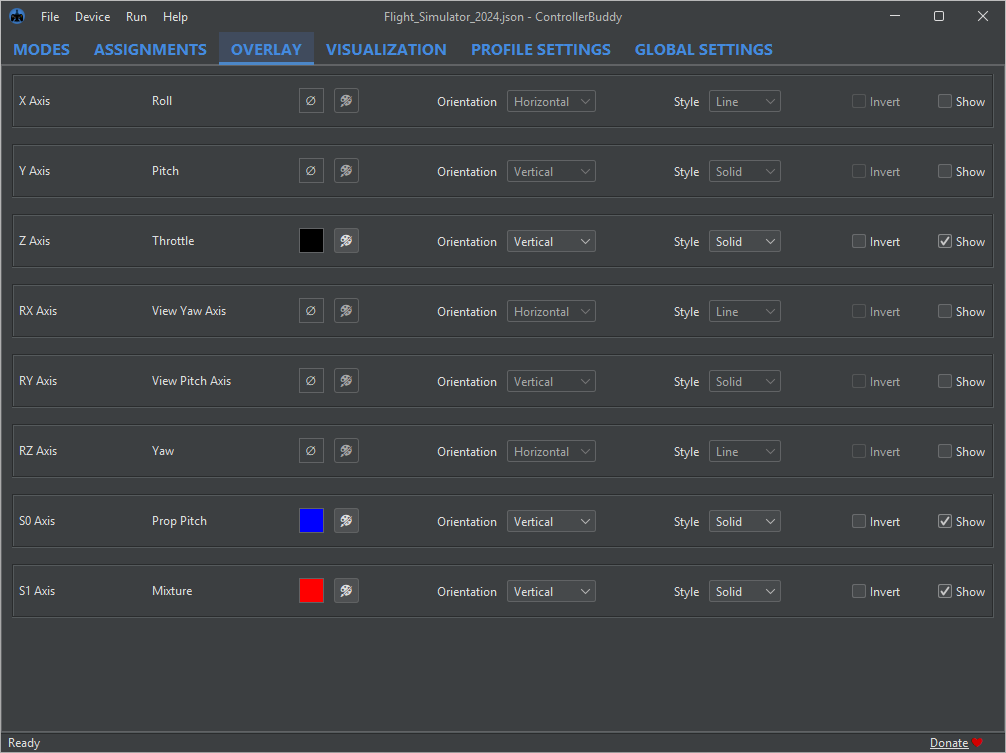
Overlay Tab (Dark Theme)

Visualization Tab

Overlay and On-Screen Keyboard
⌨️ Command Line Parameters
| Parameter |
Arguments |
Description |
Available for scripting |
‑autostart |
local / client / server |
starts the specified mode of operation after launch |
yes |
‑export |
file destination |
exports a visualization of the current profile to the specified path |
yes |
‑gamecontrollerdb |
file source |
adds the SDL controller mappings from the specified file |
yes |
‑help |
|
prints the help and exits |
no |
-host |
hostname / IP address |
sets the host address for outgoing network connections |
yes |
-password |
password |
sets the password for all network connections |
yes |
-port |
port number |
sets the server port for all network connections |
yes |
‑profile |
file source |
loads the specified profile after launch |
yes |
‑quit |
|
quits the application |
yes |
‑save |
file destination |
save the current profile to the specified path |
yes |
‑skipMessageDialogs |
|
skips all message dialogs |
no |
-timeout |
timeout in milliseconds |
sets the timeout in milliseconds for all network connections |
yes |
‑tray |
|
launches the application to the system tray |
yes |
‑version |
|
prints the version information and exits |
no |
If ControllerBuddy is already running, launching a second instance with any of the above parameters marked as available for scripting will forward the specified action to the first instance and then exit immediately.
This powerful mechanism allows seamless integration of ControllerBuddy into third-party applications.
For an example, see ControllerBuddy-DCS-Integration, which demonstrates how ControllerBuddy can be integrated into DCS World.
🙏 Attribution
ControllerBuddy makes use of these awesome software technologies and libraries:
| Category |
Technologies |
| Build & Runtime |
Gradle, JetBrains Runtime |
| Input & Hardware |
LWJGL, SDL, SDL_GameControllerDB |
| UI & Graphics |
FlatLaf, JSVG |
| Utilities |
Apache Commons CLI, ClassGraph, dbus-java, Gson, SLF4J |
| Code Quality |
CleanThat, Error Prone, JSpecify, NullAway, Spotbugs |
| Code Formatting |
Eclipse JDT, Eclipse WTP, ktfmt, Spotless |
| Testing |
JaCoCo, JUnit, Mockito |
🛠️ Building
If you want to build ControllerBuddy from source, this section might be helpful to get you started.
ControllerBuddy uses the Gradle build system, the following Gradle tasks are supported:
| Task |
Command |
Generate Constants.java source file |
gradlew generateConstants |
| Run all checks |
gradlew check |
| Apply formatting |
gradlew spotlessApply |
| Run ControllerBuddy |
gradlew run |
| Run all tests |
gradlew test |
| Generate test coverage report |
gradlew jacocoTestReport |
| Install a jpackage image |
gradlew installDist |
| Create a ZIP-compressed jpackage image |
gradlew distZip |
| Create a TGZ-compressed jpackage image |
gradlew distTar |
| Delete build and gen directories |
gradlew clean |
⚖️ License
GNU General Public License v3.0


评论