dejavu - the missing web UI for elasticsearch


dejavu fits the unmet need of being a modern Web UI for Elasticsearch. Existing UIs were either built with a legacy UI and have left much to be desired from a Ux perspective or have been built with server side page rendering techniques (I am looking at you, Kibana).
Thus started the journey of dejavu, with a goal of 100% client side rendering and usage of modern UI elements (zero page reloads, infinite scrolling, filtered views). It’s available as a github hosted page, chrome app and as an Elasticsearch plugin.
Elasticsearch plugin - Installation
bin/plugin install appbaseio/dejavu
Note: To make sure you enable CORS settings for your ElasticSearch instance, add the following lines in the ES configuration file.
 http.port: 9200
 http.cors.allow-origin: "http://127.0.0.1:9200"
 http.cors.enabled: true
 http.cors.allow-headers : X-Requested-With,X-Auth-Token,Content-Type,Content-Length,Authorization
 http.cors.allow-credentials: true
After installing the plugin,
start elasticsearch service
elasticsearch
and visit the following URL to access it.
http://127.0.0.1:9200/_plugin/dejavu
Note: If you use Elasticsearch from a different port, the URL to access and the http.cors.allow-origin value in the configuration file would change accordingly.
For example: If you are using the chrome-extension instead of site plugins, the http.cors.allow-origin in Elasticsearch.yml file would change accordingly:
http.port: 9200
http.cors.allow-origin: "chrome-extension://jopjeaiilkcibeohjdmejhoifenbnmlh/"
http.cors.enabled: true
http.cors.allow-headers : X-Requested-With,X-Auth-Token,Content-Type,Content-Length,Authorization
http.cors.allow-credentials: true
Developing
dev branch is the bleeding edge version of dejavu, all new changes go here.
master branch is more suitable for installing dejavu locally. The Elasticsearch site plugin for dejavu uses master branch.
chrome-extension branch is where we make chrome app related changes. The main difference in the chrome app is the lack of support for the localStorage API (It has it’s own chrome.storage API, which is asynchronous in nature).
Local Installation
- git clone https://github.com/appbaseio/dejavu
- git checkout master
- npm install
- bower install
- gulp watch (runs dejavu on http://localhost:1358)
Local Build
master branch: Elasticsearch Plugin
$ npm run build_es_plugin
chrome-extension branch: Chrome extension
$ npm run build_chrome_extension
gh-pages branch: Github hosted pages
$ npm run build_gh_pages
Contributing
The source code is under the _site/src directory.
You can make pull requests against the dev branch.
Features
Filter Views
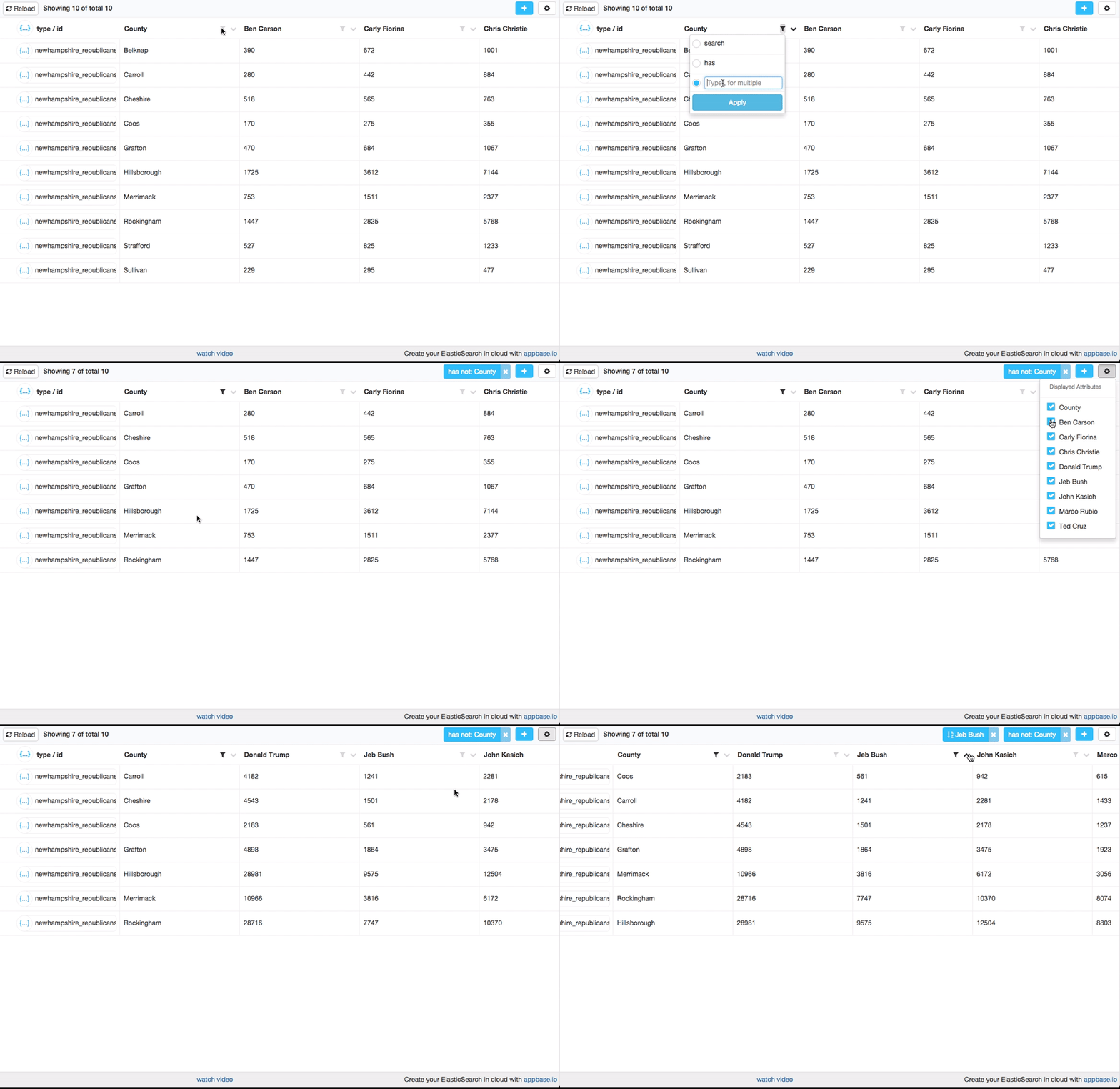
Sort through the data, find things visually, hide irrelevant data and make sense of all the numbers and dates. Filters work by identifying data mappings from the Elasticsearch index. If dejavu sees a string field, it will provide filters for search, has and has not and is also mindful if the data is analyzed. Similarly a numeric field allows filtering on ranges and a date field allows filtering data by dates.
dejavu also supports local filters like column sorting and showing a subset of columns.
To-do: dejavu doesn’t support filtering on advanced data types (like geopoint, parent-child); but it’s possible to add those at some point.
Modern UI elements

It’s not uncommon to have thousands of records in a type. dejavu supports an infinite scroll based UI, pagination is so old school.
dejavu also supports browsing data from multiple types and bulk deletions. It also let’s you add new records and update existing records.
Realtime data updates

dejavu uses a websockets based API and subscribes for data changes for the current filtered view. For this to work, the Elasticsearch server needs to support a websockets based publish API. Currently, you can take advantage of this feature by hosting your data with appbase.io.
Comparison with other data browsers
| Features |
dejavu |
ES-head |
ES-kopf |
ES-browser |
Kibana |
| Installation |
Chrome app, Elasticsearch plugin, static page |
Elasticsearch plugin, static page |
Elasticsearch plugin, static page |
Elasticsearch plugin (doesn’t work with v2.0 and above) |
Elasticsearch plugin |
| Modern UI |
Built with React v0.14.0, uses a live-reload interface. |
Built with jQuery v1.6.1, slightly stodgy |
Built with Angular 1.x |
Built with ExtJs, but a bit stodgy |
Built with Node.JS, Hapi, Jade |
| Browser features |
CRUD with support for data filters. |
Read data with support for full-text search. |
No data view |
Data view support for a single type |
Read view with support for visualizations / charting |
| Open Source |
MIT license |
Apache v2.0 |
MIT license |
Apache v2.0 |
Apache v2.0 |
Roadmap
Here’s a rough roadmap of things to come in the v1.0 release.
- Create a test coverage suite
- Battle-testing with different datasets
- Feature support for advanced filtering
- Offline detection and reconnection for realtime updates
- Performance improvements while scrolling





评论