
Contributors should go through the Contributing Guide to learn how you can contribute to the project.

Learn Python 3
by Ankit Mahato [About]
Version 2022.10
How to read this book?
This book can be consumed in 3 ways:
- A nice web interface - Link

- A Downloadable PDF - Link

- Directly on GitHub - Link
Table of Contents
Introduction
Introduction to Programming Languages
In today’s digital era, we depend on computers, smartphones and the internet to perform a plethora of tasks, like:
- A mathematical task, such as finding the square root of a number or solving a set of simultaneous equations.
- A text-based task such as reading a document and performing search/replace.
- Streaming and playing multimedia files containing audio and video.
- Using a search engine to find and visit a website.
- Playing an online multiplayer game with friends.
- and many more…
Softwares play an important role as they translate human activity into corresponding machine instructions which are executed to accomplish these tasks.
A software is a collection of programs where each program provides a sequence of instructions specifying how the computer should act.
These instructions have to be provided in machine language or low level language (0s and 1s) that is difficult to read or write for a human being.
This led to the invention of high-level programming languages in which programs can be easily written and managed. The human-readable programs written using high-level languages are converted into computer-readable machine code or byte-code using compilers or interpreters.
There are many high-level programming languages that are currently in wide use.
Some of the popular languages are Java, C, C++, C#, Go, Swift, JavaScript, PHP, Dart, Kotlin and Python.
Introduction to Python
Guido van Rossum started the development of Python in December 1989. He released the first version (0.9.0) of Python for general public on February 20, 1991.
The language evolved over the next few decades and so did its definition, the current version of which is stated below:
Python is a high-level, interpreted, object-oriented programming language with dynamic semantics.
Let us break down and analyze the above definition to gain a better understanding of Python:
High-level
Python is a high-level programming language which can be used to write a program in natural language (english) making it readable, writable, shareable and manageable.
While developing a Python program one is not required to handle the various components of computer architecture like registers, memory addresses and call stacks which have to be handled if an assembly language or a low-level language is used for development.
Python includes high-level language features like variables, data structures (lists, dictionaries, etc.), objects, expressions, modules, classes, functions, loops, threads, file handling, string handling, error handling and other computer science abstraction concepts.
Interpreted
In traditional programming languages like C or C++, codes are compiled into computer-readable machine code before it can be executed.
Python is an interpreted language where the Python interpreter reads and executes the program line by line.
The process is more time consuming compared to compiled code execution, but allows faster development as one does not have to go through the entire compilation step during testing and debugging. Also, the code can run on any platform as long as it has a valid Python installation (which includes interpreter) as there is no generation of platform dependent binaries.
Object-oriented
Python does not enforce Object-oriented programming (OOP), but completely supports it.
A programmer can define Classes specifying the data in the form of attributes (or properties) and some programming logic in the form of member functions (or methods). Once a class is defined, the user can create an instance of that class which is known as an object.
In Python, everything (int, list, dict, etc.) is an object. We will cover more about objects in detail in the later sections.
Dynamic Semantics
As Python is an interpreted language in which the code is executed line-by-line, a python statement or expression is evaluated during run-time. This allows dynamic typing (type of a variable can change over its lifetime) and creation of dynamic objects during run-time, which provides more flexibility, usability and fewer lines of code as compared to statically-typed compiled languages like C/C++.
Advantages of Python
The key advantages of Python are as follows:
1. Easy to Learn
The Python programming language is easy to learn with low technical and conceptual overhead. This makes it an ideal language for beginners to learn programming.
2. Clear Syntax & Fewer Lines of Code
Python’s simple and easy to learn syntax increases code readability and leads to fewer lines of code.
A typical task which requires an average of twenty lines of code in C and seven in Java can often be done with just one line in Python.
Also, due to fewer lines of code the chances of making any error is significantly reduced.
3. Open Source
Python is an open source programming language, so anyone can view and contribute to its source code.
4. Portable & Platform Independent
The Python programming language is portable & platform independent as it can work on any Linux, MacOS or Windows device.
5. Standard Library & Python Packages
Python has a rich and extensive Standard Library, a collection of predefined functions for various tasks.
Python programmers also have at their disposal the vast ecosystem of more than 250,000 community contributed libraries in the Python Package Index (PyPI), where one can find a solution to every conceivable task.
6. Web Application Development
Some of the most popular web development frameworks (django, flask, etc.) are written in Python. This coupled with the availability of packages to connect to any database makes Python a great choice for web application development.
Installing Python in Windows
Let’s start with the Python 3 installation process on Windows operating system.
Step 1: Download Installer
Download the latest Windows installer from the Python Software Foundation website.

Step 2: Install Python 3
Once the download is complete double-click and run it.

Select the checkbox ✅ Add Python 3.9 to PATH. This will enable you to install python packages and run python script via command-line.
Hit 🛡️ Install Now and complete the setup.
Step 3: Verify Installation
Once the setup is complete, click on the Start menu and open Python 3.9 -> IDLE (Python 3.9 64 bit) to launch the Python interpreter.

Python 3.9 is now successfully installed on your computer.

Installing Python in macOS (Apple)
Let’s start with the Python 3 installation process on macOS operating system.
Step 1: Download Installer
Download the latest macOS installer from the Python Software Foundation website.

Step 2: Install Python 3
Once the download is complete double-click and run it.

Hit Continue and complete the setup.
Step 3: Verify Installation
Once the setup is complete, click on the Launchpad -> IDLE to launch the Python interpreter.

Python 3.9 is now successfully installed on your computer.
Execution Modes
After installing the latest version of the Python interpreter, we can now write and execute some basic Python codes.
There are two ways to execute a Python program:
- Interactive Mode: When the IDLE application is launched, the Python interpreter or the Python shell pops up on the screen. User can interact with the Python interpreter and execute statements (single line or multiline code snippets) directly in this Python shell.
- Script Mode: This is the most commonly used method for executing a Python program. The entire Python program is written and saved in a file (
.py extension) which can be executed using the IDLE application.
Interactive Mode of Execution
Let us execute some basic Python statements and interact with the Python shell.
Launching the Python Shell
To launch the IDLE application click [Windows Start Menu Button] -> [Python 3.9 Folder] -> [IDLE (Python 3.9 64 bit)].
The Python interpreter or the Python shell will pop-up on the screen.
The version (3.9) of the Python interpreter is displayed at the top of the window followed by the >>> symbol which indicates that the interpreter is ready to take instructions.
Python commands or statements can be input on this prompt. The input statements are executed instantaneously and any variable assignments are retained as long as the session is not terminated.
Basic Arithmetic
Let us perform some basic arithmetic operations in the interactive mode using an integer number (2) and a floating-point number (3.5):
>>> 2 + 2
4
>>> 2 * 3.5
7.0
It can be observed that the results of each of the above computations are displayed immediately in the shell.
Storing Values/Results
Instead of immediately displaying the results, they can also be stored in variables using the assignment symbol (=) as shown below:
>>> a = 2 + 2
>>> b = 2 * 3.5
The values of a and b can be accessed later for future calculations as shown below:
>>> a
4
>>> b
7.0
>>> a * 5
20
>>> b / 3
2.3333333333333335
Basic String Operation
Interactive mode is not just restricted to basic arithmetic or assignments. Let us join two strings - "Hello, " and "world!".
>>> "Hello, " + "world!"
'Hello, world!'
The complete functionality of Python is easily accessible to a user via the Interactive Mode.
This makes it convenient for testing and instant execution of small code snippets (single line or few lines of code), a feature not available in compiled languages like C, C++ and Java.
But, the statements cannot be saved for future use and have to retyped for re-execution. This disadvantage is overcome by the use of Python in Script Mode as described in the next section.
Script Mode of Execution
To write reusable codes, script mode is the most preferred mode of code execution.
File Creation
To create a new file using the IDLE application click [File] -> [New File]

Write a simple Python program as shown below
a = 2 + 2
a
and save the script as example.py (.py file extension for all Python scripts) using [File] -> [Save As...]

Script Execution
Now run this script using [Run] -> [Run Module].
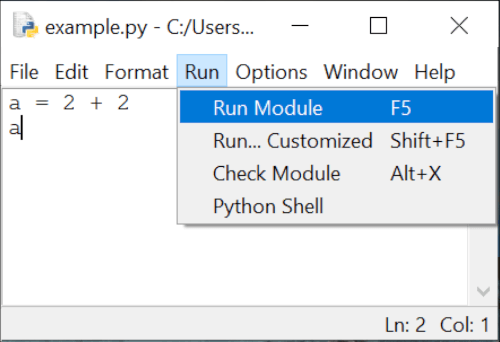
It can be observed that the code has been executed, but no output is displayed on the console (or the standard output) as all outputs have to be explicitly specified when running a code in the script mode.
This can be done by using the print() function which is used in Python scripts to display output on the output stream. Let us quickly add the print() function in the above code and execute it.
a = 2 + 2
print(a)
Now, when you run the script you will observe that the value of a, that is 4, is now displayed on the console.
Python Fundamentals
Tokens: Introduction
When a Python code is executed, the Python interpreter reads each logical line and breaks it into a sequence of lexical units.
These lexical units are better known as tokens - the smallest individual units of a program. They are the building blocks of a Python code and can be classified into one of the following categories:
- Keywords : Reserved words that convey special meaning when processed by the Python interpreter.
- Identifiers : Names defined by the programmer to refer to objects that can represent variables, functions, classes, etc.
- Literals : Values specified in the program which belong to exactly one of the Python’s built-in data types.
- Delimiters : Symbols that denote grouping, punctuation, and assignment/binding.
- Operators : Symbols that can operate on data and compute results.
Tokens: Keywords
Keywords are reserved words that have special meaning when processed by the Python interpreter. They are case-sensitive and cannot be used for naming identifiers (class, function, variable or structure names).
The list of keywords in Python are provided below:
|
|
|
True |
False |
import |
from |
as |
None |
and |
or |
not |
in |
is |
try |
except |
finally |
raise |
del |
global |
nonlocal |
lambda |
def |
class |
with |
if |
elif |
else |
pass |
for |
while |
continue |
break |
assert |
return |
yield |
async |
await |
|
Tokens: Identifiers
Identifiers are used for defining the names of Python objects such as variables, functions, classes, modules, etc. The naming convention for identifiers is as follows:
- Must begin with a lowercase character (
a-z) or an uppercase character (A-Z) or underscore sign (_).
- Followed by any number of letters (
a-z, A-Z), digits (0-9), or underscores (_).
- Should not be a keyword.
- No special symbols are allowed like
!, @, #, $, %, etc.
Some points to keep in mind while naming identifiers:
- Identifiers are case-sensitive in nature and any difference in case of any character refers to a different identifier. e.g.,
length and Length are different identifiers.
- Identifiers differing by only underscores are different. e.g.,
unitlength and unit_length are different identifiers.
It is also a good practice (although not compulsory) to follow the following procedure while naming identifiers:
- Identifiers should be named carefully with an emphasis on clarity and readability. For example, in a program that calculates the area of a rectangle, a good choice for identifier names are -
length, breadth and area.
- Class names should start with uppercase character.
- Identifiers starting with an underscore have special meaning in a program.
- Variable, function and method names should be in lowercase characters, with underscores separating multiple words like
area_of_square, area_of_triangle, etc.
Tokens: Literals
Literals are tokens in the source code which represent fixed or constant values. They are often used in assignment statements for initializing variables or in comparison expressions.
The various types of literals available in Python are as follows:
Numeric Literals
Numeric literals are used for representing numeric values in the source code. They can be of three types - integers, float point numbers and imaginary numbers.
Integer Literals
Integer literals are numbers without any fractional component.
In Python, integer literals can be written in four positional (base) numeral systems:
i. Decimal or base-10 Integer
A decimal integer literal consists of one or more digits (0-9) and cannot have any zeros preceding the first non-zero digit, except when the number is 0.
Example base-10 integers:
34
3283298
864
0
092 is not a valid decimal integer literal as a zero precedes the first non-zero digit 9.
ii. Binary or base-2 Integer
A binary integer or base-2 integer begins with 0b or 0B followed by binary digits 0-1.
For example, 27 can be written as a binary integer literal 0b11011.
iii. Octal or base-8 Integer
An octal integer or base-8 integer begins with 0o or 0O followed by octal digits 0-7.
For example, 27 can be written as an octal integer literal 0o33.
iv. Hexadecimal or base-16 Integer
A hexadecimal integer or base-16 integer begins with 0x or 0X followed by digits 0-9 or letters A-F (case insensitive).
For example, 27 can be written as a hexadecimal integer literal 0x1B or 0x1b.
Thus, it can be observed that number 27 can be written in the program as 27 (decimal), 0b11011 (binary), 0o33 (octal) or 0x1B (hexadecimal).
Underscores in Integer Literals
An optional character _ (underscore) is also allowed in an integer literal to group digits for enhanced readability.
One underscore can occur between digits, and after base specifiers like 0o.
They are ignored while determining the actual numerical value of the literal.
Some valid underscore usages are - 10_00_00_000, 0b_1110_0101, 0x23_123.
Floating Point Literals
Floating point literals are real numbers present in the source code. They contain fractional component and/or exponential component.
The fractional component includes the digits after the decimal point (.).
Example floating point literals:
3.4
.4
8.
3.4E2
3.4e-2
In the above example, .4 is equivalent to 0.4 and 8. is equivalent to 8.0.
The exponential component can be identified by the letter e or E followed by an optional sign (+ or -) and digits (0-9). This exponent is equivalent to multiplying the real number with the power of 10.
For example, 3.4E2 is equivalent to 3.4 x 10^2 or 340.0, whereas 3.4e-2 is equivalent to 3.4 x 10^-2 or .034.
Imaginary Literals
To specify complex numbers and perform complex number mathematics, Python supports imaginary literals which are given by real or integer number followed by the letter j or J which represents the unit imaginary number.
Example imaginary literals:
3.5j
15.j
12j
.005j
3e100j
3.5e-10j
Points to Note
In Python,
- there is no specialized literal such as a complex literal. A complex number is actually represented in the program using an expression comprising a real number (integer/float numeric literal) and an imaginary number (imaginary literal). For example,
1 + 2j consists of an integer literal (1) and a imaginary literal (2j).
- numeric literals do not include the minus sign (
-). - is actually a unary operator it combines with a numeric literal to represent negative numbers. For example, in -3.14 the numeric literal is 3.14 and - is an operator.
Boolean Literals
The reserved words True and False are also boolean literals which can be used to specify the truth value in a program.
String Literals
String literals are texts which can be specified in a variety of ways in Python:
- Single quotes:
'python'
- Double quotes:
"python"
- Triple quoted:
'''Triple python''', """Three python""".
Triple quoted strings can also span multiple lines.
Example:
s = "I am a String"

s1 = """A
multiline
String"""

s2 = '''Also a
multiline
String'''
The backslash (\) character can be used in a string literal to escape characters that otherwise have a special meaning, such as newline, linefeed, or the quote character.
| Escape Sequence |
Meaning |
\\ |
Backslash (\) |
\' |
Single quote (') |
\" |
Double quote (") |
\a |
ASCII Bell (BEL) |
\b |
ASCII Backspace (BS) |
\f |
ASCII Form-feed (FF) |
\n |
ASCII Linefeed (LF) |
\r |
ASCII Carriage Return (CR) |
\t |
ASCII Horizontal Tab (TAB) |
\v |
ASCII Vertical Tab (VT) |
Although \' and \" can be used to specify quote characters, Python allows embedding double quotes inside a single-quoted string ('My name is "Python".') and single quotes inside a double-quoted string ("Python's World").
String literals also support unicode characters which can be specified using \u escape sequence followed by the 4 letter unicode.
>>> print("E = mc\u00B2")
E = mc²
In the above example, \u00B2 is the unicode character which represents the ‘SUPERSCRIPT TWO’.
Special Literal
None is a special literal which is used to denote the absence of value.
It should not be confused with 0 as 0 is an integer literal with a defined finite value, whereas None implies nothingness.
>>> a = None
>>> a
>>>
In the above example, the Python shell does not display any value of a as it is assigned as None which has no value.
Collection of Literals
Python has the provision for specifying a collection of literals in the source code using a special syntax known as “displays”.
One can create specialized containers like list, set and dictionary using this syntax.
Some example collection of literals (displays) are provided below:
- List:
a = ['a', 'b', 'c']
- Set:
a = {'a', 'b', 'c'}
- Dictionary:
a = {'a':1, 'b':2, 'c':3}
List, set and dictionary will be covered in detail in later chapters.
Tokens: Operators
Operators are tokens which can be combined with values and variables to create expressions which evaluate to a single value. Python supports a rich set of operators:
+       -       *       **
/       //      %      @
<<      >>
&       |       ^       ~
:=      <       >
<=      >=      ==      !=
Each of the above operators are covered in detail in the chapter - Operators.
Tokens: Delimiters
Delimiters are tokens which are useful for organizing a program and are used in statements, expressions, functions, literal collections, and various other code structures.
They can be classified based on utility as follows:
Grouping
(), [] and {} are delimiters used for:
- grouping expressions which can be spread across multiple physical lines.
- creating collection of literals like list display, dictionary display, set display.
- creating parenthesized sub-expression having the highest operator precedence (evaluated first) in a complex expression.
Example
days = ['Sunday', 'Monday',
        'Tuesday', 'Wednesday',
        'Thursday', 'Friday',
        'Saturday']

sum_6 = (1 + 2 +
         3 + 4 +
         5 + 6)
is equivalent to
days = ['Sunday', 'Monday', 'Tuesday', 'Wednesday', 'Thursday', 'Friday', 'Saturday']

sum_6 = (1 + 2 + 3 + 4 + 5 + 6)
Punctuation, Decoration and Annotation
Tokens in Python which are used for punctuation, decoration and annotation are:
.       ,       :
;       @       ->
Assignment/Binding
The assignment or binding delimiters are used for binding objects to names via assignment statements. The complete list of tokens are provided below:
=       +=      -=      *=
/=      //=     %=      **=
@=      &=      |=      ^=
<<=     >>=
Except =, the rest of the tokens have an operator followed by = character.
These delimiters are also known as augmented assignment operators as they perform an operation in combination with assignment.
Character Set
A set of valid characters that a programming language recognizes is known as its character set.
Python is a new age programming language which supports Unicode encoding standard. The default encoding for Python source code is UTF-8 (Unicode Transformation Format – 8-bit) which enables developers to use Unicode characters not only as literals, but also as identifiers.
This makes Python one of the very few programming languages that support multiple languages as shown in the example below:
Code
message = "हिन्दी में print करे"
print(message)

क = 1  # Devanagari Letter KA
ক = 2  # Bengali Letter KA
க = 3  # Tamil Letter KA
ક = 4  # Gujarati Letter KA
print(क + ক + க + ક)
Output
हिन्दी में print करे
10
Blocks and Indentation
In traditional programming languages like C++ or Java, programs are organised in form of code blocks.
Each code block contains one or more statements which are enclosed between braces - { and } and are executed sequentially.
A sample C++/Java code is provided below which checks for an input x.
C++
if (x < 10) {
    cout << "x is less than 10" << endl;
    if (x <= 5) {
        cout << "x is less than or equal to 5" << endl;
    }
    else {
        cout << "x is more than 5 but less than 10" << endl;
    }
}
else {
    cout << "x is not less than 10" << endl;
}
Java
if (x < 10) {
    System.out.println("x is less than 10");
    if (x <= 5) {
        System.out.println("x is less than or equal to 5");
    }
    else {
        System.out.println("x is more than 5 but less than 10");
    }
}
else {
    System.out.print("x is not less than 10");
}
It can be seen how indentations (tab at the beginning of line) are added (not required by programming language) to the code to increase readability, which helps in guiding readers through the code.
Python
Code blocks in Python are inspired by this idea as it makes it easier to understand a Python code.
A block of code is denoted by line indentation, typically 4 spaces (preferred) or a tab. This indentation is used to determine the logical group of statements, with all statements within a group having the same level of indentation.
The corresponding Python code for the above C++/java examples is provided below.
Notice how the code blocks are indented according to the logic.
if x < 10:
    print("x is less than 10")
    if x <= 5:
        print("x is less than or equal to 5")
    else:
        print("x is more than 5 but less than 10")
else:
    print("x is not less than 10")
Python supports single-line comments and multi-line comments to enhance code readability via adding documentation.
A single line comment begins with #. Everything between # and the end of line is ignored by the Python interpreter.
# A single line comment.
a = 1 # assign a
A multiline comment begins with ''' or """ and ends with the same.
"""
I am
a multiline
comment.
"""

'''
I am
also a multiline
comment.
'''
As compared to single line comments, multiline comments should begin at the same indentation level corresponding to their code block.
For example,
"""
Begin program
here
"""
if x < 10:
    """
    Enter code block when x
    is less than 10
    """
    print("x is less than 10")
    if x <= 5:
        """
        Enter code block when x
        is less than or equal to 5
        """
        print("x is less than or equal to 5")
    else:
        """
        Enter code block when x
        is more than 5 but less than 10
        """
        print("x is more than 5 but less than 10")
else:
    """
    Enter code block when x
    is not less than 10
    """
    print("x is not less than 10")
Variables, Objects & Data Types
What are Objects & Variables?
A program is a sequence of instructions which often acts on information (data) provided by the user.
The process of creating, storing and manipulating this data helps in the computation of new data or the end result.
Variables are the fundamental building blocks of a program which provide a way to store, access and modify values during the life-cycle of a program.
Each variable has:
- a name (handle),
- a type or data-type (kind of data), and
- a value (actual data).
In traditional programming languages like Java or C++, the type of the variable is pre-defined.
For example, if you want to use the value 1 inside the program, you can store it in a variable named a of type int.
int a = 1;
This a is synonymous to a box of fixed dimensions (fixed type) holding something (value 1) inside it.

In case we want to change the contents of the box, we can replace it with something similar (same type).
a = 2;

The contents of this box can be replicated and placed in a similar (same type) box:
int b = a;

Multiple boxes can exist, each containing an item having the same value.
int x = 3;
int y = 3;
int z = 3;

As shown above, the programming languages in which the variables (named boxes) are declared along with their types (size of the boxes) are known as statically typed languages.
The size of these boxes cannot change later in the program until the variable is re-initialized with the same name and different type.
Python is a dynamically-typed language, where every value or data item (of any type like numeric, string, etc.) is an object.
The variable names are just name-tags pointing to the actual object containing data of any type.
As there is no need of any variable declaration in Python before usage, there is no concept of default value (an empty box or null) which exists in other programming languages.
Whenever a new object is created in Python, it is assigned a unique identity (ID) which remains the same throughout the lifetime of that object. This ID is the address of the object in memory and the built-in function id() returns the value of this address.
>>> a = 1
>>> id(a)
140407745943856
>>> a = 2
>>> id(a)
140407745943888
In the above example, the ID of a changes as it points to a new object (2).
>>> b = a
>>> id(b)
140407745943888
Also, when a is assigned to b, instead of creating a new copy, b points to the same object as a.
Variables & Assignment Statements
A variable is uniquely identified by a name (identifier) and follows the same naming convention:
- Must begin with a lowercase character (
a-z) or an uppercase character (A-Z) or underscore sign (_).
- Followed by any number of letters (
a-z, A-Z), digits (0-9), or underscores (_).
- Should not be a keyword.
- No special symbols are allowed like
!, @, #, $, %, etc.
Assignment
Variables can be bound to a reference of an object (of any type) using assignment statements.
You can create an object (data) and bind it’s reference to a variable using equal sign (=):
count = 100       # integer
pi    = 3.141     # real number
name  = "Python"  # string
Here, L-value refers to the assignable variables (count, pi, name) on the left side of the assignment and R-value refers to the expression on the right side of the assignment operator that has a value (100, 3.141, "Python").
As variables are just references, you can rebind them to another object of same or different type:
a = 100       # integer
a = 3.141     # real number
a = "Python"  # string
Deletion
The del statement can be used to unbind the reference to an object.
>>> a = 10
>>> del a
>>> a
Traceback (most recent call last):
  File "<stdin>", line 1, in <module>
NameError: name 'a' is not defined
Accessing a results in a NameError as the reference (variable) to the object holding value 10 is deleted.
The object is also automatically cleaned up from the memory if there is no other variable referencing to it (garbage collection).
Multiple Assignment
In Python, multiple assignment can be used to condense variables which are set to the same value:
>>> x = y = z = 'foo'
>>> x
'foo'
>>> y
'foo'
>>> z
'foo'
Tuple Swapping
In Python, a temporary variable is not required to swap values of two variables. Values can be directly swapped (tuple swapping) as shown below:
>>> a = 'Hello'
>>> b = 'World'
>>> b, a = a, b
>>> a
'World'
>>> b
'Hello'
Built-in Data Types
In Python, the type of a data (or value) is not linked to the variable, but to the actual object which contains it. This type is also known as the object’s data type and is used for identifying the operations that can be performed on the data.
The following built-in data types are available in Python:
- Numeric Types -
int, float, complex, bool
- Sequence Types -
list, tuple, str
- Set Type -
set
- Mapping Type -
dict
- Special Type -
None
Often sequence, set and mapping types are also collectively known as iterables as they are a collection of items on which a user can traverse (iterate).
Numeric Types - int, float, complex, bool
Numeric data types are used for storing the following types of numbers:
Integer Numbers
Objects holding integer numbers like -1, 0, 200 are of int data type.
Real or Floating-point Numbers
Objects holding real or floating point numbers like -1.1, 3e2, 20.0 are of float data type.
Complex Numbers
Objects storing complex numbers like 2 + 1j, -3j, -1 + 2J are of type complex.
Each complex number has two parts, the real part which is a numeric integer or floating point literal, and the imaginary part which is an imaginary literal.
Boolean
The boolean data type (bool) is a subtype of int. It stores the evaluated value of expressions represented as keywords - True (integer value 1) and False (integer value 0).
Sequence Types - str, list, tuple
An ordered collection of items where each item can be accessed using an integer index is known as a sequence. The following three sequence data types are available in Python:
String
A string (str data type) is a sequence of zero or more unicode characters enclosed within a pair of single (') or double (") quotes.
Some example strings are - "42", 'hello', "python".
List
A list is sequence of items of same or different data types which are enclosed within brackets - [ ].
Some example lists are - [1, 2, 3], ['abc', 23, 3.14], ['edpunk', 'python'].
Tuple
A tuple is an immutable sequence of items of same or different data types which are enclosed within parentheses - ( ).
Some example tuples are - (1, 2, 3), ('abc', 23, 3.14), ('edpunk', 'python').
Set Type - set
A set is an unordered collection of unique items of same of different data types which are enclosed in curly braces - { }.
Some example sets are - {1, 2, 3}, {'abc', 23, 3.14}, {'edpunk', 'python'}.
Mapping Type - dict
dict is a mapping data type which stores values in the form of key-value pairs.
It is used for representing data where you can quickly access the value (any data type) corresponding to a key (any data type except list, set or dict), just like a dictionary where you can lookup the meaning of a given word.
Keys and corresponding values are separated by colon (:).
The key-value pairs are separated by comma (,) and enclosed within curly braces - { }.
Some example dictionaries are - {1: "a", 2: "b", 3: "c"}, {"name": "edpunk", "language": "python"}.
Special Type - None
None is a special data type which is used to denote the absence of value in an object.
It is neither 0 nor False as these are defined finite values, whereas None implies nothingness.
Type Checking
The built-in type() function can be used to fetch the data type of an object.
Examples:
>>> count = 100
>>> type(count)
<class 'int'>

>>> pi = 3.141
>>> type(pi)
<class 'float'>

>>> name = "Python"
>>> type(name)
<class 'str'>
This function can be used along with the is operator in an expression to test whether the object is of the given type.
>>> count = 100
>>> type(count) is int
True
The in operator can be used along with the type() function to test if the data type is one of the mentioned types.
# count is of type int or float
>>> type(count) in (int, float)
True
Type Casting
The process of converting the data type of an object from one type to another is known as Type Casting or Type Conversion.
The two kinds of type casting supported in Python are:
Implicit Type Casting
The Python interpreter automatically converts the data type without the need of user intervention when evaluating expressions to determine the final data type.
In the below example the final type of c is automatically determined as float by the Python interpreter.
>>> a = 1   # int
>>> b = 2.0 # float
>>> c = a + b
>>> c
3.0
>>> type(c)
<class 'float'>
Explicit Type Casting
When the type conversion is explicitly specified by the user using the various built-in functions available in Python, it is known as explicit type casting.
The built-in functions which can be used for explicit type casting are as follows:
1. int()
Creates an int from a bool, float or str containing integer characters (with or without sign).
>>> int(True)
1
>>> int(2.3)
2
>>> int("2")
2
2. float()
Creates a float from a bool, int or str containing floating point literals (with or without sign).
>>> float(True)
1.0
>>> float(2)
2.0
>>> float("2.3")
2.3
float() also accepts the following string inputs -
"Infinity""inf""nan" (not a number).
>>> float("Infinity") > 1
True
>>> float("nan")
nan
Floating point literals can also contain the following characters -
., which denotes the fractional part of a number.e or E, which denotes the exponent part of a number.
>>> float("3.14")
3.14
>>> float("10.")
10.0
>>> float("1e100")
1e+100
>>> float("3.14e-10")
3.14e-10
3. str()
Converts any object into a str.
>>> str(2)
'2'
>>> str([1, 2, 3, 4])
'[1, 2, 3, 4]'
4. tuple()
Creates a tuple from an iterable of type str, list, set or range.
>>> tuple('hello')
('h', 'e', 'l', 'l', 'o')
>>> tuple([1, 2, 3, 4])
(1, 2, 3, 4)
>>> tuple(range(6))
(0, 1, 2, 3, 4, 5)
5. list()
Creates a list from an iterable of type str, tuple, set or range.
>>> list('hello')
['h', 'e', 'l', 'l', 'o']
>>> list({1, 2, 3, 4})
[1, 2, 3, 4]
>>> list(range(6))
[0, 1, 2, 3, 4, 5]
6. set()
Creates a set from an iterable of type str, tuple, list or range.
>>> set('hello')
{'o', 'e', 'l', 'h'}
>>> set([1, 2, 3, 4])
{1, 2, 3, 4}
>>> set(range(6))
{0, 1, 2, 3, 4, 5}
Mutable & Immutable Data Types
Immutable Data Types
A data type is said to be immutable when the value of an object of that type cannot be modified.
The following data types are immutable:
intfloatcomplexbooltuplestrNone
You might be wondering if some of the above types are immutable then how are we able modify the values of variables?
In case of variable re-assignment, the original objects are not modified, but new objects (with new values) are created in a new memory location and are bound to the variables. The object containing the old value is destroyed if no other variable references it.
Let us take an example,
>>> a = 1
>>> id_a = id(a)
>>> a = 2
>>> id_a2 = id(a)
>>> id_a == id_a2
False
You can witness in the above example how the object containing the value 1 is different from the object containing the value 2, and a points to the latest object.
Sequence data types like strings and tuples are also immutable, i.e., no modifications are permitted to any item once it is created and any attempt to do so raises an error.
>>> s = "Hello"
>>> s[1] = "P"
Traceback (most recent call last):
  File "<stdin>", line 1, in <module>
TypeError: 'str' object does not support item assignment
>>> t = (1, 2, 3)
>>> t[1] = 0
Traceback (most recent call last):
  File "<stdin>", line 1, in <module>
TypeError: 'tuple' object does not support item assignment
Although, similar to numeric types the variables can be re-assigned to new sequences.
>>> s = "Hello"
>>> id_s = id(s)
>>> s = "Help"
>>> id_s2 = id(s)
>>> id_s == id_s2
False

>>> t = (1, 2, 3)
>>> id_t = id(t)
>>> t = (0, 2, 3)
>>> id_t2 = id(t)
>>> id_t == id_t2
False
Mutable Data Types
In Python, the following data types are mutable, i.e., any modification does not create a new object but modifies the existing object:
Let us take a list and modify its contents.
>>> l = [1, 2, 3]
>>> id_l = id(l)
>>> l[0] = 0
>>> l
[0, 2, 3]
>>> id_l2 = id(l)
>>> id_l == id_l2
True
Let us take an example of a dictionary and add a new key:value pair.
>>> d = {"a": "apple", "b": "boy"}
>>> id_d = id(d)
>>> d["c"] = "cat"
>>> d
{'a': 'apple', 'b': 'boy', 'c': 'cat'}
>>> id_d2 = id(d)
>>> id_d == id_d2
True
Let us take an example of a set and add new item.
>>> s = {"apple", "bat"}
>>> id_s = id(s)
>>> s.add("cat")
>>> s
{'cat', 'apple', 'bat'}
>>> id_s2 = id(s)
>>> id_s == id_s2
True
In the above examples, the id of the objects (list, dict, set) do not change, which implies that no new objects are created and the original objects are modified.
input() function is used to accept new input data from the user.
When this function is encountered in the code, the python interpreter waits for the user to type a response which is read as a string and assigned to a variable.
>>> name = input()
edpunk
>>> name
'edpunk'
The function also has an optional string argument which is used as a prompt message for the user.
>>> name2 = input("Enter name: ")
Enter name: EdPunk
>>> name2
'EdPunk'
User input can be converted into integer or floating point numbers using the type conversion functions int() and float().
>>> num = int(input("Enter n: "))
Enter n: 10
>>> type(num)
<class 'int'>
>>> num
10

>>> pi = float(input("Enter pi: "))
Enter pi: 3.14
>>> type(pi)
<class 'float'>
>>> pi
3.14
Displaying Output
The built-in print() function is used to display an output (value of variables, expressions, etc.) on the standard output.
Let us go through a program which computes the area of a rectangle and displays it:
Code
length = 10
breadth = 5
area = length * breadth
print("Area:", area)
Output
Area: 50
print() function can also be used to output the value of multiple objects when they are provided as arguments to the function.
Code
a = 2 + 2
b = 2 * 3.5
print(a, b)
Output
4 7.0
In the above code, the values of a and b are separated by a blank space (the default value of sep).
This property can be modified by providing any user defined separator using the sep option.
Let us modify the code and provide "," as the separator.
Code
a = 2 + 2
b = 2 * 3.5
print(a, b, sep=",")
Output
4,7.0
When expressions are provided as arguments to the print() function, output is the evaluated value of those expressions.
For example,
Code
print(2 + 2)
print(2 * 3.5)
print("Hello, " + "world!")
Output
4
7.0
Hello, world!
In the above code snippet, each print() function invocation creates a new line of output. This is because end parameter has the newline character ('\n') as the default value in the print() function.
This can be modified by the user as shown below:
Code
print(2 + 2, end=",")
print(2 * 3.5, end=";")
print("Hello, " + "world!")
Output
4,7.0;Hello, world!
Note
All non-keyword arguments or expressions are converted to strings and written to the output stream by the print() function. They are separated by sep and followed by end. An empty print() invocation writes end parameter (an empty line as end defaults to the newline character '\n').
Operators & Expressions
Introduction to Operators
Operators are symbols that perform a single simple task or operation on one or more values resulting in a single evaluated value.
The values on which these operators are applied are called operands.
Unary Operators
Unary operators are applied on a single operand positioned on right side of the operator.
Following are some unary operators available in Python:
+ (plus): The unary + operator does not change the value of the operand.- (minus): The unary - operator changes the sign of the operand.~ (bitwise NOT): The unary ~ results in the bit-wise inversion of the integer operand. The bit-wise inversion of x is defined as -(x+1).
>>> x = 5
>>> -x
-5
>>> +x
5
>>> ~x
-6
Binary Operators
Binary operators are applied on two operands.
For example, arithmetic operators (+, –, *, /) evaluate the result of mathematical computation of two values.
Operators in Python
A rich set of operators are available in Python which can be categorized as follows:
- Arithmetic Operators -
+, –, *, /, %, **, //
- Relational Operators -
==, !=, >, >=, <, <=
- Assignment Operators -
+=, -=, *=, /=, %=, **=, //=
- Logical Operators -
not, or, and
- Identity Operators -
is, is not
- Membership Operators -
in, not in
- Bitwise and Shift Operators -
&, |, ^, ~, <<, >>
Arithmetic Operators
Arithmetic operations can be performed in Python using the following arithmetic operators:
Addition
The + operator adds the values of numeric operands.
>>> 2 + 3
5
>>> 2 + 3.0
5.0
In case the operands are of type str, list or tuple, the + operator concatenates these two sequences or strings.
>>> 'edpunk' + 'python'
'edpunkpython'
>>> ["ed", "punk"] + ["python", ]
['ed', 'punk', 'python']
Subtraction
The - operator subtracts the value of operand on right from the value of operand on left.
>>> 2 - 3
-1
Multiplication
The * operator multiplies the values of numeric operands.
>>> 2 * 3
6
In case the operands are of type str, list or tuple, the * operator returns a sequence or string self-concatenated the specified number of times.
>>> "python" * 3
'pythonpythonpython'
>>> ['ed', 'py'] * 3
['ed', 'py', 'ed', 'py', 'ed', 'py']
Division
The / operator divides the value of operand on left by the value of operand on right and returns the real number quotient.
>>> 6 / 2
3.0
>>> 5 / 2
2.5
Floor Division
The // operator divides the value of operand on left by the value of operand on right and returns the integer quotient.
>>> 5 // 2
2
Modulus
The % operator divides the value of operand on left by the value of operand on right and returns the remainder.
>>> 5 % 2
1
Exponent
The ** operator raises the left operand to the power of the right operand.
>>> 5 ** 2
25
Relational Operators
Relational operators are useful for comparing the values of the operands to determine their relationship. Following relational operators are available in Python:
Equals to
The == operator returns True if the value of operand on left is same as the value of operand on right.
>>> 2 == 2
True
>>> 2 == 3
False
In case of sequence operands like str, list or tuple, the result is True if both the sequences are exactly the same.
>>> "python" == "python"
True
>>> "pypi" == "python"
False
>>> [1, 2, 3] == [1, 2, 3]
True
As a sequence is an ordered collection of items, so the order in which the items are positioned is very important.
>>> [2, 1, 3] == [1, 2, 3]
False
Not equal to
The != operator returns True if the value of operand on left is not equal to the value of operand on right.
>>> 2 != 2
False
>>> 2 != 3
True
>>> 'py' != 'oy'
True
>>> [2, 1, 3] != [1, 2, 3]
True
>>> [1, 2, 3] != [1, 2, 3]
False
Greater than
The > operator returns True if the value of operand on left is greater than the value of operand on right.
>>> 3 > 2
True
>>> 2 > 2
False
In case of strings operands, > operator perform comparison according to the Unicode code point (integer) of each character one-by-one.
The Unicode code point of a character can be obtained using the ord() function in Python.
The code point of first character of both operands are compared. In case they are equal, the code point of next character of both operands are compared and the process continues.
For example,
>>> "python" > "Python"
True
The code point of "p" (112) is greater than the code point of "P" (80). As 112 is greater than 80 the expression evaluates to True.
Let us take another example:
>>> "pYthon" > "python"
False
The code point of first character is same (112), so the next set of characters are compared. The code point of "Y" (89) is not greater than the code point of "y" (121) so the expression evaluates to False.
If two string operands p and q are of unequal lengths (len(p) < len(q)) and p is a substring of q such that q = pt where t is any string of length greater than 0, then q > p returns True.
>>> "python" > "py"
True
In case of sequence operands like list or tuple, the items are compared one-by-one starting from index 0.
>>> ["p","py","PY"] > ["p","Py","PY"]
True
>>> [1, 3] > [1, 2]
True
>>> [1, 3, 4] > [1, 2]
True
In the above examples, "py" is greater than "Py" and 3 is greater than 2 respectively.
If two sequences are of unequal lengths and the smaller sequence is the starting subsequence of the larger one, then the larger sequence is considered greater than the smaller one.
>>> [1, 2, 4] > [1, 2]
True
Greater than or equal to
The >= operator returns True if the value of operand on left is greater than or equal to the value of operand on right.
>>> 3 >= 3
True
>>> 2 >= 3
False
In case of sequence operands (str, list, tuple), the comparison operation performed is along the same lines as the > operator discussed above.
>>> "python" >= "Python"
True
>>> "python" >= "python"
True
>>> ["py", "py", "PY"] >= ["py", "Py", "PY"]
True
>>> [1, 2] >= [1, 2]
True
>>> [1, 2, 4] >= [1, 2]
True
Less than
The < operator returns True if the value of operand on left is less than the value of operand on right.
>>> 2 < 3
True
>>> 3 < 3
False
In case of sequence operands (str, list, tuple), the comparison operation performed is along the same lines as the > operator discussed above.
>>> "file" < "Pile"
False
# f(102) is > P(80)
>>> "py" < "python"
True
>>> ["Py", "PY"] < ["py", "PY"]
True
>>> ['a', 2] < ['a', 3]
True
>>> [1, 2] < [1, 2, 4]
True
Less than or equal to
The <= operator returns True if the value of operand on left is lesser than or equal to the value of operand on right.
>>> 2 <= 3
True
>>> 3 <= 3
True
In case of sequence operands (str, list, tuple), the comparison operation performed is along the same lines as the > operator discussed above.
>>> "file" <= "Pile"
False
# f(102) is > P(80)
>>> "py" <= "python"
True
>>> ["Py", "PY"] <= ["py", "PY"]
True
>>> ['a', 3] <= ['b', 2]
True
>>> [1, 2] <= [1, 2, 4]
True
Assignment Operators
The assignment symbol (=) serves as a delimiter between the name and value in an assignment statement.
It binds (or rebinds) a value (data, variable, expression) on the right to the target variable on the left.
>>> x = 1
>>> x
1
>>> y = x
>>> y
1
>>> y = "python"
>>> y
'python'
Binary operators can be combined with the assignment symbol to create Augmented Assignment Operators.
These operators perform the binary operation on the two operands and assign the result to the original target (left operand).
If <op> is a binary operator, then the expression a <op>= b containing the augmented assignment operator is equivalent to a = a <op> b.
+=
The += operator adds a value (right operand) to the variable (left operand) and assigns the result to that variable.
>>> a = 2
>>> a += 3
>>> a
5
>>> x = "hello"
>>> y = "world"
>>> x += y
>>> x
'helloworld'
-=
The -= operator subtracts a value (right operand) from the variable (left operand) and assigns the result to that variable.
>>> a = 3
>>> a -= 2
>>> a
1
*=
The *= operator multiplies a value (right operand) to the variable (left operand) and assigns the result to that variable.
>>> a = 3
>>> a *= 2
>>> a
6
>>> x = "hi"
>>> x *= 3
>>> x
'hihihi'
/=
The /= operator divides the variable (left operand) by a value (right operand) and assigns the result to that variable.
>>> a = 4
>>> a /= 2
>>> a
2.0
//=
The //= operator floor divides the variable (left operand) by a value (right operand) and assigns the result to that variable.
>>> a = 5
>>> a //= 2
>>> a
2
**=
The **= operator raises the variable (left operand) to a power (right operand) and assigns the result to that variable.
>>> a = 4
>>> a **= 2
>>> a
16
%=
The %= operator computes modulus of the variable (left operand) and a value (right operand) and assigns the result to that variable.
>>> a = 4
>>> a %= 3
>>> a
1
Logical Operators
Expressions using logical operators evaluate to a boolean value (True or False) based on the logical state of the operands.
Logical State of Operands
In Python, all values except 0, None, False, "", '', (), [], {} have their logical state as True.
bool() built-in function can be used to determine the logical state of literals, variables or expressions.
The logical state of the following literals is False.
>>> bool(False)
False
>>> bool(0)
False
>>> bool([])
False
>>> bool(None)
False
>>> bool("")
False
>>> bool([])
False
>>> bool(())
False
>>> bool({})
False
Some example literals having boolean state as True are provided below.
>>> bool(True)
True
>>> bool(1)
True
>>> bool(2.0)
True
>>> bool(100)
True
>>> bool("python")
True
>>> bool(["py", "thon"])
True
not
The logical state of an operand can be reversed (False to True, and vice versa) using the logical not operator.
>>> n = 5
>>> bool(n)
True
>>> bool(not n)
False
or
The logical or operator returns True if the logical state of any of the two operands is True.
>>> True or False
True
>>> bool(1 or 0)
True
>>> False or False
False
and
The logical and operator returns True if the logical state of both the operands is True.
>>> True and True
True
>>> True and False
False
>>> bool(10 and 20)
True
>>> bool(1 and 0)
False
Identity Operators
We have already witnessed how Python treats every value or data item as an object.
The relational operator == can be used to test whether the operands contain the same value.
>>> n = 1
>>> n2 = 1
>>> n == n2
True
This operator however does not check if both the operands are referring to the same object or d
README 内容过长,已截取前 64 KB。完整内容请前往 GitHub 仓库查看。


评论