MIT License

项目介绍

alexylem/jarvis 是一个托管在 GitHub 上的开源项目,主要使用 Shell 编写,采用 MIT License 许可证,目前获得 852 个 Star、193 次 Fork。

仓库全名
alexylem/jarvis
开源许可证
MIT License
Star 数
852
Fork 数
193
未关闭 Issue
178

README 摘要

Overview & full documentation available on http://openjarvis.com/ Jarvis.sh is a lightweight configurable multi-lang voice assistant Meant for home automation running on slow computers (ex: Raspberry Pi) Installs automatically voice recognition & speech synthesis egines of your choice Highly extendable thanks to a wide catalog of community plugins Languages supported (for voice recognition and speech synthesis)…

完整内容见 GitHub 原始 README 或本页 。

常见问题

jarvis 用什么语言开发?

主要使用 Shell 编写,采用 MIT License 许可证,目前有 852 个 Star。

jarvis 可以免费商用吗?

仓库采用 MIT License 许可证,可免费使用与修改,商业使用请遵守许可证条款(例如保留版权声明与许可声明)。

如何获取 jarvis 的源码?

可以直接克隆仓库:git clone https://github.com/alexylem/jarvis.git,默认分支为 master;安装与运行步骤见仓库 README。

jarvis 最近还在维护吗?

仓库最近一次更新为 2021年5月29日,当前有 178 个未关闭 Issue;Star 数为 852,可作为社区活跃度的参考。

关于

Jarvis.sh is a simple configurable multi-lang assistant.

描述取自 GitHub 官方 API,中文内容由 GitRead 中文社区 编辑团队整理。

简要分析

热度分
1306
价值分
567
活跃状态
活跃

语言占比

Perl
Python
Shell

README

Jarvis Version-shield Build-shield Plugins-shield

Banner

Overview & full documentation available on http://openjarvis.com/

Jarvis.sh is a lightweight configurable multi-lang voice assistant
Meant for home automation running on slow computers (ex: Raspberry Pi)
Installs automatically voice recognition & speech synthesis egines of your choice
Highly extendable thanks to a wide catalog of community plugins

Languages supported (for voice recognition and speech synthesis):
:fr: :gb: :us: :es: :it: :de:

Installation

See Requirements.

$> git clone https://github.com/alexylem/jarvis.git
$> cd jarvis/
$> ./jarvis.sh -i

More info on the site installation page.

Usage

$> jarvis

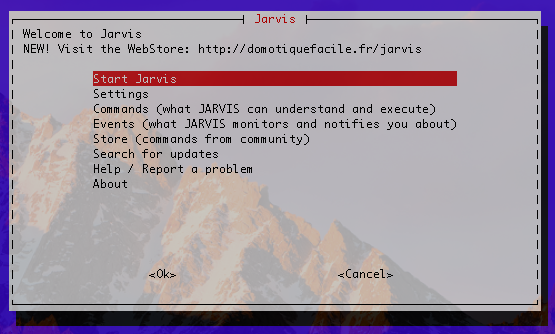
App-menu

Asciinema

Command-line options

$> jarvis -h
    Main options are accessible through the application menu

    -b  run in background (no menu, continues after terminal is closed)
    -c  overrides conversation mode setting (true/false)
    -i  install and setup wizard
    -h  display this help
    -j  output in JSON (for APIs)
    -k  directly start in keyboard mode
    -l  directly listen for one command (ex: launch from physical button)
    -m  mute mode (overrides settings)
    -n  directly start jarvis without menu
    -p  install plugin, ex: jarvis -p https://github.com/alexylem/jarvis-time
    -q  quit jarvis if running in background
    -r  uninstall jarvis and its dependencies
    -s  just say something and exit, ex: jarvis -s 'hello world'
    -u  force update Jarvis and plugins (ex: use in cron)
    -v  troubleshooting mode
    -w  no colors in output
    -x  execute order, ex: jarvis -x "switch on lights"

Support

http://openjarvis.com/content/support

License

License-shield

评论

暂无评论