aiomonitor
… image:: https://github.com/aio-libs/aiomonitor/workflows/CI/badge.svg
:target: https://github.com/aio-libs/aiomonitor/actions?query=workflow%3ACI
:alt: GitHub Actions status for the main branch
… image:: https://codecov.io/gh/aio-libs/aiomonitor/branch/main/graph/badge.svg
:target: https://codecov.io/gh/aio-libs/aiomonitor
:alt: codecov.io status for the main branch
… image:: https://badge.fury.io/py/aiomonitor.svg
:target: https://pypi.org/project/aiomonitor
:alt: Latest PyPI package version
… image:: https://img.shields.io/pypi/dm/aiomonitor
:target: https://pypistats.org/packages/aiomonitor
:alt: Downloads count
… image:: https://readthedocs.org/projects/aiomonitor-ng/badge/?version=latest
:target: https://aiomonitor.aio-libs.org/en/latest/?badge=latest
:alt: Documentation Status
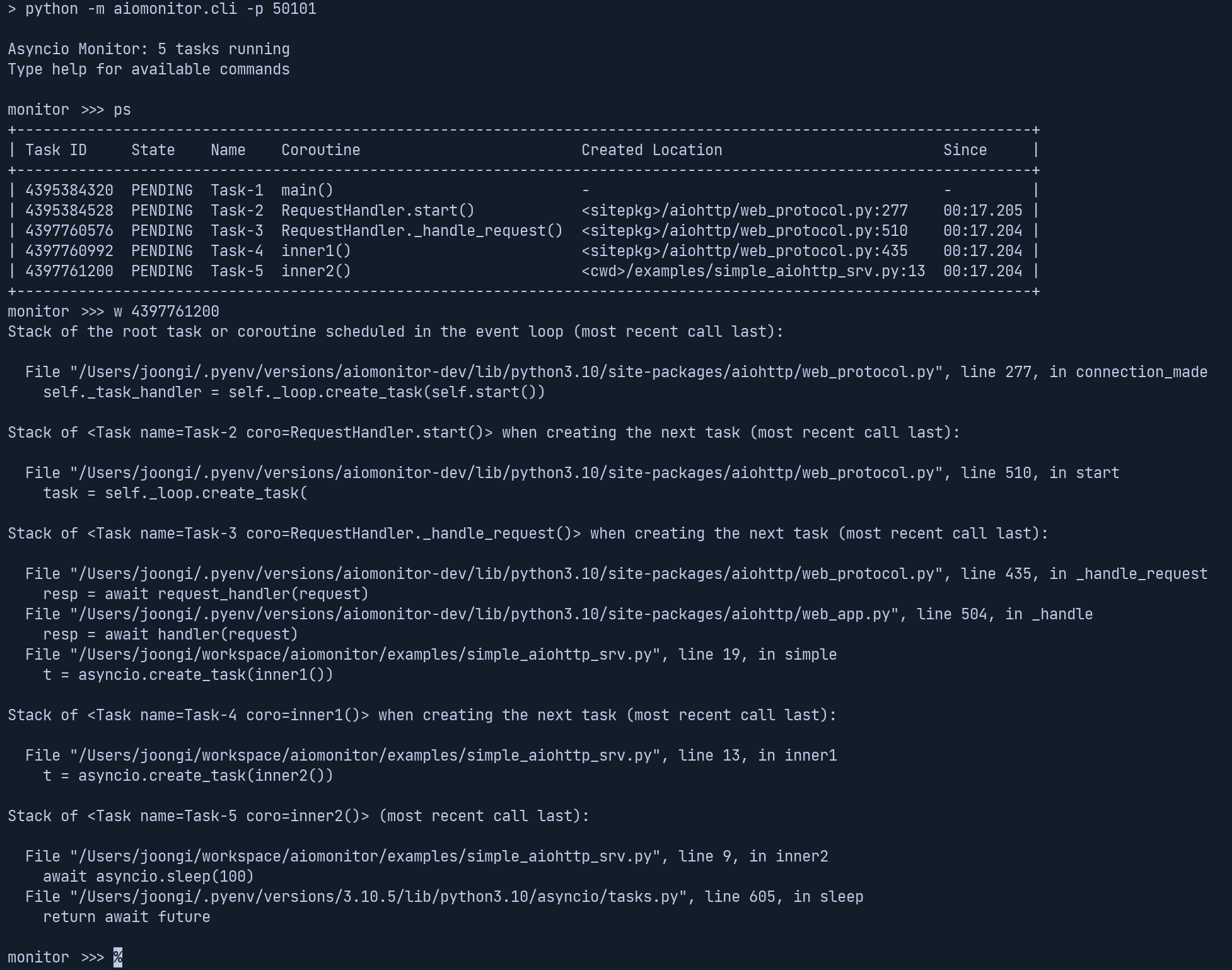
aiomonitor is a module that adds monitor and cli capabilities
for asyncio_ applications. Idea and code were borrowed from curio_ project.
Task monitor that runs concurrently to the asyncio_ loop (or fast drop-in
replacement uvloop_) in a separate thread as result monitor will work even if
the event loop is blocked for some reason.
This library provides a python console using aioconsole_ module. It is possible
to execute asynchronous commands inside your running application. Extensible
with you own commands, in the style of the standard library’s cmd_ module
… image:: https://raw.githubusercontent.com/aio-libs/aiomonitor/main/docs/screenshot-ps-where-example.png
:alt: An example to run the aiomonitor shell
Installation
Installation process is simple, just::
$ pip install aiomonitor
Example
Monitor has context manager interface:
… code:: python
import asyncio

import aiomonitor

async def main():
    loop = asyncio.get_running_loop()
    run_forever = loop.create_future()
    with aiomonitor.start_monitor(loop):
        await run_forever

try:
    asyncio.run(main())
except KeyboardInterrupt:
    pass
Now from separate terminal it is possible to connect to the application::
$ telnet localhost 20101
or the included python client::
$ python -m aiomonitor.cli
Tutorial
Let’s create a simple aiohttp_ application, and see how aiomonitor can
be integrated with it.
… code:: python
import asyncio

import aiomonitor
from aiohttp import web

# Simple handler that returns response after 100s
async def simple(request):
    print('Start sleeping')
    await asyncio.sleep(100)
    return web.Response(text="Simple answer")

loop = asyncio.get_event_loop()
# create application and register route
app = web.Application()
app.router.add_get('/simple', simple)

# it is possible to pass a dictionary with local variables
# to the python console environment
host, port = "localhost", 8090
locals_ = {"port": port, "host": host}
# init monitor just before run_app
with aiomonitor.start_monitor(loop=loop, locals=locals_):
    # run application with built-in aiohttp run_app function
    web.run_app(app, port=port, host=host, loop=loop)
Let’s save this code in file simple_srv.py, so we can run it with the following command::
$ python simple_srv.py
======== Running on http://localhost:8090 ========
(Press CTRL+C to quit)
And now one can connect to a running application from a separate terminal, with
the telnet command, and aiomonitor will immediately respond with prompt::
$ telnet localhost 20101
Asyncio Monitor: 1 tasks running
Type help for commands
monitor >>>
Now you can type commands, for instance, help::
monitor >>> help
Usage: help [OPTIONS] COMMAND [ARGS]...

  To see the usage of each command, run them with "--help" option.

Commands:
  cancel                  Cancel an indicated task
  console                 Switch to async Python REPL
  exit (q,quit)           Leave the monitor client session
  help (?,h)              Show the list of commands
  ps (p)                  Show task table
  ps-terminated (pst,pt)  List recently terminated/cancelled tasks
  signal                  Send a Unix signal
  stacktrace (st,stack)   Print a stack trace from the event loop thread
  where (w)               Show stack frames and the task creation chain of a task
  where-terminated (wt)   Show stack frames and the termination/cancellation chain of a task
aiomonitor also supports async python console inside a running event loop
so you can explore the state of your application::
monitor >>> console
Python 3.10.7 (main, Sep  9 2022, 12:31:20) [Clang 13.1.6 (clang-1316.0.21.2.5)] on darwin
Type "help", "copyright", "credits" or "license" for more information.
---
This console is running in an asyncio event loop.
It allows you to wait for coroutines using the 'await' syntax.
Try: await asyncio.sleep(1, result=3)
---
>>> await asyncio.sleep(1, result=3)
3
>>>
To leave the console type exit() or press Ctrl+D::
>>> exit()

✓ The console session is closed.
monitor >>>
Extension
Additional console variables
You may add more variables that can be directly referenced in the ``console`` command.
Refer `the console-variables example code <https://github.com/aio-libs/aiomonitor/tree/main/examples/console-variables.py>`_

Custom console commands
~~~~~~~~~~~~~~~~~~~~~~~

``aiomonitor`` is very easy to extend with your own console commands.
Refer `the extension example code <https://github.com/aio-libs/aiomonitor/tree/main/examples/extension.py>`_

Requirements
------------

* Python_ 3.8+ (3.10.7+ recommended)
* aioconsole_
* Click_
* prompt_toolkit_
* uvloop_ (optional)


.. _PEP492: https://www.python.org/dev/peps/pep-0492/
.. _Python: https://www.python.org
.. _aioconsole: https://github.com/vxgmichel/aioconsole
.. _aiohttp: https://github.com/aio-libs/aiohttp
.. _asyncio: http://docs.python.org/3/library/asyncio.html
.. _Click: https://click.palletsprojects.com
.. _curio: https://github.com/dabeaz/curio
.. _prompt_toolkit: https://python-prompt-toolkit.readthedocs.io
.. _uvloop: https://github.com/MagicStack/uvloop
.. _cmd: http://docs.python.org/3/library/cmd.html


评论