MIT License

技术解读

以下内容由 GitRead 中文社区 编辑团队基于项目 README 与官方资料整理, 结合中文开发者的常见使用场景补充技术选型建议。具体以项目官方文档为准。

HASwitchPlate:LCD 触摸屏驱动家庭自动化

项目背景与痛点

在智能家居领域,如何提供一个高度集成并且易于使用的控制面板一直是一个核心问题。很多时候,家庭自动化系统依赖于手机应用来管理设备,但这并非理想解决方案,尤其是在家中老年人使用设备的情况下。类似的设备控制面板往往会依赖于专用应用进行控制,这增加了用户的学习成本,也造成了一定的不便。HASwitchPlate 应运而生,它提供了一个带有 LCD 显示器的触摸屏设备,旨在简化用户控制多个智能设备的过程。

对于家庭自动化来说,一个直观的、触摸式的控制面板可以显著提高用户体验,减少设备管理的复杂性。因此,构建一个兼具美观和高效的界面十分必要。

核心技术揭秘

HASwitchPlate 依赖于一系列高效的技术栈来实现其核心功能。首先,它采用了 Arduino 开源硬件框架作为其底层操作系统,这种选择不仅确保了广泛的硬件支持,也使得开发过程更加灵活。其次,开发团队使用了 I2C 总线协议来实现 LCD 显示器与 Arduino 控制板之间的通信,这种通信方式简化了硬件连接,也保证了信息传输的稳定性。此外,HASwitchPlate 具有响应式触摸界面,这得益于它使用了 Microchip TouchWorks 技术,从而确保了良好的用户体验。

graph TD A[用户触控界面] --> B[处理触摸事件] B --> C{"事件类型"} C -->|"触摸选中按钮"| D[运行相应函数] C -->|"触摸滚动条"| E[滚动显示内容] D --> F[更新屏幕显示] E --> F F --> G[返回控制]

功能亮点与差异

与其它智能控制面板产品相比,HASwitchPlate 拥有几个独特的优势。它不仅支持自定义方案,可以选择任何类型的 LCD 显示屏,还特别强调了对多种触摸面板的支持。这意味着用户可以根据自己的需求选择不同的显示屏尺寸和触摸面板类型。此外,HASwitchPlate 的设计十分模块化,这使得它能够适应多种家庭自动化系统,并可以根据需求调整其功能。

更值得注意的是,HASwitchPlate 的开源特性也极大地推动了创新。它的代码是完全开源的,任何开发者都可以贡献代码或定制开发来适应自己的需求。

应用场景与落地建议

在生产环境使用 HASwitchPlate 时,需要注意以下几个方面。首先,准确选择并设定触摸面板类型,确保它与 Arduino 控制板之间能够稳定通信。其次,由于不同用户需求差异较大,优化软件界面和交互逻辑显得尤为重要。此外,考虑到潜在的硬件故障和软件 bug,构建一套备份和恢复机制也不可或缺。

HASwitchPlate 适用于多种家庭自动化场景,特别是需要统一控制多个设备的家庭。例如,在老人家中,通过简单的触摸即可实现对各种智能设备的控制,降低了操作门槛。

综合评价

HASwitchPlate 显示了极高的技术实力,展示了一个典型的家庭自动化控制面板,在简化用户交互成本方面有着明显优势。它的模块化设计和技术选型也让它极富扩展性和灵活性,维护方便。不过,由于开源特性,它的稳定性和安全性需开发者自行保证。

综上所述,HASwitchPlate 是一个值得拥有的家庭自动化工具,在很多应用场景中都能发挥出色的作用。

关于

GitHub 原始描述(英文)

LCD touchscreen for Home Automation

描述取自 GitHub 官方 API,保持仓库作者书写的原文。

简要分析

热度分
1736
价值分
555
活跃状态
活跃

语言占比

C++
Shell

Release

README

We’re Moving!

This repository is an archived snapshot of the pre-1.0 HASP project.

Click here to head to the new home for HASPone!

Below you’ll find saved information about previous versions of HASP.


HA SwitchPlate

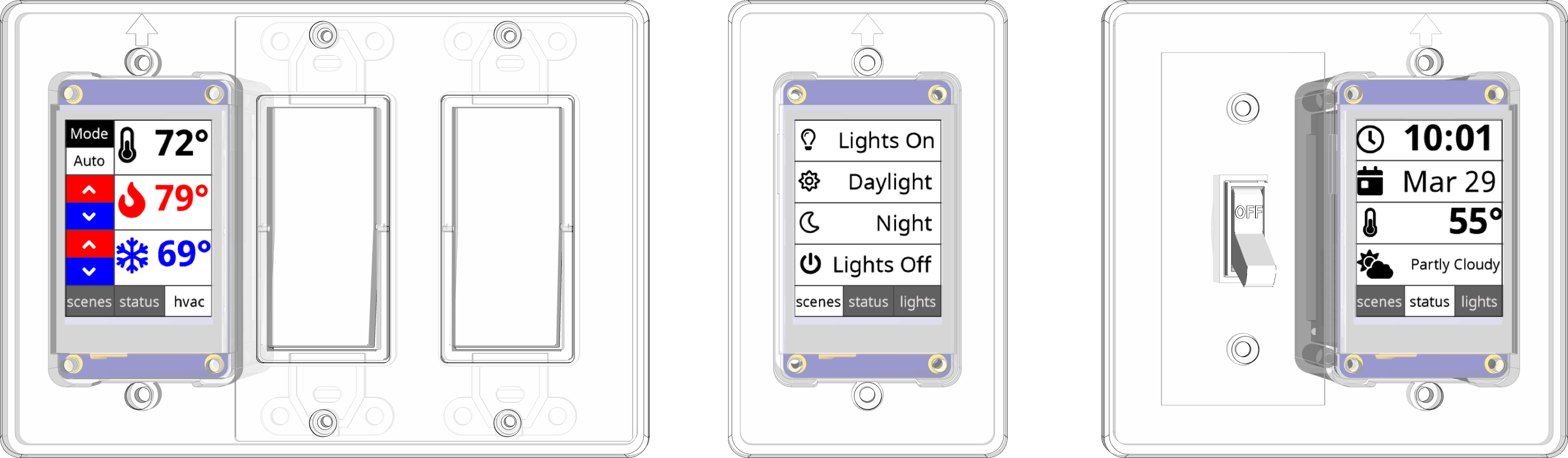
The HA SwitchPlate is a user-programmable LCD touchscreen you can mount into a standard North American work box in place of a light switch. It connects to your home automation system over WiFi to send and receive MQTT messages in response to user interactions on the screen or events happening in your home. The result is an attractive and highly-customizable controller for your home automation system which you can build yourself!

HA SwitchPlate Models

The HA SwitchPlate (“HASP”) utilizes a Nextion 2.4" LCD Touchscreen display mounted in a 3D-printed enclosure as a touchscreen panel for home control and information display. An ESP8266-based microcontroller provides WiFi connectivity and system control. The project has been developed to integrate with Home Assistant and OpenHAB but should be compatible with any other MQTT-enabled automation platform such as Domoticz, Node-Red, Wink, SmartThings, Vera, HomeKit, etc.

The Arduino code for the ESP8266 provides a generic gateway between MQTT and the Nextion instruction set. A basic Nextion HMI display file has been included with several pages of various layouts to provide user controls or to present information in response to MQTT messages sent to the device.

Demo screens

Scene controller Status display Media control Alarm Panel Slider/Dimmer Controls HVAC Controls Light toggles Fan controller WiFi Setup

Purchase an assembled unit

As this build requires some specialist skills and tools, I will occasionally be offering assembled devices for sale here.

Buy me a coffee

Buy me a coffee

This project is powered by coffee. I might get a little weird about it at times, but it’s not much of a stretch to suggest that coffee both powers and consumes a fair portion of my mental energy. Hook me up if you think HASP is cool. Thanks!

Bill of Materials

To build a simple version of this project you will minimally need the Nextion display and the WeMos D1 Mini, 4 jumper wires, and a USB cable to power both devices.

A complete build that’s ready to install will require the following components:

Get Started!

Check out the documentation to get started building your own HA SwitchPlate.

评论

暂无评论